By Hossein Nourikah, Developer Community Architect at The Document Foundation
In LibreOffice, interoperability is considered a very important aspect of the software. Today, LibreOffice can load and save various file formats from many different office applications from different companies across the world. But, bugs are inevitable parts of every software: there are situations where the application does not behave as it should, and a developer should take action and fix it, so that it will behave as it is expected by the user.
What if you encounter a bug in LibreOffice, and how does a developer fix the problem? In these series of articles, we discuss the steps needed to fix a bug. In the end, we will provide a test and make sure that the same problem does not happen in the future, again.
The article is presented in three parts:
- Understanding the Bugs and QA
- Developing a Bug Fix
- Writing the Tests and Finishing the Task
This is the third part.
3. Writing the Tests and Finishing the Task
So, if you have read the two previous parts on “Fixing an Interoperability Bug: Missing Lines in Save and Load” (part 1, part 2), this is the third and last part of these series. In this part, we discuss how to write a test, submit the patch to the Gerrit and try to get it incorporated into the LibreOffice code.
3.1. Writing a Test for the Regression
In order to make sure that this regression will not happen again, we should create test for every bug that is fixed. If we don’t do this, there is a big chance that this bug will occur again and again.
But how to start writing a test? The answer is that there are ~3000 tests available in sw/qa/extras/ folder, and there is a tiny document sw/qa/extras/README that describes them. These tests can be a basis for writing a new test. For example, test for tdf#91687 consist of these lines:
DECLARE_WW8EXPORT_TEST(testTdf91687, "tdf91687.doc")
{ // Exported Watermarks were resized
 uno::Reference xWatermark = getShape(1);
 CPPUNIT_ASSERT_EQUAL(sal_Int32(5172), xWatermark->getSize().Height);
 CPPUNIT_ASSERT_EQUAL(sal_Int32(18105), xWatermark->getSize().Width);
}
It uses a macro DECLARE_WW8EXPORT_TEST too, that checks some properties of the document after loading it, and then again after saving and reloading it. If some property is erroneously changed, the test will fail, and you will get noticed.
As you can see, the name of the test, and the name of the test document in which here is .doc file, come from the bug number.
The test for this regression should check for the position and size of the shapes, so there are similarities between the our desired test and the test above. But how can we find the properties of the elements of the document? The answer is the new UNO object inspection tool for the LibreOffice:
https://blog.documentfoundation.org/blog/2021/03/02/update-on-tender-for-a-built-in-uno-object-inspection-tool-in-libreoffice/
As can be seen in figure 1, the size for Shape7 which is the first vertical line, is visible on the right.
In previous versions, tools called XRAY or MRI were used for object inspection.
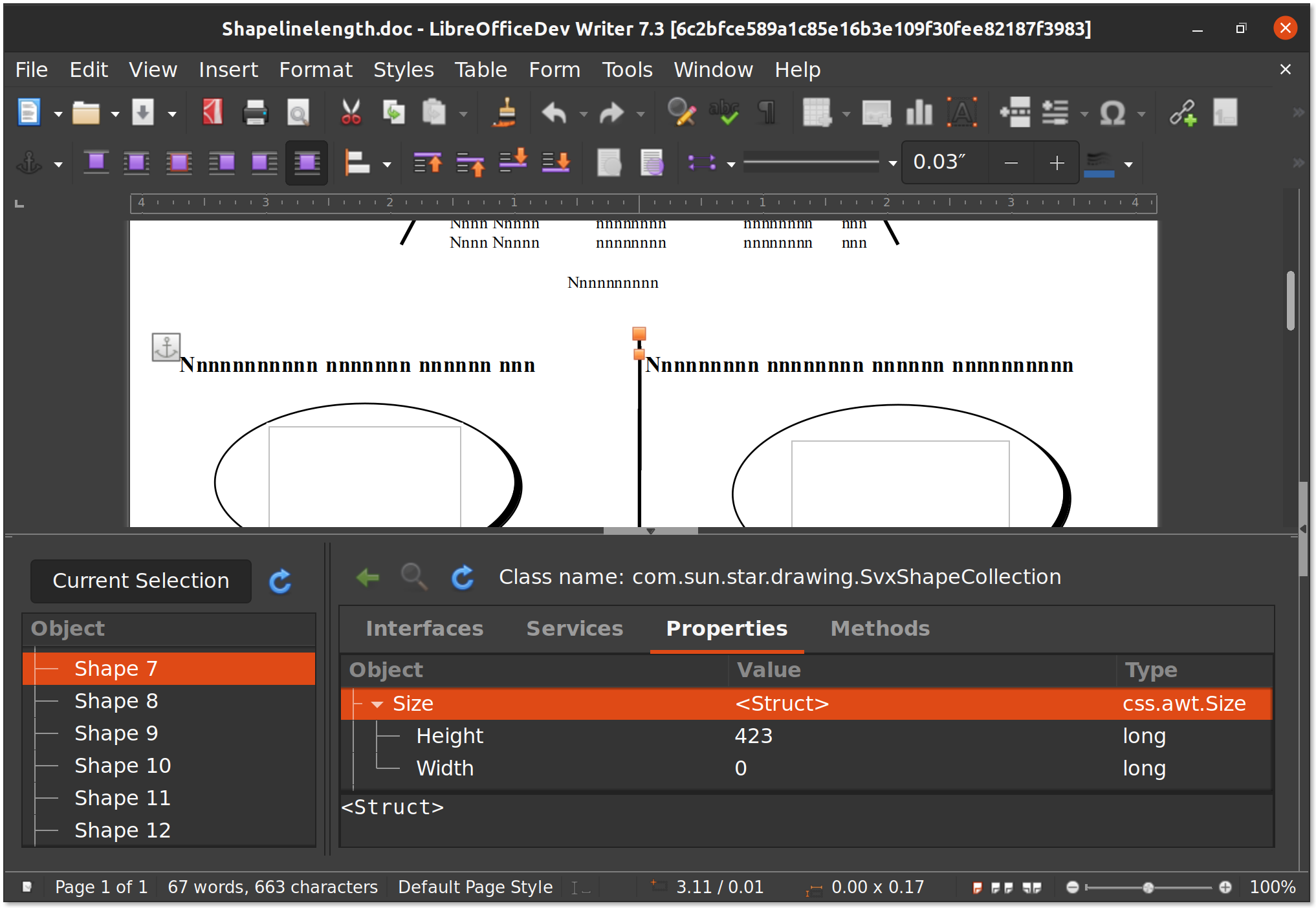
Figure 1. UNO object inspection tool for the LibreOffice
The completed test comes below. It takes Shape7, Shape8 and Shape9 which are the three vertical lines, and ensures that they have the same size in the first load, and after save and reload. Without the fix, some of these test fail, which are size checking for the first and last vertical lines. Their size was reduced to ~0, so it is justifiable that previously they were erroneously disappearing after save and reload. The test passes after applying the fix.
DECLARE_WW8EXPORT_TEST(testTdf123321, "shapes-line-ellipse.doc")
{
 // These are the 3 lines in which 1st and 3rd one were
 // disappearing before
 uno::Reference<drawing::XShape> l1 = getShape(7);
 uno::Reference<drawing::XShape> l2 = getShape(8);
 uno::Reference<drawing::XShape> l3 = getShape(9);
 // first line (smallest)
 // Fails without the fix: Expected: 423, Actual: 2
 CPPUNIT_ASSERT_EQUAL(sal_Int32(423), l1->getSize().Height);
 // Fails without the fix: Expected: 0, Actual: 2
 CPPUNIT_ASSERT_EQUAL(sal_Int32(0), l1->getSize().Width);
 CPPUNIT_ASSERT_EQUAL(sal_Int32(7908), l1->getPosition().X);
 CPPUNIT_ASSERT_EQUAL(sal_Int32(37), l1->getPosition().Y);
 // second line (larger)
 CPPUNIT_ASSERT_EQUAL(sal_Int32(2542), l2->getSize().Height);
 CPPUNIT_ASSERT_EQUAL(sal_Int32(2), l2->getSize().Width);
 CPPUNIT_ASSERT_EQUAL(sal_Int32(7916), l2->getPosition().X);
 CPPUNIT_ASSERT_EQUAL(sal_Int32(289), l2->getPosition().Y);
 // third line (largest)
 // Fails without the fix: Expected: 7027, Actual: 2
 CPPUNIT_ASSERT_EQUAL(sal_Int32(7027), l3->getSize().Height);
 // Fails without the fix: Expected: 0, Actual: 2
 CPPUNIT_ASSERT_EQUAL(sal_Int32(0), l3->getSize().Width);
 CPPUNIT_ASSERT_EQUAL(sal_Int32(7911), l3->getPosition().X);
 CPPUNIT_ASSERT_EQUAL(sal_Int32(231), l3->getPosition().Y);
}
As you can see, not all the tests fail without the fix, but they are in place to protect the correct load and save of the shapes in the future.
3.2. Cleaning up and Submitting the Changes
After we finished the fix, we commit the changes, and submit it to the LibreOffice Gerrit.
$ git add include/svx/svdopath.hxx svx/source/svdraw/svdopath.cxx sw/qa/extras/ww8export/data/shapes-line-ellipse.doc sw/qa/extras/ww8export/ww8export2.cxx
$git commit
Let’s see our latest commit:
$ git show --name-only
Author: Hossein <hossein@libreoffice.org>
Date:   Mon Jul 19 13:03:42 2021 +0200

    tdf#123321 Fix DOC/DOCX export bug which made some lines disappear

    * Fix the wrong calculation of SdrPathObj (line) extent while exporting
      to .doc and .docx formats. This resolves tdf#123321 which cause some
      lines to disappear after save and reload. This fix does not break
      tdf#91687
    * added tests to make sure this does not happen again, based on the
      .doc file provided in Bugzilla
    * Loading the bad exported file in MS Word is OK, but it does not work
      in LibreOffice, and some of the lines will be hidden. This needs
      additional work.

    The regression came from d72e0cadceb0b43928a9b4f18d75c9d5d30afdda

    Change-Id: Ic5a7af4d29df741204c50590728542e674ee9f91

include/svx/svdopath.hxx
svx/source/svdraw/svdopath.cxx
sw/qa/extras/ww8export/data/shapes-line-ellipse.doc
sw/qa/extras/ww8export/ww8export2.cxx
The actual commit information is lengthy, but for making it shorter, we only listed the name of the changed or new files. Then, we submit the patch:
$ ./logerrit submit master
This is with the assumption that we have successfully configured Gerrit before. One should set up Gerrit before doing this. A step-by-step manual is presented in The Document Foundation Wiki.
https://wiki.documentfoundation.org/Development/gerrit/setup
3.3 Getting the Submission Merged
Every submission to the Gerrit is reviewed by one or more developers, and is possibly gets merged into to the code after the submitter has done all the requested fixes and improvement. This is done by the decision one of the people with commit access. Commit access is granted to the developers who had a good record of contributions and are trusted to change the code base directly.
So, the code is reviewed in the Gerrit:
https://gerrit.libreoffice.org/c/core/+/119116
Every submitted code is built automatically by Jenkins in a process called CI (continues integration). If the build is successful, you will get a Verified +1 from Jenkins.
If, for any reason, one of the builds for several platforms that is tested fails, you will get Verified -1 from Jenkins. Then, you will have to fix the problem and re-submit again. Please note that there are situations that some tests fail because of the Jenkins problem itself. If that is the case, you should ask people in the #libreoffice-dev irc channel to invoke a resume for you, or try rebasing to initiate a rebuild.
The original submission (patch set 1) lacked the tests, so a test was requested. After doing the improvements, including a change in the title and uploading seven patch sets in total, it was given the Code Review +2 from the reviewer. Here, Miklos Vajna from Collabora has done the reviews and merging.
Then, the proposed changes eventually got merged into the code by the reviewer with appropriate access. After that, everyone can pull the changes from Git:
https://git.libreoffice.org/core/+/bda4d7a7c3fcc259e023f568606be5dcba818db9
3.4 Marking the Bug as Fixed
After the commit is done, the journey ends with marking the bug as fixed. Looking at the other possible registrations of the symptoms at TDF Bugzilla, it turns out that another bug can be considered a duplicate of this one:
Bug 127296 – FILESAVE: DOC Rotated line loses rotation when saved
https://bugs.documentfoundation.org/show_bug.cgi?id=127296
It is reported in 2019-09-02, and it is newer than the one we have fixed. So, we can mark tdf#127296 as a duplicate of this one. After that, we can safely change the status of tdf#123321 to “RESOLVED FIXED”, and we’re done!
3.5 Want to Get Involved?
If you want to get involved in Libreoffice development, you can help in fixing the bugs. Looking at the statistics from TDF’s Bugzilla, we see that there is a total of ~12k open bugs, in which ~1.3k of them are regressions. Among them, around 1.1k are bibisected. They are more suitable for getting into, because the root of the problem is known to some extent.
You can go through the same process that was discussed in the series of articles here to fix the bugs and submit your patch, and if you had any questions, #libreoffice-dev is a good place to ask. Also, it is suggested that you join the LibreOffice development mailing list. See the instructions here.
Hossein Nourikhah is the Developer Community Architect at the The Document Foundation (TDF), the non-profit behind LibreOffice. If you need assistance getting started with LibreOffice development, you can get in touch with him:
E-Mail: hossein@libreoffice.org
IRC: hossein in the IRC channel #libreoffice-dev on the Libera.Chat network connect via webchat