Results of survey amongst desktop users confirm project’s momentum
Berlin, September 28, 2017 – Today, the LibreOffice community celebrates the 7th anniversary of the leading free office suite, adopted by millions of users in every continent. Since 2010, there have been 14 major releases and dozens of minor ones, fulfilling the personal productivity needs of both individuals and enterprises, on Linux, macOS and Windows.
LibreOffice is available in over 100 native languages, and as such is contributing to the preservation of native cultural heritages, as in the case – for instance – of the Guarani language in South America, and the Venitian language in Northern Italy. All localizations are managed by local volunteers.
LibreOffice is also a reference implementation of the Open Document Format (ODF) ISO standard for office documents, which today represents the only choice in the market for true interoperability.
Results of Ubuntu 18.04 LTS Default Desktop Applications Survey
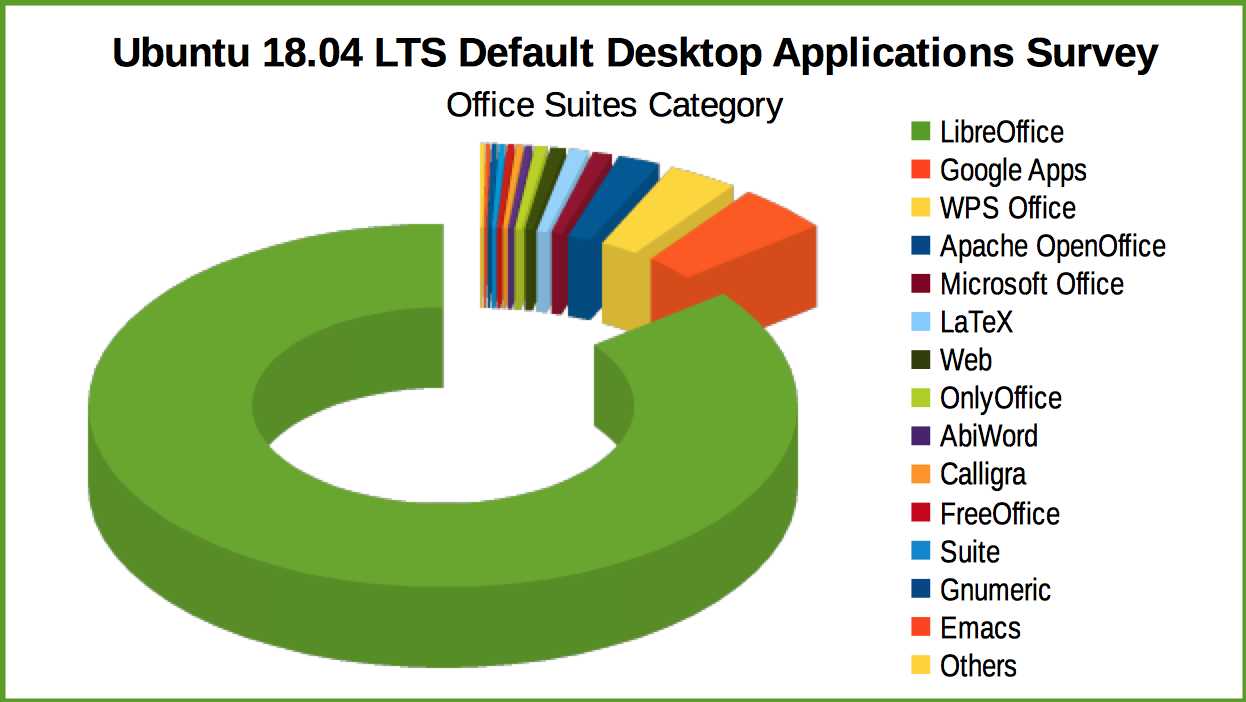
LibreOffice’s leadership amongst office suites has been recently confirmed by the survey of Ubuntu users for desktop productivity software, with 85.52% of the votes. The closest competitors were Google Docs with 4.29%, WPS Office with 3.22% and Apache OpenOffice with 1.96%.
The Ubuntu 18.04 LTS Default Desktop Applications Survey produced over 15,000 responses in total, with over 6,400 for the office suite category. LibreOffice received the largest margin of preference of the entire survey. Results are available here: http://blog.dustinkirkland.com/2017/09/results-of-ubuntu-desktop-applications.html (video and slides).
LibreOffice users, free software advocates and community members can support The Document Foundation with a donation at https://www.libreoffice.org/donate/. Donations help TDF to maintain its infrastructure, share knowledge, and organise events such as the LibreOffice Conference, with the next one taking place in October in Rome (https://conference.libreoffice.org).
Thursday, 28th September 2017 will be a special day – not only is it the seventh birthday of The Document Foundation, but we will also be running an “Ask me (us) Anything” session on Reddit – specifically, the /r/linux subreddit.
Team and board members from The Document Foundation will be on hand to answer questions and point people in the right directions. The AmA will run from 12:00 UTC, and we’ll be around for several hours to answer questions. (And indeed we’ll check the post the following day for any extra questions).
We look forward to taking part and talking to everyone!
LibreOffice’s native file format is the fully standardised OpenDocument Format. This is ideal for long-term storage of data, but many of us have to work with other file formats as well, including those generated by proprietary software. The Document Liberation Project (DLP) develops libraries to help us access these files, and there have been various updates in the last two weeks, so let’s see what’s new:
libfreehand 0.1.2 – This is a library for importing Aldus/Macromedia/Adobe FreeHand documents. In this release, the library can import more elements, such as text on paths, text effects, stroke patterns, arrows and paragraph attributes.
libzmf 0.0.2 and libcdr 0.1.4 – libzmf is a library for importing Zoner drawing and bitmap files, currently supporting Callisto/Draw 4-5 and Bitmap, while libcdr is a library that parses the file format of CorelDRAW documents of all versions. Both have been made more secure thanks to OSS-Fuzz, which we talked about recently, and there have been build fixes as well.
libwpg 0.3.2 and libwpd 0.10.2 – The former is for importing WordPerfect Graphics images, and has performance improvements when reading image data from WPG2 files, while the latter has had build system improvements and also fixes from the aforementioned OSS-Fuzz.
These improvements will be included in future major releases of LibreOffice, and indeed other open source programs that use Document Liberation Project libraries.
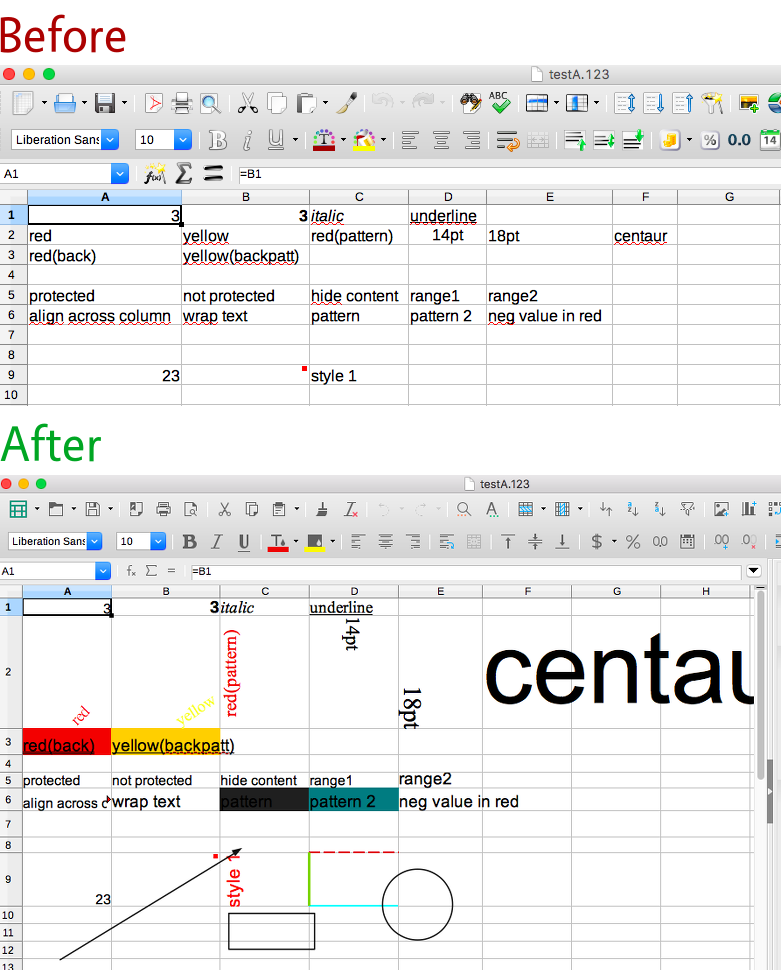
Meanwhile, DLP developer Laurent Alonso sent us this great before-and-after picture, showing recent improvements to the import of Lotus 123 spreadsheets. At the top you can see a Lotus 123 file (that contains lots of formatting) being displayed in LibreOffice 5.3 – but the formatting is missing. Thanks to improvements in DLP libraries, though, LibreOffice 5.4 can read and display the spreadsheet much more accurately, as you can see underneath (click for bigger):
The DLP community appreciates all contributions, and even if you’re not a coder, there are many ways to help – such as documenting file formats, or preparing sample documents. To learn more about DLP, check out our short video:
Please confirm that you want to play a YouTube video. By accepting, you will be accessing content from YouTube, a service provided by an external third party.
Thanks to donations to The Document Foundation, along with valued contributions from our community, we maintain a small team working on various aspects of LibreOffice including documentation, user interface design, quality assurance, release engineering and marketing. Together with Italo Vignoli, I help with the latter, and today I’ll summarise some of the achievements so far in 2017.
Videos
The year started off with preparations for LibreOffice 5.3, a major release that arrived on February 1st. We’ve found that videos are a great way to demonstrate new features to end users – and news websites often embed them as well. So I created a series of New Features videos for LibreOffice 5.3 covering the suite as a whole, along with Writer, Calc and Impress. So far they’ve had over 150,000 views in total:
Please confirm that you want to play a YouTube video. By accepting, you will be accessing content from YouTube, a service provided by an external third party.
If you accept this notice, your choice will be saved and the page will refresh.
I also coordinated script translations from our diligent localisation community, so that the videos had subtitles in 17 different languages. Thanks to everyone who helped!
Around the same time, FOSDEM took place in Brussels, and I used the opportunity to record video interviews with various people involved in The Document Foundation. If you want to learn more about how TDF works, and what you can do to help the project, check out this playlist:
Please confirm that you want to play a YouTube video. By accepting, you will be accessing content from YouTube, a service provided by an external third party.
In May, we had another Month of LibreOffice, celebrating contributions from right across the project. But this time we awarded printed stickers to everyone who took part:
Over 300 contributors won stickers, and we gathered together some photos showing them in action on laptops, PCs, and even a bike!
Regarding events, I attended the MuvGoc ’17 BarCamp in Munich together with Thorsten Behrens. We discussed removing barriers in the digital world, and the relationship between open data and open source. See here for the write-up.
From 23 – 25 of June, I helped to organise a German LibreOffice community meeting in Berlin. We talked about various topics, including ways to bring in new contributors and link different parts of the project and community together – see here for the details (German version).
Website, blog and infrastructure
The LibreOffice download page was due for a facelift, so I worked with Christian Lohmaier (Cloph) on a new design: this makes the download button more prominent, provides better and clearer information, and is generally more pleasant to look at. Similarly, we worked on a restructured donate page, making it significantly simpler and more user-friendly than the previous version.
Meanwhile, I created a new Frequently Asked Questions page on the site, to handle some of the queries TDF receives every day. Community members can point users to these answers where necessary, and discuss them further on Ask LibreOffice.
Various LibreOffice-related events around the globe have taken place since the start of the year, and I collected information about them and wrote a short report. In addition, I summarised various updates from the Document Liberation Project.
If you haven’t seen TDF’s 2016 Annual Report yet, check out out – the TDF team worked together to write it and translate it into German.
Infrastructure-wise, Guilhem Moulin and I set up a new Nextcloud instance for community members to host and share data. We also moved the events calendar to Nextcloud as well.
LibreOffice timeline and LibreOffice 5.4
LibreOffice has a rich history behind it, starting with StarOffice in the 1990s and being open sourced as OpenOffice.org in 2000. To showcase many of the important steps along the way, we worked on a LibreOffice timeline on the website. Along with new versions of the suite, you can see news of major LibreOffice migrations and events that took place.
In August, TDF welcomed a new Development Mentor, Teodor Mircea Ionita (aka Shinnok). I worked with him to examine the state of our build system documentation, to see how we can make it friendlier for new developers – here’s my report.
Finally, for LibreOffice 5.4 I created another New Features video – and again, our localisation communities did a great job providing subtitle translations:
Please confirm that you want to play a YouTube video. By accepting, you will be accessing content from YouTube, a service provided by an external third party.
If you accept this notice, your choice will be saved and the page will refresh.
So that’s the progress so far this year – but there’s more to come, with the LibreOffice Conference in October, another Month of LibreOffice in November, and preparations for LibreOffice 6.0 – which is due to be released early next year!
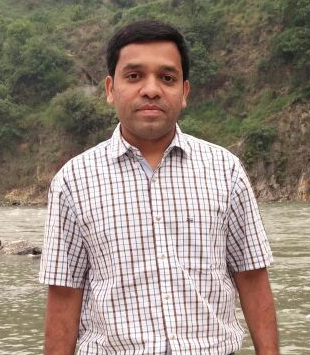
LibreOffice contributors around the world have a big impact on the success of the project – we really appreciate their help. Today we’re talking to Chandrakant Dhutadmal, who is involved in various free and open source projects including Mozilla Firefox and LibreOffice…
Where do you live?
I live in Pune, Maharashtra State, India.
Do you work for a LibreOffice-related company or just contribute in your spare time?
I work for the Centre for Development of Advanced Computing (C-DAC), which is an autonomous scientific organization under the Ministry of Electronics and Information Technology, in the government of India. We worked on a project of national importance where we aimed to provide software tools in Indian languages (free of charge) so that people can easily use the software in their own languages.
One of the applications which we worked on initially (way back in 2006) was OpenOffice.org. Later we shifted to work on LibreOffice. I do contribute to the project in my free time as well.
How did you get involved with LibreOffice?
During the above mentioned project work, we interacted with many organizations and individuals. Mr. Rajesh Ranjan was one of the persons who I interacted with – and told to about how the open source community works, and what kind of impact can it bring to the overall project.
We interacted very frequently and that is where we started working on organized efforts of volunteers for LibreOffice in India. I started doing a bit of contributions for LibreOffice since that time. Mr. Mahesh Kulkarni, who heads the department where I work, and my office in general have been really supportive for such activities.
What areas of the project do you normally work on? Anything else you want to tackle?
I normally work on LibreOffice marketing, community building and localization. These tasks keep me occupied enough.
What was your initial experience of contributing to LibreOffice like?
I was very pleased with the way the global LibreOffice community accepts newcomers and beginners. Initially, I was hardly a serious contributor to LibreOffice. But the fact that even small contributions by new contributors are valued by the community. Members like Sophie Gautier and Italo Vignoli have always been very supportive to me and others in India.
What does LibreOffice need most right now?
One of the most common and frequent issues which people report to me whenever I talk about LibreOffice is compatibility with Microsoft Office. It is quite a difficult task to satisfy them by explaining a few facts. I generally ask people to pinpoint the issues which affect them. Another area is to build a community of developers in India who can contribute to LibreOffice development.
What do you do when you’re not working on LibreOffice?
I read lot of articles on financial literacy. This is one of the topics which interests me a lot. I also like to travel to different places.
Anything else you want to mention?
I hope people get motivated enough by reading interviews like this, and get involved in the project!
Thanks Chandrakant – and indeed, there are many ways to get involved and make LibreOffice better for millions of users around the world. Our community is friendly and fun, and contributing to the QA, documentation, design, marketing or other projects is a great way to build up experience for a future career!
The Google Summer of Code (GSoC) takes place every year, and provides university students with funding to work on free and open source software. For 2017, nine LibreOffice projects were accepted into GSoC, and as developers finish their work, let’s take a look at some of their achievements…
Grzegorz Araminowicz – Improve SmartArt import
SmartArt graphics are used in Microsoft Office to “easily make a visual representation of your information”. LibreOffice already had the ability to import SmartArt, with file parsing code and basic layout features, but Grzegorz started to extend it, taking Office 2007 test files one-by-one and implementing missing features to load them correctly.
Throughout GSoC, Grzegorz worked on many fixes and improvements, as described in this mailing list post. At the end, he summarised his results:
I am happy with project results. Now LibreOffice is able to load and correctly render many types of basic diagrams. However, there is still much to be done to support more complex SmartArts. If anyone would be interested in contributing in this area, feel free to contact me for any help.
Muhammet Kara – Revamp the customization dialog
LibreOffice’s “Customize” dialog box, under the Tools menu, is very versatile but could also be improved in terms of design and user friendliness. Muhammet started his work by adding a search feature for the Functions pane of the Keyboard tab, as search was described as “the killer feature” by the design team.
He then started cleaning up the source code (most of the dialog was implemented in a single file with over 5,000 lines of code), before moving on to layout and design improvements. In the end, he had 19 patches integrated into LibreOffice, and made a video demonstrating the updated dialog in action:
Please confirm that you want to play a YouTube video. By accepting, you will be accessing content from YouTube, a service provided by an external third party.
If you accept this notice, your choice will be saved and the page will refresh.
Aditya Dewan – LibreOffice online
Aditya is a third-year undergraduate student at the Indian Institute of Information Technology in Allahabad, specialising in Information Technology. Throughout GSoC he worked on LibreOffice Online, the cloud-based version of the suite. He started with small features and fixes to get familiar with the codebase, such as compression on startup and extra graphs in the admin console.
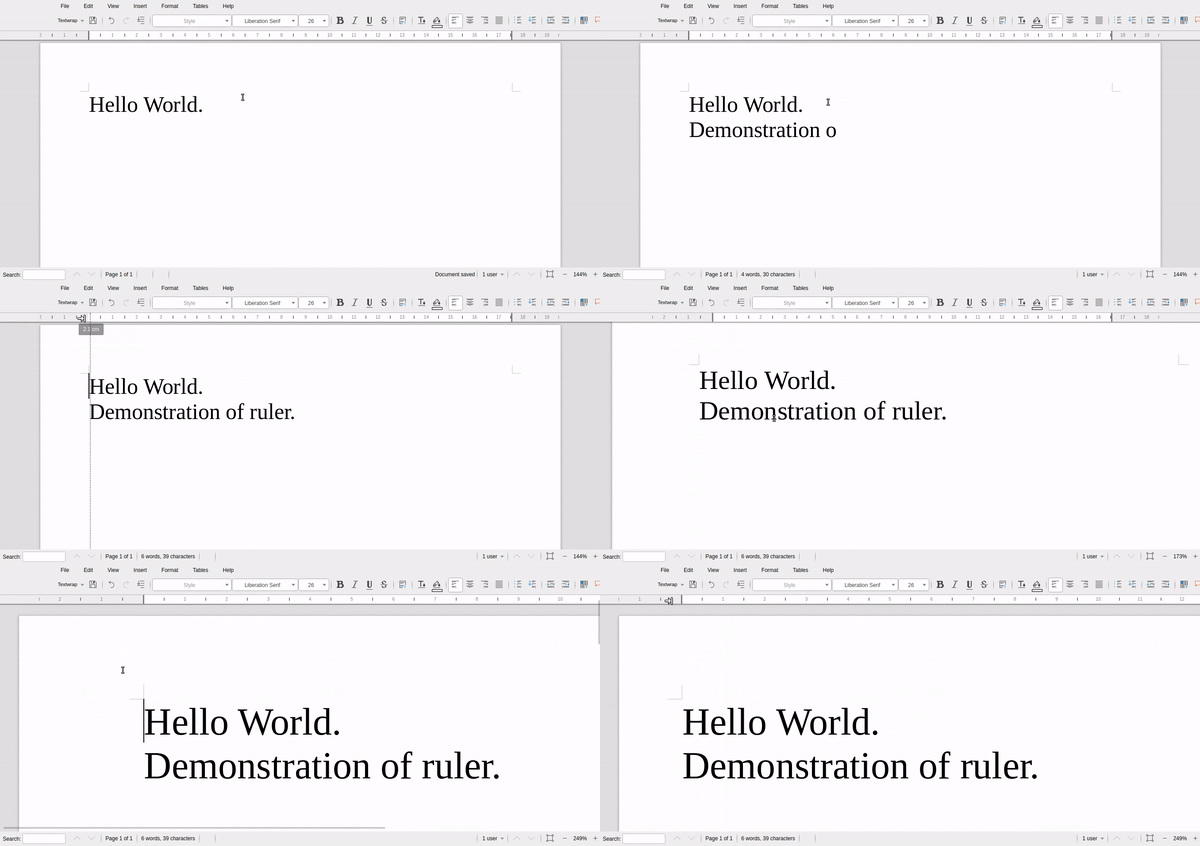
Then he moved on to a bigger job: adding an interactive horizontal ruler, as seen in the desktop version of the suite. Here’s Aditya’s demonstration of the new feature:
With that done, he extended the current WOPI implementation to support “Save as” functionality. Summarising GSoC, he said:
It was a very good experience for me. I have done a lot, and learned a lot this summer. Thank you to all LibreOffice developers, especially my mentors, for your support.
Gautam Prajapati, Alex Pantechovskis, Mohammed Abdul Azeem, Ximeng Zu, Akshay Deep and Varun Dhall – various improvements
Meanwhile, other GSoC developers did great work fixing bugs, adding new features and boosting compatibility. Gautam Prajapati made significant improvements to the Android Viewer build system, as described in his report, while Alex Pantechovskis helped to create a QuarkXPress import filter for the Document Liberation Project (see our recent blog post).
So 2017’s Google Summer of Code was a terrific success, and has helped to improve LibreOffice in many different areas. We’ll all get to enjoy these changes and new features in LibreOffice 6.0, due early next year. Thanks to all of the developers for their excellent work – and thanks to Google for their support and initiative. We look forward to GSoC 2018!


 Thanks to


 LibreOffice contributors around the world have a big impact on the success of the project – we really appreciate their help. Today we’re talking to Chandrakant Dhutadmal, who is involved in various free and open source projects including Mozilla Firefox and LibreOffice…
 The Google Summer of Code (GSoC) takes place every year, and provides university students with funding to work on free and open source software. For 2017,