This is part of the Annual Report 2025 from The Document Foundation, the non-profit that coordinates the LibreOffice project and community.
Across the reporting period, the public conversation about office software and document formats shifted decisively. The justification for moving away from proprietary suites is no longer framed primarily as cost saving. It is framed as the preservation of independence — the ability of a government to act without asking permission from a foreign supplier. Several of the year’s migrations were announced with that argument stated explicitly and the cost argument set aside; the Austrian Armed Forces went so far as to say the move was not about money at all.
This reframing matters for The Document Foundation, because it moves the debate onto ground where the Foundation has argued for two decades. Digital sovereignty is the ability of nations, organisations and individuals to control their own digital destiny: to control access to their own information without depending on third parties, to make technological choices based on their own needs rather than a vendor’s commercial strategy, and to preserve that self-determination as the market consolidates. When public bodies store their documents in proprietary formats controlled by a single company, they surrender part of that sovereignty.
The year also clarified a distinction the foundation has long insisted on: sovereignty is not delivered by any single layer of the technology stack. It requires an open standard format at the base, an open source application above it, open source infrastructure for data location, and a legislative framework that defines the requirements. A law favouring open source, an open cloud, and an open suite together still leave sovereignty incomplete if the document format itself remains under one vendor’s control. The format is the foundation of the stack, and it is the layer most often overlooked.
The year’s central policy development was Germany’s formal commitment to ODF, a decision whose full weight became apparent only as it moved from principle toward binding implementation.
Germany’s IT Planning Council commits to ODF (April 2025)
In April 2025, Germany’s IT Planning Council — a seventeen-member body representing the federal government and the state governments — committed to moving public administration to the Open Document Format, with the stated aim of making ODF the standard for document exchange by 2027. The Council framed open formats and open interfaces as a necessary building block of public-sector transformation toward digital sovereignty, and commissioned its Standardization Board to implement the decision. The commitment set a clear trajectory: a federal-level decision, binding on the implementing board, with a 2027 target for ODF as the standard for document exchange. Its translation into concrete, enforceable infrastructure standards was expected to follow — and the early signs as the year closed pointed toward exactly that outcome.
ODF v1.4 approved as an OASIS Standard (December 2025)

On 3 December 2025, OASIS Open approved ODF v1.4 as an OASIS Standard — the organisation’s highest level of ratification — coinciding with the twentieth anniversary of ODF’s original adoption as an OASIS Standard. The new version maintains full backward compatibility while improving accessibility support (assistive technologies, decorative-object marking), professional formatting and visual design, and features for data analysis and technical documentation. It remains an XML-based, vendor-neutral, royalty-free format. Earlier ODF versions are published as ISO/IEC 26300; the four-part v1.4 specification is available in the OASIS library.
Twentieth anniversary of ODF standardisation
The year carried the twentieth-anniversary thread throughout: ODF’s adoption as an OASIS Standard in 2005, and its ISO/IEC standardisation on 3 May 2006. The ODF v1.4 ratification in December 2025 was deliberately timed to the OASIS anniversary. The anniversary is not merely commemorative: it underpins the argument that ODF is the only open standard for office documents with a twenty-year record governments can rely on for long-term archival access.
Open Document Format Campaign and Document Freedom Day
The Foundation ran a sustained ODF communications campaign through the year, built around a regular series of articles on the TDF blog. Rather than isolated announcements, the series formed a coherent body of work that moved from the fundamentals — what ODF is and why it matters — through technical and practical material on file types, compliance and interoperability, the differences between ODF and proprietary formats, migration guidance, and the new features of recent ODF versions, and on to the wider argument connecting open document standards to digital sovereignty. Taken together, the series gave the Foundation a standing reference resource and a consistent public voice on the format throughout the year.
Document Freedom Day was marked as a purely advocacy-driven occasion: blog posts, social media activity across the Foundation’s channels, and small local events organised by community members around the world. The emphasis was on awareness and outreach rather than on any single flagship event.
Please confirm that you want to play a YouTube video. By accepting, you will be accessing content from YouTube, a service provided by an external third party.
If you accept this notice, your choice will be saved and the page will refresh.
Public Administrations Migrating to LibreOffice/ODF During the Year
The following migrations were publicly reported and verifiably advanced during 2025. Status reflects what the cited primary or most reliable source actually supports. Long-standing legacy deployments are deliberately excluded; this list is reserved for movement during the year, and only entries with solid sourcing are included. Figures and completion claims should be confirmed against TDF records before publication.
Schleswig-Holstein (Germany) — confirmed, substantially advanced
By early December 2025, the northern German state reported that close to 80% of administrative workstations outside the tax administration were running LibreOffice as the binding standard, with Microsoft Office and Outlook either already uninstalled or in the process of removal, and a new-licensing rate already well below 10%. The state reported licence-cost savings already exceeding €15 million, against a one-time 2026 migration investment of €9 million. The remaining ~20% of workstations depend on specialist applications with technical ties to Microsoft formats; migration paths for these, and for the tax administration, have been defined. In parallel, the state completed the migration of more than 40,000 mailboxes (over 100 million messages and calendar items) off Exchange/Outlook to Open-Xchange and Mozilla Thunderbird, with the cutover finishing 2 October 2025.
- Schleswig-Holstein State Chancellery press release, 4 December 2025
- Source: The Register, 15 October 2025 (email migration completion)
Austrian Armed Forces / Bundesheer — confirmed, completed in 2025
The Austrian military migrated approximately 16,000 workstations across all branches from Microsoft Office to LibreOffice, with the project finalised in 2025 and Microsoft Office 2016 removed from all machines (Office 2024 LTSC retained only under special permission for legacy macro/Access cases). The Directorate 6 (ICT & Cyber) stated the primary driver was digital sovereignty and in-house data processing, explicitly not licence savings. The Bundesheer contributed more than five person-years of upstream development back to the LibreOffice project; the migration was presented at the LibreOffice Conference 2025 in Budapest.
Denmark — Ministry of Digital Affairs — confirmed, phased, in progress
The Danish Ministry of Digital Affairs committed to replacing Microsoft 365/Office with LibreOffice, beginning July 2025 with a phased rollout (roughly half of staff in the summer, the remainder by autumn). For accuracy: earlier reporting that Denmark would abandon Windows for Linux entirely was subsequently corrected — Windows remains in use on many devices; the confirmed change is the office-suite migration. Several municipalities, including Copenhagen and Aarhus, were reported to be pursuing similar moves.
Threats to ODF Adoption and Digital Sovereignty
The year’s gains were real, but they sit alongside structural threats. The central risk is that the open-source application migrations succeed while the open format battle is quietly lost — that lock-in survives the move by relocating from the application to the document.
Format sovereignty as the overlooked layer
An office suite that does not use ODF as its native format handles ODF files imperfectly, which re-creates interoperability problems and pushes users back toward the proprietary format “for convenience.” A government can therefore adopt an open suite and an open cloud and still fail to achieve sovereignty if its documents remain in a format controlled by a single vendor. The format is the base of the stack; without it, every layer above is compromised.
The “ISO standard format” sleight of hand
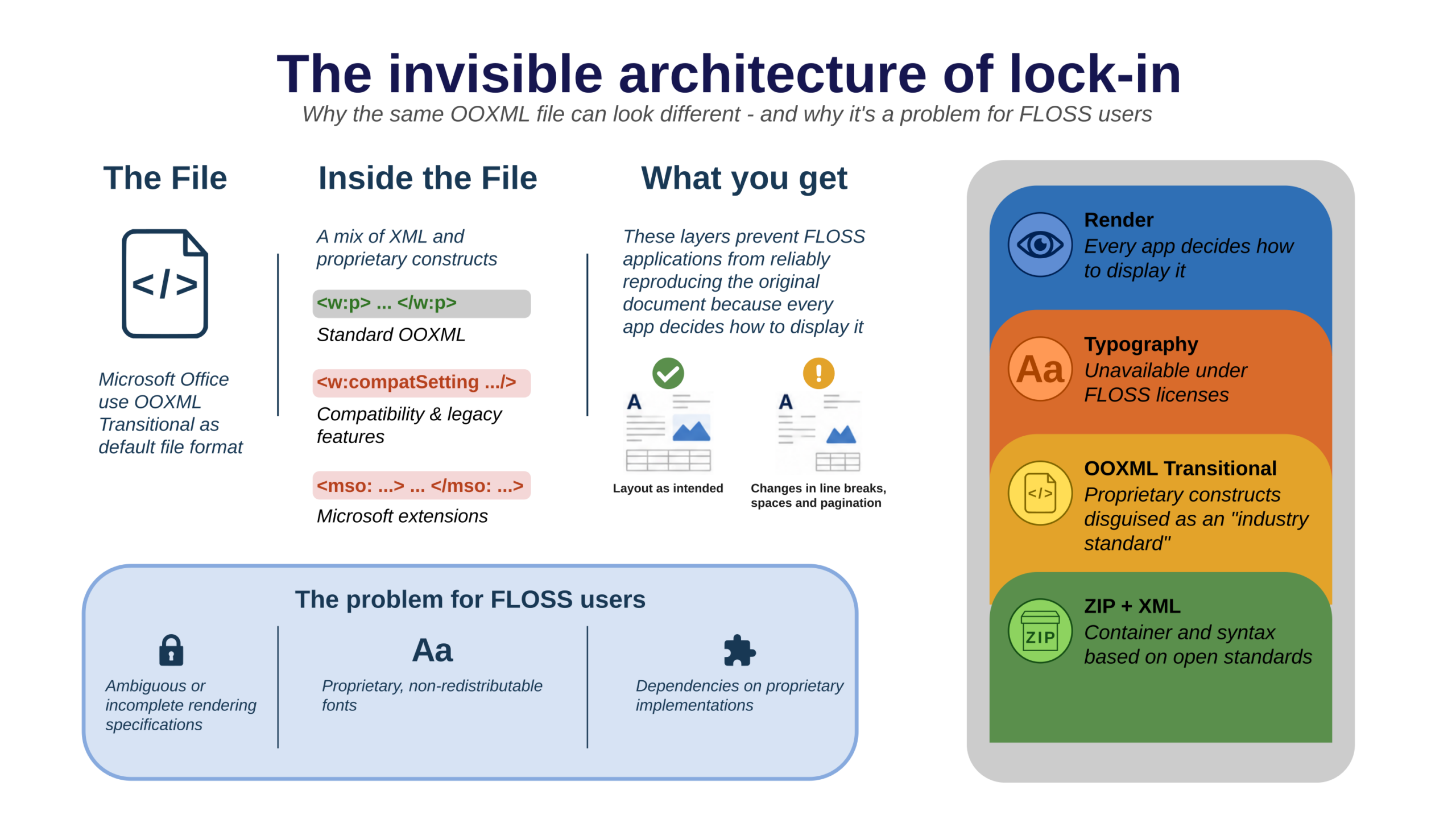
When a public administration is told its documents are stored in “an ISO standard format,” the reasonable assumption is genuine openness. OOXML Transitional does not deliver it: its stacked dependencies — format, rendering and fonts — re-encode failure at each layer. A format named as a standard while defined by its own specification as provisional is the principal rhetorical obstacle to ODF adoption, and the principal target of the Foundation’s three-strand evidence work.
Initiatives that default to OOXML under a sovereignty banner
A specific and growing risk is the European sovereignty initiative that adopts open source applications and open infrastructure while defaulting to OOXML rather than ODF as its native document format. Such an arrangement re-encodes the dependency at the format layer even as it presents independence at every other layer. This is the precise failure mode Section 4.5 describes, and it gives the Foundation’s insistence on a native open format its practical
urgency.
Political reversibility
Sovereignty gains are reversible without durable policy commitment. Munich’s LiMux reversal remains the cautionary precedent, and the year offered a live counter-signal: even as Schleswig-Holstein advanced, Bavaria was reported to be pursuing a major Microsoft 365 contract. This is why a binding federal commitment to ODF, of the kind Germany set in motion in 2025, matters: it raises the cost of reversal. But commitments depend on sustained political will to carry them into enforceable practice.