The Internet, January 25th, 2018. The Brazilian community is pleased to announce the immediate availability of the Getting Started Guide 5.2, with all innovations and enhancements from LibreOffice 5.2. The guide is an in-depth update of the 5.0 Getting Started Guide that has already been translated.
The team was composed of IT professionals, translators, engineers, teachers and technicians. The team members are:
Chrystina Pelizer (Getting Started Guide project leader, translator and reviewer)
Vera Cavalcante (reviewer and book assembler)
Fábio Coelho (translators, reviewer and infra manager)
Túlio Macedo, Raul Pacheco da Silva, Valdir Barbosa e Olivier Hallot (translators and reviewers)
Thanks to The Document Foundation’s support, the team met together at the Instituto de Física of UNESP university in São Paulo, Brazil for a final review sprint of the translated chapters, and then delivered the contents to Vera Cavalcante for book assembly and release.
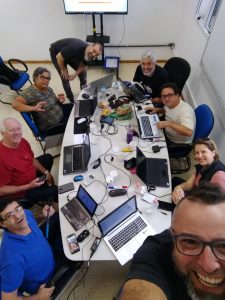
Without the face-to-face meeting in December 2017 sponsored by TDF, the guide’s release would have been delayed further due to personal and professional commitments of the volunteer team members. The face-to-face meeting was an opportunity to boost productivity, and the team finished the revision in two days of focused work. The team is planing more meetings for the other guides under production.
Earlier this month we talked to the localisation community about the preparations they are making for LibreOffice 6.0, which is due to be released in late January (or early February). Now we turn to the documentation project, and Olivier Hallot, who is coordinating updates to guidebooks and a new help system…
What has the documentation community been working on in preparation for LibreOffice 6.0?
The community is engaged in delivering two major features for the 6.0 release: the first is a new and updated Getting Started Guide, a book targeted at new users of LibreOffice 6.0. We included the latest developments that are in the scope of an introductory text for LibreOffice 6.0. For 2018 we are assembling a team of writers to update our other guides, starting with the Calc Guide.
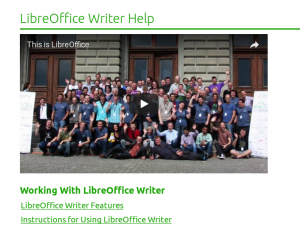
The other major feature is the new LibreOffice help system, a completely redesigned help system that now uses the operating system’s web browser to display help pages. Here’s a screenshot from the LibreOffice 6.0 release notes, showing how it looks in a mobile web browser:
What are your favourite new features in this release?
I always appreciate applications that have beautiful aesthetics. When choosing between two applications or desktop environments with the same features, I take the one that’s good-looking and has a well-crafted user interface. There are so many excellent programs with clumsy interfaces or ugly aesthetics struggling to survive. It is purely subjective but in the end, beauty pays. So my take for 6.0 are the features that bring a better and nicer UI: new icons, toolbars and redesigned dialogs. Here’s a preview of the Elementary icon set, which will be included in 6.0:
Aesthetics, together with essential technology evolutions, were the drive to develop our new help system based on web technology. We expect to open an avenue for improving the contents of our help with multimedia, animations and better navigation – altogether bringing a modern web experience for our users who are reading the help.
What tools and services do you use in the documentation community?
At the moment we use Plone as our document repository, and we have a workflow for editing, revision and publication. Released documents are available on our documentation website for download, and some l10n (localisation) communities prefer to use the TDF wiki.
With the recent developments in LibreOffice Online, I am planning to use it for document editing and production, in a simpler way than using Plone. LibreOffice Online is by far the best online editor for OpenDocument formatted files, and is an essential feature for preserving our current documents and making editing easier.
For 2018, we will work to develop an special online editor for help files, making it easier for occasional contributors to make changes to the content.
Finally, how can people get involved with the documentation community?
The first step is to read this page and follow the instructions there. We need good software documenters, along with people who really know how an office suite works, and who are capable of writing about new features with authority.
Thanks Olivier, and thanks to the whole documentation community for their work in LibreOffice 6.0. Over the next few weeks, we’ll be talking to other projects, including QA and development – keep checking this blog for updates.
The Instituto de Física Teórica of the State University of São Paulo (UNESP), under Prof. Dr. Marcelo Yamashita’s administration, hosted the Brazilian LibreOffice documentation community, which is committed to achieving a final sprint for the review and publication of the Getting Started Guide 5.2.
Eight members of the community gathered together in an effort to review the translation and check the consistency of the contents for final publication. Once the initial introductions were done, each member of the team picked two or three chapters and started work.
This is lengthy work that requires attention, and the team committed to reach the goal in the timeframe that was set. In meetings of this kind, doubts and questions about content are debated immediately. As an additional benefit, the text was improved while some of the user interface terms were corrected and improved for better accuracy, since the team had direct access to the translation server for immediate fixes.
On the second day, by invitation of the documentation team, Vanderlei Junior (a professional content designer) taught the team some techniques needed to produce instructional content – especially videos and interactive media. Vanderlei emphasised the absolute need to plan contents and speeches, and offered important information on framing and timings for instructional videos. He highlighted the fact that video capture is less important than careful definition of content, which, if it’s lacking, will lead to failures.
From Left to right: Raul Pacheco, Olivier Hallot, Vera Cavalcante, Vanderlei Júnior, Túlio Macedo, Valdir Barbosa, Chrystina Pelizer and Fabio Coelho.
On the third day, with all chapters revised and ready for compilation into a book – thus with the goal achieved – the team had a crash course on the Pootle server used for translations of the Help and the user interface of LibreOffice. They also learned about The Document Foundation and its operation, sharing experiences of the older members.
“To participate in the São Paulo Hack-doc was a rich experience for me” said Valdir Barbosa, a TDF-certified instructor and team coordinator for UNESP. “I could discuss several issues related to my job, while discussing new techniques for document production and less known resources of LibreOffice. Besides, it is also exciting to be able to improve the software, with direct access to the development tools” said Valdir.
“It was an excellent opportunity to see some members of the documentation team, as well as meet old documentation friends” said Vera Cavalcante, a community member and LibreOffice Magazine editor. “As I did the previous book compilation, I’ll use my experience to do this one very quickly. I believe it is essential to have periodic meetings for documentation tasks. The Hack-Doc idea worked very well and, for sure, we produced a lot in a short period of time”, she said.
The meeting, originally set for a review sprint, also triggered some discussions on community activities and planning for 2018. The team set a target to define in 2018 a LibreOffice curriculum with multimedia resources for users at several difficulty levels. Also, we discussed the current process of book production – and it is clear that direct translation of the contents for each release is not optimal, and a better approach is to update contents from the release notes, directly in Portuguese. The guide and the multimedia contents will come side-by-side, in complimentary form. Regarding events for 2018, the team will do its best to create a national or Latin American LibreOffice-exclusive event.
Starting from July, the TDF team has increased by one unit with the arrival of Teodor Mircea Ionita, aka Shinnok, in the role of Development Mentor.
Teodor has a degree in Computer Science from the University of Iasi in Romania, his native country and city, where he is still living.
We asked Teodor a couple of questions in order to introduce him to the LibreOffice community.
How would you describe yourself?
I’m a passionate open source advocate and developer, Unix head and occasionally sysadmin. I’m also deeply interested and involved in systems, network and information security as an independent security researcher and aficionado.
On a personal note, I like to travel a lot, enjoy swimming and sun bathing, exchanging good reads and good movies (who doesn’t like them?), as well as interacting with peeps of various trades and life experiences and learning from real people, instead of avatars.
Can you outline your work experience?
My experience in the field spans across 10 years, casting a wide range of interest in programming and scripting languages, operating systems, network and web technologies, with a rather strong focus on systems, network and application development on Unix flavours and cross-platform technologies.
I’ve been venturing with many more technologies throughout my career path, such as web development, system administration and some electrical engineering. Suffice it to say that I cast a wide and evolving net of interests in this fascinating and rapidly ever changing field. Not sure where it will ever stop? 🙂
I like to think of myself as a passionate open source advocate and developer, and an eager contributor to several FLOSS communities/projects like the Nmap Security Suite, Openwall and the Qt project. I also contribute via technical blogging, participation at events and conferences and involvement in knowledge and code exchange based communities like Stack Overflow and GitHub.
As a seeder to the open source ecosystem I authored several open-source tools: a front-end to the John the Ripper password security testing suite, and a cross-platform desktop app for the Tarsnap secure online backup service, as well as less impressive projects like an FTP server and a small GUI version of the Netcat tool.
Gabriele Ponzo (left), Theodor and Xisco Fauli (right) at KDE Akademy in Almeria (Spain)
Which are your desktop configuration and preferred development tools?
Having been a longtime Debian user on desktop, server and mobile (Maemo, Moblin, Meego, Nokia N810/900… the first real “smart” phones IMHO, good old days), lately I’ve been using macOS as my preferred desktop platform of choice out of convenience and probably because I’m getting older.
I like having a decent desktop and range of GUI applications to choose from, on top of the powerful Unix backend and tooling that I need for my day-to-day work – and I think the Mac provides that to a sufficiently acceptable degree and atop of a good hardware lineup.
Rest assured, on my day to day routine I still interact a lot with the various Linux and BSD distros out there, I wouldn’t go anywhere without my virtual machine only USB3 SSD Samsung Pro drive.
I still sport a powerful Intel based desktop workstation, with a triple boot, built just a year ago paired with a 40” 4k display from Philips, but I find that I use it sparingly nowadays.
For editing I use Vim, for complex projects Qt Creator IDE, LLVM/Clang tooling for C++, Git everyday everywhere and that’s about it.
Why did you decide to apply for the position of TDF Development Mentor?
This one has a simple answer: I was actively looking to fill a gap in my clients roster and what I usually do in that case is look at the daily tools that I’ve been using for years, with a preference towards the open ones, that I would like and love to contribute to and push further.
Needless to say LibreOffice was one of those indispensable tools for me and lo and behold, the TDF was actually looking for the Development Mentor position! We got in touch, we clicked and so I started as soon as possible. Thank you TDF! I’m genuinely excited to be part of it and hopefully I’ll be able make myself a valuable asset in a short time.
Teodor is available on IRC using the alias shinnok.
LibreOffice’s help system needs to evolve and be more effective for users.
LibreOffice’s help system was designed in 2003-2004 and released in 2005. Since then it has not evolved, except for the introduction of an online version hosted in a wiki server (and accessible from LibreOffice when the local help is not installed).
I worked recently to transform our ancient help system into a modern browser-based version. The partial result is available in the (temporary) website at https://helponline.libreoffice.org – please be advised that this is still work in progress.
The XML help pages are transformed into pure, almost static and responsive HTML. This approach has some advantages:
Works in every browser
Provides the current functionality of the help system
Preserves the current development, help authoring, release engineering and translation process as it is
You can read the help pages in your mobile phone or tablet
It’s easy to add extra markup for better search engine indexing
The disadvantage is an increase in disk storage on the server.
Transforming XML into HTML for every browser
The help pages were designed when the minimal standard HTML was version 3.2 and, since then, many developments have brought us HTML5 in all major browsers. There is little advantage now to keep the current XML, and all of its designed functionality can be replaced and improved by HTML, CSS and JavaScript, for example, adding better navigation and multimedia contents.
The new Help page layout benefits of many modern technologies
Friends of OpenDocument has just released another excerpt from Bruce Byfield’s book Designing with LibreOffice, called Styles and Templates.
Styles and Templates contain most of the information on the subject included in Designing with LibreOffice, with some alterations in structure and edits for continuity. It is intended for those who want information on LibreOffice styles and templates but would prefer not to have the complete book.
Both publications are released under the Creative Commons Attribution ShareAlike license, and are available for download from http://www.designingwithlibreoffice.com. The page also contains a link for buying hardcopy versions of both books.