The LibreOffice community has returned from a great conference in Rome (more on that later this week), and we’re now working eagerly on LibreOffice 6.0, which is due to be released at the end of January 2018. This version will include a large number of new features – and those already implemented are summarised on the release notes page.
In order to find, report and triage bugs, the LibreOffice QA team is organizing the first Bug Hunting Session on Friday October 20, 2017. Tests will be performed on the first Alpha version of LibreOffice 6.0, which will be available on the pre-releases server a few days before the event. Builds will be available for Linux (DEB and RPM), macOS and Windows, and will run in parallel with the production version.
Mentors will be available from 08:00 UTC to 22:00 UTC. Of course, hunting bugs will be possible also on other days, as the builds of this particular Alpha release (LibreOffice 6.0.0 Alpha 1) will be available until mid November.
During the day there will be two dedicated sessions: the first to chase bugs on the main LibreOffice modules between 15:00 UTC and 17:00 UTC, and the second to test a set of the top 5 features between 17:00 UTC and 19:00 UTC. All details of the second bug hunting session are available on the wiki.
During the dedicated sessions, we will concentrate our efforts to chase and reproduce bugs, in order to confirm and file them in a more comprehensive way. Of course, the more comprehensive the bug report, the easier it will be for developers to solve the bugs in time for the final release. Thanks in advance for your help, and we look forward to your input!
LibreOffice’s native file format is the fully standardised OpenDocument Format. This is ideal for long-term storage of data, but many of us have to work with other file formats as well, including those generated by proprietary software. The Document Liberation Project (DLP) develops libraries to help us access these files, and there have been various updates in the last two weeks, so let’s see what’s new:
libfreehand 0.1.2 – This is a library for importing Aldus/Macromedia/Adobe FreeHand documents. In this release, the library can import more elements, such as text on paths, text effects, stroke patterns, arrows and paragraph attributes.
libzmf 0.0.2 and libcdr 0.1.4 – libzmf is a library for importing Zoner drawing and bitmap files, currently supporting Callisto/Draw 4-5 and Bitmap, while libcdr is a library that parses the file format of CorelDRAW documents of all versions. Both have been made more secure thanks to OSS-Fuzz, which we talked about recently, and there have been build fixes as well.
libwpg 0.3.2 and libwpd 0.10.2 – The former is for importing WordPerfect Graphics images, and has performance improvements when reading image data from WPG2 files, while the latter has had build system improvements and also fixes from the aforementioned OSS-Fuzz.
These improvements will be included in future major releases of LibreOffice, and indeed other open source programs that use Document Liberation Project libraries.
Meanwhile, DLP developer Laurent Alonso sent us this great before-and-after picture, showing recent improvements to the import of Lotus 123 spreadsheets. At the top you can see a Lotus 123 file (that contains lots of formatting) being displayed in LibreOffice 5.3 – but the formatting is missing. Thanks to improvements in DLP libraries, though, LibreOffice 5.4 can read and display the spreadsheet much more accurately, as you can see underneath (click for bigger):
The DLP community appreciates all contributions, and even if you’re not a coder, there are many ways to help – such as documenting file formats, or preparing sample documents. To learn more about DLP, check out our short video:
Please confirm that you want to play a YouTube video. By accepting, you will be accessing content from YouTube, a service provided by an external third party.
LibreOffice’s development community has been growing steadily for seven years, thanks to the great enthusiasm demonstrated by several core members. They have mentored an entirely new generation of LibreOffice developers, also thanks to Hackfests and other face-to-face meeting opportunities such as FOSDEM and the LibreOffice Conference.
After seven years is now the right time to start thinking about the new generation of Hackfests. For several reasons, their number has decreased over the last couple of years, and they have never really gone beyond European borders (even with core developers flying over the Atlantic to attract potential new developers).
Bjoern Michaelsen will be hosting a conference call to discuss HackFests “The New Generation” on Sunday, September 17, at 4:30PM CEST (Berlin time, or UTC +2). Everyone interested is warmly invited to participate, especially from LibreOffice native language communities around the world.
If you cannot connect, make your voice heard by sending a couple of ideas by email to the Projects mailing list: projects@global.libreoffice.org.
The Google Summer of Code (GSoC) takes place every year, and provides university students with funding to work on free and open source software. For 2017, nine LibreOffice projects were accepted into GSoC, and as developers finish their work, let’s take a look at some of their achievements…
Grzegorz Araminowicz – Improve SmartArt import
SmartArt graphics are used in Microsoft Office to “easily make a visual representation of your information”. LibreOffice already had the ability to import SmartArt, with file parsing code and basic layout features, but Grzegorz started to extend it, taking Office 2007 test files one-by-one and implementing missing features to load them correctly.
Throughout GSoC, Grzegorz worked on many fixes and improvements, as described in this mailing list post. At the end, he summarised his results:
I am happy with project results. Now LibreOffice is able to load and correctly render many types of basic diagrams. However, there is still much to be done to support more complex SmartArts. If anyone would be interested in contributing in this area, feel free to contact me for any help.
Muhammet Kara – Revamp the customization dialog
LibreOffice’s “Customize” dialog box, under the Tools menu, is very versatile but could also be improved in terms of design and user friendliness. Muhammet started his work by adding a search feature for the Functions pane of the Keyboard tab, as search was described as “the killer feature” by the design team.
He then started cleaning up the source code (most of the dialog was implemented in a single file with over 5,000 lines of code), before moving on to layout and design improvements. In the end, he had 19 patches integrated into LibreOffice, and made a video demonstrating the updated dialog in action:
Please confirm that you want to play a YouTube video. By accepting, you will be accessing content from YouTube, a service provided by an external third party.
If you accept this notice, your choice will be saved and the page will refresh.
Aditya Dewan – LibreOffice online
Aditya is a third-year undergraduate student at the Indian Institute of Information Technology in Allahabad, specialising in Information Technology. Throughout GSoC he worked on LibreOffice Online, the cloud-based version of the suite. He started with small features and fixes to get familiar with the codebase, such as compression on startup and extra graphs in the admin console.
Then he moved on to a bigger job: adding an interactive horizontal ruler, as seen in the desktop version of the suite. Here’s Aditya’s demonstration of the new feature:
With that done, he extended the current WOPI implementation to support “Save as” functionality. Summarising GSoC, he said:
It was a very good experience for me. I have done a lot, and learned a lot this summer. Thank you to all LibreOffice developers, especially my mentors, for your support.
Gautam Prajapati, Alex Pantechovskis, Mohammed Abdul Azeem, Ximeng Zu, Akshay Deep and Varun Dhall – various improvements
Meanwhile, other GSoC developers did great work fixing bugs, adding new features and boosting compatibility. Gautam Prajapati made significant improvements to the Android Viewer build system, as described in his report, while Alex Pantechovskis helped to create a QuarkXPress import filter for the Document Liberation Project (see our recent blog post).
So 2017’s Google Summer of Code was a terrific success, and has helped to improve LibreOffice in many different areas. We’ll all get to enjoy these changes and new features in LibreOffice 6.0, due early next year. Thanks to all of the developers for their excellent work – and thanks to Google for their support and initiative. We look forward to GSoC 2018!
The Document Liberation Project (aka DLP) is working to free users and content creators from vendor lock-in. To achieve this, it develops and maintains libraries for reading documents in many different formats – including those generated by proprietary software. To learn more about the DLP, check our our short video.
In recent months, DLP developers have been working on updates and new features, so read on for all the details.
QuarkXPress import filter
Lithuanian coder Aleksas Pantechovskis (who we interviewed last year) has been working with David Tardon on a filter to read documents generated by the QuarkXPress desktop publishing application. He was doing this as a Google Summer of Code project, and added code for importing text boxes, shapes and other objects.
The image below shows an original QuarkXPress document on the left, and how it is converted into the open and standardised OpenDocument Format for use in LibreOffice and other software:
Aleksas and David have implemented the filter in a new library, libqxp – it supports QuarkXPress 3.1 – 4.1 documents at the moment.
PowerPoint and StarOffice
Meanwhile, Laurent Alonso has been improving a number of libraries for better compatibility with legacy documents. For instance, in libmwaw he has implemented an import filter for presentations created in Microsoft PowerPoint 2 (Windows), PowerPoint 4 (Mac and Windows) and PowerPoint for Windows 95. If you have old presentations in this format and need to retrieve the main contents, this filter will help you out.
In addition, he has updated libstaroffice, which is a library used to read files generated by StarOffice (which later became OpenOffice.org and then LibreOffice – see our timeline for the full history). Thanks to Laurent’s work, .sdc spreadsheet files preserve more of their formatting when imported, while .sda files created with StarOffice Impress are now converted as presentations.
Give us a hand!
As you’ve seen, DLP is helping users and content creators to free their data from old, legacy and proprietary formats. DLP libraries are used by many well-known applications such as LibreOffice, Inkscape and Scribus, so your contributions can help millions of people around the world.
And you don’t have to be a developer! While code contributions are always welcome, you can help us by reverse-engineering and documenting file formats, or sending us sample documents to analyse and test against the DLP libraries. Any help can really make a big difference, so see this page to learn more. We look forward to meeting you!
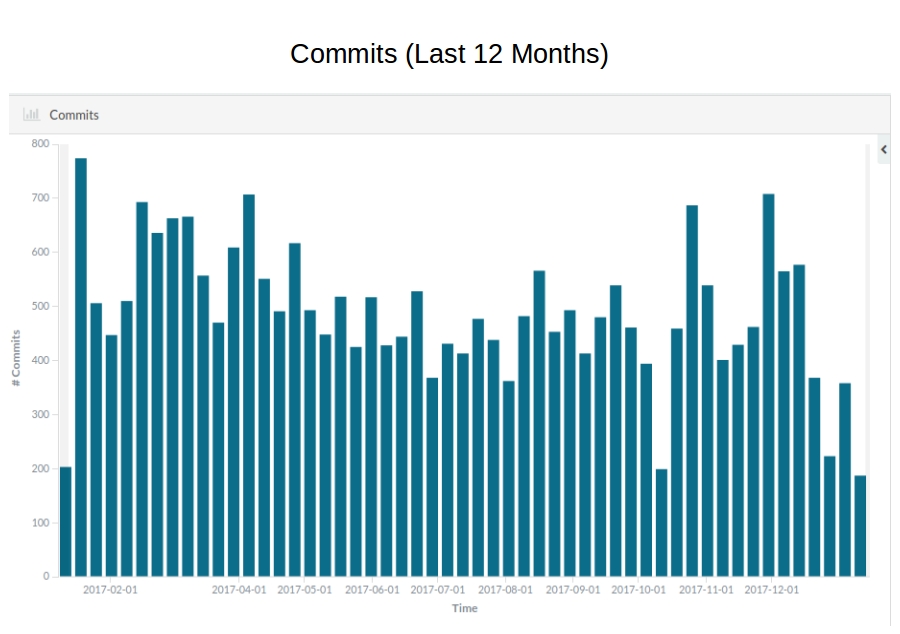
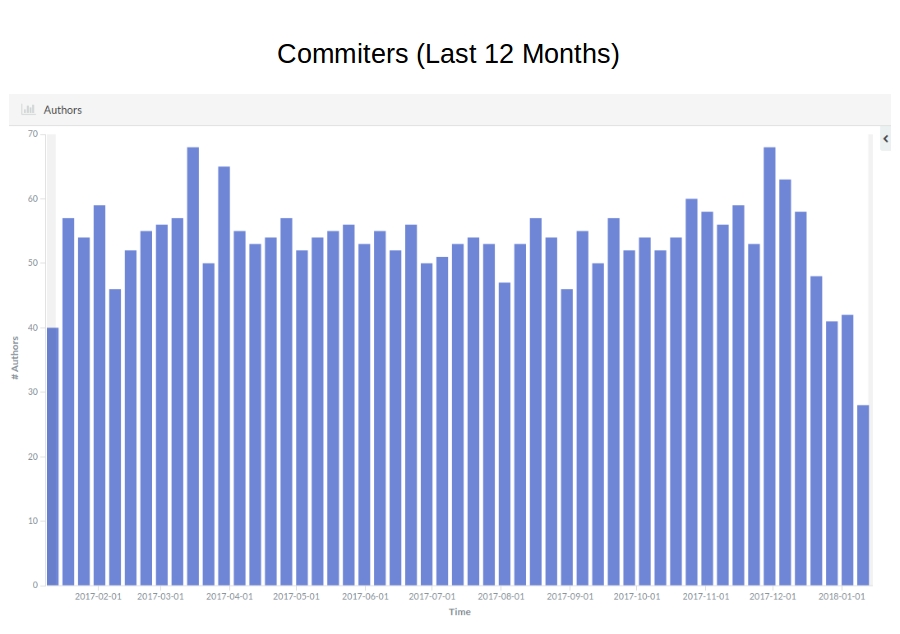
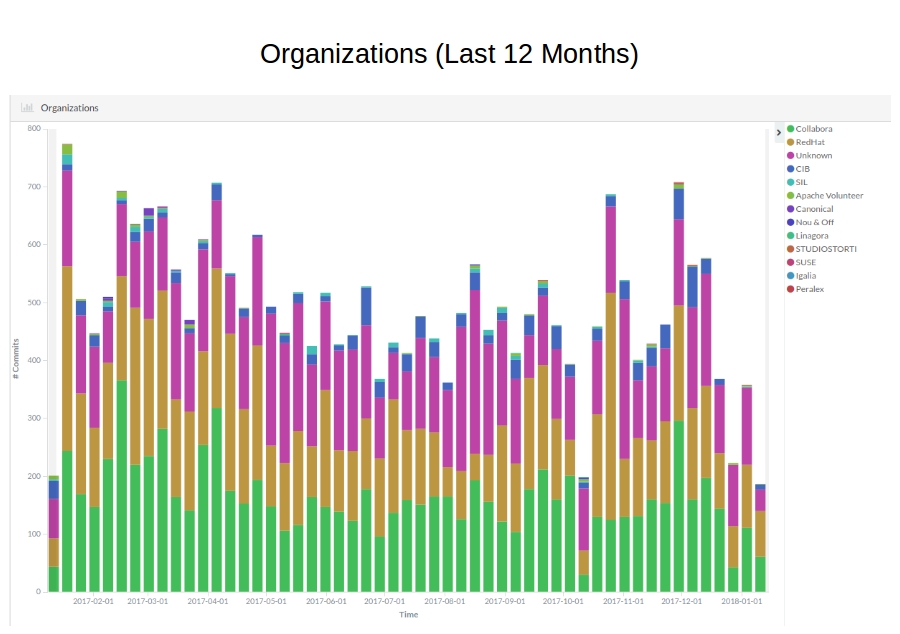
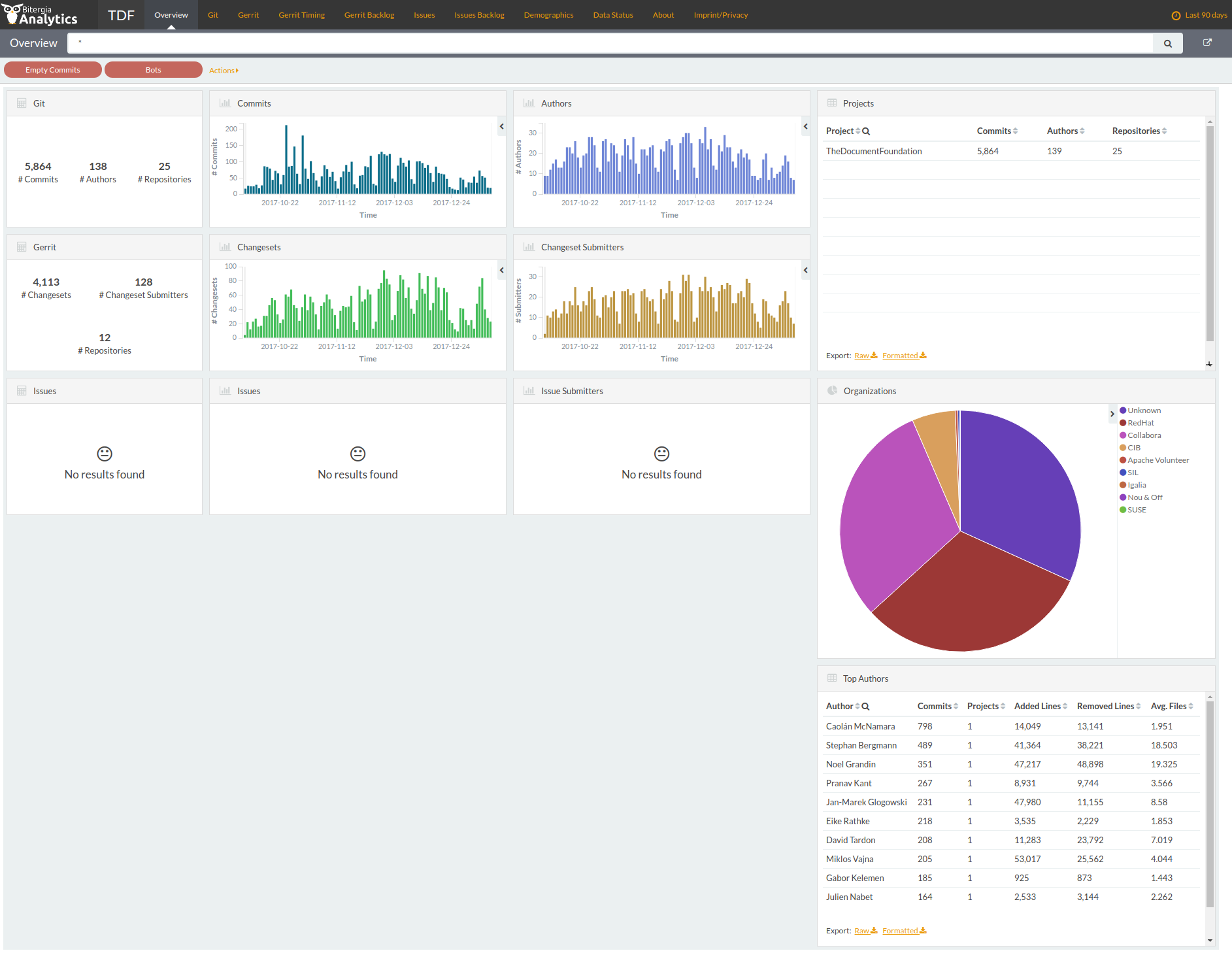
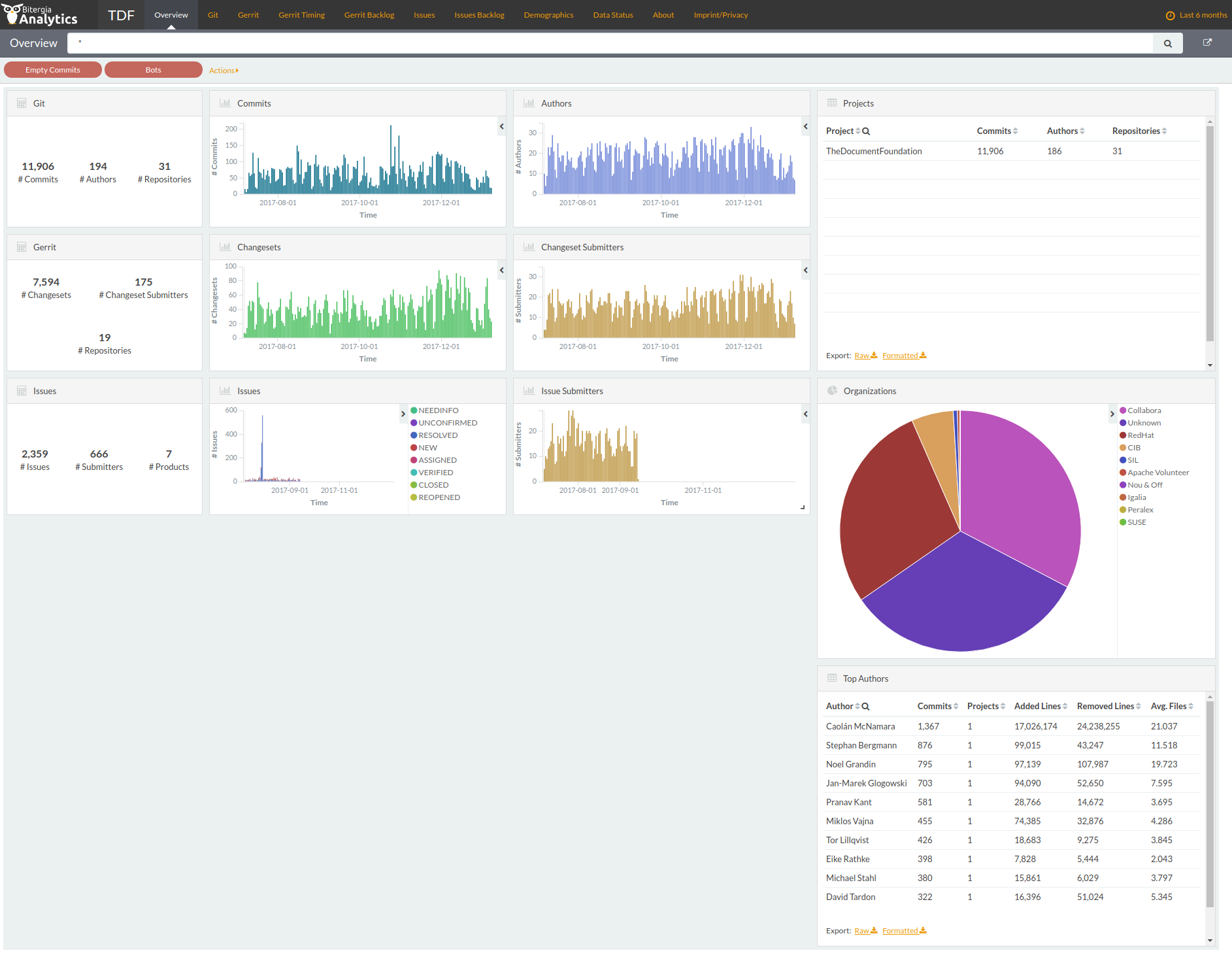
Berlin, August 2nd, 2017 – Effective immediately, The Document Foundation offers a transparent overview of LibreOffice development with the announcement of a Dashboard, available at http://dashboard.documentfoundation.org, which provides a visual representation of the activity on the source code.
LibreOffice Dashboard: activities during the last 30 days
Developed by Bitergia, the Dashboard is based on information retrieved from publicly available data sources, such as Git, Gerrit and Bugzilla repositories, or mailing lists archives. All tools used to retrieve, store, analyse and visualize data from repositories are based on free, open source software. The key component is GrimoireLab, a software development analytics toolset.
“The Dashboard shows the key information about LibreOffice development in several panels, each one including different visualizations, with many actionable elements”, says Bjoern Michaelsen, one of TDF BoD members who has managed the project. “When the user interacts with the actionable elements, the information in the whole panel (or in the whole dashboard) are reconfigured, by filtering in or out some data. Following our transparency guidelines, we are therefore offering an open window on LibreOffice development”.
“Bitergia was founded by a group of Spanish FLOSS enthusiasts, with a large experience in development, research and consultancy”, says company co-founder Jesus Gonzalez-Barahona. “We are very happy to see our software deployed by The Document Foundation for LibreOffice, one of the largest and most successful free software projects”.
Other key software used to produce the Dashboard are Python (to develop most of the retrieval and analytics programs), ElasticSearch (for data storage) and Kibitter, a fork of Kibana contributed back upstream (for data visualization).