Donations to The Document Foundation are used for many purposes, such as organising events, maintaining our infrastructure, and paying a small team to handle QA, marketing, documentation and other tasks. But donations are also used to fund tenders, whereby companies and individuals improve LibreOffice in specific areas and share knowledge with the community.
One such tender was posted in May 2017: “improve image handling in LibreOffice (#201705-01)“. When images are used in LibreOffice documents, the software manages them in a “life-cycle” which includes importing, displaying, modifying, exporting and more. To save memory – especially with large documents – images that are not currently on screen are sometimes moved out of memory and saved onto disk in a technique known as “swapping” or “paging”. The goal of the tender was to improve LibreOffice in these areas, making it more efficient at handling images and modernising the code base.
Collabora was selected to implement the tender; the work is now complete, and it will benefit all users in the upcoming LibreOffice 6.1 (due to be released in early August). Here are some technical notes about what was improved in the source code of LibreOffice, and what was achieved.
Problems with the image life-cycle
Currently, when an image is read from a document, a GraphicObject is created for the image and handled over to the GraphicManager which manages the life-cycle. When this happens we usually get back the string based unique ID of the GraphicObject with which we can always get access the image by creating a new GraphicObject with the unique ID (GraphicManager will look for the image with that unique ID).
Usually the unique ID is the one that is passed on between layers in LibreOffice (for example, from the ODF filter when loaded, to the model, where it is manipulated and then to the OOXML filter when saving) but the unique ID itself is just a “reference” to the image and by itself it doesn’t have any control over when the image can safely be removed and when not. It could happen that in a certain situation we would still have the unique ID referenced somewhere in the model, but the image would already be removed. This is dangerous and needs to be changed.
Usually for this kind of object we use a reference counting technique, where we pass an object around that holds a reference to the object resource. When the object is created, the reference count is increased; when destroyed, the reference count is decreased; when the reference count reaches zero, the resource object is destroyed.
The solution for the life-cycle
So instead of passing around a unique ID, the idea is to use the usual reference counting technique, which is normally used in this situation. The GraphicObject is mainly a wrapper around Graphic (which then holds a pixel-based image, or animated image, or possibly a vector image), and in addition it keeps additional attributes (gamma, crop, transparency etc.). It also has the implementation of swapping-in and out.
On the other hand, Graphic is properly reference-counted already (Graphic objects are reference counting the private ImpGraphic) so the solution to the life-cycle problem is that instead of GraphicObject unique ID, we would just pass along the Graphic object instead, or XGraphic, XBitmap which are just UNO wrappers around Graphic. Potentially we could also pass along the GraphicObject or XGraphicObject (UNO wrapper for the GraphicObject) when we would need to take into account the graphic attributes too. This should make the life-cycle much more manageable.
GraphicObject refactoring
GraphicObject and the implementation of XGraphicObject (UnoGraphicObject) and XGraphic (UnoGraphic) were located in module svtools, which is hierarchically above vcl. This is problematic when creating new instances like in Graphic.GetXGraphic method, which needs to bend backward to make it even work (ugly hack by sending the pointer value as URL string to GraphicProvider). The solution to this is to move all GraphicObject related things to vcl, which surprisingly didn’t cause a lot problem and once done, it looks like a much more “natural” place.
Managing memory used by images
Previously, the memory managing was done on the level of GraphicObjects, where a GraphicManager and Graphic-Cache were responsible to create new instances from uniqueID and manage the memory usage that GraphicObject take. Here’s the hierarchy before refactoring:
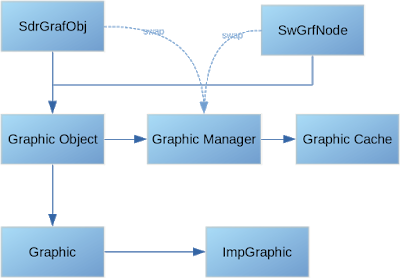
This is not possible anymore as we don’t operate with uniqueIDs anymore, but always use Graphic and XGraphic objects (in UNO), so we need to manage the creation of Graphic object or more precisely – ImpGraphic (Graphic objects are just reference-counted objects of ImpGraphic).
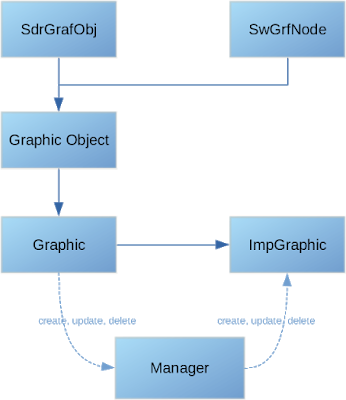
So to make this possible GraphicManager and GraphicCache need to be decoupled and removed from GraphicObject and a new manager needs to be introduced between Graphic and ImpGraphic, where the manager controls the creation and accounts for the memory usage:
Graphic swapping and swapping strategy
The new swapping strategy is relatively simple – if a lot of memory is needed by graphic objects in a certain time, we let it use it and don’t try to over-aggressively try to free it. In the past this cased swap-out and swap-in cycle that made the application completely unusable. In the future, external hints when a certain Graphic object can be swapped out may be added, so we can perform swapping more effectively. There are also several other ideas which will increase performance and reduce memory usage that can be implemented now with the new hierarchy where most all of the swapping is contained inside the Graphic itself, but all of this is currently out of the scope of this work.
In conclusion
Thanks to Collabora and Tomaž Vajngerl for their work on this. Although the details are highly technical, the end result is a faster and more robust office suite. If you’re an end user of LibreOffice and your documents include lots of images, you will be able to enjoy the benefits of this work in future releases, starting with LibreOffice 6.1.