The Internet, January 25th, 2018. The Brazilian community is pleased to announce the immediate availability of the Getting Started Guide 5.2, with all innovations and enhancements from LibreOffice 5.2. The guide is an in-depth update of the 5.0 Getting Started Guide that has already been translated.
The team was composed of IT professionals, translators, engineers, teachers and technicians. The team members are:
Chrystina Pelizer (Getting Started Guide project leader, translator and reviewer)
Vera Cavalcante (reviewer and book assembler)
Fábio Coelho (translators, reviewer and infra manager)
Túlio Macedo, Raul Pacheco da Silva, Valdir Barbosa e Olivier Hallot (translators and reviewers)
Thanks to The Document Foundation’s support, the team met together at the Instituto de Física of UNESP university in São Paulo, Brazil for a final review sprint of the translated chapters, and then delivered the contents to Vera Cavalcante for book assembly and release.
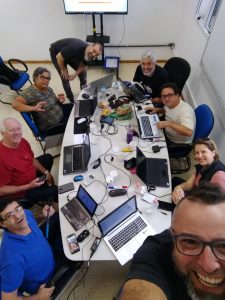
Without the face-to-face meeting in December 2017 sponsored by TDF, the guide’s release would have been delayed further due to personal and professional commitments of the volunteer team members. The face-to-face meeting was an opportunity to boost productivity, and the team finished the revision in two days of focused work. The team is planing more meetings for the other guides under production.
The Instituto de Física Teórica of the State University of São Paulo (UNESP), under Prof. Dr. Marcelo Yamashita’s administration, hosted the Brazilian LibreOffice documentation community, which is committed to achieving a final sprint for the review and publication of the Getting Started Guide 5.2.
Eight members of the community gathered together in an effort to review the translation and check the consistency of the contents for final publication. Once the initial introductions were done, each member of the team picked two or three chapters and started work.
This is lengthy work that requires attention, and the team committed to reach the goal in the timeframe that was set. In meetings of this kind, doubts and questions about content are debated immediately. As an additional benefit, the text was improved while some of the user interface terms were corrected and improved for better accuracy, since the team had direct access to the translation server for immediate fixes.
On the second day, by invitation of the documentation team, Vanderlei Junior (a professional content designer) taught the team some techniques needed to produce instructional content – especially videos and interactive media. Vanderlei emphasised the absolute need to plan contents and speeches, and offered important information on framing and timings for instructional videos. He highlighted the fact that video capture is less important than careful definition of content, which, if it’s lacking, will lead to failures.
From Left to right: Raul Pacheco, Olivier Hallot, Vera Cavalcante, Vanderlei Júnior, Túlio Macedo, Valdir Barbosa, Chrystina Pelizer and Fabio Coelho.
On the third day, with all chapters revised and ready for compilation into a book – thus with the goal achieved – the team had a crash course on the Pootle server used for translations of the Help and the user interface of LibreOffice. They also learned about The Document Foundation and its operation, sharing experiences of the older members.
“To participate in the São Paulo Hack-doc was a rich experience for me” said Valdir Barbosa, a TDF-certified instructor and team coordinator for UNESP. “I could discuss several issues related to my job, while discussing new techniques for document production and less known resources of LibreOffice. Besides, it is also exciting to be able to improve the software, with direct access to the development tools” said Valdir.
“It was an excellent opportunity to see some members of the documentation team, as well as meet old documentation friends” said Vera Cavalcante, a community member and LibreOffice Magazine editor. “As I did the previous book compilation, I’ll use my experience to do this one very quickly. I believe it is essential to have periodic meetings for documentation tasks. The Hack-Doc idea worked very well and, for sure, we produced a lot in a short period of time”, she said.
The meeting, originally set for a review sprint, also triggered some discussions on community activities and planning for 2018. The team set a target to define in 2018 a LibreOffice curriculum with multimedia resources for users at several difficulty levels. Also, we discussed the current process of book production – and it is clear that direct translation of the contents for each release is not optimal, and a better approach is to update contents from the release notes, directly in Portuguese. The guide and the multimedia contents will come side-by-side, in complimentary form. Regarding events for 2018, the team will do its best to create a national or Latin American LibreOffice-exclusive event.
LibreOffice’s help system needs to evolve and be more effective for users.
LibreOffice’s help system was designed in 2003-2004 and released in 2005. Since then it has not evolved, except for the introduction of an online version hosted in a wiki server (and accessible from LibreOffice when the local help is not installed).
I worked recently to transform our ancient help system into a modern browser-based version. The partial result is available in the (temporary) website at https://helponline.libreoffice.org – please be advised that this is still work in progress.
The XML help pages are transformed into pure, almost static and responsive HTML. This approach has some advantages:
Works in every browser
Provides the current functionality of the help system
Preserves the current development, help authoring, release engineering and translation process as it is
You can read the help pages in your mobile phone or tablet
It’s easy to add extra markup for better search engine indexing
The disadvantage is an increase in disk storage on the server.
Transforming XML into HTML for every browser
The help pages were designed when the minimal standard HTML was version 3.2 and, since then, many developments have brought us HTML5 in all major browsers. There is little advantage now to keep the current XML, and all of its designed functionality can be replaced and improved by HTML, CSS and JavaScript, for example, adding better navigation and multimedia contents.
The new Help page layout benefits of many modern technologies
The Calc module of LibreOffice is one of its most complex and extensive applications and one of the most in-demand for documentation, as our measurements of the documentation website clearly show.
The latest published Calc Guide is connected to LibreOffice release 4.1. The gap between this guide and the most recent Calc developments has widen and the current publication is outdated. (more…)
We can assure readers of this blog that LibreOffice 5.3 in Brazilian Portuguese did not simply sprout from the last tropical rainfall. It is the product of a team of volunteers working to make the best free office suite in Portuguese a reality.
Following the experience gained by translating the Getting Started with LibreOffice 5.0 guide, the team began to translate the Help Contents of LibreOffice 5.3 in December 2016. This task involved translating 18,000 words on our Pootle server in two months, due to all the improvements, updates and corrections that went in the software since version 5.2. The work was split into smaller tasks under the supervision of Olivier Hallot, translator leader since 2007 (during the OpenOffice.org days). The LibreOffice 5.3 user interface translation was handled by Olivier in that period.
So, the Brazilian community and the Brazilian users say thanks to Chrystina Pelizer, Túlio Macedo, Raul Pacheco da Silva and Douglas Vigliazi for the new LibreOffice 5.3 and Help system in Brazilian Portuguese.
“It was like a challenge for me: to actively take part in a collaborative, international software project. Learning and using the tools and techniques that volunteers use to translate the software made me feel more important and met my expectations, because they greatly reduce the effort and we get results very quickly. Also, I am very happy to be part of a project team.” Chrystina Pelizer (Florianópolis – SC)
“I always liked to be part of the LibreOffice community when my professional activities let me do so. Specifically, I like to be part of the translation projects of the software and the documentation. I use all the resources I can to fulfil my duties within the team and I don’t like to miss our weekly team call.” – Raul Pacheco da Silva (Suzano – SP)
“I took advantage of the fact that my professional duties are related to LibreOffice, and for me, taking part in the LibreOffice project is an opportunity to develop my professional skills, including at an international level. The translation project is one of the opportunities to contribute to the community.” – Douglas Vigliazi (Santos – SP)
“I already had translation experience with the Fedora project in Brazilian Portuguese, and that helped me a lot with using the LibreOffice toolset. The translation helped me to get to know LibreOffice in depth, in order to understand the context of the translation I was doing. I also liked very much being part of a team.” – Túlio Macedo (Brasília – DF)
“After years of personal commitment to keeping the Brazilian LibreOffice fully translated and with quality, it was a great satisfaction to assemble a team that will be able to keep the project alive by themselves, ensuring part of the translation effort of this wonderful software.” – Olivier Hallot (Rio de Janeiro – RJ)
Berlin, March 6, 2017 – The Document Foundation’s Documentation Team announces the immediate availability of the new Getting Started with LibreOffice guide version 5.2. The guide was updated to include the developments of LibreOffice 5.2 and previous releases.
The Getting Started guide is an introductory text for end users on using the LibreOffice office suite. It is written for individuals as well as organizations that deploy LibreOffice as their preferred office suite tool. The text allows users to get familiar with the features and resources of LibreOffice and shorten the time to become productive in office document edition.
The guide is written in LibreOffice Writer in Open Document Format (ODF). The team worked to not only update the contents but also to clean the formatting used in the text with a double objective: One is to make the text suitable for computer aided translation (CAT) tools and the other is to generate an online version (XHTML) of the guide.
The documents composing the Guide were formatted using styles only, avoiding direct formatting that has impact on CAT tools and on HTML export. For HTML export, the underneath template of the documents was adapted to handle the unmatched formatting properties between ODT and XHTML. At the end, a unique content source was able to produce the guide in ODT, PDF and XHTML formats.
The Documentation team is in charge to develop, modernize, update and enhance all form of documentation related to LibreOffice in all languages supported by LibreOffice. It includes the authoring of LibreOffice guides for all modules, the Help system modernization and contents update, and to offer ways and means for the community to contribute to the LibreOffice project. Communities interested in contributing or translating contents can get it touch with the team by sending an e-mail to documentation at libreoffice dot org