There is a sophisticated mechanism by which proprietary technology ecosystems maintain their grip on users and institutions, even when those users and institutions believe they are making free choices, using open standards, and building independent digital infrastructure.
The mechanism does not work through force, but through a subtler and more durable strategy: the layering of dependencies, in which each layer obscures the one beneath it, so that when the system fails the apparent cause is something other than the real one.
It is a structural pattern with identifiable components and predictable failure modes, and with a single political consequence: the systematic attribution of interoperability failures to open alternatives rather than to the proprietary dependencies that actually cause them.
Understanding all of this is essential for anyone working on a genuine interoperability policy, because without it even the best-intentioned policy interventions address the visible symptom while leaving untouched the larger problem of the underlying architecture, which goes on working exactly as designed.
The perception of malfunction
Let us start from the user’s experience, because this is where the political damage occurs.
A document is created in Microsoft Word and sent to a colleague who uses LibreOffice on a Linux desktop. The colleague opens the file. Something is wrong: a table has shifted, the text has reflowed, a font looks different, the page breaks have moved.
The experience is familiar to millions of people in institutional settings that have adopted, or are considering adopting, open source software. It is the experience that generates the helpdesk tickets, the emails of pure frustration to the IT department, the conversations that end with “can you just send me a PDF?”, and the broader sentiment, consolidating over time, that open source software is not ready for professional use.
What is the cause of this failure? Users will blame LibreOffice, IT managers will blame format incompatibility, policymakers will blame the immaturity of open standards.
These are all wrong answers. Or rather, they are all answers to the wrong question, because they describe where the failure manifests rather than where it originates.
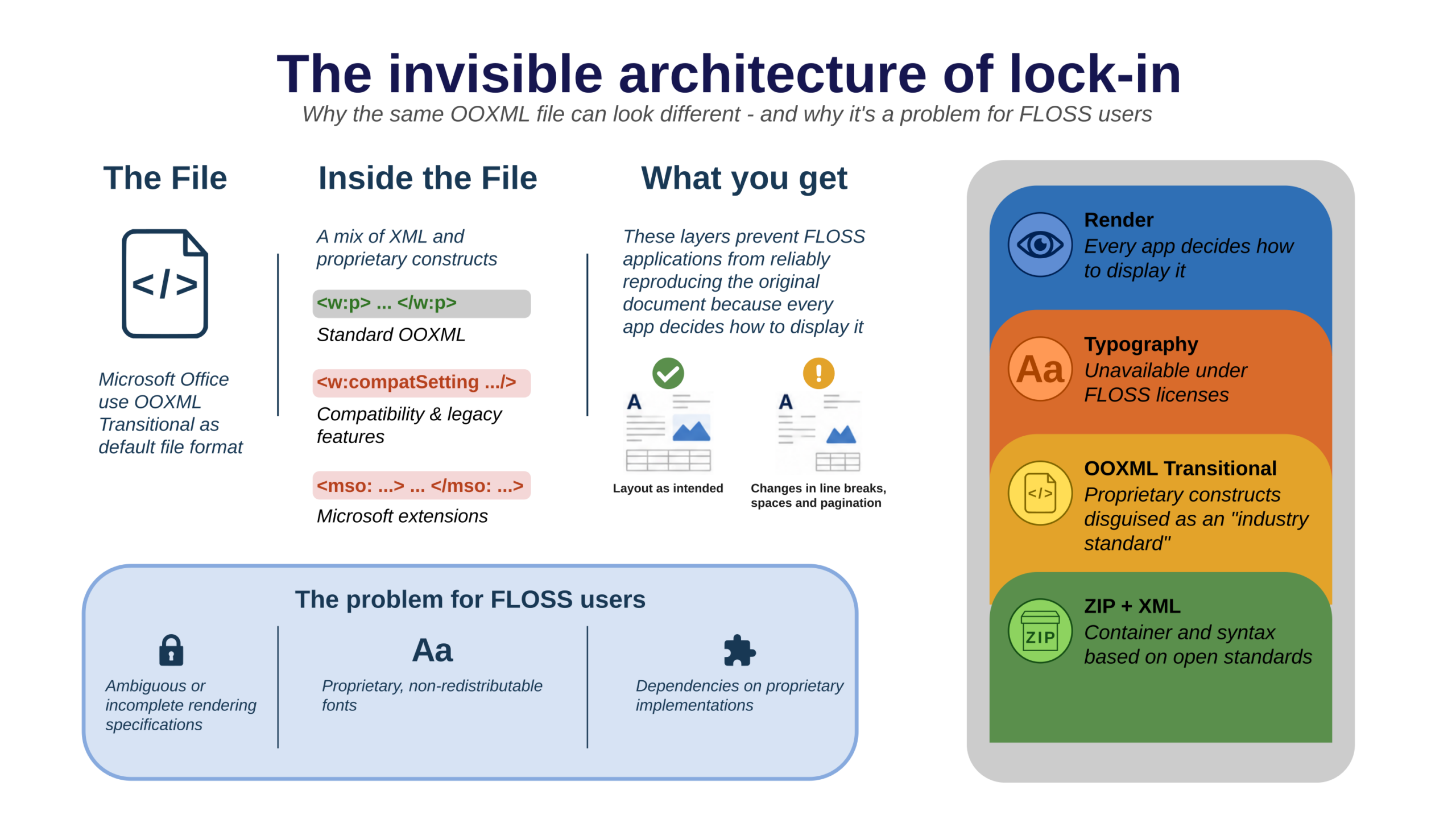
The actual cause is a set of interdependent technical systems, each contributing a different failure mode, all producing a single visible result.
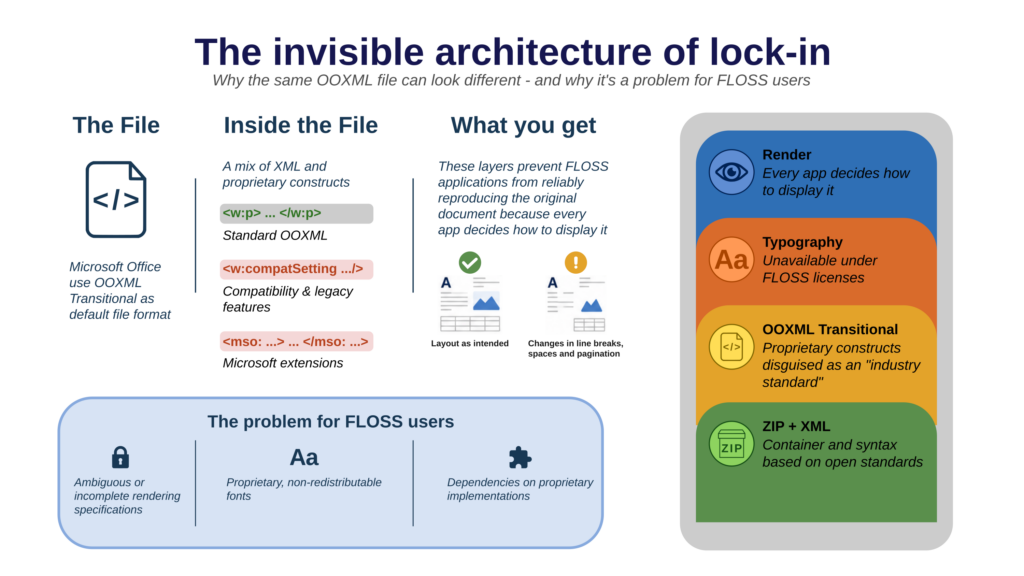
The format contains proprietary structures that only Microsoft’s implementation handles correctly. The rendering introduces platform-dependent variations that the format specification does not control. The proprietary fonts cannot be legally bundled with open source software.
Three distinct failure modes producing the same symptom, and equally invisible to the user, who perceives only that things worked in Word and do not work in LibreOffice.
This is the architecture of layered dependency. Each layer absorbs the causal chain and emits a different signal, one that points toward the open alternative.
Layer One: the format and its hidden features
The first layer is the most discussed and the most politically visible: the document format. The conflict between ODF and OOXML has been extensively documented, litigated within standards bodies, and debated in national parliaments and in the European institutions.
But even within this well-mapped terrain, it is worth clarifying the specific mechanism of obscuration at the format layer.
OOXML, the format Microsoft Office produces by default, exists in two conformance levels. Strict is a reasonably clean specification. Transitional is something categorically different: a format designed to encode the accumulated behaviour of earlier Microsoft Office versions, preserving decades of proprietary implementation choices as normative elements of an apparently open standard.
OOXML Transitional includes VML — Vector Markup Language, a proprietary drawing format from the late 1990s that predates and contradicts the DrawingML system defined elsewhere in the same specification.
It includes references defined as “as in earlier versions of Microsoft Office”, which make sense only if one has access to those earlier versions and to their undocumented implementation details.
It includes extensions that allow Microsoft to embed proprietary functionality in documents, invisible to non-Microsoft implementations, and capable of causing silent rendering differences ranging from minor visual variation to complete layout failure.
Crucially, OOXML Transitional is what Microsoft Office produces by default.
Every time a user saves a Word document without selecting a different format, they produce a file optimised for the Microsoft ecosystem and subtly hostile to every other.
Users do not know this is happening, because the choice is made for them at the format level, and when the document fails in LibreOffice, the format layer’s contribution to that failure is invisible. The user sees a rendering problem, not a format problem.
This is the first layer of obscuration: proprietary format constructs masked by the label “industry standard”, producing errors that appear to be implementation shortcomings in the receiving software.
Layer Two: rendering and its unspecified behaviour
The second layer is less discussed, less politically visible, and for these very reasons more durable as a source of interoperability failure: text rendering.
Document format standards specify content. They define what a document contains: text, structure, logical relationships, embedded objects, and formatting instructions.
What they do not specify, and what none of the major document format standards has ever specified, is how that content should be rendered. The translation of encoded content into visible glyphs on a screen or a page is left to the implementation, and different implementations make different choices.
These choices operate across several subsystems.
Shaping engines — the software components that translate sequences of Unicode characters into sequences of glyphs, and that handle the complex rules of scripts such as Arabic, Devanagari and Thai — differ by platform.
HarfBuzz, the open source shaping engine used by LibreOffice and by most Linux applications, produces correct, standards-compliant output, but that output may differ in detail from Windows’ Uniscribe or DirectWrite engines, particularly for complex scripts with context-sensitive glyph selection.
The differences are almost always invisible for Latin text, but for the non-Latin scripts used by a significant portion of the European public sector and citizenry, they can be significant.
Hinting interpretation varies across rendering engines. Fonts embed hinting instructions — algorithms that adjust glyph outlines for crisp display at low screen resolutions — but those instructions are interpreted differently by different renderers.
A font optimised for Windows’ GDI rendering engine may display with different weight and spacing under FreeType on Linux, even at identical sizes.
The differences are minute for any single character, but they affect the perceived quality of the text and contribute to the general impression that open source environments are slightly less polished.
Line-breaking and justification algorithms are the most significant source of rendering variation and the most direct cause of document reflow.
The algorithm that determines where to break lines — how to distribute words across a line of a given width, whether and how to hyphenate, how to handle justified text — is an implementation choice that no format specification regulates.
Microsoft Word’s line-breaking algorithm is proprietary and undocumented, and it is very different from LibreOffice’s. Both are legitimate implementations of the same function, and they can produce different line breaks; different line breaks mean different page breaks; and different page breaks mean that a document paginated in Word will not be paginated the same way in LibreOffice.
This is not a defect in implementation quality, but the normal and predictable consequence of differing rendering choices that document format standards do not define. And it produces errors that are invariably attributed to the software receiving the document, because that is where the visible difference appears, rather than to the specifications that are their cause.
The rendering layer is the most technically complex component of the layered dependency and the hardest to address, but it is also the layer that most clearly reveals the dimensions of the problem: an error generated by a different choice made by two projects, attributed solely to the open source software, on the basis of an entirely unjustified, almost faith-based trust in the quality of the proprietary software.
Layer Three: fonts and the dependency on proprietary resources
The third layer completes the picture and, in many practical settings, causes the greatest damage: fonts. Here we will not analyse font-level lock-in as such, but will instead explain how the font layer operates within the layered dependency model.
Fonts interact with both layers above. At the format level, fonts appear as named references: a document declares that the body text is set in Calibri and the headings in Cambria. If those two fonts are not available on the receiving system — and this is the case on every system for which a licence for the proprietary fonts has not been acquired — the software must substitute them.
Substitution changes the metrics, and the metrics in turn change the geometry. Altered geometry produces reflow, broken layouts, forms overflowing their margins; and here too the failure is attributed to the application receiving the document.
At the rendering level, fonts interact with the shaping engine, the hinting system and the antialiasing pipeline in ways specific to each font’s design and embedded instructions. A font optimised for the Windows rendering stack will display differently under FreeType, even before any substitution occurs, and this contributes to the overall visual divergence between environments.
What makes the font layer particularly effective as a lock-in mechanism is the combination of legal unavailability and the user’s lack of information. The proprietary fonts at the heart of the problem — Calibri and Cambria, and before them Arial and Times — are not available under any kind of open source licence.
This is a legal constraint that open source software cannot overcome, but one that users perceive not as a licensing problem but as a software problem — not as the consequence of a strategy but as proof that open source software cannot handle ordinary documents.
Only Aptos, the latest of Microsoft’s proprietary fonts, is released under a partially restrictive licence, since it ties use to a download from Microsoft’s site. It can therefore be installed by Linux users too, and used legally, but this has not been communicated widely enough, so the lock-in mechanism is only reduced, not eliminated.
Why “invisible” is the key word
Each of the three layers would be a manageable problem if it were visible, and if users had the chance to see clearly that the error originates in the proprietary format, or in the insufficient rendering specifications, or in the proprietary font. Visible problems can be addressed and solved on the basis of accurate diagnosis and targeted intervention.
The strength of this scheme lies in its obscurity. Each layer acts as a signal re-encoder: it takes the output of the layer beneath it and re-emits it as something that looks like a different kind of problem.
So the dependency on proprietary fonts produces an error that looks like a software rendering issue; the rendering problem produces an error that looks like an implementation shortcoming; and finally the proprietary format structure produces an error that looks like a failure to comply with standards.
By the time the error reaches the user, its origin is completely obscured, and responsibility is systematically redirected to the last element in the chain: the open source software, which was merely trying to display a document designed to defeat it.
This is not a coincidence arising from poor design.
Software that generated random errors would be a problem for the company that developed it, because user frustration would flow back toward the originating software.
A system that generates errors at the boundary with competitors, in such a way that they are always attributed to those competitors, is a competitive asset.
Here the question of intent matters less than the question of structure: whatever the motivation behind the original design decisions, the resulting architecture functions as a constraint, and its effects are observable and measurable.
How policy responded, and where it failed
The policy response to document lock-in has concentrated on the format: mandating the use of ODF and open formats in public procurement, and guaranteeing that government documents can be created and consulted without the use of proprietary software. Unfortunately, these interventions have almost never been paired with penalties to enforce compliance, and the rules have often been ignored.
Moreover, these format mandates have not addressed the use of proprietary fonts in document templates, so by fixing only the upper layer they leave the lower one exposed and fully operational, where it is less visible and less politically salient, and therefore more durable.
Documents continue to fail at the boundary with open source software, and users continue to blame the latter. The political will behind the format mandate is progressively eroded by user complaints about interoperability problems, which seem to contradict the promise of the open, standard format mandate itself.
An institution that deploys LibreOffice but fails to address rendering consistency — allowing a mixed infrastructure of Windows and Linux systems to exchange documents without recognising that rendering variation is not a software defect — risks creating an internal interoperability problem that could be used to justify a return to monoculture.
The rendering layer has received almost no policy attention. No major digital sovereignty framework specifies rendering-fidelity requirements. No procurement standard defines conformance in terms of visual consistency across implementations.
The tools to address this problem — reference rendering implementations, rendering test suites, fidelity benchmarks — exist only as prototypes or proposals, and have not been integrated into any serious policy framework.
Knowing this pattern is a political act
The invisible layering of dependencies is a pattern born of nearly fifty years of unregulated evolution of personal productivity software, and one that threatens to make the path toward digital sovereignty extraordinarily complex.
It matters to give the pattern a name, so that it can be used in policy discussions, in parliamentary questions, in procurement specifications and in the public debate on digital sovereignty, at every level, including by the media.
The invisible layering of dependencies connects phenomena that do not appear to be related — document format incompatibilities, rendering variation, font substitution failures — and shows that they are expressions of the same underlying architecture.
Once these phenomena are seen as a pattern rather than as isolated technical problems, an appropriate policy response becomes clearer, because it is not enough to fix a single layer and mandate a single standard — even though that is a fundamental first step.
It is necessary to make all the dependencies legible and to integrate them into interoperability policies that address format, rendering and fonts explicitly and specifically, with enforcement mechanisms applying to all three layers.
The open source and open standards community has built the technical foundations for genuine interoperability: open formats are mature and solid, open source applications are fully up to the task, and there are hundreds of openly licensed fonts, many of them metric-compatible with the proprietary ones.
The architecture of lock-in does not persist because the alternatives are inadequate. It persists because policy has not yet learned to look beyond the visible surface of format conformance and to recognise the underlying layers where proprietary dependencies go on operating — invisible and ignored — doing the work they were designed to do.