
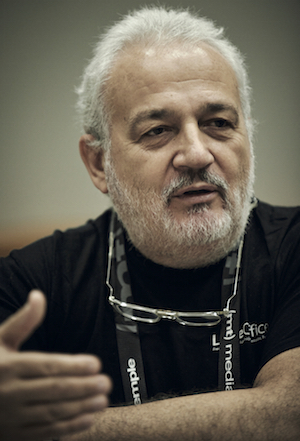
 The free and open source software world is known for being inclusive and open: anyone can get involved, regardless of age, location or background. In the LibreOffice community, we value the input from experienced community members who bring valuable knowledge and ideas to the table. Today we talk to Italo Vignoli, who has been with LibreOffice since day one and is responsible for marketing and public relations. He describes what led him to open source, along with the challenges and opportunities in marketing LibreOffice.
1. Your background is probably a bit unusual in the free software world. Why did you decide to become an advocate for free software and OpenOffice.org (the predecessor to LibreOffice) at age 50?
In the late nineties, I started to look for Microsoft Office alternatives but I was not happy with “clones” as they were clearly missing a vision. Then, in 2002 I stumbled on OpenOffice.org, and I was fascinated by the potential of the application (although version 1.0 was still very “young”).
I was completely new to open source software, but I decided to learn. During 2003 I started trying to understand the community, and then – in early 2004 – I sent a message to the leaders of the Italian NLP (Native Language Project) and the marketing project, offering my help to raise the awareness of OpenOffice.org within the media.
I met the OpenOffice.org community in September 2004, at the conference in Berlin, and I decided to stay because I loved their ethical values and the passion for innovation. Thirteen years have gone by since that time, and I still have the same enthusiasm and motivation to be part of a community that changes the world of software.
2. What was your background beforehand – and what led you into open source?
I was born in 1954, so I am 63. I have always been extremely curious, and this has helped me in going beyond my background in humanities.
In fact, after my degree in human geography, I started working at the Italian Touring Club as editor-in-chief of the cartographic department. At the same time, I was volunteering as an assistant professor of geography at Milan State University, and a journalist covering metropolitan areas development in Europe.
In late 1981, I moved to Honeywell – at the time a large computer company – to increase the awareness of printers for PCs (the IBM PC had just been launched that year). I soon discovered a passion for information technology which I could not even suspect, given my background and my lack of understanding of mathematics.
Having worked as global marketing director for peripherals and UNIX computers, I realized that communications of high-technologies was my dream job. So, in 1987 I left the company to join a large Italian PR agency, and worked with several agencies throughout my career path. Having founded two own agencies before, these days I work as a freelancer and helped several international companies to set up or grow their operations in Italy.
In 2004, I started to volunteer with OpenOffice.org, to grow the awareness of the free office suite within the Italian media. In 2010, I was one of the people involved in the birth and development of The Document Foundation (TDF) and LibreOffice, and I have been a member of the Steering Committee and then of the first Board of Directors of TDF.
I am a member of TDF’s paid team since late 2013. I first helped to shape the certification project, and then I have focused on marketing and PR since late 2014.
3. How you spend your time when working for TDF?
I spend most of my time behind a desk, studying products and related topics like standard formats, interacting with journalists, monitoring online articles and comments, drafting documents, creating presentations, managing budgets, dealing with local communities, and handling daily tasks.
Like many who are active in the community, I also deal with a large number of emails and messages, as I am subscribed to most project mailing lists and Telegram groups. This is time consuming, but it is also a very good way of interacting with native language communities, which are often faced by different issues based on local language, culture and legislation.
In addition, I often travel to local events, to speak about The Document Foundation, LibreOffice and Open Document Format. One of my objectives for the next few years is to attend more events, to strengthen the links between the core team and the native language communities.
4. How you spend your free time?
I love travelling with my wife to discover geographies I have never visited, but I love free and open source software, so I also spend lots of my free time attending conferences or local community meetings, to speak about open source software, open standards and – of course – LibreOffice.
5. What is your personal perspective about the LibreOffice project?
LibreOffice is the dream of the community turned into reality: an independent self-sustaining foundation able to push forward the free office suite concept, and to educate users about the advantages of open source software and open document formats.
History forced the community to reconsider the situation and it turned out it was the right time for a paradigm shift: after 10 years under an umbrella, we turned the umbrella upside down into a mixing bowl, where the contribution of every volunteer became a key ingredient for the recipe.
In September 2010, we did not realize that we were writing a new chapter of the open source history. Today, we are fully conscious of the fact that The Document Foundation and LibreOffice are key assets of the open source ecosystem, and as such share a huge responsibility.
LibreOffice is one of the open source “icebreakers”, as it is one of the first open source programs installed on Windows and macOS individual desktops, together with the browser and the email client. It is also the first open source program used to replace the proprietary counterpart in enterprises and public administrations.
6. What do you see as the most important challenges for TDF in 2018 and beyond?
With the publication of the first “alternatives to LibreOffice” articles in the media in early 2017, we have reached the status of recognized leader in the area of free office suites.
So, the first challenge is to keep up with the expectations of stakeholders: journalists, who have silently elected LibreOffice as the main alternative to the market leader; decision makers, who have made a bet on LibreOffice when they have decided to replace proprietary suites; and our millions of users, who are relying on LibreOffice for their daily duties.
The second challenge is to keep the ball rolling, major release after major release. LibreOffice is constantly improving, adding new features and improving the existing ones, and getting rid of some rough corners inherited from OpenOffice.org.
Last, but not least, we have the responsibility of educating public administrations and enterprises, and even individual users, about the advantages of open document formats for interoperability. Unfortunately, this is not an easy task, as the majority of people underestimates the importance of the topic (and has not been educated about interoperability).
7. Where do you see TDF and LibreOffice in 2020? And in 2025?
When we launched the project in late September 2010, we told the media that our dream would have been to reach 200 million users in 2020. After seven years, we are on track. So, let’s avoid any speculations and continue to work on a daily basis to improve the software and grow the community.
8. What is your opinion about TDF achievements? Is there anything we could have achieved if…?
Of course, we could have done even more to grow the community since the first day. Especially during our initial setup phase, though, our resources were limited and we had to balance between bootstrapping the foundation, improving the product and communicating to raise the awareness.
From the results we have been getting during the last couple of years in term of community development, I think that it was the right decision, as we managed to establish the brand and raise the awareness to keep the flow of downloads and donations (which has been key, so far, to support the different activities, including the growth of the community).
9. Are you contributing to other open source projects? If yes, which is your role, and which are your expectations?
I am currently a member of the board of directors at Open Source Initiative (OSI), where I try to bring my marketing and communications experience to grow awareness.
10. Last, but not least, what is your personal hardware/software configuration? Do you have any preferred tool?
I have been a Mac user for a long time, based on the fact that Apple is the system of choice for most public relations agencies. I still own a couple of Macs, but I am now a happy GNU/Linux user. I use a Dell XPS laptop with Ubuntu 16.04, but in the future I will switch to a vendor providing GNU/Linux based laptops, as Dell is no longer selling them in Europe. I also have an Android-based ASUS Zenfone 4, and an Android based Samsung Galaxy Tablet 2.
 LibreOffice contributors around the world have a big impact on the success of the project – we really appreciate their help. Today we’re talking to Chandrakant Dhutadmal, who is involved in various free and open source projects including Mozilla Firefox and LibreOffice…
 Where do you live, and are you active on social media?