Welcome Dan Williams, new LibreOffice Developer focusing on UI/UX

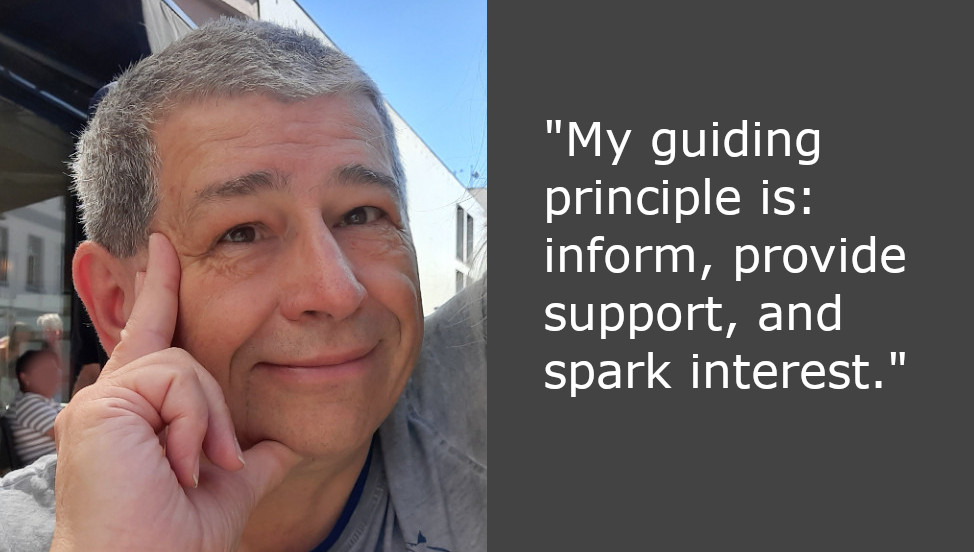
Photo of Dan Williams

The Document Foundation is the small non-profit entity behind LibreOffice. It oversees the project and community, and is now expanding with new developer roles. So let’s say hello to Dan Williams, who joins the team to work on design and user interface (UI) improvements, with an initial focus on macOS:

Tell us a bit about yourself!

I’m from the USA, have lived on both US coasts at various times, and now live back in the “midwest” where I grew up.

I was previously a software engineer, team lead, and manager at Red Hat for more than 20 years. In that time I’ve worked on a large variety of projects, from local networking to cloud networking to desktop software. I spent two years helping build the One Laptop Per Child software stack which was an eye-opening experience from a UI and design perspective. I believe passionately in free and open-source software; all the code I’ve written so far in my career is open-source.

Oddly enough, I’m not new to the LibreOffice community; I was an OpenOffice contributor and co-founded the NeoOffice port to Mac OS X (now called macOS). That led to being hired by Red Hat to package and improve OpenOffice for Fedora and Red Hat Enterprise Linux, where I helped start the 64-bit port and realize the Native Widget Framework that’s still used in LibreOffice today. I eventually handed my Red Hat OpenOffice duties over to Caolán McNamara (now at Collabora) and moved on to networking. I still recognize quite a few of our community members who I worked with before!

Outside of office software I’m the maintainer of the ModemManager WWAN software stack and I seem to have developed a hobby of collecting LTE and 5G base stations. I enjoy playing with hardware (especially if it runs Linux), baking and cooking, building large structures out of wood, and occasionally brewing beer in my basement.

What’s your new role at TDF, and what will you be working on?

A significant part of my new role will echo my early OpenOffice contributions: Mac! I’ll convert the last bits of Carbon API into modern Cocoa ones. This old code involves some pretty core functionality like popup menus and key modifier detection so it’s going to be tricky but we need to do it. Nobody knows how much longer Apple’s going to support HIToolbox but I’d like to be prepared. I’m also going to improve general Mac usability and experience; I’ve been using LibreOffice on macOS since the beginning so I’m familiar with its rough edges.

LibreOffice screenshot, running on macOPS

But the Mac isn’t the only platform so I’ll be driving user interface improvements and fixing annoying bugs everywhere else too, regardless of platform or visual backend. I also look forward to working with the LibreOffice Design community to try out new ideas and see what sticks.

I enjoy the challenge of working throughout the entire codebase, from the depths of VCL/SAL up to the UI logic and layout in the applications at the top. I’m also a big believer in automated testing and continuous integration (CI) and I hope to improve our reliability and reduce regressions. It’s often a pain to write tests for a small bug fix or any other change, but I think they’re necessary for a healthy project.

How can all users of LibreOffice help out?

What are the most annoying interface and interaction bugs, for the Mac or otherwise? Make sure they’re in Bugzilla! I need help prioritizing issues – so here’s your chance to get your favorite bug looked at.

If you’re interested in LibreOffice’s user interface and visual identity, join the Design team.

Do you have Cocoa experience on the Mac and a bit of extra time? Help me out with bugs! I’d be happy to get you started.

LibreOffice Podcast, Episode #5 – Accessibility in Free and Open Source Software

LibreOffice strives to be accessible for people with special needs or limitations, such as visual impairment or limited motor abilities. How does the software work towards this? What accessibility features are in the pipeline? And how can all users help out? We talk to Michael Weghorn about these topics – and more. (This episode is also available on PeerTube.)

Please confirm that you want to play a YouTube video. By accepting, you will be accessing content from YouTube, a service provided by an external third party.

YouTube privacy policy

If you accept this notice, your choice will be saved and the page will refresh.

Community Member Monday: Devansh Varshney

Devansh Varshney

Today we’re talking to Devansh Varshney, who added histogram chart support to LibreOffice and is working on improvements to the Basic IDE…

Tell us a bit about yourself!

I am from Mathura in India, one of the historical cities where the first image of Buddha was carved during the Kushan Empire, Jain Tirthankar Neminatha’s birthplace and the more famous Bhagwan Krishna birthplace. A city where Greek kings also ruled and whose history has been documented by many travellers, the more famous Xuanzang and Faxian.

The rich history and diverse art culture of Mathura also reflects my interests too. My interests range from history to astrophysics to economics, and from tweaking custom Android ROMs back in high school to now tweaking the LibreOffice codebase which is one of the most interesting puzzles I came across. Even the people around me noticed and back in school I was given the name “Internet” – which was quite an interesting name but really reflects my nature.

Besides working on the LibreOffice codebase, I am also planning to complete my book on ADHD which I have mapped around first principles and physics. Hopefully by next year it will be complete.

Vishram Ghat by Umang108 on Wikimedia Commons

Vishram Ghatl on the banks of river Yamuna in Mathura (image: Umang108 on Wikimedia, CC-BY-SA)

What are you working on in the LibreOffice project right now?

This year I am working on making the Basic IDE better and more powerful by introducing a new Object Browser in the IDE, which is one of the most-demanded features as users working with LibreOffice had to visit the online API webpage to refer to the details of UNO APIs. That was quite a friction, and slows down not just the work but also decreases the user experience specially for macro developers.

Along with this, there is also the Basic code suggestion which will be available to users, so that they do not have to look every time what is going to be put when the suggestion can show the list of possible parameters and variables that can be placed.

Why did you choose to join the LibreOffice project, and how was the experience?

This is an interesting question. Back in 2017-2018 I experienced a lot of challenges with the Chrome browser, and thought about fixing them. That’s when I came across the Chromium project – upon which Chrome is based – and I did try to ask how to contribute and got some reply, but it was different from what I got in the LibreOffice project.

Here I did not get silence or confusion when I picked a bug, rather people showed interest and curiosity, and helped me do what I intended to fix. I am not putting other open-source projects on a pedestal – it’s just what I experienced at LibreOffice.

I also made some small contributions to the Google Benchmark and Blockly project and Phoenix Framework previously, but the big twist came last year when Ilmari got curious and asked me why I hadn’t mentioned the Google Summer of Code (GSoC) yet and pushed me to apply for 2024. I looked at the projects and found “Adding Native Histogram support to LibreOffice“.

Since in the past I had worked with machine learning, I saw that the need for these new chart types is crucial. But this is not just the point — while preparing the proposal for the histogram project, I found that CERN uses LibreOffice for their work and they even had a tutorial on a workaround of making histogram charts via column charts (link).

Which showed me two things: first, the lack of this feature is not just slowing human research, but also that the impact of LibreOffice is worldwide. This was the exact moment I realised that LibreOffice is not just about an office suite that lets people have autonomy over their data – but also its impact on human evolution and development is of sheer size.

Histogram charts in LibreOffice

Anything else you plan to do in the future? What does LibreOffice really need?

Yes, there is a lot of work remaining. First and foremost is the addition of Histogram Chart and other new chart types, as we later found challenges with how charts are being mapped in the codebase, and the newly introduced namespace by Microsoft for OOXML export made work more challenging. Then this year I got more interested in OCR with images and files like PDFs, natively available to users locally.

I tried to make an extension with Tesseract but its efficiency is not that great and it misses the whole structure of how the text was in the image.

Since LLMs (large language models) are something famous nowadays, I looked at how they are processing and reading images, and found they really can’t read images directly. The images first have to be processed by something called Vison Language Models (VLMs).

Nowadays there are some amazing open-source VLMs available which are also small in size and can run locally – even with the computing power of a mobile device. So I am also looking at ways we can get this working with LibreOffice, so that not just OCR but also reliable translation from text to the captured structure and modifying that structure can be done.

Many thanks to Devansh for the great contributions to LibreOffice! Everyone is welcome to find out what they can do to make the suite even better 😊

PyPos3DLO: Python 3D App based on LibreOffice

PyPos3DLO

Today we’re talking to Olivier Dufailly, who’s working on PyPos3DLO, an app based on LibreOffice to create mechanical characters, edit and optimize Poser files, and manipulate WaveFront files:

Tell us a bit about yourself!

I live in Toulouse (France) and for around 30 years I’ve mainly worked in the space and aeronautical domain (from software to system engineering), although I was also a business manager for a few years, and the first CIO of a mid-size engineering company. But now, I’m back in my preferred domain: space systems engineering and development. It’s a so exciting environment.

On a personal side, I like and practice sports (swimming, biking, running) and 3D modeling. I remember, when I bought my first Casio graphic tracer in 1985, I immediately ported some Apple BASIC 3D curves programs to Casio BASIC!

And now, I always like to produce some airplanes models for 3D rendering (unfortunately, the former free site ShareCG.com has disappeared so I need to find a way to publish my work elsewhere). Additionally, I think that we – all of us – are responsible of our children’s planet, and open source software is sustainable and so is vital to help us in the future.

What are you working on right now?

I’ve produced a LibreOffice-based application to help 3D mechanical characters development. I’d would be proud to present it in more detail later, but for now: PoJamas aims to provide a Python library and tools for loading, processing, and producing .cr2, pz3 (crz, pzz) files compatible with the SmithMicro (e-Frontier) Poser character animation application. It includes PyPos3DLO, an app based on LibreOffice to create mechanical characters, and edit and optimize Poser files.

Why did you choose to become a member of The Document Foundation?

LibreOffice is a great project and I’d like to try to contribute to its development. It’s just the beginning, but I feel welcome in the project already.

Anything else you plan to do in the future? What does LibreOffice really need?

I have a strategic approach concerning LibreOffice and general engineering usage.

In my professional and personal domains, engineers, PhD, techs guys produce studies and data for testing and running large and complex systems. To do this, they usually use Microsoft Office with a huge amount of BASIC macros. Moreover, they also use MATLAB and try to integrate or automatize things.

They usually have a lot of “integration” problems and the result is frequently a mess: hard to use, and more or less impossible to maintain or transfer. It’s a lack of experts’ time, when they spend too much time o “silly” development instead of doing their own business.

Our main problems are testing, maintainability and costs.

Finally, I’m convinced that we should promote a new maintainable approach for engineering studies with a better integration of Python (or other, if any languages) in LibreOffice. (Financial studies may be also greatly enhanced with an easy integration between Python libraries and Calc/Excel sheets).

At the end of the journey, BASIC should naturally become extinct.

To achieve this goal, we will need to enhance LibreOffice, ease the development of LibreOffice macros, and teach our users with many tutorials.

I’d be happy to help with testing, writing tutorials, or anything else.

PyPos3DLO

AI extension: Stable Diffusion image generator for LibreOffice

Screenshot of Stable Diffusion extension for LibreOffice

LibreOffice does not include artificial intelligence (AI) out-of-the-box. But many users want AI features in the suite – so we encourage developers to make them available as optional extensions. And that’s what Igor Támara did, creating the “Stable Diffusion for LibreOffice” extension for AI-generated images powered by AI Horde (a volunteer crowd-sourced distributed cluster of image generation workers).

We talked to Igor about the extension – here’s what he had to say:

What does the extension do?

You write some text describing an image, and get an AI image generated from the given text. You can tweak parameters, choose a model and use the best result on written documents, presentations or the place you prefer. The images are generated on volunteer GPUs through AI Horde.

When did you start working on it?

Two weeks ago, starting from a Gimp plugin as a base. I’m brand new to the LibreOffice project, and started it as a macro to get this functionality in the software. One week later I put it on GitHub.

Later on I got help from friendly people on the forum to turn it into an extension. I also joined the the chat and filled some requests in the bug tracker.

What are the current limitations, and what’s coming next?

Be aware that the text you provide is sent to AI Horde and seen by the machines that create the image, so do not send sensitive data. Also, you can get better results if you send the description of the desired image in English. You are encouraged to try different languages to see the results.

You need internet connection to use it. If you wanted to create images locally on your machine, it would take time to configure your environment with local AI models, with gigabytes of memory dedicated to this purpose, and maybe processing for hours to get something useful.

Sometimes the text can be marked as NSFW (“not safe for work”) – in which case you end up with black and white text saying so.

For now, the extension works in Writer and Impress; when invoked from other LibreOffice components, it opens a new text document and inserts the image along with the provided text.

The roadmap includes:

  • Translating the plugin to other languages
  • An option to pre-translate the text to English
  • Better integration with LibreOffice Calc and Draw
  • Earn kudos, rating the images to have more priority when requesting an image

Screenshot of Stable Diffusion extension for LibreOffice

How can others help to improve it?

Report any problems you find, and help to translate into your language. Please do so by filling an issue with your intention saying which language.

If you have a GPU (and good graphics hardware in general), you can volunteer as a worker joining the horde, to add to the computing power – and you can earn kudos to have higher priority when you need it.

If you work with a friendly company that wants to make use of the existing hardware, you can join the horde too.

One of the purposes of AI Horde is to aid education, having a special program for that.

This plugin and AI Horde are all open source, so everyone can learn and be as transparent as possible in this changing and revolutionary world of AI times.

There might be concerns about the use of products and the ownership of work. As I see it, we are always learning by example and reusing what others have invented from thousands of years ago, like how to walk, make fire, communicate, explore, recreate and mix. We can continue to learn and make fair use of resources – and contribute too.

Click here to get the extension

LibreOffice Podcast, Episode #4 – Documentation in Free and Open Source Software

Good software needs good documentation. But how do we define “good” in this sense? And what does the future hold? Find out in episode 4 of the LibreOffice Podcast! (This episode is also available on PeerTube.)

Please confirm that you want to play a YouTube video. By accepting, you will be accessing content from YouTube, a service provided by an external third party.

YouTube privacy policy

If you accept this notice, your choice will be saved and the page will refresh.