LibreOffice and Google Summer of Code 2021: The results

Google Summer of Code logo

This year, LibreOffice was once again a mentoring organization in the Google Summer of Code (GSoC), a global program focused on bringing more student developers into free and open source software development. Seven projects were finished successfully. Students and mentors enjoyed the time, and here we present some of the achievements, which should make their way into LibreOffice 7.3 in early February 2022!

You can experiment with the new features by using daily builds and report any problems in our bug tracker.


100 Paper Cuts by Bayram Çiçek

Mentors: Muhammet Kara (Collabora), Heiko Tietze (TDF)

100 Paper Cuts aims to improve user interface, implementing enhancement requests and solving the most annoying issues on the user experience (UX) side of LibreOffice.

Bayram fixed six bugs from different topics. Most notable are border preview not showing the diagonal border option, a bug where cropping flipped images occurred at the wrong side, and mouse-over effect for different palettes in the area tab.

Learn more about 100 Paper Cuts in the final report.
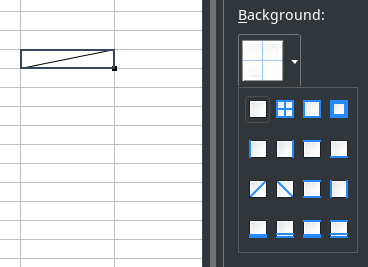
Screenshot of diagonal borders


Integrate .ui dialogs with translation tooling/string search webservice to help translators by Sary Nasser

Mentors: Christian Lohmaier, Olivier Hallot (TDF)

Sary automated the adding of screenshots to our translation platform, Weblate, while associating them with translatable words. This will greatly help translators by providing context for their work.

Learn more about the translation tooling in the final report.


Tests for the VCL graphic backends by Akshit Kushwaha

Mentors: Tomaž Vajngerl, Luboš Luňák (Collabora)

LibreOffice adapts its user interface to different operating systems with the help of its graphics toolkit Visual Class Library (VCL). Thanks to Akshit’s work, we have a working suite of automated graphics rendering tests. There is now also the ability for users to run the tests manually, inspect the results and attach them to our bug tracker in case there is a problem.

Learn more about the tests in the final report.
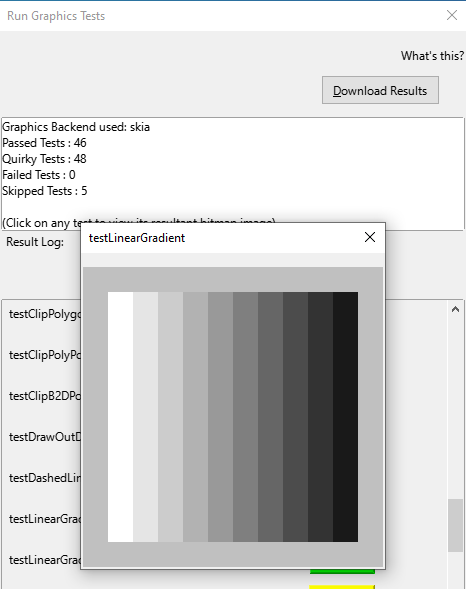
Screenshot of VCL tests


Improving table styles by Balázs Sántha

Mentors: László Németh (independent), Michael Stahl (allotropia)

This project resulted in fixes for the most annoying Writer table style issues. Further work is needed to provide full DOCX compatibility.

Learn more about DOCX tables styles in the final report.


Make SVM (StarView Metafile) format independent of the VCL Metafile + tests of the format by Panos Korovesis

Mentors: Tomaž Vajngerl, Miklos Vajna (Collabora)

Thanks to the work of Panos, the SVM file format is handled independently of internal VCL constructs, which will make important reorganisation of the VCL code possible. Panos also created automated tests for the SVM format.

Learn more about the SVM project in the final report.


Show text styles together in the sidebar by Anshu Khare

Mentors: Mike Kaganski, Tomaž Vajngerl (Collabora), Heiko Tietze (TDF)

Both paragraph as well as character styles are essential means to format text. Many users struggle with this concept and use direct formatting. Also, we don’t show both at once, and the two style families are not obvious to spot for casual users.

In order to improve the handling of styles (and as necessary preparation for the styles highlighter), Anshu started to rework the code. The new code makes it now possible to merge both lists into one view. A first patch was also part of the project – although it is not finished yet.


Implement Interface for external data source import into Calc by Tushar Kumar Rai

Mentors: Markus Mohrhard (independent), Heiko Tietze (TDF)

The data provider allows to import various data such as local CSV files or streams from external sources, and to apply transformations like adding/removing rows or columns, formatting and numerical operations with the data before it is inserted into the sheet. Plus, to update the data by still applying the transformations is just a click.

The project aimed to rework the user interface. Tushar organized the layout according the user workflow and common UI principles and made the workflow of adding/removing transformations easy to understand. He also added a couple of transformations.

Learn more about the data provider project in the final report.
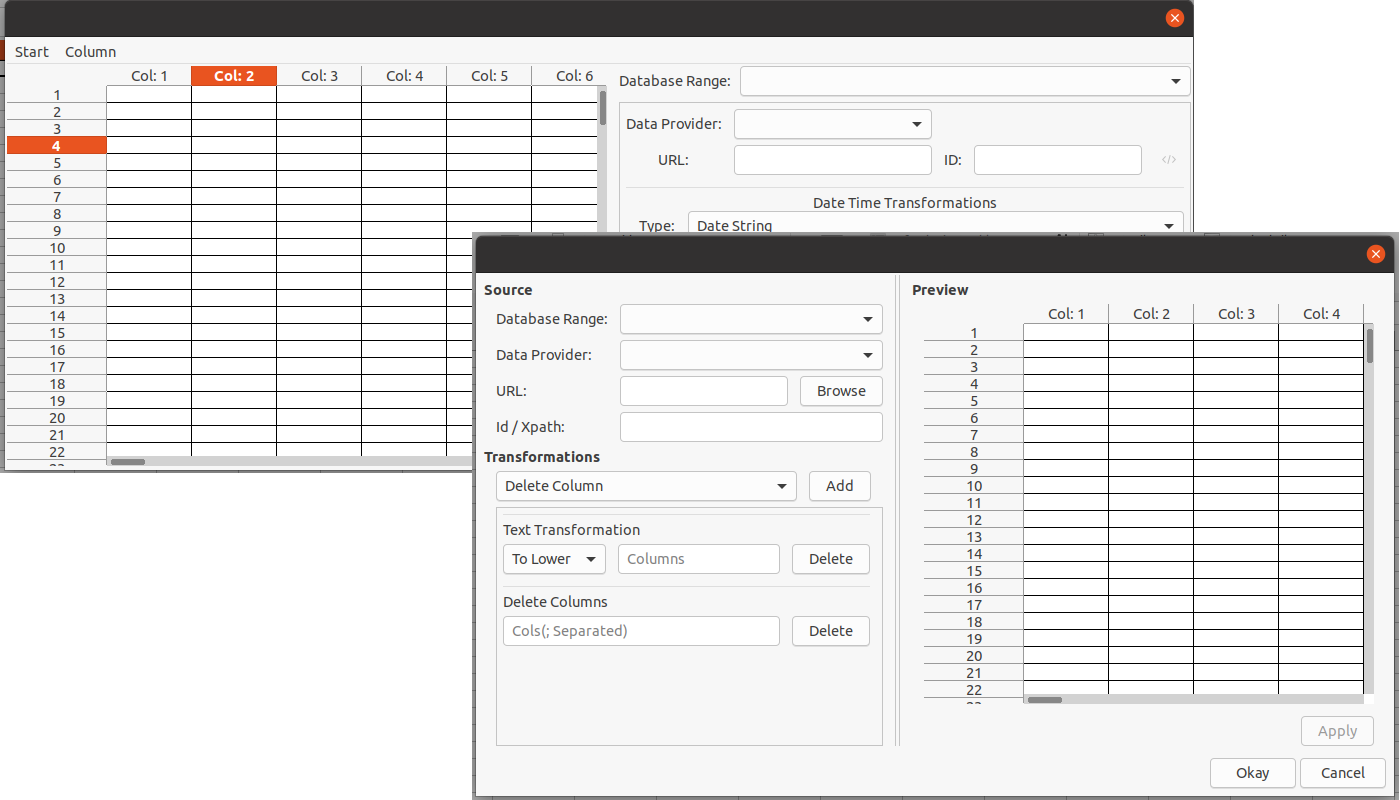
Screenshot of Data Provider


Wrapping up

Many thanks to all students who spent their summer time improving LibreOffice. You are awesome! And special thanks also to the mentors who always put so much love and energy into these tasks. That’s what makes LibreOffice rock.

Now we are looking forward to next year’s GSoC. If you are interested, why not prepare early? Learn more at out wiki page where some ideas are listed.

Participating in GSoC is a great way to build your skills, and show future employers what you’re capable of!

Improvements in LibreOffice’s PowerPoint presentation support

LibreOffice’s native file format is OpenDocument, a fully open and standardised format that’s great for sharing documents and long-term data storage. Of course, LibreOffice does its best to open files made by other office software as well, even if they’re stored in pseudo-“standards” with cryptic and obfuscated contents. Compatibility with PowerPoint PPT(X) presentations is therefore a challenge, but developers are working hard on improvements…

In September 2019, we announced an initiative to improve the support of PPT and PPTX files in LibreOffice. A year has passed since the last review and it is time to summarise achievements again.

Everyone is invited to participate in the PowerPoint support initiative, either in development or testing. If you are interested in joining, please send an email to ilmari.lauhakangas@libreoffice.org.

Audio

Miklos Vajna (Collabora):
Added import and export support for slide narrations and their icons

Borders and fills

Miklos Vajna (Collabora):
Handle stroke properties of image shapes
Improve import of transparency in multi-step gradients

Before screenshot of bug 134183
Slide before Miklos’s fix

After screenshot of bug 134183
Slide after Miklos’s fix

Regina Henschel:
PPTX: transparency gradient on solid fill is not considered in export
Add fill to fontwork in export to PPTX

Charts

Zhenhua Fong (PPT/X team):
Chart background is white instead of Automatic/No fill plot area

Custom shapes

Gülşah Köse (Collabora):
Handle greyscale effect on bitmap filled custom shapes (blog post)
Apply mirror property to custom cropped graphic (blog post)
Import support for custom stretch values (blog post)
Import crop position of bitmap filled shape (blog post)
Import graphics cropped into custom geometry as custom shapes (blog post)

Mark Hung (PPT/X team):
Export names of custom shapes

Miklos Vajna (Collabora):
Handle adjust values from both the custom shape and its placeholder

Tünde Tóth (NISZ):
Fix lost arcTo shape

Xisco Faulí (TDF):
PPT: export custom shapes as Bitmap

Hyperlinks

Tibor Nagy (NISZ):
Fix internal hyperlink to slide in PPTX
Fix lost direct hyperlink colors
Fix internal hyperlinks with PPTX export

Zhenhua Fong (PPT/X team):
Import hyperlinks from PPT

Tables

Gülşah Köse (Collabora):
Table row height improvement in Impress (blog post)

Miklos Vajna (Collabora):
Shadow for tables from PPTX in Impress (blog post)

Tibor Nagy (NISZ):
Fix vertical alignment in exported table

Text boxes

Attila Bakos (NISZ):
Fix exporting of placeholders

Gülşah Köse (Collabora):
Fix the placeholders priority order
Text box gets displaced by text coming from master page

Text in shapes

Gülşah Köse (Collabora):
Camera Rotation Improvement (blog post)

Miklos Vajna (Collabora):
SmartArt improvements in Impress, part 5 (blog post)
SmartArt improvements in Impress, part 6 (blog post)

Regina Henschel:
Text transformation “Deflate” is wrongly imported as “Inflate”
Wordart 3D is lost on round trip

Serge Krot (CIB):
Top-aligned text in imported PPTX becomes bottom-aligned

Various

Ahmad Ganzouri:
OOXML support for shadow blur

Bartosz Kosiorek (PPT/X team):
OOXML Fix storage of date in Custom Properties

Dániel Arató (NISZ):
Fix missing chart in exported PPTX

Gülşah Köse (Collabora):
Protect aspect ratio of graphic bullets
Import shadow size

Luboš Luňák (Collabora):
Load images in parallel
Implement PowerPoint ‘flash’ slide transition

Mike Kaganski (Collabora):
Support for transparency attribute of glow effect

Miklos Vajna (Collabora):
Crash fix for pyramid SmartArt import
Detecting 0-byte files based on extension in Impress and elsewhere (blog post)

Samuel Mehrbrodt (allotropia) and Piet van Oostrum:
Tab positions not being retained in PPT and being lost in PPTX

Tibor Nagy (NISZ):
Fix duplicated slide name with PPTX import

Vasily Melenchuk (CIB):
Support API-based MS-CRYPTO algorithms

Zhenhua Fong (PPT/X team):
Correct positions for group shapes
SmartArt caption text location is wrong

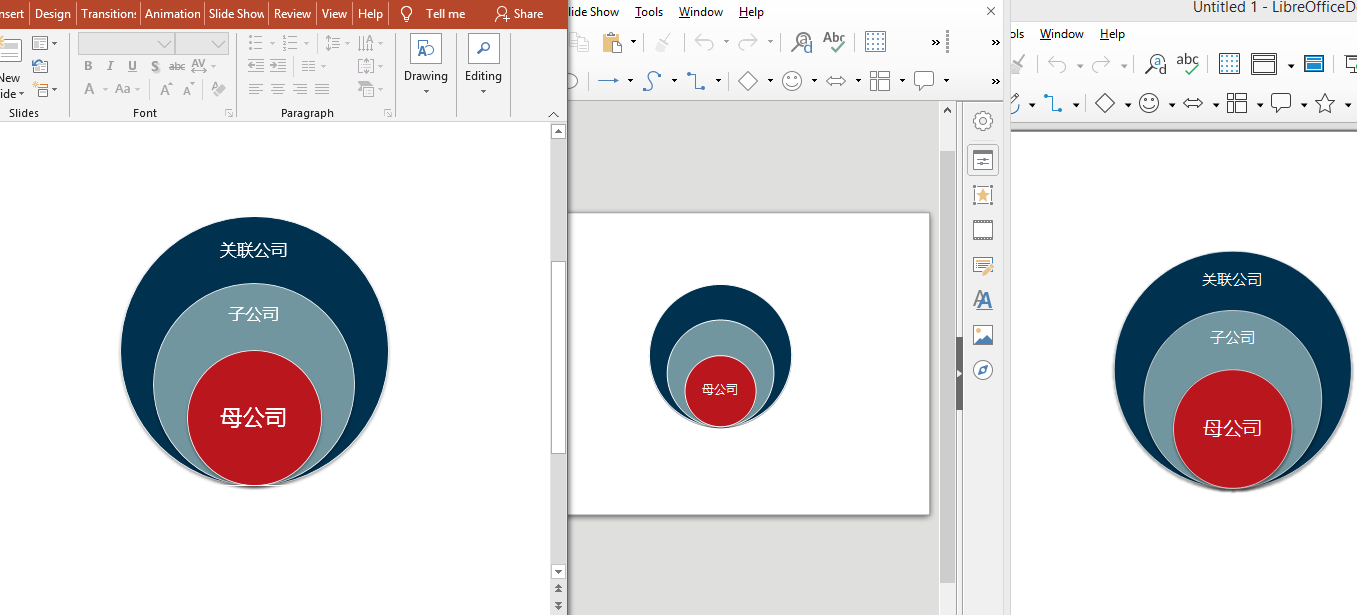
From left to right: PowerPoint, LibreOffice before Zhenhua’s fix, LibreOffice after the fix

LibreOffice Macro Team: progress report

Macros help users to automate common tasks in LibreOffice. In September 2019 we announced a new team in our community to work on macro support. The last progress report was published in April 2020, so it is high time to look into what has happened since then.

If you are interested in contributing to the macro team (development, testing or documentation), we’d love to hear from you – please send an email to ilmari.lauhakangas@libreoffice.org and we’ll get in touch.

ScriptForge Libraries

The biggest single event was the introduction of ScriptForge Libraries in LibreOffice 7.1. ScriptForge and its documentation is a collaboration betwen Jean-Pierre Ledure, Alain Romedenne and Rafael Lima. You can read more about it in the January 2021 blog post and the work-in-progress Help content.

Wiki docs

Nathan Ullberg continued working on Impress macro articles.

Celia Palacios improved the Python guide and added new macro tutorials, such as populating spreadsheets with data from an SQL database.

Alain Romedenne continued adding syntax diagrams and improved and expanded the Python guide and macro articles.

Mauricio Baeza improved and expanded articles and added new ones, such as Insert a comment with custom presets, Copy content cell from Spreadsheet to other and Charts in Calc.

Steve Fanning added several new examples of Calc macros.

Code contributions from macro team members

Alain Romedenne:

Andreas Heinisch:

George Bateman:

Tomoyuki Kubota:

Code contributions from honorary associate members

Compatibility fixes for Python 3.8 to 3.12 done by David Ostrovsky, Dante Doménech, Noel Grandin (Collabora) and Stephan Bergmann (Red Hat).

Anshu Khare:

Arnaud Versini:

  • Many cleanups and optimisations in Basic handling code

Arpit Bandejiya:

Caolán McNamara (Red Hat):

John Turpish:

Maxim Monastirsky:

Michael Stahl (allotropia):

Mike Kaganski (Collabora):

Noel Grandin (Collabora):

Serge Krot (CIB):

Shubham Jain:

Stephan Bergmann (Red Hat):

Tushar Kumar Rai:

Xisco Fauli (TDF):

Help content

Improved by Alain Romedenne:

Added by Alain Romedenne:

Improved by Rafael Lima:

Improved by Olivier Hallot (TDF):

Added by Olivier Hallot (TDF):

LibreOffice and Google Summer of Code 2020: The results

Google Summer of Code logo

This year, LibreOffice was once again a mentoring organization in the Google Summer of Code (GSoC) a global programme focused on bringing more student developers into free and open source software development. We ran six projects – and all were finished successfully. Students and mentors enjoyed the time, and here we present some of the achievements, which should make their way into LibreOffice 7.1 in early February 2021!

You can experiment with the new functionality by using daily builds and report any problems in our bug tracker.


Styles Inspector for Writer by Shivam Kumar Singh

Mentors: Tomaž Vajngerl, Mikhail Kaganskiy (Collabora)

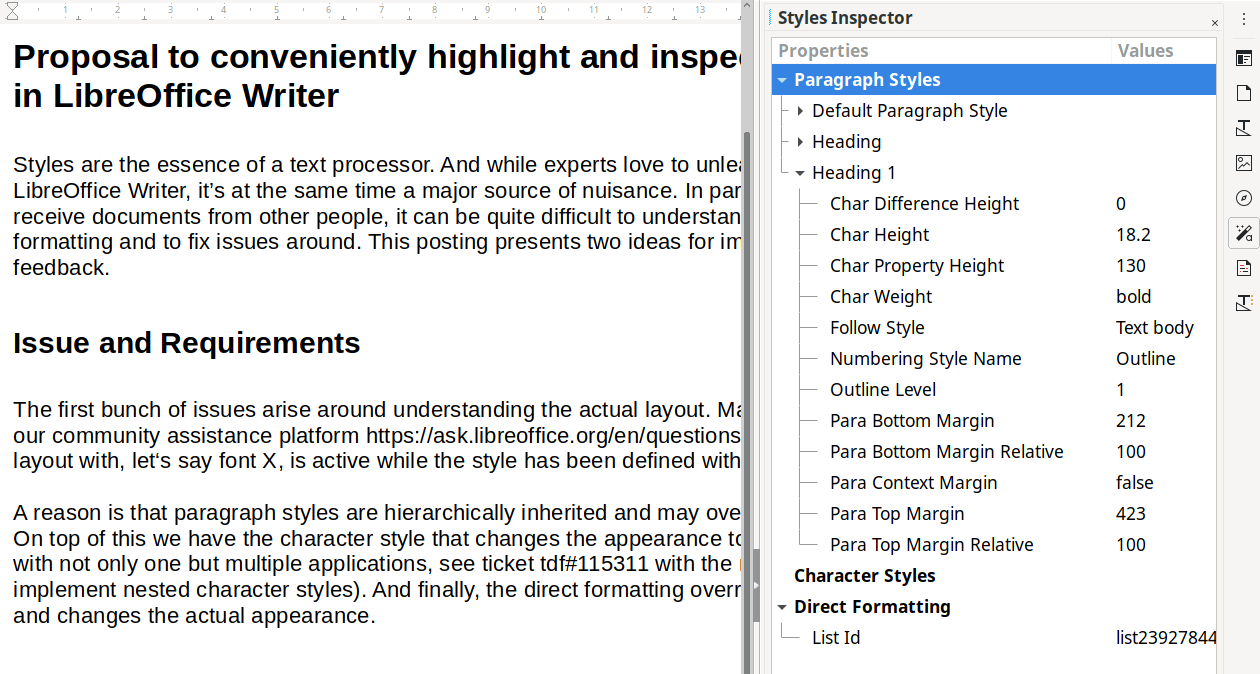
Dealing with styles and formatting in complex documents can become tedious, especially when you are working on something you did not create yourself. The Styles Inspector implemented by Shivam conveniently displays all the properties of the elements making up a document. It will surely become an essential tool for Writer experts.

Learn more about the Styles Inspector in the final report.

Styles Inspector


Additions – Tight integration of extensions by Yusuf Keten

Mentor: Muhammet Kara (Collabora)

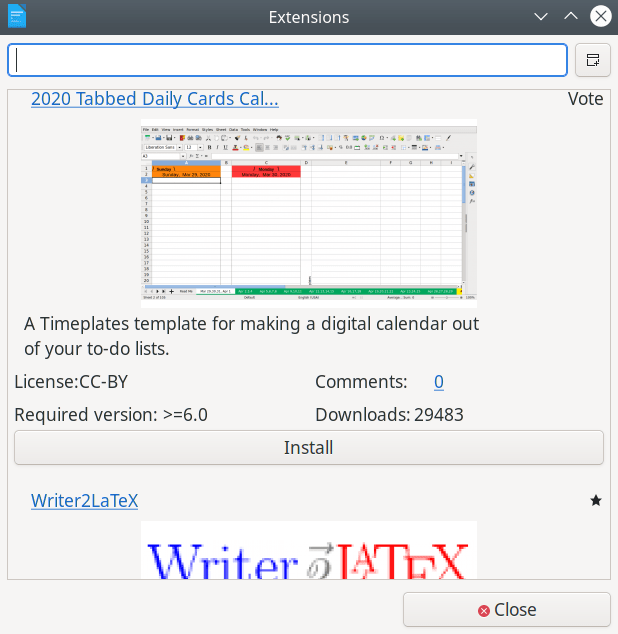
Thanks to the work of Yusuf, users are now able to fetch extensions, templates and other resources as well as discover guide books without ever leaving LibreOffice.

Learn more about Additions in the final report.

Additions


Extending the UI testing framework by Ahmed ElShreif

Mentor: Markus Mohrhard

A domain-specific language (DSL) for LibreOffice’s Python-based UI testing framework was originally implemented by Saurav Chirania in 2018. Ahmed ElShreif continued the work in 2019 and now tackled further improvements in the DSL and in the testing framework itself. This means that the automated quality assurance system is better at preventing bugs from slipping into LibreOffice.

Learn more about the UI testing project in the final report.


Impress shape animations with a real physics engine by Sarper Akdemir

Mentor: Thorsten Behrens (CIB)

Sarper added the ability to enrich presentations with animations powered by the physics simulator engine Box2D.

Please confirm that you want to play a YouTube video. By accepting, you will be accessing content from YouTube, a service provided by an external third party.

YouTube privacy policy

If you accept this notice, your choice will be saved and the page will refresh.

Learn more about the physics engine project in the final report.


Moving the gallery code to a friendly format by Aditya Sahu

Mentors: Tomaž Vajngerl, Michael Meeks (Collabora)

It was not simple to work on galleries due to them being stored in a custom binary format. Now Aditya got us out of this unfortunate situation and designers will have a much easier time.

Learn more about the gallery project in the final report.


Blurry shadows by Ahmad Ganzouri

Mentors: Tomaž Vajngerl, Miklos Vajna (Collabora)

Shapes and objects in LibreOffice used to only support hard shadows. Now Ahmad implemented proper blurriness for the shadows, supporting both ODF and OOXML formats.

Blurry shadows

Learn more about blurry shadows in the final report.


Wrapping up

Many thanks to all students who spent their summer time improving LibreOffice. You are awesome! And special thanks also to the mentors who always put so much love and energy into these tasks. That‘s what makes LibreOffice rock.

Now we are looking forward to next year’s GsoC. If you are interested, why not prepare early? Learn more at out wiki page where some ideas are listed. Participating in GSoC is a great way to build your skills, and show future employers what you’re capable of!
Build your skills – join our online hackfest during the LibreOffice conference!

Who makes LibreOffice? How can you – as a user – get involved in the community? And what can you contribute to the project? Well, we’ll answer all of these questions, and more, in an upcoming online “hackfest” during the LibreOffice conference. This is a virtual event where the world’s foremost LibreOffice experts will be at hand, to answer your questions about contributing to the project. You can see how they work and “how the sausage is made”, as they say!

There are many ways to help out:

  • Designing the user interface
  • Improving the features and functionality with C++ programming
  • Updating the documentation
  • Translating the app and website
  • Starting cool marketing campaigns
  • Confirming bug reports from other users

And much more. By joining a well-known and well-established FOSS project like LibreOffice, you can build up your skillset for future career options. And also meet new people and have fun!

So, do you have a question about contributing? If so, please send your questions to ilmari.lauhakangas@libreoffice.org by 27 September 2020.

A panel of experts will convene to present on your questions and topics. Everyone is welcome to join and ask further questions. In the case that your spontaneous questions render the experts speechless, answers will be provided after the event. The duration of the event is one hour.

We look forward to hearing from you!

Improvements in LibreOffice’s PowerPoint presentation support

LibreOffice’s native file format is OpenDocument, a fully open and standardised format that’s great for sharing documents and long-term data storage. Of course, LibreOffice does its best to open files made by other office software as well, even if they’re stored in pseudo-“standards” with cryptic and obfuscated contents. Compatibility with PowerPoint PPT(X) presentations is therefore a challenge, but developers are working hard on improvements…

In September 2019, we announced an initiative to improve the support of PPT and PPTX files in LibreOffice. A summary of achievements was published later that year. Now it is time for another review.

Everyone is invited to participate in the PowerPoint support initiative, either in development or testing. If you are interested in joining, please send an email to ilmari.lauhakangas@libreoffice.org.

Import/export

nd101 (PPT/X team):
Preserve table background colour when importing PPTX file

Table before nd101’s fix
Table after nd101’s fix

Preserve text position when importing PPTX file

Text position before nd101’s fix
Text position after nd101’s fix

Ayhan Yalçınsoy:
Export the scaling handle of custom shape


Gülşah Köse (Collabora):

Import table style in PPTX

No table style before before Gülşah’s fix
Table style correct after Gülşah’s fix

Missing bullet in Smartart

Extra margin on second list level in SmartArt

Missing bullet and extra margin before Gülşah’s fix
Bullet and margin correct after Gülşah’s fix

Tamás Bunth (Collabora):

Chart labels in PPTX appear as “[PERCENTAGE]”

Chart labels before Tamás’s fix
Chart labels after Tamás’s fix

Performance

Gülşah Köse (Collabora):

Presentation does not move forward in Linux (not smooth in Windows)

A big thanks to everyone who helped out! We look forward to further updates.