Projects selected for LibreOffice in the Google Summer of Code 2024

The LibreOffice Google Summer of Code projects have been selected for 2024.

  • Adam Seskunas – More and better tests: the project aims to add automated tests for fixes related to document export as well as converting tests written in Java to C++.
  • Ahmed Hamed – Improvement to the Functions Deck in LibreOffice Calc: the functions deck in the Sidebar will get a better search, an editor area with syntax highlighting and debugging capabilities among other enhancements.
  • Aung Khant – Improving user experience around windows: remembering the size and position of windows will be made consistent and Start Center will be enhanced.
  • Devansh Varshney – Adding native support for histogram chart and its variations: this project will bring support for multiple chart types introduced in Microsoft Office 2016.
  • Mohit Marathe – Comments in Sidebar: after this project is completed, comments can be viewed and edited in the Sidebar in addition to the document margin.
  • Printf Debugging – LibreOffice Theme: the goal of this project is to increase flexibility in colouring the LibreOffice interface.
  • Ritobroto Mukherjee – Cross platform .NET bindings for UNO API: LibreOffice will get support for .NET 8 and an additional API that will feel more natural to .NET developers.
  • Venetia Furtado – LUA UNO Language Binding in Libreoffice: after this project is completed, you will be able to control LibreOffice using the LUA programming language.
  • Bonus project under Linux Foundation: Biswadeep Purkayastha – Desktop integration: CPDB support for the LibreOffice print dialog: Common Print Dialog Backends allow the separation of the user interface from printing technologies. The idea in this project is to bring CPDB support up to date.

Good luck to the contributors – we appreciate their work on these important features and improvements! And thanks to our mentors for assisting them: Tomaž Vajngerl (Collabora); Thorsten Behrens, Stephan Bergmann and Sarper Akdemir (allotropia); Rafael Lima; Andreas Heinisch; Heiko Tietze, Xisco Faulí, Michael Weghorn and Hossein Nourikhah (TDF).

Between August 19 and 26, contributors will submit their code, project summaries, and final evaluations of their mentors. Find out more about the timeline here, and check out more details about the projects on this page.

Results from our survey of LibreOffice localisation tooling and workflows

Globe

LibreOffice’s localisation community translates the software’s user interface, along with its documentation and websites.

Julia Spitters, Heiko Tietze and Sophie Gautier ran a survey among members of the localisation teams to learn what tools are used, how they engage in workflows, and what future developments they might expect.

Demographics

The survey had a total of 29 participants and 18 complete entries of quantitative data. When asked to rate their experience on a scale from (1) Beginner to (5) Expert, most of our participants had intermediate to advanced translation experience (M = 3.75, Min = 1.00, Max = 5.00), and worked on an average of 5.56 localisation projects besides LibreOffice (SD = 7.31, Min = 0, Max = 30). Our results may capture more experienced members of the localisation community who are working on quite a few projects at once, so we want to thank everyone for their work!

Tooling

We were particularly interested in what tools participants use besides Weblate, which is likely the most common translation tool used among LibreOffice translators. We allowed participants to rate their satisfaction with additional tools they use on a scale from (1) Very Dissatisfied to (5) Very Satisfied, and rate the importance of potential changes. Participants who did not leave any response were excluded.

LibreOffice localisation survey results - tools used

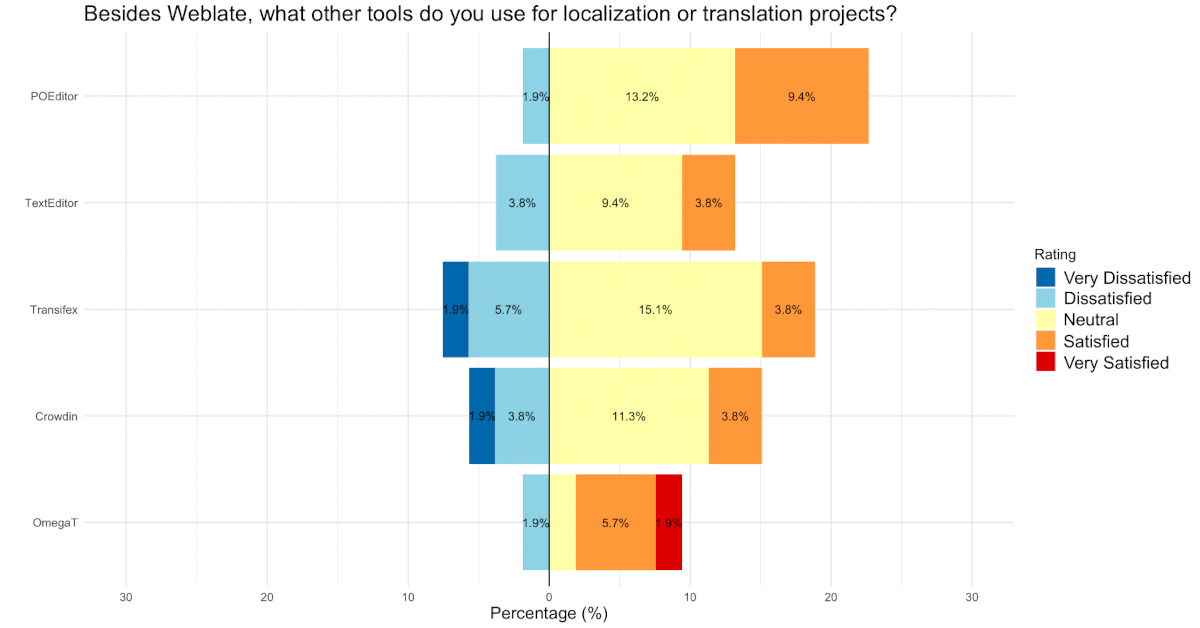
Among the different Localization tools available, most participants felt neutral towards the most commonly used tools, which include POEditor, TextEditor, Transifex, Crowdin, and OmegaT. However, the few participants who use OmegaT seemed to be relatively satisfied with the tool.

Q: Do you download strings and translate locally?

When asked if they download strings and translate locally, most participants reported that they either partially did so, or not at all.

Q: Do you want to receive notifications on updates related to translation tasks?

LibreOffice localisation survey results - notifications

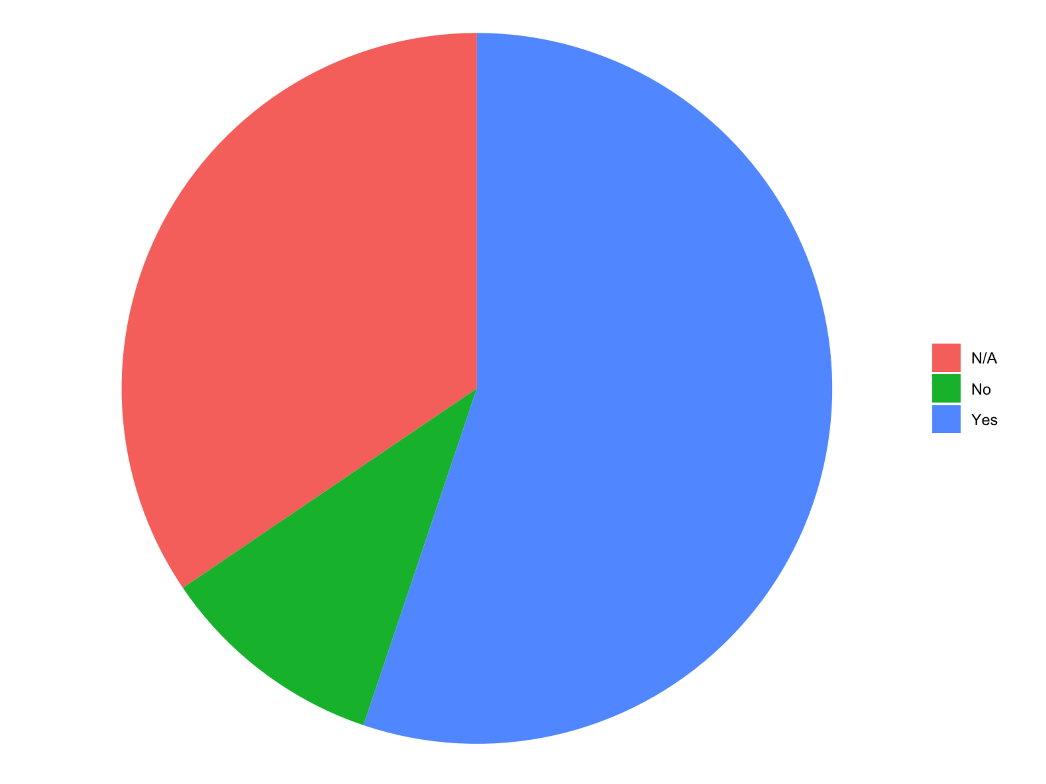
The majority of participants were interested in receiving notifications for translation task updates.

Q: How satisfied are you with the translation memory?

When asked about their satisfaction with translation memory from (1) Very Dissatisfied to (5) Very Satisfied, there were very mixed reviews, which did not allow us to capture where the majority opinion lies.

Q: If Weblate were able to auto-accept string matches, how important would this function be for you?

When asked to rate the importance of auto-accepting string matches on a scale from (1) Not at all important to (5) Extremely important, 10 out of 16 total participants rated this as at least (3) Moderately important. This might suggest that this could be a useful feature to add, but our qualitative responses will also show some potential issues that might arise if it is enabled for all translators.

Is the dashboard too complex?

LibreOffice localisation survey results - dashboard complexity

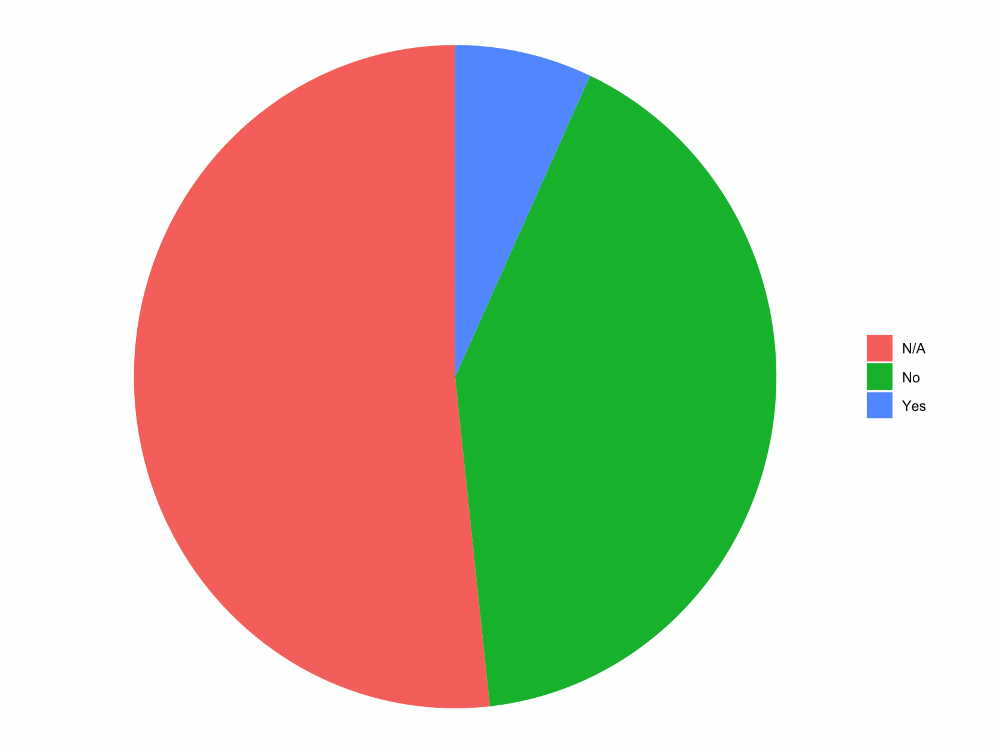
Although most participants who responded did not seem to have a problem with the Weblate dashboard, more than half of our responses were empty, making it difficult for us to understand the team’s opinion.

Q: What parts of the dashboard contribute to your satisfaction or dissatisfaction?

The few participants who assessed their satisfaction with the dashboard in the open-ended format touched on a number of topics, suggesting that the Weblate dashboard might be too complex or chaotic. They mentioned that they would like it if less projects were displayed, or if they were able to view only what they were working on.

However, another participant was interested in being able to view more projects on the dashboard so that they could more easily receive recommendations for a new project to start. Despite this valued feedback, only four participants left complete open-ended responses, making it a challenge to generalise these results across the whole team.

Q: Would you like to have machine translation such as LibreTranslate available in Weblate?

When asked to rate the importance of access to machine translation in Weblate on a scale from (1) Not at all important to (5) Extremely important, the reviews for this question were rather mixed. Though out of our 16 responses, slightly more than half (10/16) of our participants rated this as at least (3) Moderately important. Nonetheless, there may be need for a follow-up or additional data collected before a decision should be made, but this preliminary data suggests some support for the LibreTranslate project.

Q: How do you feel about the current separation between Weblate, the wiki, and user guides for translation memory?

  • Support for centralisation: Those who hoped for centralisation of these tools believe it would help to save work and maintain consistency, and help projects if there is more overlap in all instances, while another participant specifically mentioned that they would appreciate having LibreOffice user guides available on Weblate.
  • Thoughts on the current separation: A few participants reported that this centralisation would be inconvenient, while a few others who primarily used Weblate anyway felt neutral about the topic or liked the current separation as it is.

Are there any other problems that need attention?

  • Add Machine Translation: Feedback from one participant included support for a good machine translation service, but that it is not a priority. However, our close-ended data indicate that more than half of participants find having machine translation at least moderately important.
  • Increase access to translator publishing status: One participant reported that in the French section, there is limited mobility for translators to publish as there are only two authorised publishers. This prevents contributors from receiving credit for their work.
  • Satisfaction and difficulties translating in Weblate: One participant particularly liked Weblate, especially compared to competing products, while another reported an issue relating to not finding which words are used in which functions in Weblate. Two participants found difficulties in adding existing translations to re-occurring words and that some single words require approval before they do not have to be translated over and over again.
  • Individual translation issues: One participant wrote that auto-accepting string matches is not helpful in languages such as Japanese, where one word can have multiple meanings across contexts. One participant also reported difficulties in accessing information for specific releases (ie how many new strings to translate, who did translations, and how good translation has been for certain languages)
  • Individual issues – needing updates: One participant also had trouble with publishing updates to translations after previously uploading an entire glossary. They found difficulty with making changes to whole glossary entries, and currently can only make changes one by one, thus slowing down the pace of updates.

Looking to the future

Although Weblate is a very popular and effective translation tool, a number of pain points were shared. These issues generally related to auto-accepting string matches, status hierarchies in publishing translations, and needing updates on translations and translation information.

One participant focused on the need for future changes and felt limited by the current pace of progress in the development of Weblate under the support of The Document Foundation and the community. There seems to be quite some room for improvement, but we thank you for your participation in helping us refine our vision in supporting the localisation community.

Celebrating Document Freedom Day 2024!

Document Freedom Day banner

Today is Document Freedom Day, which raises awareness of how open standards and open document formats provide us with the freedom to read and write as we wish:

Remember when you were sent an important file that your computer couldn’t read properly? Remember having to buy or download a new application just so you could open an attachment that you needed for work? The same thing happens tens of thousands of times each day. Can you imagine how much knowledge exchange doesn’t happen just because sender and receiver (intentionally or not) are using different data formats? Incompatibilities like this are usually caused by ways of storing information that are secret (‘closed’), and privately owned (‘proprietary’).

Document Freedom Day is an opportunity to tell the world about open standards, which are crucial to ensure our ability to exchange information, remain independent of software vendors, and keep our data accessible in the long term. LibreOffice uses the Open Document Format, for example, which is also used in many other apps.

Learn more and spread the word here!

Announcing the ODF Toolkit 0.12.0 release

Open Document Format logo

ODF is the Open Document Format, the native format used by LibreOffice (and supported by many other apps too). It has various sub-formats such as .odt for text files, .ods for spreadsheets, and .odp for presentations.

Meanwhile, the ODF Toolkit is a set of Java modules that allow programmatic creation, scanning and manipulation of ODF files. And at the end of last month, the developers announced a new version: 0.12.0!

Big changes include a new ODF 1.3 mimetype “Text master template”, while the API for Text Selection was completely refactored. In addition, there were many fixes to improve reliability and security.

Check out the full announcement and link to the release notes here

More info about LibreOffice Viewer app for Android in the Google Play Store

LibreOffice Viewer for AndroidWith the release of LibreOffice 7.6.3, the LibreOffice Viewer app for Android has been made available in the Google Play Store.

LibreOffice Viewer is a lightweight version of LibreOffice for Android smartphones and tablets for viewing Open Document Format (.odt, .ods, .odp) and Microsoft Office (.docx, .xlsx, .pptx) documents. It is built on the same LibreOffice technology as the LibreOffice desktop app for Windows, macOS and Linux, so it displays documents in exactly the same way.

LibreOffice Viewer also has experimental editing features that can be enabled in the application’s settings, but are not considered ready for production use. As we’re a volunteer-driven, community open source project, we’d appreciate help to improve the editing support.

LibreOffice Viewer has been available on Google Play in the past, but due to lack of maintenance it was withdrawn in 2020. Since then, more than two hundred changes have been made to improve the app, increase its stability and usability, support current Android versions and better integrate with the system.

Since the beginning of this year, LibreOffice Viewer has been updated to the latest versions in F-Droid. With the re-release of the app on the Google Play Store, LibreOffice Viewer is now widely available to Android users.

Feedback and bug reports are welcome to help the community improve the quality of the app. You can report bugs and attach files here: bugs.documentfoundation.org

Developers interested in helping improve the app can find more information about LibreOffice development in general and the Android version in particular on the wiki.

Tap here to get LibreOffice Viewer on Google Play

Video: Meet LibreOffice’s Engineering Steering Committee

How are technical decisions made in the LibreOffice project? And who makes them? Watch this video with our Engineering Steering Committee from the recent recent LibreOffice Conference 2023 in Bucharest, to find out. (PeerTube version here.)

Please confirm that you want to play a YouTube video. By accepting, you will be accessing content from YouTube, a service provided by an external third party.

YouTube privacy policy

If you accept this notice, your choice will be saved and the page will refresh.