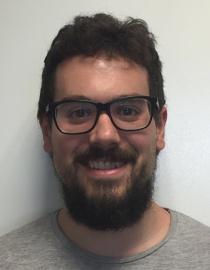
LibreOffice developer interview: Krishna Keshav

Krishna Keshav LibreOffice developer

In our next developer interview, we talk to Krishna Keshav, a new contributor to the LibreOffice project who is currently working on Easy Hacks and plans to expand into more complex bug-fixes in the future…

Where are you based, and do you work for a LibreOffice-related company or just code in your spare time?

I am currently pursuing my Bachelor’s in Computer Science and have just entered my final (fourth) year of study at PES College of Engineering. PESCE is located in the small town of Mandya in the state of Karnataka, India. I use LibreOffice for individual purposes. I mostly use Writer as my requirements are limited to it, but I also use Impress for creating presentations whenever needed. The best thing I like is its availability for every system, and it loads faster than its counterpart.

How did you get involved with LibreOffice?

Earlier I was just aware of open source software and used to see it in articles on the internet. So I decided to start with open source during the month of March 2016. Eventually, I found out that people here in India are not familiar with open source involvement and programs like the Google Summer of Code (GSoC). Anyway, getting back to how I started: I found LibreOffice as the most familiar organization while looking for open source organizations in the GSoC 2016 list.

Since the day I started with LibreOffice, the steps I took towards contributing to the software made me explore other open source software like Gerrit, Jenkins, GDB and much more. The LibreOffice community is very well organized and has appropriate documentation and a wiki page for every step, which helped me a lot while getting started. Additionally, I would like to say that LibreOffice has some very nice people on the IRC channels.

What areas of the code do you normally work on? Anything else you want to tackle?

So far I have worked on small bugs and tasks which LibreOffice refers to as Easy Hacks. You can visit my patches via this link. I am currently trying to tackle more complex bugs, and learning the user interface design of LibreOffice. In future, I would like to be involved as a more active and significant contributor to LibreOffice.

What is your vision for the future, or what would you most like to see improved in LibreOffice?

Libreoffice already seems to be a very stable product, with enough features for any end users. However, since things can always be better, I will definitely talk to the community if I find something to improve. Moreover, I would like to see LibreOffice replace its proprietary counterpart.

What do you do when you’re not working on LibreOffice?

Apart from looking for something to code, I like to read tech articles whenever I find time. I love bike rides, playing table tennis and sometimes exploring music. I can be found on Facebook, LinkedIn and GitHub.

Thanks Krishna! And to any other interested developers reading this: join our community and help to make LibreOffice even better.

LibreOffice developer interview: Laurent Balland-Poirier

Following our previous interviews with Xisco Fauli and Muhammet Kara, we now speak to Laurent Balland-Poirier, who works in his spare time on Calc.

Where are you based, and do you work for a LibreOffice-related company or just code in your spare time?

I’m teaching chemical engineering at Rouen University (Normandy, France), and doing some research in industrial process safety. So I can only hack on LibreOffice code during my spare time.

How did you get involved with LibreOffice?

I started using StarOffice 5.2 in the late 1990s. My first contributions were bug reports, then I helped to improve the French documentation (the OpenOffice.org wiki with its great FAQ, and translations of official guides).

As I have some basic C++ coding skills, I was always interested in hacking on LibreOffice, but I was afraid of code complexity. So I started really simple. One of my first patches was correcting a typo in an obscure hyperbolic function in Math. Encouragements from other experienced coders make me feel proud about this little contribution, so I then continued with more audacious patches.

What areas of the code do you normally work on? Anything else you want to tackle?

As I am using LibreOffice in my daily life, I feel concerned about annoying small bugs. The patch that I’m the most proud of was fixing bug 54686: preventing entering percentage value in Calc with the French locale.

I extended my knowledge of the LibreOffice code with how numbers are displayed in Calc. The most visible contribution (for those who care with engineering calculation in Calc) was introducing engineering notation. I also made some light improvements to trend lines (regression curves) in Chart.

I would really like to able to modify text elements in Chart (axis labels or trend line equations), to have superscript/subscript, and so on.

What is your vision for the future, or what would you most like to see improved in LibreOffice?

I think it is necessary to improve how help is built, because it is quite complex for contributors to make corrections/improvements to the help text. However, I have no idea where to start 🙂

What do you do when you’re not working on LibreOffice?

When I return to real life, during holidays, I like traveling and hiking in the desert. I am fan of board games and like playing with friends: Ticket to Ride, Stone Age, Splendor…

Thanks Laurent! And to any other interested developers reading this: join our community and help to make LibreOffice even better.

LibreOffice documentation: join us in this adventure

olivier_hallot_07062010_964x1036
The LibreOffice documentation team produces the guidebooks, reference materials, wiki and online help to support users of the software. We’re working hard to add all the exciting new features and functions of recent LibreOffice versions, to show how your office productivity can be improved thanks to the free office suite – and your help would be very much appreciated! Even if you can only spare 30 minutes each week, your contribution would be very valuable, and you’ll also get experience with a big-name open source project. Read on for the full details…

(more…)

LibreOffice developer interview: Xisco Fauli

Xisco Fauli LibreOffice developer

A few weeks ago we talked to Muhammet Kara about his work on LibreOffice, and today we hear from Xisco FaulĂ­, a Spanish developer who started with Easy Hacks to get familiar with the code…

Where are you based, and do you work for a LibreOffice-related company or just code in your spare time?

I live and work in Madrid, Spain, but originally I’m from Valencia, on the east coast of the Iberian Peninsula. Currently, I work for a private company as a QA engineer, so I write code for LibreOffice in my spare time, normally late at night.

How did you get involved with LibreOffice?

Before LibreOffice existed, I knew OpenOffice.org as the open source alternative to Microsoft Office, but I never thought of contributing to the project because from my point of view, it looked really difficult for someone like me with little knowledge in C++ and no previous experience in an open source project, to contribute to such a big project.

However, when LibreOffice was forked, I came across the LibreOffice Easy Hacks page and I realized that some of the easy hacks didn’t require much knowledge in C++ – so I decided to give it a try. In fact, my first contribution to the project was as simple as deleting some commented lines, but it was really encouraging to see how welcoming the community was to me and how fast my patch was merged into master, so I got hooked right away.

What areas of the code do you normally work on? Anything else you want to tackle?

In 2011, I was accepted as a student in the Google Summer of Code to work on porting Java wizards to Python in order to reduce the Java dependency. During the program, I ported the Letter, Fax and Agenda wizards. Later on, the Web wizard was ported by Javier Fernandez (Igalia). However, there are still some database wizards that need to be ported: tdf#83814. So I take the opportunity to encourage anyone interested to work on this task.

More recently, I’ve done some work in the SVG filter (which I hope it will be deprecated soon) and in the SVGIO filter, especially adding unit tests in order to avoid regressions. More info: http://x1sc0.blogspot.com. Besides, I’m also working on tdf#89329 with the help of Noel Grandin, and tdf#62525 with the help of Thorsten Behrens (thanks to them both!) and I must say it’s helping me a lot to improve my knowledge in the code base and in C++.

What is your vision for the future, or what would you most like to see improved in LibreOffice?

I’d love to see more Spanish contributors in the project and a more active Spanish community. It would be nice to have something like in Germany, Japan, Brasil or Italy and celebrate local meetings from time to time. This could also help to have more widespread use of LibreOffice in the Spanish public administrator, which would be another thing I’d love to see in the near future.

What do you do when you’re not working on LibreOffice?

I like sports, specially those done in the mountains like climbing, skiing and trail running. I also like traveling – recently I’ve discovered the pleasure of travelling by bicycle and I must say I love it. When I have evenings free, I like to go to the cinema, the theater or go out with friends.

Thanks Xisco! And to any other interested developers reading this: join our community and help to make LibreOffice even better.

Friday 24 June: Next Bug Hunting Session

Help to fix bugs in the next version of LibreOffice, and make it the best yet! As we mentioned last week, we are holding a Bug Hunting Session on Friday 24 June, from 07:00 to 20:00 UTC, and everyone is welcome to take part. All you have to do is:

And as thanks for your help, if you find or confirm a bug we’ll award you a shiny Badge that you can proudly show on your website, blog or social media. For more details, see the full Bug Hunting Session wiki page.

We hope to see you on Friday, at some point between 07:00 to 20:00 UTC – and thanks in advance for your help!

Document Liberation Project: progress so far in 2016

If you haven’t heard of the Document Liberation Project (DLP) before, we made a short video explaining what it does and why it’s important. In summary: it supports development of software libraries to read documents from many (usually proprietary) applications. If you’ve ever opened a file generated by Apple Pages, WordPerfect or Microsoft Works in LibreOffice, you’ve benefitted from the hard work of the DLP team. And DLP libraries are used in many other prominent FOSS tools such as Inkscape and Scribus as well.

For example, here’s a file being created in Apple Pages, and the same file being rendered in LibreOffice thanks to DLP libraries (click for a bigger version):

So, what has been going on in the DLP so far this year? Here’s an overview.

New releases

In January, libetonyek 0.1.6 was released with a bunch of new features. This library, which helps applications to read files produced by Apple Keynote, Pages and Numbers, can now properly parse links, lists and text languages in Keynote 6 files, while resizing of tables is handled properly. Text containing non-ASCII characters (ie, the majority of non-English languages) is now managed much better as well.

Scribus 1.5.1 was released in February, as part of the development process towards a stable 1.6 release of this desktop publishing tool. Along with many new features and updates, Scribus 1.5.1 makes use of the libfreehand 0.1.1 library, which allows it to read documents created in Adobe FreeHand. This feature is still marked as experimental – as it’s very early days – but is already working well and will be very useful to some Scribus users.

March saw the release of two other DLP libraries: libpagemaker 0.0.3 (for parsing Adobe PageMaker documents) can now read big-endian (Mac) files, while writerperfect 0.9.5 (for conversion of various document formats to ODF, EPUB and AbiWord) includes a number of build fixes and can also convert old StarOffice files.

Website updates

In order to make the goals of the Document Liberation Project clear and accessible, and attract potential new contributors, we redesigned the front page of the DLP website. We broke up the big chunks of text that used to dominate the front page, and added logos and links to several projects that use DLP libraries.

Here’s a before-and-after comparison:

In addition, we added a link to the aforementioned video that describes DLP and tries to make it accessible to a wider audience. As more and more computer users recognise the downsides of non-standard file formats and vendor lock-in, projects like the DLP will become increasingly important.

Get involved!

DLP is always looking for new contributors, and appreciates all help with coding, testing and documentation. If you enjoy programming and tackling new challenges, creating a new import library can be especially rewarding! Fathoming out the insides of a closed file format is fascinating, and you’ll get plenty of appreciation from users in the future who can finally open their old documents without struggling to run ancient software in a virtual machine…

So to join, visit the contributor page for pointers to get started.