The Writer Guide 7.2 just arrived

The new Guide comes one week after the release of the latest LibreOffice Community software

Jean H. Weber and Kees Kriek from the LibreOffice Documentation Team are happy to announce the immediate availability of the Writer Guide 7.2, one week after the release of LibreOffice Community 7.2

LibreOffice 7.2 Community includes many changes not visible in the user interface. These changes include improved interoperability with Microsoft’s proprietary file formats and performance improvements in handling large files, opening certain .docx and .xlsx files, managing font caching, and opening presentations and drawings that contain large images.

The Writer Guide 7.2 has been updated from Writer Guide 7.1. It covers changes that are visible in the user interface, including:

  • Added a note about icon sets and Gallery sets in this Preface.
  • Added details about the Insert > Formatting Mark submenu (Chapter 2).
  • Updated list terminology and changed screenshots in Chapters 4, 8, 9, 11, and anywhere else lists are mentioned.
  • Added new gutter margins and choices for page background fills (Chapters 5, 6, and 9).
  • Updated details about some options on tabs of the PDF Options dialog (Chapter 7).
  • Added new, advanced features of the Style Inspector (Chapter 9)
  • Updated details about Templates dialog (Chapter 10).
  • Added “no registered database” error message in Mail Merge Wizard (Chapter 14).
  • Added information on classifying document contents (Chapter 17).
  • Added Basic Fonts options and custom dictionaries (Chapter 20).
  • New Chapter 21 on user interface variants.
  • Minor rewording, updates to terminology, and replacement figures in many chapters.

LibreOffice Community 7.2 release notes are here: https://wiki.documentfoundation.org/ReleaseNotes/7.2.

A big thank you to Jean and Kees for their wonderful work.

Jean Weber
Kees Kriek


The LibreOffice Documentation Team is devoted to produce the best documentation for LibreOffice and is open to everyone interested in contributing to our collective effort.

The Guia do Writer 7.1 is finally here.

Translation courtesy of Timothy Brennan Jr.

Brazilian computer users in general, the community of Brazilian free software users and supporters, and of LibreOffice in particular, have received quite the gift today: the Brazilian LibreOffice documentation team proudly announces the publication of the Guia do Writer 7.1, the most complete Writer word processor guide for the best free software office suite, the LibreOffice Community.
The Guia do Writer 7.1 is an extensive 570-page volume covering the most advanced text-editing techniques, from simple typing of a page to assembling multi-volume documents, including electronic forms, illustrations, tables, indexes and summaries, automation and export to numerous file formats.

The guide is the LibreOffice Brazilian documentation team’s contribution to the public. The team has used automatic translation followed by a thorough manual review correcting terms, drafting and stylistics of the Portuguese language, as well as proofreading. While rereading the content, the team is able to check the accuracy of the techniques described in the documentation and review the terminology used in the software, signaling to the LibreOffice translation team the inconsistencies found in the interface suggesting improvements in terms, changes in the vocabulary of the commands and correction of the software Help Pages. This feedback has served to make the LibreOffice interface even more robust, consistent and has helped consolidate its command terminology.

The Guia do Writer 7.1 is available in three formats: The traditional PDF with adjusted pagination for those who want to print the guide and bind it, the source file in Open Document Format (ODF) for free editing, and the installed online version on The Document Foundation’s servers for reading on tablets, your desktop browser and — of course — on mobile phones.

“The importance of the  Guia do Writer is enormous. I suggest reading it for all who need to produce professional documents, as well as using the guide for creating courses, video classes, and even material for public tenders” says Olivier Hallot, coordinator of LibreOffice’s global documentation. “We are working on the LibreOffice Community ‘s manual library to provide the most advanced user guides for all LibreOffice modules, and, other volumes are on the way.” added Olivier.

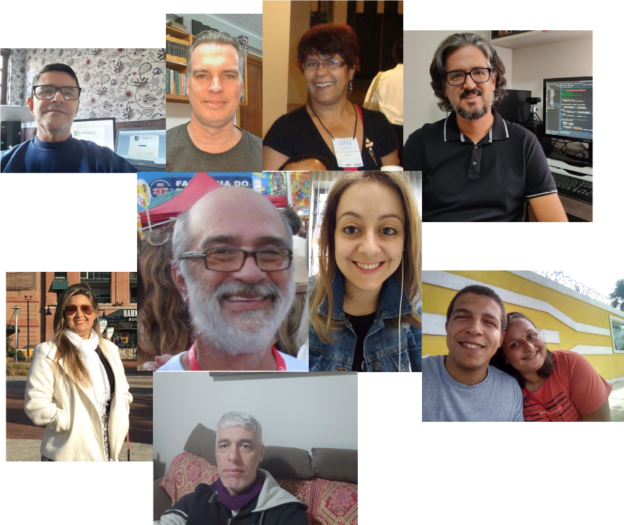
The Brazilian  LibreOffice Community documentation team is made up of volunteers from all over Brazil (and one person in Ireland) and has been dedicated to producing the reference material in Brazilian Portuguese. The team includes (name and state or country) Vera Cavalcante (São Paulo), Luciana Mota (Distrito Federal), Márcia Buffon Machado (Ireland), Jackson Cavalcanti Jr. (Pernambuco), Raul Pacheco da Silva (São Paulo), Timothy Brennan Jr (Rio Grande do Sul), Túlio Macedo (Distrito Federal), Diego Peres Marques (Rio de Janeiro), Rafael Lima (Santa Catarina) and Olivier Hallot (Rio de Janeiro).
The Brazilian Guia do Writer 7.1 can be downloaded at https://documentation.libreoffice.org/pt-br/portugues   along with other volumes for Impress, Calc, Math and the Beginner’s Guide.

The original Writer Guide 7.1 can be downloaded at https://documentation.libreoffice.org/en/english-documentation/


The Draw Guide 7.1 has arrived!

Led by Peter Schofield, the LibreOffice Documentation Team is proud to announce the release of the LibreOffice Draw Guide 7.1, the ultimate guide for LibreOffice Draw.

LibreOffice Draw produces anything from a quick sketch to a complex plan, and gives the means to communicate with graphics and diagrams. With a maximum page size of 300cm by 300cm, Draw is an excellent package for producing technical drawings, brochures, posters and many other documents. Draw manipulates graphical objects, group them, crop them, use objects in 3D and much more.

“The Draw guide update is long due in the set of LibreOffice Guides and I am happy to have coordinated the effort to bring it to the community. LibreOffice Draw is a powerful vector drawing tool plenty of resources and the Guide is the most comprehensive text on the features. I hope the Draw community will thrive with this book.”

Peter Schofield
Peter Schofield

The Draw Guide is available in PDF format and is part of the LibreOffice Library, a set of advanced guides for the LibreOffice productivity suite. Download other important LibreOffice guides in our Documentation website.

Meet the documentation team page!

Happy documenting!

Announcing the LibreOffice Getting Started Guide 7.1

Jean Weber, Kees Kriek, Felipe Viggiano and Peter Schofield from the LibreOffice Documentation Team are happy to announce the immediate availability of the Getting Started Guide 7.1, the introductory guide for all readers that need to start using the LibreOffice suite and quickly get to the proficiency level.

Download Getting Started Guide 7.1

Covering all LibreOffice modules, from the Calc spreadsheet to the Base database and including chapters on the suite settings as well as macro coding, the Getting Started Guide 7.1 is a valuable companion for organizations that must deploy documentation on LibreOffice together with the software suite on their offices and also at user’s home.

The Guide is available in PDF format and is part of the LibreOffice Library, a set of advanced guides for the LibreOffice productivity suite.

Meet the documentation team page!

Happy documenting!

The LibreOffice Calc Guide 7.1 is Here!

The LibreOffice Documentation community announces the immediate availability of the Calc Guide 7.1, with additions based on the the improvements in LibreOffice Calc 7.1, which was released in February this year.

Download Calc Guide 7.1

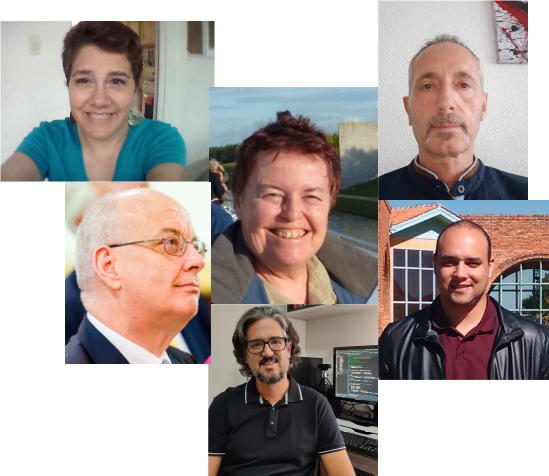
The Guide is the volunteer effort of many members of the documentation community. Revisions and enhancements on the contents are the work of Rafael Lima from Brazilian community, Martin Van Zijl and Kees Kriek from the Dutch community, Celia Palacios from the Hispanic language community. A special mention to Yusuf Keten from the Google Summer of Code program on new extensions and templates dialogs, to Steve Fanning for his editorial review and to Jean Hollis Weber for her improvements and organization of the text. The LibreOffice Calc Guide 7.1 update activities was coordinated by Felipe Viggiano from Brazil.

Celia, Jean, Kees, Steve, Rafael, Felipe

The book is available in PDF format and contains 545 pages, covering all basic and advanced features of the spreadsheet module of LibreOffice, and is a must-read book for exploiting the maximum of LibreOffice Calc.

Download the Calc Guide 7.1

Brazilians in turbo mode: Impress Guide 7.0 in Portuguese is now available

The Brazilian LibreOffice community is pleased to announce the immediate availability of the Portuguese Impress 7.0 Guide, the complete guidebook for creating high quality presentations in any environment, be it family, cultural or professional.

The book is 330 pages, and details the fundamentals of Impress, before covering the concepts of slide masters, styles, presentation templates, graphic objects, transition effects, object animations, export to other formats and much more. It’s rich in illustrations and examples – as well as scripts for the most important operations when editing and running presentations.

The documentation team in Brazil grew with the arrival of Luciana Mota, Diego Marques Pereira and Márcia Buffon Machado. Here are the newcomers’ messages to all!

Luciana Mota

“I already used LibreOffice professionally when it was still BrOffice.org. I learned about the work of the documentation team in Brazil through social networks, and decided to participate. It was a good surprise to get back in touch with former colleagues and everyone excited about reviewing the texts and answering questions. I’m learning a lot from this team. The Impress Guide was just the beginning, and I am already working on the Writer Guide with this great team!” said Luciana Mota.

Diego Marques Pereira

“I followed the activities of LibreOffice through the Telegram channel, and the activities of the LibreOffice documentation group in Brazil caught my attention. I started with some formatting tasks – and then went on to review one of the chapters of the Impress Guide, and participated in team meetings to answer questions and learn a lot about LibreOffice. I am already reviewing some chapters of the Writer Guide (that I consider one of the most important in the suite). The opportunity left me with a new perspective on text editors and software documentation” added Diego Marques.

Márcia Buffon Machado

“I’ve recently met the skilled Brazilian LibreOffice documentation group and, from my experience in localisation (EN-PT) and enthusiasm for this software, I was welcomed and started collaborating with them. It’s been a rewarding experience! We’re sharing knowledge about the software and technical writing all the time in the virtual group, as well as in the weekly virtual meetings. I’m living in Ireland and, even with different time zones, I enjoy those meetings because learning is a social and collaborative process and the best way for building a better world” said Márcia Buffon Machado.

The Impress 7.0 Guide is the group efforts of Peter Schofield, Felipe Viggiano, Claire Wood, Regina Henschel, Dave Barton, Jean Hollis Weber, Samantha Hamilton and Olivier Hallot.

Jackson, Timothy, Vera, Flavio, Felipe, Raul, Tulio and Olivier

The LibreOffice Brazilian Portuguese documentation team is composed by Raul Pacheco da Silva, Vera Cavalcante, Jackson Cavalcanti Jr, Tulio Macedo, Marcia Buffon Machado, Luciana Mota, Felipe Viggiano, Diego Peres Marques, Timothy Brennan Jr and Flavio Schefer, coordinated by Olivier Hallot. The final assembly of the Impress Guide was in charge of Vera Cavalcante.