
This is the second part of our interview with the Bundesheer (see here for the first).
At the LibreOffice Conference 2025, you showcased the new LibreOffice features sponsored by the Austrian Armed Forces. How did that come about?
From the very beginning, we clearly recognised the need to further develop LibreOffice. Before finalising our plans, we also examined how we could continue to develop the product. Ultimately, we issued a Europe-wide, open call for proposals to secure both support and development capacity for LibreOffice. The way we selected the product enhancements stemmed in part from this preliminary study, because we had identified specific import capabilities and compatibility requirements.
That’s one major aspect: improving interoperability in line with our needs. The other focus was on improving LibreOffice based on ongoing user feedback and feedback regarding collaboration with external organizations. One example of this was the “Notes” bar in Impress. In the past, users had to edit notes in a separate notes view.
We were told very early on that users wanted to be able to do this directly within the slide editing view. This is a very well-known enhancement that we sponsored, which – I think – works very well. In addition, there are many other details, such as scrolling through presentations with the mouse wheel. Previously, you had to keep switching back and forth to the slide overview view to scroll. Now all of this is possible right from within the slide, which simply makes it easier to use and also increases acceptance because users expect it.
I could list many more extensions. We’re not the only ones contributing a great deal to LibreOffice – we see ourselves as part of the community, and we’re happy when the community uses our contributions and when others contribute their own, which we’re of course very happy to use as well. That’s what makes the project so attractive and successful.
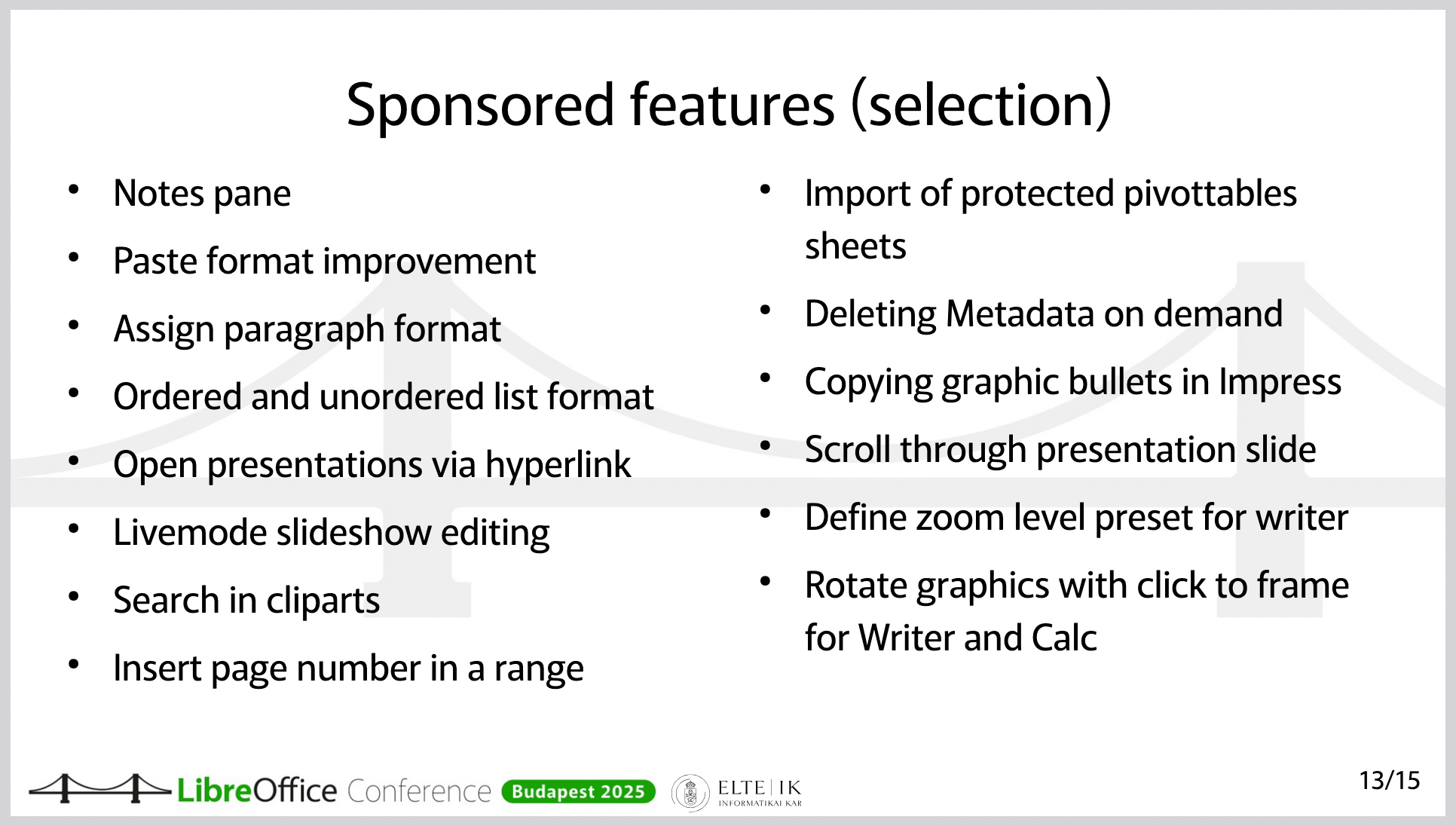
Features and improvements in LibreOffice, sponsored by the Austrian Military (this is a slide from a presentation at the LibreOffice Conference 2025)
Have you also developed external extensions?
We’ve developed extensions for internal use, but there are also several publicly available extensions. One of them integrates our own help page, since we provide targeted help within our internal systems.
On a much larger scale, there’s an extension hosted on GitHub that covers military-tactical symbols. It’s available as open source software, so anyone can use it. This is actually an extension that, although it’s still in “release candidate” status, already works well. The extension is, of course, also suitable for collaboration with other armies. Its functionality is unique. To my knowledge, it’s not available anywhere else.
Do you also use the Open Document Format internally?
Yes – one of the advantages of LibreOffice is that the format is ISO-standardised and truly open. You get the best functionality in LibreOffice when you use ODF. We use ODF throughout. It’s clear that our external partners don’t do this to the same extent. This is where LibreOffice benefits from its ability to handle (read and edit) Office Open XML (OOXML) documents as well.
LibreOffice doesn’t have a built-in email client. How did you handle this issue during the migration?
The Austrian Armed Forces protect the Austrian population; to make this possible, we need, for example, systems that function independently of external parties. We have a large number of systems based on open source solutions and many solutions that are platform-independent. This includes the email system.
Therefore, we didn’t have to replace Outlook or Microsoft Exchange.
At the LibreOffice Conference, you emphasised that the migration was never about saving on licensing costs. The migration was driven by other reasons, correct?
The switch to LibreOffice in the Austrian Armed Forces stems from the necessity that we must be able to function even when nothing else is working. In other words, we cannot rely on public infrastructure. We cannot rely on our data being processed in another data center.
Therefore, the top priority in this transition – unlike 20 years ago, when people very often considered switching to a free office suite or Linux in the workplace for cost reasons – was digital sovereignty.
As for the costs: It was clear to us from the start that we would have to invest in the product in order to gain the additional functionality we needed and to improve interoperability.
Would you like to say a few words about the foundation – that is, The Document Foundation?
Why did we choose LibreOffice in the first place – after all, there are alternative products? LibreOffice isn’t the only solution. First, LibreOffice uses ODF, the open and standardised file format. That’s very important. Second, LibreOffice is truly fully open source software – it’s not a product that just has an open source “core.” There’s no risk of having to pay for variable enterprise features.
And the fact that this is the case is very closely tied to the foundation of LibreOffice, namely The Document Foundation. The way this open source project is implemented and anchored through the foundation – that’s an important guarantee and a key factor in its reliability for us.
Another point is that there is an ecosystem. There are several companies that offer the services we need. Using open source doesn’t just mean using free software – for us, it means we need maintenance, support, the ability to further develop the software, addressing security vulnerabilities, and secure software deployment. All of this comes with a very mature software product that is constantly being developed. That was a key factor in our decision.
What advice would you give to others who are also planning to switch to LibreOffice and open source?
First: There’s a vast amount of information available within the community. It’s important to familiarise yourself with the product. How does LibreOffice work? How does Bugzilla work? Where can I find issues that might not be working but are of interest to me? Where can I find roadmaps for new features, release notes, and so on?
Second: It’s absolutely crucial to properly prepare and fund the resources for a project like this. IT managers have gotten used to rolling out new Office versions without much effort.
However, switching from one office suite to another is actually a massive migration project. This should not be underestimated. It’s not just a matter of installing the software; it requires change management, people to provide support, test the software, and work on new features. It requires the support of service providers. All of this must be prepared in advance. And that’s what sets it apart from previous new office suite releases. You’ll need a project team for this – migration isn’t something you can just do on the side. So, you’ll need proper project organisation and agile change management. How can I provide my users with the necessary knowledge based on their needs? What communication channels do I have to keep my users informed and stay in touch with them?
We – the Austrian Armed Forces – have already received many inquiries about the transition, and we have shared our experiences with numerous organisations. We would be delighted to help build a LibreOffice community for government and enterprise organisations in order to accelerate the collaborative development of LibreOffice.
To that end, I invite you to contact us at libreoffice@bmlv.gv.at.