Stellungnahme der Document Foundation zur bevorstehenden Diskussion der Stadt München über eine Rückmigration zu Windows und MS Office

The Document Foundation ist eine unabhängige, gemeinnützige Stiftung und die Heimat von LibreOffice. Wir haben die Entwicklungen in München mit großer Besorgnis verfolgt und sind enttäuscht darüber, dass eine kleine Gruppe von Politikern offensichtlich den Rat genau derjenigen Experten ignoriert, die sie zuvor selbst aufgesucht haben.

Seit der Wahl von Oberbürgermeister Dieter Reiter sind regelmäßig Gerüchte über eine Rückkehr der Stadt München zu Microsoft Windows und Microsoft Office im Umlauf. Reiter wurde in einem Interview mit dem stadtbild-Magazin im Jahr 2014 als „Microsoft-Fan“ beschrieben.

Oberbürgermeister Dieter Reiter hat den Microsoft-Partner Accenture beauftragt, einen Bericht über die IT-Infrastruktur der Stadt München zu erstellen. Das Ergebnis war ein 450 Seiten langes Gutachten, in dem nicht etwa Open Source-Betriebssysteme und -Applikationen, sondern vielmehr organisatorische Themen als Problem identifiziert wurden.

In Zeiten von Open Data und Transparenz im politischen Entscheidungsprozess freut es uns, dass dieses Gutachten nun auch der Allgemeinheit zur Verfügung gestellt wird (https://www.ris-muenchen.de/RII/RII/DOK/SITZUNGSVORLAGE/4277724.pdf).

Dem Gutachten zufolge hatte nur eine sehr kleine Zahl von Anwendern (je nach Applikation zwischen 18% und 28%) größere Probleme mit den Programmen, was durch die Umstellung ihrer Arbeitsplätze auf Windows und MS Office behoben werden könnte. Bemerkenswert ist aber, dass 15% aller Anwender angegeben haben, auch größere Probleme mit MS Office zu haben.

Das Accenture-Gutachten schlägt eine Trennung von Betriebssystem und Anwendungen vor, um die clientseitigen Abhängigkeiten zu reduzieren. Um das zu gewährleisten, sollen sowohl Windows als auch LiMux jeweils in einer Basiskonfiguration zur Verfügung gestellt werden, was sowohl Betriebssystem als auch Applikationen beinhaltet, beispielsweise LibreOffice, Terminverwaltung und E-Mail, wie sie von allen Abteilungen benötigt werden. Diese Grundkonfiguration soll abhängig von der jeweiligen Anwendung erweitert werden.

Trotz dieser Empfehlung wird der Münchener Stadtrat auf Initiative einiger weniger Politiker am Mittwoch, den 15. Februar, den Vorschlag diskutieren, bis zum Jahr 2020 sowohl Windows 10 als auch MS Office 2016 auf den städtischen Arbeitsplätzen einzuführen. Das wird den Steuerzahler an die 90.000.000 € (in Worten: neunzig Millionen Euro) über die nächsten sechs Jahre kosten, eine Steigerung um 35% gegenüber den von Accenture ursprünglich vermuteten 66 Millionen.

Zusätzlich sollen laut eines Kostenvoranschlags von Stadträten der Grünen weitere 15.000.000 € (in Worten: fünfzehn Millionen Euro) dafür ausgegeben werden, alte Computer aufzurüsten oder zu ersetzen, die sich zwar perfekt für ein ressourcenschonende Betriebssystem wie Linux eignen, aber nicht einmal eine Windows 10-Basiskonfiguration unterstützen würden.

Zu guter Letzt wird ein Großteil der Ausgaben im Zusammenhang mit dem Kauf von Microsoft-Lizenzen primär die irische Wirtschaft fördern – denn von dort stammen alle in Europa verkauften Microsoft-Produkte – anstatt örtlichen Firmen zugute zu kommen, die bereits die schon vorhandenen Open-Source-Lösungen betreuen. Das ist eine ziemlich auffällige Verschiebung bei der Verteilung von Steuergeldern, die entsprechend berücksichtigt werden sollte.

Ganz abgesehen von der Kostensteigerung vernachlässigt der Vorschlag zudem den wichtigsten Grund für die Migration hin zu freier Software: die Unabhängigkeit von einem einzelnen Softwareanbieter und den Wechsel weg von proprietären hin zu offenen Dokumentformaten.

Obwohl der eingebrachte Vorschlag die MS-Office-Dokumentformate als Industriestandard bezeichnet, sollte klar sein, dass MS-Office-Dokumente proprietär und daher nur bedingt für die Interoperabilität geeignet sind, selbst wenn sie von internationalen Standardisierungsgremien wie der ISO anerkannt sind. Ein Dokumentformat, das als offener Standard gelten soll, muss auch so implementiert werden und darf nicht nur auf dem Papier bestehen.

Falls der aktuelle Vorschlag angenommen würde, verliert die Stadt München nicht nur die Herstellerunabhängigkeit, nach der sie mehr als ein Jahrzehnt gestrebt hat, sondern wird vielmehr auch eine Strategie verfolgen, die den unübersehbaren Trend hin zu offenen Dokumentformaten in Ländern wie Großbritannien, Frankreich, Schweden, den Niederlanden und Taiwan schlicht ignoriert.

Anstatt in den Umgang mit offenen Dokumentformaten zu investieren, um deren Verbreitung weiter zu erhöhen und dadurch die Kosten für Interoperabilität zu senken, würde die Stadt München ein pseudo-standardisiertes Dokumentenformat einsetzen, das bekannt dafür ist, ist selbst dann Probleme zu verursachen, wenn von einer MS-Office-Version auf die nächste aktualisiert wird.

Aufgrund dieser Erwägungen ist die gemeinnützige Stiftung The Document Foundation der festen Überzeugung, dass der Vorschlag, der diesen Mittwoch diskutiert wird, für die Stadt München einen erheblichen Rückschritt bedeuten würde, verbunden mit einer erheblichen Steigerung der Kosten, einer unbekannten Zahl versteckter Kosten für die Interoperabilität – sowie einer fragwürdigen Verwendung von Steuergeldern.

LibreOffice 5.3 triggers a record of donations

In this case, one image is better than 1,000 words, as the histogram represents donations during the first 10 days of each month, since May 2013, and doesn’t need any further comment. LibreOffice 5.3 has triggered 3,937 donations in February 2017, 1,800 more than in March 2016, and over 2,000 – sometimes over 3,000 – more than any other month. Donations are key to the life and the development of the project. Thanks, everyone.


LibreOffice 5.3: A week in stats

We announced LibreOffice 5.3 one week ago, and a lot has happened in the meantime! Here’s a summary of downloads, web page views, social media activity and other statistics. We’ve also compared these to the LibreOffice 5.2 first week stats to see how the project and community is progressing…

410,472 downloads of LibreOffice 5.3

This is a 32% increase over the first week of LibreOffice 5.2 – and note that it only includes downloads from our servers and mirrors, and not other sources (such as Linux distribution package repositories).

378,719 unique visitors to our website

Here we have a major 77% increase over the same period for the last release. In addition, there were 834,959 page views.

3,293 donations to The Document Foundation

Donations help our project and community in many ways – infrastructure, documentation, events, marketing, and more. Compared to the first week of LibreOffice 5.2, the number of donations increased by 79%.

77,878 views of our New Features videos

More big growth here – the videos for LibreOffice 5.2 had 37,252 views in comparison, so this is a 109% increase. A lot of this growth can be attributed to the many news articles on the web that embedded the videos for readers to watch.

Now, how about social media?

30,298 people reached by the announcement on Facebook

Our Facebook community is growing steadily, and here we see a 21% increase over the same statistic for LibreOffice 5.2. The announcement was liked by 851 people and shared 213 times. Meanwhile, our Google+ post received 229 likes (up from 115 for the previous version).

So there’s plenty to be happy about, but there are some areas where we can improve as well:

20,203 impressions from the announcement tweet

This is a 42% decrease compared to the tweet for LibreOffice 5.2. There are many possible reasons for this decrease, some out of our control, but we’ll revise our strategy for the next release to ensure that the Twittersphere keeps talking about us. Similarly, Reddit activity around the release wasn’t quite as strong this time: links to the LibreOffice 5.3 announcement on the blog received 486 upvotes, compared to 632 for last time, so that’s something to work on as well.

But on the whole, we can see that the project and community is growing well. Thanks to everyone who helped out with marketing, promotion and social media activity around the release!

Download LibreOffice 5.3 here

The Document Foundation announces feature-rich LibreOffice 5.3

Berlin, February 1st, 2017 – The Document Foundation announces LibreOffice 5.3, one of the most feature-rich releases in the history of the application. The office suite is immediately available for Windows, macOS, and Linux, and for the first time also for the private cloud.

LibreOffice 5.3 represents a significant step forward in the evolution of the software: it offers an introduction to new features such as online with collaborative editing, which increase the competitive positioning of the application, and at the same time provides incremental improvements, to make the program more reliable, interoperable and user-friendly.

“LibreOffice is backed by a fantastic community of developers”, says Michael Meeks, a member of the board of The Document Foundation. “In 2010, only a few people were betting on our capability of attracting a large number of code contributors, which are instrumental for the success of a large code base. In six years we have attracted over 1,100 new developers and, thanks to this large community, during the last two years we have had an average of 300 people active on the source code”.

LibreOffice 5.3 highlights

LibreOffice 5.3 offers a number of interesting new features in every area: a new cross-platform text layout engine that uses HarfBuzz for consistent text layout on all platforms, with significant advantages across languages and alphabets; a revised Help menu, with new quick links to user guides and community support forums, for an improved user experience; and better import/export filters to new and legacy MS Office documents.

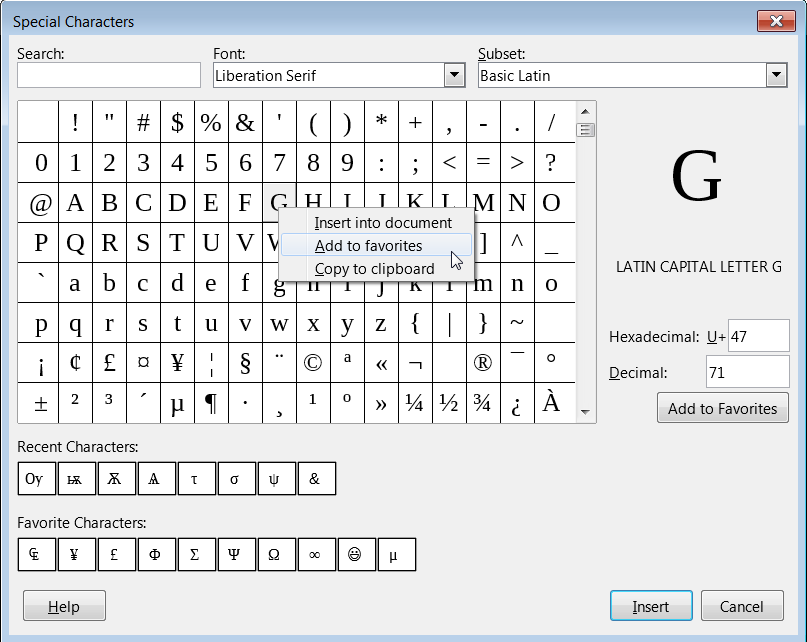
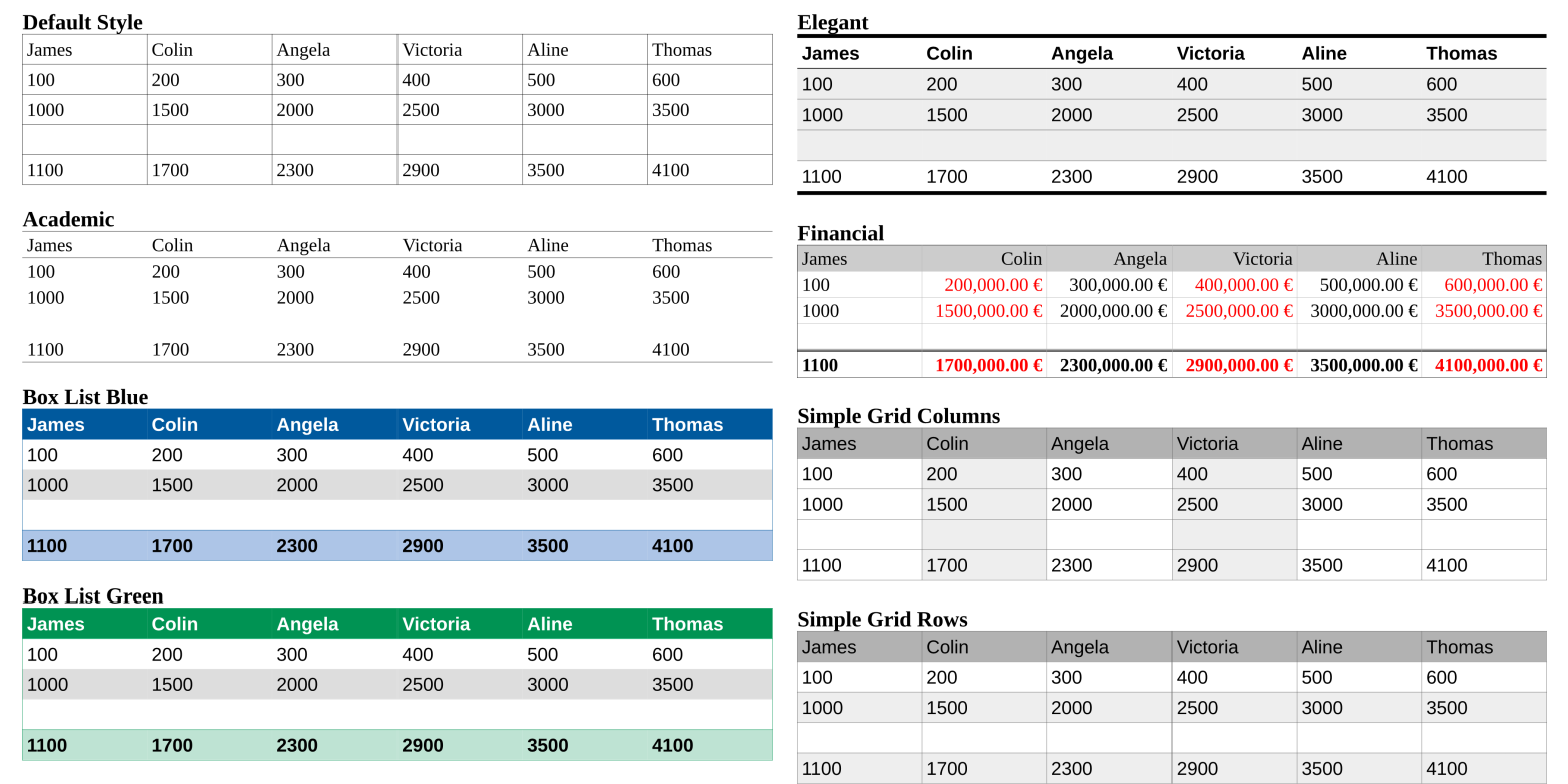
Writer now supports Table Styles, for applying formatting to a table which is preserved when you make edits to it; a new Page Deck in the sidebar lets the user quickly customise page settings without having to go through a separate dialog box; and a new Go to Page Box makes it possible to jump to another page in the document with just a few keystrokes.

Calc provides a new set of default cell styles, with greater variety and better names than in previous releases; in fresh installations, “Enable wildcards in formulas” is now the default option, rather than regular expressions, to improve compatibility with other spreadsheet software; and a new text entry box lets the user narrow down the functions he is looking for, and simplifies the search for the right one.

Impress now opens with a template selector, to get the user off to a quick start; and a new Slide Properties Deck is now available in the sidebar while in slide master mode.

A list of the most significant new features is available in a separate document (http://tdf.io/lo53features) and is presented in a series of short videos (http://tdf.io/53vids). A page with the top new features is also available on the website at http://www.libreoffice.org/discover/new-features/.

LibreOffice 5.3 has also been improved “under the hood,” thanks to the work of hundreds of volunteers. This translates into an open source office suite which is easier to develop, maintain and debug. Although this is not visible to users, it is extremely important for enterprise deployments.

LibreOffice is deployed by large organizations in every continent. A list of the most significant migrations announced in the media is available here: https://wiki.documentfoundation.org/LibreOffice_Migrations.

LibreOffice Online

LibreOffice 5.3 features the first source release of LibreOffice Online, a cloud office suite which provides basic collaborative editing of documents in a browser by re-using the LibreOffice “core engine”. Rendering fidelity is excellent, and interoperability matches that of LibreOffice.

LibreOffice Online is fundamentally a server service and should be installed and configured by adding a cloud storage and an SSL certificate, which are not included in the solution. It might be considered an enabling technology for the public cloud of ISPs or the private cloud of enterprises and large organizations.

Builds of the latest LibreOffice Online source code are available as Docker images: https://hub.docker.com/r/libreoffice/online/.

A background document providing the positioning of LibreOffice Online is available here: http://tdf.io/loonlineback.

Experimental UI features

Starting from the 5.3 family, LibreOffice UI has been extended with the addition of an experimental Notebookbar, which offers another UI option in addition to the Default UI (with two toolbars), the Single Toolbar UI and the Sidebar with a Single Toolbar. Each UI layout has been thought to serve a different cluster of LibreOffice users.

LibreOffice UI is code named MUFFIN, an acronym for My User-Friendly & Flexible INterface. A background document explaining the UI concept is available here: http://tdf.io/muffinback.

Availability and enterprise deployments

LibreOffice 5.3 represents the bleeding edge in term of features for open source office suites, and as such is targeted at technology enthusiasts, early adopters and power users.

For enterprise class deployments, TDF maintains the more mature 5.2.5 version, which should be supported by certified professionals according to best practices recognized worldwide (http://www.libreoffice.org/get-help/professional-support/).

LibreOffice 5.3 is immediately available from the following link: http://www.libreoffice.org/download/. LibreOffice users, free software advocates, and all community members can support The Document Foundation with a donation at http://donate.libreoffice.org.

Press Kit and Screenshots

The press kit, with background documents and high-resolution images, can be downloaded from http://tdf.io/lo53presskit. Screenshots can be downloaded from http://tdf.io/lo53screenshots.

Announcement of LibreOffice 5.2.5

Berlin, January 26, 2017 – The Document Foundation (TDF) announces LibreOffice 5.2.5 “still”, the fifth minor release of the LibreOffice 5.2 family. Based on the upcoming announcement of LibreOffice 5.3, all users are invited to update to LibreOffice 5.2.5 from LibreOffice 5.1.6 or previous versions.

TDF suggests deploying LibreOffice in large organizations, public administrations and enterprises with the backing of professional support by certified people (a list is available at http://www.libreoffice.org/get-help/professional-support/).

Road to LibreOffice 5.3

LibreOffice 5.3 will be announced in less than a week, on February 1st, 2017. Users can start learning about the new features on LibreOffice 5.3 Release Notes page (https://wiki.documentfoundation.org/ReleaseNotes/5.3).

Download LibreOffice

LibreOffice 5.2.5 is immediately available for download from the following link: http://www.libreoffice.org/download/libreoffice-fresh/. LibreOffice users, free software advocates and community members can support The Document Foundation with a donation at http://donate.libreoffice.org.

Several companies sitting in TDF Advisory Board (http://www.documentfoundation.org/governance/advisory-board/) are providing either value added Long Term Supported versions of LibreOffice or consultancy services for migrations and training, based on best practices distilled by The Document Foundation.

LibreOffice contributor interview: Tamás Bunth

LibreOffice developers, testers, translators and documentation authors are working hard on LibreOffice 5.3, which is due for release in early February. One contributor to the project, Tamás Bunth, has been helping to improve Base, the database front-end of the suite. We caught up with him to ask how he got involved with LibreOffice and what the community is like…

Where do you live, and are you active on IRC channels or social media?

I’m Hungarian, and I live in Budapest. My IRC nickname is Wastack (the name comes from the game Heroes of Might and Magic, one of my favourite games from childhood – Wastack is a barbarian hero). I’m on Facebook too: https://www.facebook.com/btomi96.

Do you work for a LibreOffice-related company or just contribute in your spare time?

I did some work for Libreoffice as a Google Summer of Code (GSoC) student last year. In the future I’ll contribute in my spare time.

How did you get involved with LibreOffice?

One of my roommates in my student hostel suggested that we should try GSoC. I was searching for an end user application written in Java or C++, since these are the languages I’m comfortable with. As I looked at the Easy Hacks I realised that I may be able to solve some of these, and the developer community was helpful as well.

What areas of the project do you normally work on? Anything else you want to tackle?

My GSoC project was to upgrade the internal Firebird database management system, which is used by LibreOffice Base, and solve related bugs, which makes Firebird an experimental feature. Therefore, I got to know the drivers in some detail, and I think I’ll stick to this area in the future.

What was your initial experience of contributing to LibreOffice like?

When I first looked at the C++ code in the repository, it was scary, since even a simple string is called OUString. After that I found some UNO interfaces, and I really don’t know what was going on there. Of course, after some time and guidance from my mentor things got much clearer.

Which is your preferred text editor – and why?

Vim is my favourite. Well, I don’t now many other editors, but Vim is highly customisable. I like the recording feature too.

What do you do when you’re not working on LibreOffice?

I am a 2nd year Bachelor of Science student of Budapest University of Technology and Economics. In my free time I go rowing. This year I got 4th place on the National Championship of Hungary in eights crew. I’ve achieved two first places there, but I’ve never been in an international race. It is one of my future goals.

Any other hobbies or projects you’re working on?

When I still have some free time, I like writing little computer games. I started with a simple snake game using Flash several years ago, which was followed by a Tetris with Java Swing and a multiplayer Tron game using TCP (still Java). Currently, I have an incomplete project of a browser game, where you have to move simultaneously with figures on a map. It is written in JavaScript, with Node.js on the server side.

Thanks Tamás! And thanks to everyone else who’s working on making LibreOffice 5.3 the best release yet. If you’re reading this and want to join a friendly and busy community promoting open standards and document liberation, get involved!