LibreOffice at KDE’s Akademy meetup in Almeria

Collaboration is essential within free and open source software projects – but it’s also important between projects as well. For instance, many LibreOffice users and contributors run it on the GNU/Linux operating system, with KDE as the desktop environment. With this in mind, members of the LibreOffice community attended Akademy, the yearly summit of KDE developers, users and supporters. It was held this year in Almeria, Spain.

Gabriele Ponzo from LibreItalia, Teodor Mircea Ionita (TDF’s new Development Mentor) and Xisco Fauli (QA engineer) set up a stand for two days of the event. They answered questions from LibreOffice users, and handed out stickers and promotional flyers:

They were assisted by Franklin Weng and Jeff Huang from the Taiwanese LibreOffice community. Franklin gave two presentations:

He also hosted a Birds of a Feather (BoF) session entitled “Migrating FOSS and KDE – Does KDE have chances?”, while Jeff gave a talk about the challenges faced by translation teams. Gabriele and Xisco ran BoF sessions on the value of becoming a TDF member, and they also discussed the newly-released LibreOffice 5.4.

Teodor summarised the event with: “Being somewhat new to the LibreOffice project, this has been a very lucrative opportunity to learn a lot regarding the community and how it works, meet members in person and get a bit more acquainted on a personal human level. Oh, we also had lots of fun too!”

So that was Akademy – but don’t forget that the LibreOffice Conference in Rome is coming up too, in early October. Register now!

LibreOffice 5.3.5 available for download

Berlin, August 3, 2017 – The Document Foundation (TDF) announces LibreOffice 5.3.5, the fifth minor release of the LibreOffice 5.3 family, targeted at enterprises and individual users in production environments.

TDF suggests deploying LibreOffice in large organisations, public administrations and enterprises with the backing of professional support by certified people (a list is available at: http://www.libreoffice.org/get-help/professional-support/).

LibreOffice 5.3.5 includes a number of bug fixes along with improvements to the help content. Technical details about the release can be found in the change logs here: https://wiki.documentfoundation.org/Releases/5.3.5/RC1 (fixed in RC1) and https://wiki.documentfoundation.org/Releases/5.3.5/RC2 (fixed in RC2).

Download LibreOffice

LibreOffice 5.3.5 is immediately available for download from the following link: http://www.libreoffice.org/download/.

LibreOffice users, free software advocates and community members can support The Document Foundation with a donation at http://www.libreoffice.org/donate/. Donations help TDF to maintain its infrastructure, share knowledge, and organise events such as the LibreOffice Conference, with the next one taking place in October in Rome (http://conference.libreoffice.org).

Several companies sitting in TDF’s Advisory Board (http://www.documentfoundation.org/governance/advisory-board/) provide either value-added Long Term Supported versions of LibreOffice or consultancy services for migrations and training, based on best practices distilled by The Document Foundation.

LibreOffice 5.4 released with new features for Writer, Calc and Impress

Berlin, July 28, 2017 – The Document Foundation announces LibreOffice 5.4, the last major release of the LibreOffice 5.x family, immediately available for Windows, macOS and Linux, and for the cloud. LibreOffice 5.4 adds significant new features in every module, including the usual large number of incremental improvements to Microsoft Office file compatibility.

Shorter, sweeter documents make interoperability easier

Inspired by Leonardo da Vinci’s “simplicity is the ultimate sophistication”, LibreOffice developers have focused on file simplicity as the ultimate document interoperability sophistication. This makes ODF and OOXML files written by the free office suite more robust and easier to exchange with other users than the same documents generated by other office suites.

Thanks to the efforts of developers, the XML description of a new document written by LibreOffice is 50% smaller in the case of ODF (ODT), and around 90% smaller in the case of OOXML (DOCX), in comparison with the same document generated by the leading proprietary office suite. Additional details in the file simplicity backgrounder: https://nextcloud.documentfoundation.org/s/5Oe8guDN0XSS7h8.

LibreOffice 5.4 highlights

  • A new standard colour palette has been included, based on the RYB colour model.
  • File format compatibility has been improved, with better support for EMF vector images. This helps when you’re importing detailed diagrams from other office software.
  • Imported PDF files are rendered with much better quality, also when inserted into a document, while exported PDF files – from Writer and Impress – support embedded videos (and linked videos if opened with Acrobat Reader).
  • LibreOffice 5.4 supports OpenPGP keys for signing ODF documents on Linux. If you already use GPG/PGP for signing emails, it ensures the authenticity of your ODF documents regardless of the mode of transport or storage.

WRITER

  • In Writer, you can now import AutoText from Microsoft Word DOTM templates.
  • When you’re exporting or pasting numbered and bulleted lists as plain text, their full structure is preserved.
  • In the Format menu, you can now create custom watermarks for your documents.
  • New context menu items have been added for working with sections, footnotes, endnotes and styles.

CALC

  • Calc now includes support for pivot charts, which use data from pivot tables. When the table is updated, the chart is automatically updated as well.
  • Comments are now easier to manage, with menu commands to show, hide and delete all comments.
  • When applying conditional formatting to cells, you can now easily change the priority of rules with up and down buttons.
  • Extra sheet protection options have been added, to optionally allow insertion or deletion of rows and columns.
  • Lastly, when you’re exporting in CSV format, your settings are remembered for the next export operation.

IMPRESS

  • In Impress, when you’re duplicating an object, you can now specify fractional angles. In addition, your settings are saved for the next duplication operation.

ONLINE

  • Finally, LibreOffice Online has been improved as well. Performance is better, while the layout adapts responsively to mobile devices. In addition, a read-only mode has been added.

A list of the most significant new features is presented in a short video (https://www.youtube.com/watch?v=lBNWOWJul4w). A page with a description of new features – and links to relevant resources – is available on the wiki at https://wiki.documentfoundation.org/ReleaseNotes/5.4.

LibreOffice 5.4 has also been improved “under the hood,” thanks to the work of hundreds of volunteers. This translates into an open source office suite which is easier to develop, maintain and debug. Although this is not visible to users, it is extremely important for enterprise deployments.

LibreOffice Online

LibreOffice Online is fundamentally a server service and should be installed and configured by adding a cloud storage and an SSL certificate. It might be considered an enabling technology for the cloud of ISPs or the private cloud of enterprises and large organizations. Builds of the latest LibreOffice Online source code are available as Docker images: https://hub.docker.com/r/libreoffice/online/. Background document providing the positioning of LibreOffice Online: https://nextcloud.documentfoundation.org/s/uSdCYL2TgPa3yUI.

Enterprise deployments

LibreOffice 5.4 represents the bleeding edge in term of features for open source office suites, and as such is targeted at technology enthusiasts, early adopters and power users. For enterprise class deployments, TDF maintains the more mature 5.3 family – to be updated very soon with the announcement of the 5.3.5 release – which should always be supported by certified professionals (http://www.libreoffice.org/get-help/professional-support/).

Several companies sitting in TDF Advisory Board (http://www.documentfoundation.org/governance/advisory-board/) are providing either value added Long Term Supported versions of LibreOffice or consultancy services for migrations and training, based on best practices distilled by The Document Foundation. LibreOffice is deployed by large organizations in every continent. A list of the most significant migrations announced in the media is available on TDF wiki: https://wiki.documentfoundation.org/LibreOffice_Migrations.

Availability of LibreOffice 5.4

LibreOffice 5.4 is immediately available from the following link: http://www.libreoffice.org/download/. LibreOffice users, free software advocates and community members can support The Document Foundation with a donation at http://www.libreoffice.org/donate.

LibreOffice 5.4 is built with document conversion libraries from the Document Liberation Project: http://www.documentliberation.org.

Press Kit

The press kit, with background documents and high-resolution images, is here: https://nextcloud.documentfoundation.org/s/pfz28pVIhoZJ7uO.

Month of LibreOffice: Stickers in action!

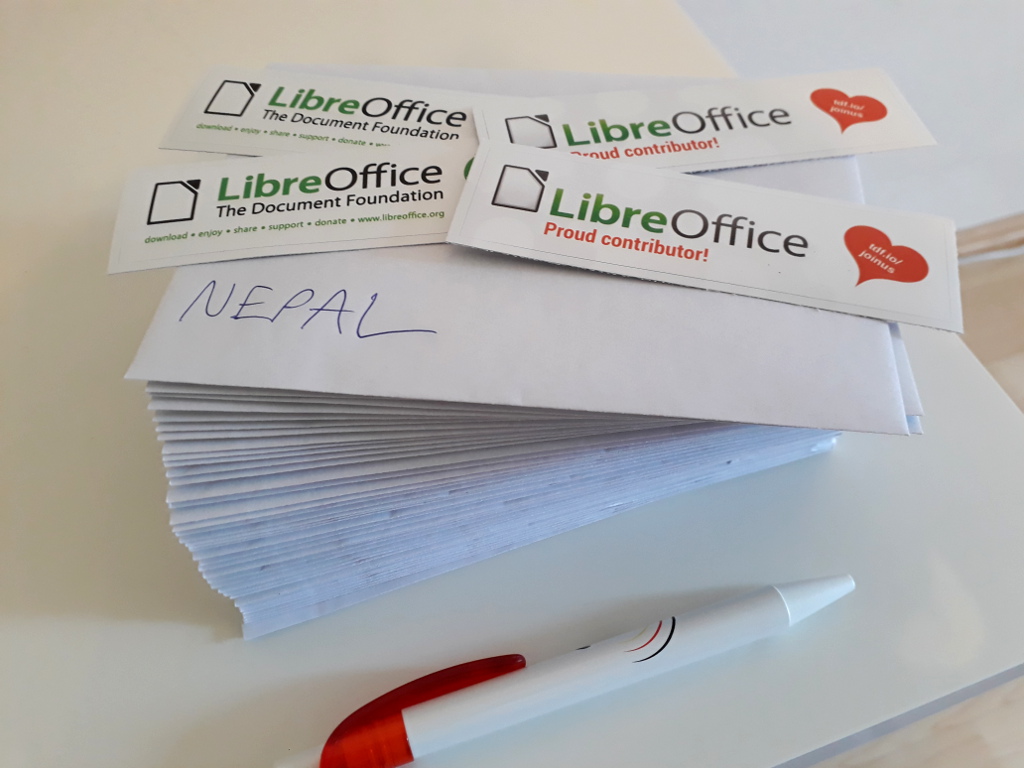
Back in May we had a Month of LibreOffice, celebrating contributions all across the project, from code and documentation through to translations and bug reports. 304 members of our worldwide community won stickers, and we’ve received some photos of them in action – so here they are!

The first is from Gabriele Ponzo, who is in The Document Foundation’s Membership Committee and already has plenty of LibreOffice stickers:

Next up is Osoitz E who helps to translate and localise LibreOffice into Basque:

Franklin Weng promotes LibreOffice and the Open Document Format in Taiwan, and sent us this photo:

Finally, Buovjaga from our QA community has a novel use for his sticker:

We’ll be repeating the Month of LibreOffice in November, so you’ll have another chance to grab a sticker – but you can get involved with our friendly community at any time. Join us and help make LibreOffice even better for millions of people around the world!

LibreOffice Conference 2017 in Rome – register now!

This year’s LibreOffice Conference will take place from 11 – 13 October in Rome, Italy. It’s a great opportunity for LibreOffice developers, users, supporters, translators and other members of the community to meet up, share ideas and make plans for future versions of the software.

And you can join us! On our conference website you’ll find a registration form, along with useful practical information. We’re still working on the website and conference programme, so stay tuned to the site for more information.

Also: if you’re attending and want to give a talk or presentation about what you’re doing with LibreOffice, check out the Call for Papers. There are many different topics and “tracks” in the programme, so whether you want to talk about development, QA, marketing, outreach, migrations or something else, submit your idea. The deadline for submissions is August 15.

We look forward to seeing you at the conference!

LibreOffice German community meeting, 23 – 25 June 2017

LibreOffice and Germany have a strong connection. StarOffice, the proprietary office suite that eventually became OpenOffice.org (and now LibreOffice) came to life in north Germany in the 1980s. Over time, more and more developers got involved, and when the suite became open source a thriving local community was established.

This continues today, and many German-speaking LibreOffice users, developers and supporters keep in touch on the mailing lists. But face-to-face meetings are important as well, so every year the German community meets up to exchange ideas, discuss new features, and make plans for the future.

This year, we met in Berlin at Endocode AG, an employee-owned software engineering company that focuses on open source. Its office features a great view of Berlin’s skyline, and – most importantly – plenty of coffee and comfy chairs for meetings and discussions. (Here’s Endocode’s blog post about the event.)

We had 17 participants in the event, and Saturday started with an introduction round. Many familiar faces who’ve been active in LibreOffice and OpenOffice.org for years were present, but there were also some new participants who were eager to get involved and help out. After choosing some discussion topics for the day, we split up into small groups and worked on tackling some issues.

For instance, one group asked the question: how can we convert LibreOffice end users into project contributors? What are the barriers? We noted that the German user mailing list has over 520 subscribers – so maybe we can provide them with some “Easy Hacks” (like in the development project) to get involved. These could be: fixing bugs and typos on the website, making small translation improvements, updating documentation, and confirming bugs. It was noted that due to our existing infrastructure, some of these tasks require good knowledge of English, though.

Other groups looked at strengthening outreach (eg getting LibreOffice into schools) and how the different projects in LibreOffice (development, documentation, QA, marketing etc.) can work together more effectively.

In the afternoon, all participants got together for a wide-ranging discussion. We talked about many things: does LibreOffice need a vision for the future? Or a killer feature? How can we steer development of LibreOffice based on such a vision? And how can we make end users feel more involved?

One idea is to run a survey of end user needs, in the style of the Open Source Survey 2017. Not only would this show that the LibreOffice community listens carefully to end users, but it could also guide the project, showing which things we need to work on, and which ones are already in good shape. (German speakers can find more notes from the discussion on our pad.)

Of course, the meeting wasn’t just about discussions – it was a great opportunity to network as well, over food and drink. We would like to thank our kind hosts from Endocode, Lisa and Mirko, very much for making that meeting possible and offering their office space for the community – we enjoyed it very much and made new friends!

If you’re a German speaker and want to join our community, sign up to the discuss@de.libreoffice.org mailing list. We look forward to hearing from you!