Simplicity and flexibility: choose the right LibreOffice interface for you

With free and open source software, you get back control – over your software, your data, and your computer as a whole. And in the LibreOffice community, we strive to create the best user experience, but we also recognise that different users have different requirements.

To this end, LibreOffice includes three main user interface designs, accessible via View > Toolbar Layout in the menu. Let’s go through them…

The first layout, Default, is what you see when you first install LibreOffice:

It’s a familiar layout with two toolbars containing various buttons. (Note that you can customise and add buttons to the toolbars if desired.)

Then there is the single mode, which opts for simplicity and minimalism, giving you more screen space to really focus on your content:

And finally, the third option is the sidebar, which uses horizontal space to provide buttons and options for your work:

So LibreOffice gives you the freedom and flexibility to choose the right interface for you. But we’re not finished yet! Our design community is working on the Notebookbar, another (optional) user interface:

It’s still experimental, but you can try it out and help us to improve it, so that we can polish it up and include it in future releases! Join our design community to provide feedback – and thank you!

Posting stickers for the Month of LibreOffice – don’t forget to claims yours!

Currently we’re posting out the sticker packs for the Month of LibreOffice. Did you contribute to the project in May 2018, and your name (or username) is on this page?

If so, and you haven’t contacted us yet, email mike.saunders@documentfoundation.org with your name (or username) from the wiki page, along with your postal address, and we’ll send you a bunch of stickers for your laptop, PC and other devices!

(Note: we will only use your postal address to send the stickers. No data will be transferred to third parties, and your address will be deleted as soon as the stickers are posted.)

LibreOffice interview: Andreas Kainz talks about new icons and the Notebookbar

Andreas Kainz

LibreOffice’s design community works on improving the user interface of the software. Today we talk to Andreas Kainz, who has created new icon themes and made improvements to the Notebookbar, an experimental and alternative user interface layout that will become an option in future releases…

Tell us a bit about yourself!

I live in Vienna, Austria. I have a KDE and LibreOffice-related blog, and a new one only for LibreOffice things, because I started by contributing to KDE, but in the last few years have been doing more and more with LibreOffice.

What have you been working on recently?

Here are some of the changes:

  • New default table styles for LibreOffice 6.0:

  • New area fill gradients for LibreOffice 6.1

And then, in terms of icons:

  • Colibre icon theme (for LibreOffice 6.1). Here’s what it looks like, with the Notebookbar activated:

All icon themes are available in PNG and SVG formats, under a GPL conforming licence, and I also maintain all three icon themes (Elementary, Colibre and Breeze – see below).

Regarding the Notebookbar, I have worked on the groupedbar full and compact, and the tabbedbar full and compact. I think that the Notebookbar is a great (optional) addition to the default toolbars and the sidebar.

(If you’re using LibreOffice 6.0 or 5.4, you can try the Notebookbar by following these steps. Please note that it’s still an experimental feature, though, and not ready for production use! But we’d like to hear your feedback.)

How much time do you spend contributing to LibreOffice?

I contribute in my spare time, between 23:00 – 01:00, when my daughter and wife are sleeping. Since 2014 I have submited 412 commits and 893,810 addition to LibreOffice core, which mean that I’m in second place in terms of additions (see the stats here – my username is DarkknightAK).

How did you get involved with LibreOffice?

I’m the maintainer of the Breeze icons for KDE, and in 2014 the LibreOffice community asked if the Breeze icons could be available for LibreOffice. Four months later, 2,500 breeze icons had been drawn and Breeze become default in LibreOffice 5 for KDE, Unity, macOS and LibreOffice Online. Here’s what Breeze looks like:

What was your initial experience of contributing to LibreOffice like?

LibreOffice is a friendly and structured project. With Gerrit and Jenkins it’s easy to have a good review process, when you’d like to submit a patch.

What does LibreOffice need most right now?

Contributors are always welcome. It would be awesome to have some goals where a team of developers AND designers work on them.

What tools do you use?

Inkscape and Kate.

Anything else you want to mention?

If you like my work, read my blog posts, join the LibreOffice design IRC channel (#libreoffice-design) or become a Patreon.

A big thanks to Andreas for his great work. As mentioned, LibreOffice users can try out the Notebookbar today, and give feedback to our design community, so that we can improve it further and make it available as a standard (optional) feature in the future!

Month of LibreOffice, May 2018: A look at the numbers

Last week, the Month of LibreOffice, May 2018 came to a close – and 336 stickers were awarded! You can read more about the results here, and today we’ll take a closer look at the numbers.

But first, we want to say a special thanks to the following people who took part during May, but weren’t in the lists during last year’s Months of LibreOffice. Welcome to the project (or welcome back if you’ve been away for a while), and a huge thanks for all your help:

Abhyudaya Sharma, Anass Ahmed, Andrew Watson, Angelos Skembris, Angermuller Hubert, Anil Kumar Shrestha, Anton Shevtsov, arindam, baffclan, Balint Fodor, bblack4jc, bertrandgajac, Brian Barker, carnish, cesar.rickinho, Charles Valente, ChenyHsu, Christian Preuß, DaeHyun Sung, Dan Lewis, Daniel Silva, David, david.vantyghem@free.fr, daviding, Denis J Navas, Derek Keats, Ding Duck, Dipesh Kumar, Drew, Drew Jensen, ebot, Eddie, eglejasu, Ekansh Jha, Elizabeth Contreras, Emersson Augusto Suarez Ortiz, EricBright, Fito, ge60, geraldg@libreoffice.org, Gerhard Weydt, gho87, Girvin Herr, himajin100000, hjek, Hrbrgr, Hussam Al-Tayeb, Ilhan Yesil, impreza233, Jean-Francois Nifenecker, Jihui Choi, jimrussell98116@gmail.com, Joachim Jacob, Joao Farias, Johannes Kingma, jomali, Jonathan Fisher, Juan C. Sanz, Kacper Kasper, Keith Curtis, kiloran, konsultor, Lamamane, Lant, Laurent BP, Leo442, Liberty Belle, Lorenzo Chiola, Luca Daghino, Luis, Luuk, merzouk.ouchene, Nikola, nobody_special, oldgoatroper, oleg.tolmatcev@gmail.com, OSS-user, PaulaO, Pheeble, Philip Jackson, Prajwol Lamichhane, Pratit Raj Giri, Regis Perdreau, Remy Gauthier, Rene Engelhard, René Leyva, Ricardo Berlasso, rir, Robert Großkopf, Roy Reese, Rraj_Gautam, Salim Habchi, scott092707@aol.com, Selim Ozcan, Sergio bh, serval2412, slimane.amiri, sludge7051-x, SteenRønnow, subedimonika, sukho, surbun@hotmail.com, Sveinn í Felli, Séamas Ó Brógáin, Takeshi Abe, Thomas Woltjer, Tim Lloyd, toki, Tom Davies, Tomáš Chvátal, Ujwal, ve3oat, Virgil Arrington, Xoristzatziki, Yauhen Kharuzhy, Ysabeau, zahra a, Zdeněk Crhonek, _dave, निराजन पन्त, सन्जोग सिग्देल

We hope you had fun in the Month of LibreOffice, and look forward to your future contributions! Oh, and if you haven’t seen it yet, here’s a video just for you:

Please confirm that you want to play a YouTube video. By accepting, you will be accessing content from YouTube, a service provided by an external third party.

YouTube privacy policy

If you accept this notice, your choice will be saved and the page will refresh.

Where do the numbers come from?

If you look at the wiki page listing the stickers that were awarded, you can see that they are split into several categories. We use various tools and data sources to gather the names (and usernames), but if we’ve missed someone, let us know! Here’s a bit more background on the various sub-projects:

  • Contributing code patches: – For this, we use our Gerrit installation. Note that we are tracking contributions from community members in the Month of LibreOffice, but throughout May there were many more code patches from various people working for LibreOffice-related companies, as you can see here.
  • Helping to report and confirm bugs: – Our QA community was really well supported in May, so thanks a lot to everyone who reported and/or confirmed bugs! Of course, you can submit a bug report at any time, as described on the wiki.
  • Helping with translations: – LibreOffice is available in over 100 languages, helping to break down digital divides. We want to express our massive appreciation for all the hard work done by people around the globe, who use our translation tools to make LibreOffice a truly universal suite.
  • Answering questions from users: – This covers Ask LibreOffice and the users mailing list. Our community does a great job there, helping users with their questions. If you want to help the LibreOffice project but don’t have much spare time, answering a few questions here and there makes a big difference, as the answers can be useful in the future too!
  • Updating documentation: – LibreOffice’s documentation comprises the built-in help and the user guides, so another hearty thanks to those who gave time to keep them up-to-date. It really makes a difference to the overall quality of the software we all use.
  • Marketing, and spreading the word on Twitter: – We don’t have to add much here! Marketing is essential to spread the word about LibreOffice and grow our community, so it’s great to see people active on social media, telling the world about free software and open standards.

So that was the Month of LibreOffice, May 2018! We’ll be running another one later in the year, with another chance to get a cool sticker bag. Of course, you can help our project and community at any time, and make LibreOffice better for millions of people around the world. Thank you!

Month of LibreOffice, May 2018: The results!

At the start of May, we kicked off a new Month of LibreOffice, celebrating contributions all across the project. Well, May has come to a close now, so how many people got stickers throughout the month? Check it out…

Great work, everyone! This is higher than the previous three Months of LibreOffice (in November 2016, and May and November 2017), which reflects our growing and thriving community. Click the number to see the full details, showing usernames of the contributors helping out in various parts of the project.

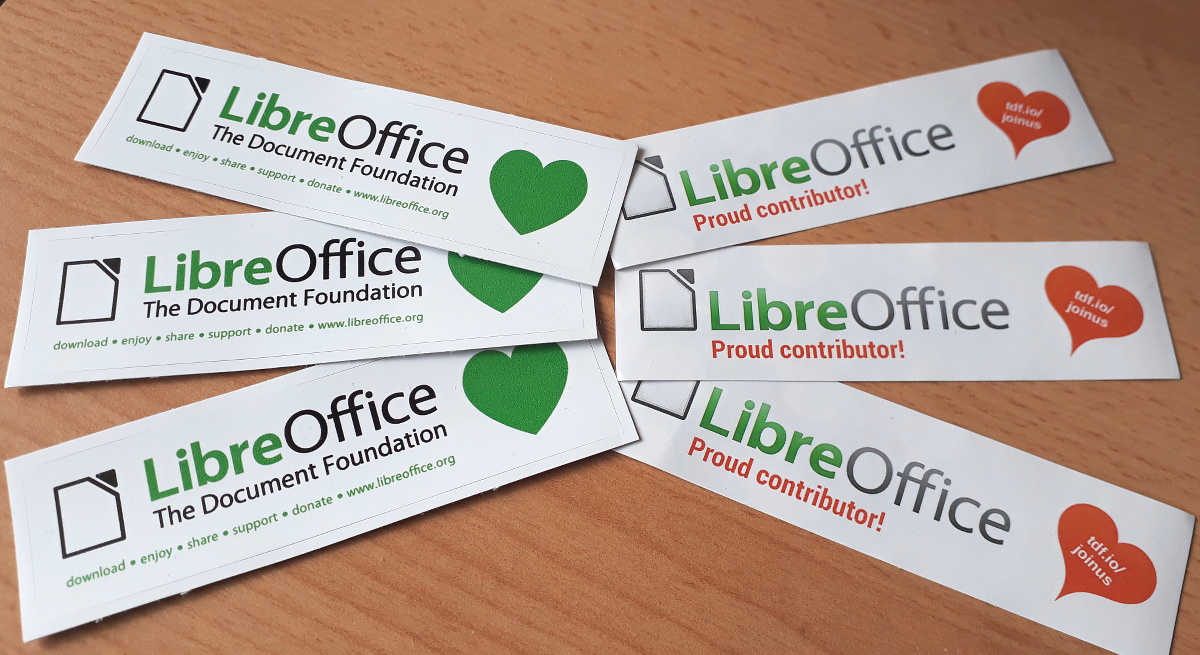
Now, if you see your name (or username) on that page, we want to send you a cool sticker pack! Email mike.saunders@documentfoundation.org with your name (or username) from the wiki page, along with your postal address, and we’ll send you these:

(Note: we will only use your postal address to send the stickers. No data will be transferred to third parties, and your address will be deleted as soon as the stickers are posted.)

If you contributed to the LibreOffice project in May but your name (or username) isn’t on the list, let us know! Send us an email stating what you did and with your address, and we’ll make sure you get a sticker too!

And here’s a special thanks to everyone who took part:

Please confirm that you want to play a YouTube video. By accepting, you will be accessing content from YouTube, a service provided by an external third party.

YouTube privacy policy

If you accept this notice, your choice will be saved and the page will refresh.

The hundreds of contributions during May have helped to make LibreOffice even better – but we’re not done yet! There are still many ways you can get involved, join our friendly community and have fun – see this page to get started. Thanks again!

LibreOffice monthly recap: May 2018

Lots of things are happening in the LibreOffice community – in development, documentation, design, QA, translations and much more. Here’s a summary of news and updates in May…

  • The Nepalese LibreOffice community reported back on their localisation sprint. Thousands of text strings were translated, LibreOffice Online was completely localised, and the number of active contributors increased from 2 to 35. Thanks to Saroj Dhakal for feedback and photos.

  • TDF announced LibreOffice 6.0.4, which includes almost 90 bug and regression fixes. In addition, LibreOffice 5.4.7 was released – the last version from the 5.4 branch.
  • Ilmari Lauhakangas set up a LibreOffice page on VolunteerMatch, with the goal of bringing in new contributors in the fields of user interface design, programming, marketing, documentation and more. If you like LibreOffice and want to help improve it in these areas, take a look!

  • The LibreOffice documentation team announced a Guide Revision Sprint Week, to review the contents of all chapters of the Getting Started Guide 6.0.

  • The QA community organised a Bug Hunting Session for LibreOffice 6.1 Beta 1, helping to identify and fix issues before the official release in early August. Thanks to the following who helped out on IRC: djredaux, Rubén, Abad, Vitdom, bogger and Stéphane Guillou.

  • And, of course, development work continued on LibreOffice 6.1. Most of the features are in place already and being refined, but there have been some extra updates this month including: a new set of default gradients (Andreas Kainz); an embedded HSQLDB to embedded Firebird migration assistant in Base (Tamas Bunth); new drawing styles and clean-up of legacy styles (Kompilainenn); Malay Arabic, Juǀ’hoan and Naro as additional languages (Eike Rathke (Red Hat, Inc.)); Autocorrect exceptions to common Greek abbreviations (László Németh); and a new UI translation into Frisian (Berend Ytsma)

Keep in touch – follow us on Twitter, Facebook and Google+. Like what we do? Support our community with a donation – or join us and help us to make LibreOffice even better!