Video: How many file and document formats can LibreOffice open?

LibreOffice is a truly universal office suite – it’s available in over 100 languages, across many operating systems, and it opens a huge range of document formats. But just how many? Check out the short video we made…

Please confirm that you want to play a YouTube video. By accepting, you will be accessing content from YouTube, a service provided by an external third party.

YouTube privacy policy

If you accept this notice, your choice will be saved and the page will refresh.

The Document Liberation project announces five new or improved libraries to export EPUB3 files and import AbiWord, MS Publisher, PageMaker and QuarkXPress documents

Berlin, January 22, 2018 – The Document Liberation Project announces five new or improved libraries to export EPUB3 and import AbiWord, MS Publisher, PageMaker and QuarkXPress files. The libraries have been originally developed for the LibreOffice 6.0 major release, but can be used by any other software thanks to the OSI (Open Source Initiative) compliant license.

libe-book exports LibreOffice ODT files to EPUB3. At the moment it offers just basic features, but development is still undergoing and new features will be added before the next major release. The library can be downloaded from https://sourceforge.net/projects/libebook/. A description of the architecture and the features is available here: https://vmiklos.hu/blog/basic-epub3-export.html.

libabw imports AbiWord documents, and can be downloaded from http://dev-www.libreoffice.org/src/libabw/. The library home page is at https://wiki.documentfoundation.org/DLP/Libraries/libabw.

libmspub imports MS Publisher documents, and can be downloaded from http://dev-www.libreoffice.org/src/libmspub/. The library home page is at https://wiki.documentfoundation.org/DLP/Libraries/libmspub.

libpagemaker imports PageMaker 6/7 documents, and can be downloaded from http://dev-www.libreoffice.org/src/libpagemaker. The library home page is at https://wiki.documentfoundation.org/DLP/Libraries/libpagemaker.

libqxp imports QuarkXPress 3.1/4.1 documents and templates and can be downloaded from http://dev-www.libreoffice.org/src/libqxp/. The library home page is at https://wiki.documentfoundation.org/DLP/Libraries/libqxp.

The Document Liberation Project was created to empower individuals, organizations and governments to recover their data – hidden inside obfuscated proprietary file formats – and migrate them into perennially accessible standard file formats.

To return effective control over content to the real authors, the Document Liberation Project develops software libraries that can be used by applications to read data in proprietary formats. The libraries are currently used by Calligra, Inkscape and Scribus.

Document Liberation Project: 2017 in review


While most of the posts on this blog are about LibreOffice, another project overseen by The Document Foundation is DLP – the Document Liberation Project. Whereas LibreOffice is an end-user application, DLP is a collection of free and open source software libraries that help to convert document formats. Developers can use these libraries in their programs, in order to import and export a large variety of files – including proprietary formats. Many well-known applications use DLP libraries, including Inkscape, Scribus, Calligra and of course LibreOffice.

So, what happened in DLP throughout 2017? Read on for our round-up of the year’s news…

New import filter: QuarkXPress

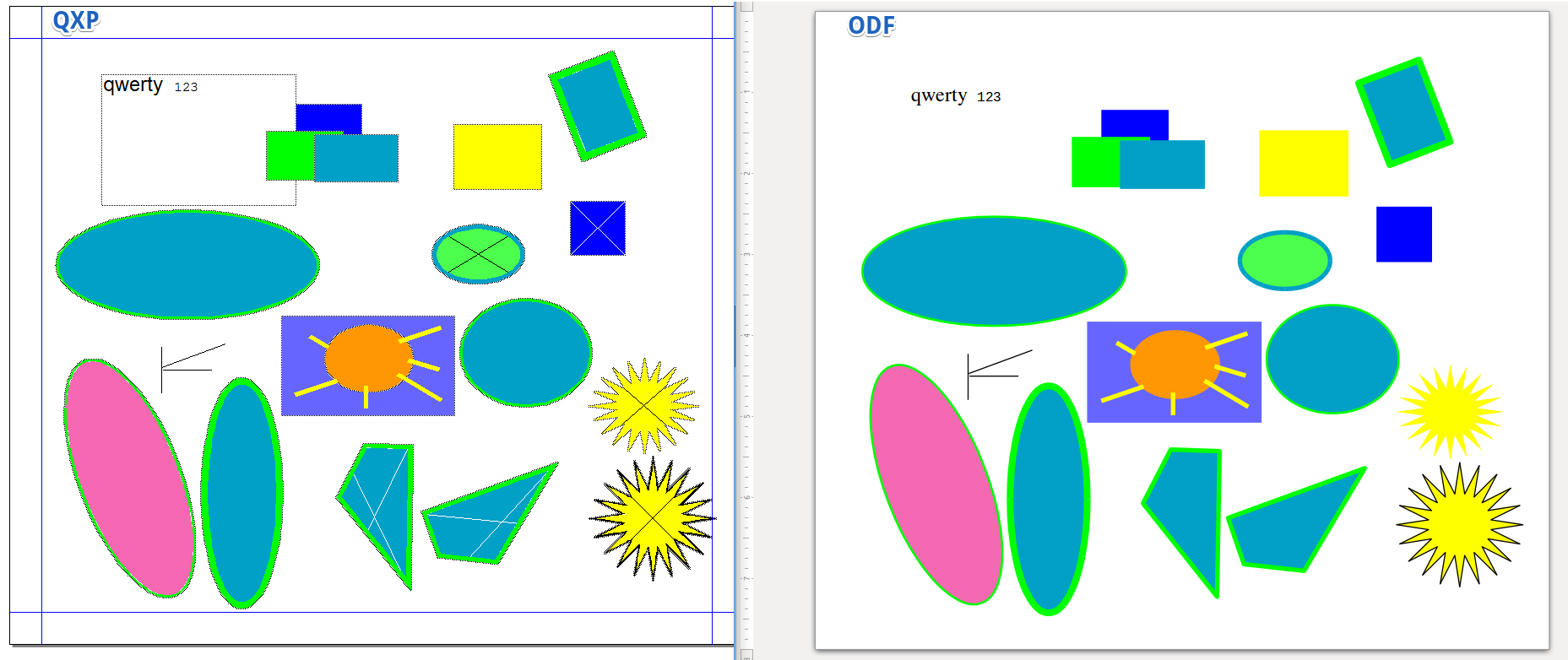
Aleksas Pantechovskis, as part of the Google Summer of Code, worked on a new import filter for QuarkXPress documents: libxqp. It currently supports QuarkXPress 3.1 – 4.1 documents, and this image shows it in action (original QuarkXPress file on the left, and how it’s converted into OpenDocument on the right):

Big improvements to Lotus 123 import

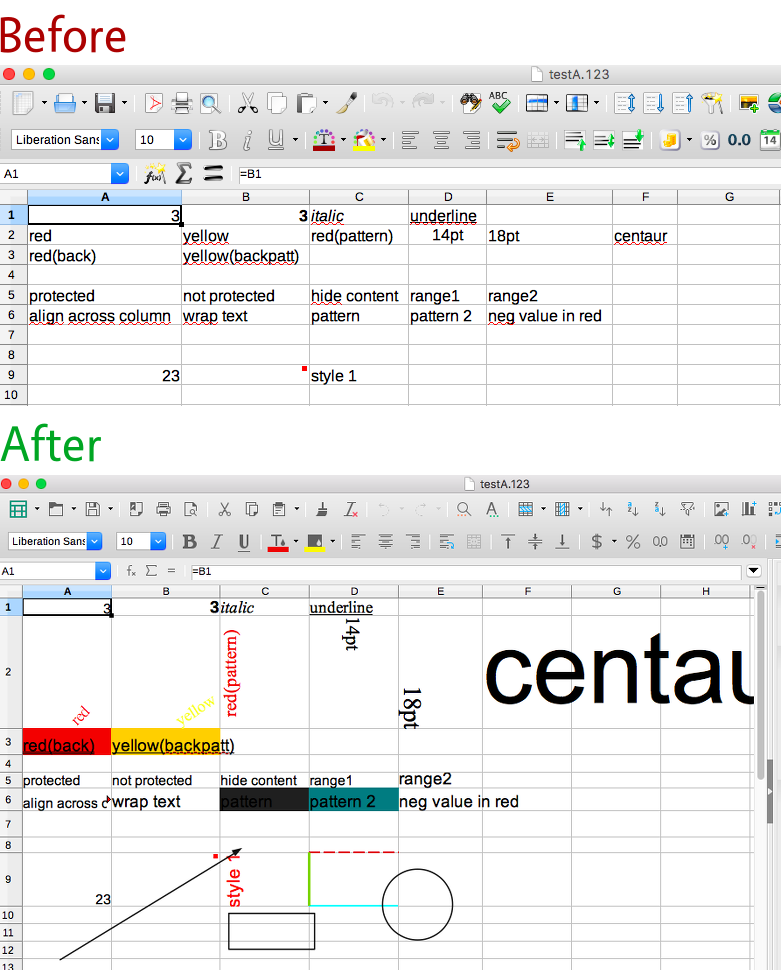
Laurent Alonso made some major improvements to the Lotus 123 filter, adding support for many formatting and layout options. Check out these pictures as an example – the top shows a Lotus 123 file in LibreOffice 5.3, missing almost all of its formatting. Underneath, however, you can see how it’s rendered in LibreOffice 5.4, with much more of the formatting present (click for bigger):

New library releases

Throughout the year, many libraries were updated as well. Here’s a summary:

  • 2 Aug – libepubgen 0.0.1 – This fixes escaping of HTML entities, and the code has been updated to C++11
  • 12 Sep – libwpd 0.10.2X – Also updated to C++11, and includes various fixes from OSS-Fuzz
  • 12 Sep – libwpg 0.3.2 – Improves performance of reading image data from WPG2 files
  • 14 Sep – libzmf 0.0.2 – Minor code cleanups and some fixes from OSS-Fuzz
  • 15 Sep – libcdr 0.1.4 – Fixes issues found by Coverity, and require C++11 for build
  • 16 Sep – libfreehand 0.1.2 – Parses more features, including text on paths, stroke patterns, arrows, and custom line and fill styles
  • 21 Oct – libvisio 0.1.6 – Various improvements to import of MS Visio files, plus Coverity and OSS-Fuzz fixes
  • 23 Oct – libetonyek 0.1.7 – Improves support for gradients, cell styles, non-RGB colours, and table border lines
  • 13 Dec – libepubgen 0.1.0 – EPUB3 support, plus support for embedded fonts, cover images and footnotes
  • 13 Dec – writerperfect 0.9.6 – Adds support for StarOffice Writer and Zoner Draw documents, and includes universal conversion tools

Find out more!

For details on the libraries mentioned above, see the projects page on the site. And check out the contribute page to see how you can help – because even if you’re not a developer, you can prepare sample documents for testing. Oh, and to learn more about DLP, watch this short video!

Please confirm that you want to play a YouTube video. By accepting, you will be accessing content from YouTube, a service provided by an external third party.

YouTube privacy policy

If you accept this notice, your choice will be saved and the page will refresh.

Coming up on 28th September: Reddit “Ask us Anything” (and a birthday)

Thursday, 28th September 2017 will be a special day – not only is it the seventh birthday of The Document Foundation, but we will also be running an “Ask me (us) Anything” session on Reddit – specifically, the /r/linux subreddit.

Team and board members from The Document Foundation will be on hand to answer questions and point people in the right directions. The AmA will run from 12:00 UTC, and we’ll be around for several hours to answer questions. (And indeed we’ll check the post the following day for any extra questions).

We look forward to taking part and talking to everyone!

Document Liberation Project: New releases


LibreOffice’s native file format is the fully standardised OpenDocument Format. This is ideal for long-term storage of data, but many of us have to work with other file formats as well, including those generated by proprietary software. The Document Liberation Project (DLP) develops libraries to help us access these files, and there have been various updates in the last two weeks, so let’s see what’s new:

  • libfreehand 0.1.2 – This is a library for importing Aldus/Macromedia/Adobe FreeHand documents. In this release, the library can import more elements, such as text on paths, text effects, stroke patterns, arrows and paragraph attributes.
  • libzmf 0.0.2 and libcdr 0.1.4 – libzmf is a library for importing Zoner drawing and bitmap files, currently supporting Callisto/Draw 4-5 and Bitmap, while libcdr is a library that parses the file format of CorelDRAW documents of all versions. Both have been made more secure thanks to OSS-Fuzz, which we talked about recently, and there have been build fixes as well.
  • libwpg 0.3.2 and libwpd 0.10.2 – The former is for importing WordPerfect Graphics images, and has performance improvements when reading image data from WPG2 files, while the latter has had build system improvements and also fixes from the aforementioned OSS-Fuzz.

These improvements will be included in future major releases of LibreOffice, and indeed other open source programs that use Document Liberation Project libraries.

Meanwhile, DLP developer Laurent Alonso sent us this great before-and-after picture, showing recent improvements to the import of Lotus 123 spreadsheets. At the top you can see a Lotus 123 file (that contains lots of formatting) being displayed in LibreOffice 5.3 – but the formatting is missing. Thanks to improvements in DLP libraries, though, LibreOffice 5.4 can read and display the spreadsheet much more accurately, as you can see underneath (click for bigger):

The DLP community appreciates all contributions, and even if you’re not a coder, there are many ways to help – such as documenting file formats, or preparing sample documents. To learn more about DLP, check out our short video:

Please confirm that you want to play a YouTube video. By accepting, you will be accessing content from YouTube, a service provided by an external third party.

YouTube privacy policy

If you accept this notice, your choice will be saved and the page will refresh.

Updates from the Document Liberation Project


The Document Liberation Project (aka DLP) is working to free users and content creators from vendor lock-in. To achieve this, it develops and maintains libraries for reading documents in many different formats – including those generated by proprietary software. To learn more about the DLP, check our our short video.

In recent months, DLP developers have been working on updates and new features, so read on for all the details.

QuarkXPress import filter

Lithuanian coder Aleksas Pantechovskis (who we interviewed last year) has been working with David Tardon on a filter to read documents generated by the QuarkXPress desktop publishing application. He was doing this as a Google Summer of Code project, and added code for importing text boxes, shapes and other objects.

The image below shows an original QuarkXPress document on the left, and how it is converted into the open and standardised OpenDocument Format for use in LibreOffice and other software:
Aleksas and David have implemented the filter in a new library, libqxp – it supports QuarkXPress 3.1 – 4.1 documents at the moment.

PowerPoint and StarOffice

Meanwhile, Laurent Alonso has been improving a number of libraries for better compatibility with legacy documents. For instance, in libmwaw he has implemented an import filter for presentations created in Microsoft PowerPoint 2 (Windows), PowerPoint 4 (Mac and Windows) and PowerPoint for Windows 95. If you have old presentations in this format and need to retrieve the main contents, this filter will help you out.

In addition, he has updated libstaroffice, which is a library used to read files generated by StarOffice (which later became OpenOffice.org and then LibreOffice – see our timeline for the full history). Thanks to Laurent’s work, .sdc spreadsheet files preserve more of their formatting when imported, while .sda files created with StarOffice Impress are now converted as presentations.

Give us a hand!

As you’ve seen, DLP is helping users and content creators to free their data from old, legacy and proprietary formats. DLP libraries are used by many well-known applications such as LibreOffice, Inkscape and Scribus, so your contributions can help millions of people around the world.

And you don’t have to be a developer! While code contributions are always welcome, you can help us by reverse-engineering and documenting file formats, or sending us sample documents to analyse and test against the DLP libraries. Any help can really make a big difference, so see this page to learn more. We look forward to meeting you!