openSUSE + LibreOffice Virtual Conference Talks Accepted

Talks submitted for the openSUSE + LibreOffice Virtual Conference have been reviewed and accepted by the conference organizers.

The approved talks have been updated in the Open Source Event Manager instance on events.opensuse.org.

The organizers thank everyone who took the time and effort to submit a talk for the conference.

Speakers have until Sept. 6 to confirm their talk/s for the conference on events.opensuse.org. Speakers will need to login, click on My Proposals and will have an option to confirm the accepted proposal. There is also a withdraw proposal option.

People who have issues logging on to confirm their talk may have not realized the openSUSE went through a migration and users might need to migrate their account following the steps on https://idp-portal-info.suse.com.

The events.opensuse.org website is used to manage talk submissions, scheduling of talks and registrations, but there will be an online live conferencing platform where the conference will take place online from Oct. 15. – 17.

More information will follow in the coming weeks about the tool and how to navigate it.

Attendees will be able to customize their schedule by adding sessions they would like to participate in once the platform is ready.

The conference will have technical talks about LibreOffice, openSUSE, open source, cloud, containers and more. Extra time for Questions and Answers after each talk is possible and the talks will be recorded. The conference will schedule frequent breaks for networking and socializing.

Organizers have online, live conference sponsorship packages available. Interested parties should contact ddemaio (at) opensuse.org for more information.

Community Member Monday: Pulkit Krishna

Today we’re talking to Pulkit Krishna, who’s a new member of The Document Foundation, the non-profit entity behind LibreOffice. He’s also active in our documentation community…

Hi Krishna! Tell us a bit about yourself…

I am from Bihar, India. I am a teacher by profession, and technical writing is my hobby.

Why did you decide to become a member of TDF?

In my country, very few people know that there are other office suites than Microsoft Office. They do not know that there is a suite that’s free and open source software. I am not talking about everyone – but the majority of people.

By becoming a member, I think I can help to spread the word, that there is a very good free office suite, LibreOffice. Also, almost everybody in my country thinks that to become a part of a software community, you have to be a developer. I want to remove this stereotype. I am not a developer and yet I am a member of TDF.

What are you working on in the LibreOffice project right now?

Currently, I am working on updating the Base Guide to version 6.4. The base guide 6.2 was translated from German, but for version 6.4 we are updating it from 6.2. It is going to be a quick update, because Base has not changed much.

Anything else you plan to do in the future? What does LibreOffice really need right now?

As the Base Guide 6.2 was translated from German, its English could be improved. Also, there are some translation mistakes. I plan to rewrite the whole guide for 7.0. The screenshots in the guide are old – they need to be updated. I am going to use the format suggested by Dan Lewis.

In the future, I would also like to spread the word about LibreOffice in my country. Although the government has declared that free and open source software should be promoted, very few people in my country even know that such a thing exists.

Thanks, Krishna! Indeed, our marketing community is reaching out and spreading the word – everyone is welcome to join and give us a hand!

LibreOffice 7.0: A week in stats

One week ago, we announced LibreOffice 7.0, our brand new major release. It’s packed with new features, and has many improvements to compatibility and performance too. So, what has happened in the week since the announcement? Let’s check out some stats…

422,938 downloads

These are just stats for our official downloads page, of course – some Linux users will have acquired the new release via their distribution’s package repositories.

113,235 hits for the press release

Our press release was viewed by people from around the world, and linked to by many websites. We also sent the PR to our announce mailing list, and it was translated into many languages thanks to our awesome localisation community.

54,079 Tweet impressions

The announcement Tweet was viewed almost 55,000 times, and had 763 likes and 508 retweets. We’re also on Mastodon, a FOSS-friendly federated microblogging service: our Mastodon toot had 79 likes and 97 shares. Meanwhile, the Facebook post reached 21,786 people, with 817 reactions and 181 shares.

48,874 video views

Our LibreOffice 7.0 New Features video has been popular, with 130 comments and 1,353 likes. (We also uploaded the video to PeerTube, an open source, decentralized and federated video platform.)

Please confirm that you want to play a YouTube video. By accepting, you will be accessing content from YouTube, a service provided by an external third party.

YouTube privacy policy

If you accept this notice, your choice will be saved and the page will refresh.

1509 upvotes on Reddit

As always, we posted the announcement on the /r/linux subreddit, where it had 1509 upvotes and 250 comments. We also have our own dedicated /r/libreoffice subreddit – check it out!

A huge thanks to our worldwide community of volunteers, and certified developers, for all their work on this release! LibreOffice keeps moving forward, and this release really cements its position as the future of OpenOffice:

50 Open Badges awarded for top LibreOffice translators!

A few months ago, we announced Open Badges for LibreOffice contributors. These are custom images with embedded metadata, awarded to our most active community members to say thanks for their great work!

The metadata describes the contributor’s work, and the badge can be verified using an external service. Open Badges are used by other free software projects, such as Fedora.

Anyway, today we’re awarding 50 Open Badges to the most active members in our localisation community, based on Weblate activity so far this year. Congratulations to everyone who got a badge – we’ve emailed it to you! Here’s the list of winners:

  • Joan Montané
  • Adam Rak
  • jwtiyar ali nariman
  • Paul Roos
  • Mihkel Tõnnov
  • Modestas Rimkus
  • Adolfo Jayme Barrientos
  • Donald Rogers
  • Valter Mura
  • eglejasu
  • Stanislav Horáček
  • Asier Sarasua Garmendia
  • Kolbjørn Stuestøl
  • Dimitris Spingos
  • Xosé
  • Tolmantas
  • Andika Triwidada
  • Baurzhan Muftakhidinov
  • Mihail Balabanov
  • tmtfx
  • Còdaze Veneto
  • Cheng-Chia Tseng
  • Karl Morten Ramberg
  • Christian Kühl
  • Stuart Swales
  • Ming Hua
  • Tuomas Hietala
  • Bachka
  • Andreas Pettersson
  • Yaron Shahrabani
  • Євген Кондратюк
  • Sérgio Marques
  • Jean-Baptiste Faure
  • Jørgen Madsen
  • Michael Wolf
  • gpopac
  • Ayhan YALÇINSOY
  • Miloš Šrámek
  • Milo Ivir
  • Ingmārs Dīriņš
  • Xuacu Saturio
  • Xandru Martino Ruz
  • kees538
  • Rhoslyn Prys
  • Khairul Aizat Kamarudzzaman
  • SteenRønnow
  • Sveinn í Felli
  • Jeanmi2403
  • kompilainenn
  • vpanter

We’ll be issuing more badges in the coming months, so stay tuned to the blog for more…

LibreOffice monthly recap: July 2020 – News, events and more…

Here’s our summary of updates, events and activities in the LibreOffice project in the last four weeks – click the links to learn more…

  • At the start of the month, we announced a Bug Hunting Session for LibreOffice 7.0 RC1. Yes, the next major release is just around the corner! You can still help us to test it before the official announcement, which is due next week…

  • But we’re still maintaining the LibreOffice 6.4 branch, and on July 2, we announced LibreOffice 6.4.5. It includes over 100 bug fixes and improvements to document compatibility and interoperability with software from other vendors.
  • In recent months, TDF and the community have been discussing marketing plans for the next five years. How can we keep the LibreOffice project sustainable in the long term? Volunteers are a huge part of the project and we’re immensely grateful for them, but companies in the ecosystem also write the majority of the source code to implement new features, so it’s important that they prosper too. See the first update and second update.
  • On July 13, we talked to Khairul Aizat Kamarudzzaman about his work in the LibreOffice community, helping with advocacy and marketing. He recently decided to become a Member of The Document Foundation – welcome on board!

  • Speaking of Members, TDF’s Membership Committee has elections coming up. The mission of the Committee is to administer membership applications and renewals following the criteria defined in the Foundation’s Statutes.

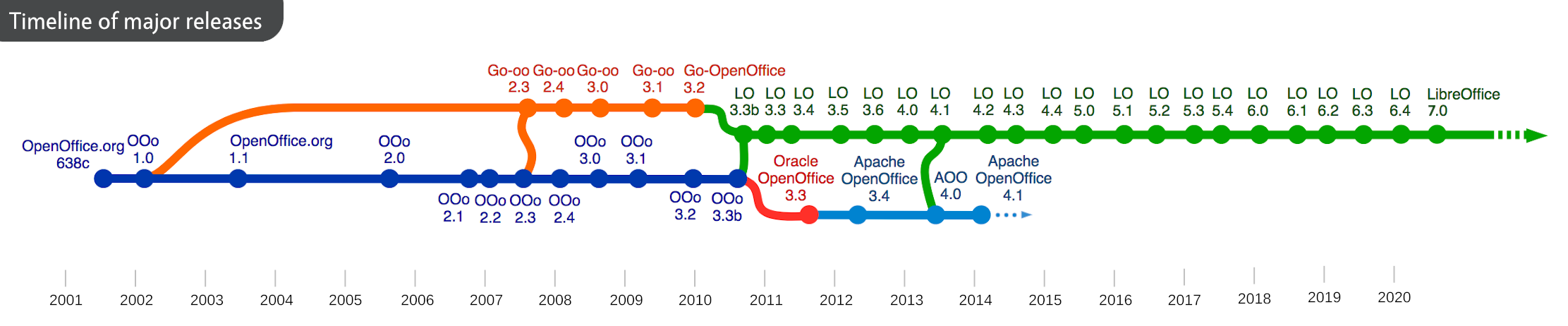
  • July 19 marked 20 years of free and open source office suites, as Sun Microsystems announced on July 19 2000 that StarOffice, which it recently acquired, would become free and open source software. This, of course, became OpenOffice, and lives on today in the form of LibreOffice, the most active and developed successor project.

  • With the ongoing coronavirus pandemic, many communities are meeting online, such as the Spanish-speaking LibreOffice community. They had a live broadcast with a series of talks, over six hours, covering translations, migrations and LibreOffice Online.

  • The joint openSUSE + LibreOffice conference will take place in October, and we’ve extended the Call for Papers until August 4. Join us, give a talk about your favourite topic, and let’s share knowledge together!

  • Lastly, we talked to Sandra Louvezo, another new TDF Member, about her experiences in the LibreOffice community in Congo. A big thanks to Sandra, and everyone in our growing LibreOffice communities in Africa, for all their great work.

Keep in touch – follow us on Twitter, Facebook and Mastodon. Like what we do? Support our community with a donation – or join us and help to make LibreOffice even better for everyone!

Tender for implementing support for a dedicated, built-in UNO object inspection tool in LibreOffice (#202007-02)

The Document Foundation (TDF) is the charitable entity behind the world’s leading free/libre open source (FLOSS) office suite LibreOffice.

We are looking for an individual or company to implement support for a dedicated, built-in UNO object inspection tool in LibreOffice, to start work as soon as possible.

In order to make working with UNO objects easier and to avoid the need to always install extensions before debugging, it is necessary to be able to inspect UNO objects in a running LibreOffice instance effectively.

This task involves reading the existing Basic IDE Watch code, evaluating how it can be improved based on ideas implemented in external tools like xray and MRI and extending the Watch code to be a first-class inspector that allows focusing the relevant part of the UNO API for opened documents and also based on your current selection (similar to what is possible in web browsers).

A good part of the features are implemented already. Work carried out under this tender will therefore mostly consist in making the features more accessible and more stable, adjusting the UI and refactoring things.

The work has to be developed on LibreOffice master, so it can get released in the next major version.


The following required features need to be implemented:

  • Dockable toolbar that can appear at the bottom of a document frame, similar to find-bar.
  • Left-hand side of the toolbar exposes a snapshot of a useful subset of the DOM as a tree view: Writer paragraphs, Calc sheets, Impress slides
    • This tree widget should populate its content on-demand whenever possible in order to ensure performance.
  • Point&click inspect mode (similar to F12 in Chrome): combine Help -> What’s this (point on something & then an action) and normal selection, so it’s possible to point on something (e.g. an image), make it the current selection and automatically launch DevTools on it. Perhaps rename ‘DevTools’ to something else.

    Note that this is mostly UI work, ThisComponent.CurrentController.Selection in Basic already gives access to the current selection in a not-so-convenient way.

  • Right-hand side: show details in a table about the current selected item in the “DOM tree-view”, which is implemented as part of the watch window in the Basic IDE:
    • object’s UNO properties
    • object methods
    • supported services and interfaces
  • User documentation for the new dialog is mandatory.
  • Brief developer documentation for the newly introduced classes is required.
  • Whenever adding new functionality, it should be considered if it’s possible to test the functionality with automated tests with reasonable amount of effort.

The following are optional features:

  • Configuration support: remember which tabpage was open last time (properties, methods, etc.)
    • Remember sorting settings (prioritize paragraphs/sheets/slides and other relevant properties or sort alphabetically)
  • Click on value for details: primitive types
    • This is useful if the user selected lots of text for inspection, we can’t show all the content in a table cell, but can if a multi-line edit replaces the table widget.
  • Click on value for details: re-launch DevTools on a sub-object on the right-hand side. This is already handled to a large degree in the existing watch variable code, which represents the object already as a tree.
    • This allows recursion: double-click on a value with a complex type, which has its own properties, methods, etc -> inspect it.
  • Show implementation name of object
    • If a consistent name is provided by the object, this can allow jumping to the relevant C++ code from DevTools easily.
  • Copy&paste support:
    • Normally content of a table in a widget is not easily copy&paste-able. It can help debugging if add explicit support to copy the table content still, e.g. all property names and their primitive values.
  • Improved presentation of the DOM for Writer/Calc/Impress:
    • The inspector tool could be just a generic presenter for any UNO object, but in practice macro and extension authors are interested in a subset of the extremely rich and generic API we provide.
    • The idea is to select a few key properties for each component, so it’s trivial for the user to see how to access the most important details of a document:
      • Writer: style families, paragraph list, text portion list, etc.
      • Calc: sheets, columns, cells, named ranges, etc.
      • Impress: slides, shapes, etc.

Required skills

  • Extensive knowledge of C++
  • Experience working on the LibreOffice source code
  • Knowledge of UNO

Other skills

  • English (conversationally fluent in order to coordinate and plan with members of TDF)

We use free, libre and open source (FLOSS) software for development wherever possible, and the resulting work must be licensed under the Mozilla Public License v2.0.

TDF welcomes applications from all suitably qualified persons regardless of their race, sex, disability, religion/belief, sexual orientation or age.

Bidders will get a preference for including a partner or independent developer who has not been involved in a successful tender before.

As always, TDF will give some preference to individuals who have previously shown a commitment to TDF, including but not limited to certified developers and/or members of TDF. Not being a member, or never having contributed before, does not exclude any applicants from consideration.
Further discussions on this tender took place on the public board discussion mailing list of The Document Foundation.

The task offered is a project-based one-off, with no immediate plans to a mid- or long-term contractual relationship. It is offered on a freelance, project basis. Individuals and companies applying can be located anywhere in the world.

When budgeting, we anticipated that this project (incl. optional tasks) to take in the region of 60 days of work. Bidders are free to bid on the required features only. Bidders who bid on both the required and optional features are asked to provide a breakdown in terms of costs for each.

TDF is looking forward to receiving your applications for one or more of the aforementioned tasks, your financial expectations and the earliest date of your availability, via e-mail to a committee at tender20200702@documentfoundation.org no later than September 1, 2020.

Applicants who have not received feedback by October 15, 2020 should consider that their application, after careful review, was not accepted.