According to the Library Journal, who has recently awarded him with the Movers & Shakers 2024 Award (the people shaping the future of libraries), in the Educators category, Phil Shapiro
Is an enthusiastic champion of digital inclusion and outside-of-school learning, assisting youth and adults with public Linux computers at the Takoma Park Maryland Library (TPML) and singing the praises of open-source software through his YouTube channel. His advocacy goes beyond library walls, however; he and a group of friends have delivered hundreds of computers donated by community members to families in need. One recipient, then a third grader, learned to touch type 50 words per minute before reaching middle school—and recently graduated from Yale. Shapiro also created Pairs, a paper-based math game, using LibreOffice Calc, and freely distributes it worldwide, with versions for preschool through middle school.
We have asked Phil a few questions, about his experience with LibreOffice, the math game he developed using LibreOffice Calc, and his passion for open source software.
 Hi Phil, you received an award from Library Journal magazine for the mathematical game you developed with LibreOffice Calc. Can you tell us why you decided to create this game, and why you decided to do it with LibreOffice Calc?
I decided to create this free, paper-based math game to help families enjoy some recreational math activities around the dining room table. The web site for this game is at http://pairsmathgame.com I use Google Sites, the free web tool, to build this web site.
Over the years, I’ve noticed that 50 percent of the students who visit the public library where I work do not like math. If you’re going to spend hundreds of hours learning math in school, then it’s unfortunate if you do not like math. This game is intended to make math more recreational, spontaneous, fun. It might be particularly useful to grandparents raising grandchildren, where the family can have some fun number related conversations around the dining room table.
In playing this game, I also encourage students to invent their own math questions. This gives them a greater sense of agency. There is no greater thrill for a youth (or adults) than to watch someone enjoy thinking about a question you yourself invented.
My goal is to reduce the percent of students who dislike math. If we, as a society, and reduce that percentage from 50 percent to 20 percent, then the world will be a better place for everyone. We all have a role to play in reaching for that goal. I’ve done my part and I challenge others to do their part – whatever they choose their part to be.
Can you describe the math game to us? Why is it called the Pairs Math Game?
The game is shown as a grid of random numbers. The object of the game is to find two numbers that add up to 100. In the original game, these two numbers needed to live in the same column. While that could be fun for some middle school students, a more open-ended question – more accessible to younger students – is to find two numbers anywhere in the grid that add up to 100. For example, 95 + 5, or 80 + 20, or 50 + 50, or even 98 + 2. I planted more than 20 pairs of such numbers within the random grid, so students have many chances to find a pair.
This grid can be printed on legal size paper (8.5 inches by 14 inches), tabloid size paper (11 inches by 17 inches), in mini banner size – 2 feet by 3 feet, and large banner size (3 feet by 8 feet). All sizes are free for anyone to print and use for any purpose. The banner sizes can also be purchased in a very durable vinyl form from Zazzle.com There is a link from the Pairs Math game web site for people to order the vinyl banner. I receive a small amount of money anytime someone buys a vinyl banner. The vinyl banners can be used outdoors, in the rain, at a picnic. The mini banner fits quite nicely on most dining room tables.
On the Pairs Math game web site, I include a screencast video, made with my Android phone, explaining more about this game. For those wanting to design their own math games using LibreOffice Calc, I explain my methods in this article I recently wrote for Computers in Libraries magazine. https://tinyurl.com/pairsmathgamearticle
 You are an educator, and have been working for some 20 years in a library where you help users to use Linux personal computers. In the past, you have written for several technology magazines. How did your passion for open source software start?
I became interested in open source because of my volunteer work as a digital inclusion activist. I’ve been taking donated computers to people’s homes for the past 30 years. I deliver Macs, Windows, and Linux computers. Linux computers are my favorite to deliver because Linux runs well on older hardware. Believe it or not, I got an earlier version of Linux Mint running nicely on a 2002 Dell laptop. People can view this laptop surfing the web in my YouTube video titled: My $20 eBay laptop.
A long time ago, between 1990 and 1994, I ran my own Apple II educational software company. At that time, I benefited a lot from studying the code of other programmers. I sold some of the software I developed to school around the nation. I also designed free educational games, which can now be played in the browser, via an Apple II emulator, on the Internet Archive web site. See https://archive.org/details/Number_Games_1_Phil_Shapiro_1992 and my (previously) commercial Number Squares logic puzzles at https://archive.org/details/NumberSquares and explanatory screencast at https://archive.org/details/NumberGames1
Do you plan to develop other mathematical games, or other educational tools?
Designing games is a fun hobby of mine. Yes, I continue designing variations of the Pairs Math game. I do not ask for anything in return, but if people help spread the word about this game, that is plenty reward for me. I’d love to see this game used in hospitals, prisons, homeless shelters, refugee camps – anywhere that people might benefit from “cognitive solace.” Cognitive solace is when the brain is engaged in something enjoyable – in a way that provides solace for other things happening in their lives.
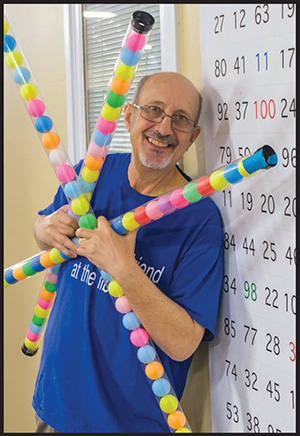
I have some other free games in development, including one with colorful ping pong balls inside of plastic tubes – and another game with colorful round stickers.
Have you used LibreOffice in any ways that creators of this software might find surprising?
Yes, I love using LibreOffice Draw to do 8K digital storytelling on YouTube. I started experimenting with this before the pandemic, back in 2019. See https://www.youtube.com/watch?v=gsgg4hgjdoY which is a sample video that might be helpful to others looking to do something similar. I’d love to see a creative contest for this kind of thing.
Of the 8 billion residents of planet Earth, I’m probably the only person using LibreOffice to create 8K videos. Being an innovator in that way is just plain fun.
What is your opinion, as an experienced user but somewhat external to the projects, of open source software?
I love open source methods because you bypass the suffocating restrictions encountered with proprietary software. If you can imagine an improvement to an open source software program, you can either code that improvement yourself, or hire someone to do the coding for you. No permission required. For a creative person, such as myself, this lifting of proprietary restrictions is liberating. It literally lets me breathe more freely. For more on how I first came to open source, search the web for my article: “The Day my Mind Became Open Sourced.”
I also believe open source software is a path to building a more inclusive world. A more inclusive world has less violence. One of my inspirations is Bogdan Tancic, from Serbia Wireless. Along with his geek friends in Bosnia, they have built a wireless community network that spans across national boundaries. Step by step, their group is slowly blurring the national boundaries in this strife affected area of the world. Everyone involved in this projects embraces open source software and open hardware. They maintain autonomy and control of their network. This is truly inspiring. About 15 years ago, I shot this short video interview with Bogdan Tancic, at an international wireless community network conference in Columbia, Maryland – not far from where I live. https://www.youtube.com/watch?v=rCVtPcFp14E
I’m also interested in the ways that open source can boost mental health. I share some of my ideas about that in this article I wrote for Opensource.com https://opensource.com/life/14/8/does-open-source-boost-mental-health It’s useful to note that Opensource.com, a project previously funded by Red Hat, has a new home at OpenSource.net, backed by the Open Source Initiative.
As a final note – I’ve composed a few songs that encapsulate my feelings about open source. You can find these on YouTube at https://www.youtube.com/watch?v=0UYGA6ek_nA and https://www.youtube.com/watch?v=WCSQorBmO58 and https://www.youtube.com/watch?v=q_QjA7PgWZs

 Hello Jonathan, you have been hired by The Document Foundation in the role of developer focusing on the issues of languages written from right to left, or RTL (Right to Left).