

This is part of the Annual Report 2025 from The Document Foundation, the non-profit that coordinates the LibreOffice project and community. More will be posted soon…
Releases of the Year
LibreOffice’s release plan works on a time-based release schedule, with major updates every six months (typically in February and August). So in other words, there are two new versions of LibreOffice per year. Many other FOSS projects adopt a similar time-based approach, and since 2024, LibreOffice has used a “year.month” versioning scheme – so LibreOffice 25.2, for instance, was released in the second month (February) of 2025. This versioning scheme helps users to see how old (or new) their currently installed version of LibreOffice is.
In addition to the major upgrades, there were monthly smaller “point” releases, mainly fixing bugs, compatibility issues and security vulnerabilities.
Major Feature Highlights
LibreOffice 25.2 was released on February 6. It introduced the ability to read and write ODF version 1.4, alongside numerous interoperability improvements with proprietary OOXML documents. It became possible to automatically sign documents after defining a default certificate. Additionally, Windows 7 and 8/8.1 were designated as deprecated platforms, with support scheduled to be removed in version 25.8, and extensions and features relying on Python ceased to work on Windows 7.
In LibreOffice Writer 25.2, improvements were made to Track Changes management to better handle a large number of changes in long documents. Comments were tracked in the Navigator when the focus was moved into them, while resizing the area containing comments showed a visual guide. Options were added to set a default zoom level for opening documents, which overrode the level stored within the documents themselves. It also became possible to delete all content of a specific content type, excluding headings, via the Navigator.
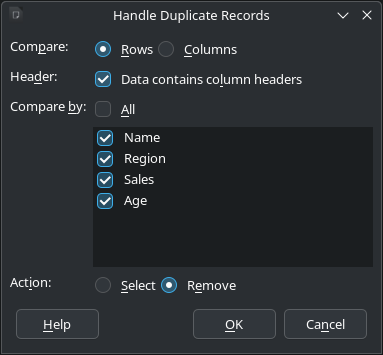
In LibreOffice Calc 25.2, a “Handle Duplicate Records” dialog was added to select or remove duplicate records. Both the Function Wizard dialog and the Functions Sidebar deck received improvements to searching and user experience. Solver models could be saved into spreadsheets, and the Solver became able to provide a sensitivity analysis report. New sheet protection options were also added relating to Pivot Tables, Pivot Charts, and AutoFilters.
Furthermore, many improvements were made to all Impress templates, which received visible elements, such as the font colour being set to black, in Master Notes and Handout. Objects could be centred on the Impress slide or Draw page in a single step, and the automatic repeating of slides could be activated in windowed mode. Finally, overflowing text in presenter notes was no longer cut off when printing.
Please confirm that you want to play a YouTube video. By accepting, you will be accessing content from YouTube, a service provided by an external third party.
If you accept this notice, your choice will be saved and the page will refresh.
Meanwhile, LibreOffice 25.8 was released on August 20. It brought new performance and features to the suite. In the User Interface, the Welcome/What’s New dialog began offering access to the user interface picker and appearance options, which allowed new users to leverage LibreOffice’s flexible UI and personalise the look and feel according to their preferences. The release also provided better interoperability with Microsoft Office files, offering more accurate handling of DOCX, XLSX, and PPTX files with fewer formatting issues, thanks to changes such as:
- A complete overhaul of word hyphenation and spacing
- Font management in Impress updated to be compatible with PowerPoint files
- The addition of new functions in Calc: CHOOSECOLS, CHOOSEROWS, DROP, EXPAND, HSTACK, TAKE, TEXTAFTER, TEXTBEFORE, TEXTSPLIT, TOCOL, TOROW, VSTACK, WRAPCOLS, and WRAPROWS
There were, of course, other important new features, such as the ability to export to the PDF 2.0 format, and several new ScriptForge library services.
Please confirm that you want to play a YouTube video. By accepting, you will be accessing content from YouTube, a service provided by an external third party.
If you accept this notice, your choice will be saved and the page will refresh.
Performance
Throughout 2025, the LibreOffice community continued to work on improved performance in the suite. In LibreOffice 25.2, the speed of font previews in Calc was greatly improved. Additionally, the speed of saving from XLS to ODS was greatly improved after the impact of increasing the supported number of columns to 16k, and saving ODS files with large merged ranges became faster. Spreadsheets with lots of conditional formatting opened and saved much faster, while spreadsheets with lots of comments also saved much faster. Finally, the speed of loading XLS files was greatly improved after the impact of increasing the supported number of columns to 16k.
In LibreOffice 25.8, performance was upgraded so that everything ran faster, from startup to scrolling through large documents, with significant speed improvements delivered on less powerful machines. In benchmark tests, Writer and Calc opened files up to 30% faster. Optimised memory management allowed for smoother operation on virtual desktops and thin clients.
Quality Assurance
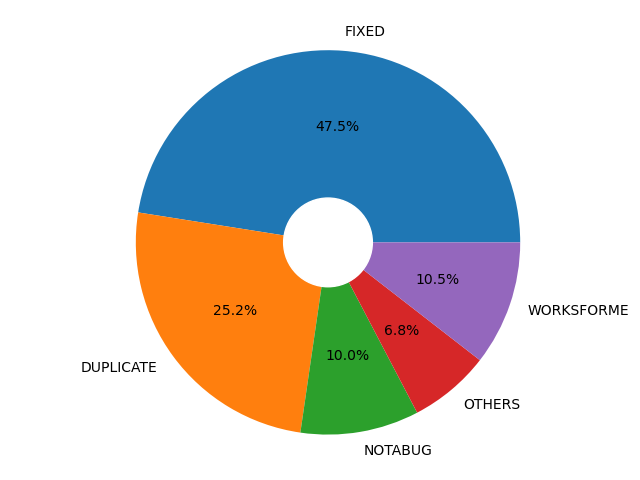
For every release, the LibreOffice Quality Assurance community produced Alpha, Beta and Release Candidate versions, giving users the chance to test the software (and report bugs) well in advance of the final release. Throughout the years, thousands of bugs were confirmed, triaged and resolved. The QA team wrote monthly reports about its activity on the QA blog.
Accessibility
In LibreOffice 25.2, the Accessibility Sidebar featured improved warning and error levels, along with a new option to ignore specific warnings. Additionally, user interface elements were updated to report an accessible identifier that can be utilised by assistive technologies.
Platform-specific enhancements included on Windows, where accessibility was automatically enabled whenever a tool querids information on the accessibility level, and accessible relations were now correctly reported. Meanwhile, on Linux, the positions of UI elements, including those on Wayland, were accurately reported on the accessibility level.
LibreOffice 25.8 added an accessibility check for links and references in header/footer. Menus in the File ▸ Templates ▸ Manage Templates dialog became screen reader accessible on Windows. Support for the IAccessible2 “text-indent” attribute was added, which could be used by assistive technology like screen readers to report the indent of a paragraph’s first line. Additionally, the table design view in Base no longer became unresponsive when a screen reader was active on Windows. Finally, comboboxes and other controls inside toolbars were also represented in the accessibility tree of the application.