LibreOffice releases, features, QA and accessibility – TDF Annual Report 2025

TDF Annual Report 2025 banner

This is part of the Annual Report 2025 from The Document Foundation, the non-profit that coordinates the LibreOffice project and community. More will be posted soon…

Releases of the Year

LibreOffice’s release plan works on a time-based release schedule, with major updates every six months (typically in February and August). So in other words, there are two new versions of LibreOffice per year. Many other FOSS projects adopt a similar time-based approach, and since 2024, LibreOffice has used a “year.month” versioning scheme – so LibreOffice 25.2, for instance, was released in the second month (February) of 2025. This versioning scheme helps users to see how old (or new) their currently installed version of LibreOffice is.

In addition to the major upgrades, there were monthly smaller “point” releases, mainly fixing bugs, compatibility issues and security vulnerabilities.

Major Feature Highlights

LibreOffice 25.2 was released on February 6. It introduced the ability to read and write ODF version 1.4, alongside numerous interoperability improvements with proprietary OOXML documents. It became possible to automatically sign documents after defining a default certificate. Additionally, Windows 7 and 8/8.1 were designated as deprecated platforms, with support scheduled to be removed in version 25.8, and extensions and features relying on Python ceased to work on Windows 7.

In LibreOffice Writer 25.2, improvements were made to Track Changes management to better handle a large number of changes in long documents. Comments were tracked in the Navigator when the focus was moved into them, while resizing the area containing comments showed a visual guide. Options were added to set a default zoom level for opening documents, which overrode the level stored within the documents themselves. It also became possible to delete all content of a specific content type, excluding headings, via the Navigator.

In LibreOffice Calc 25.2, a “Handle Duplicate Records” dialog was added to select or remove duplicate records. Both the Function Wizard dialog and the Functions Sidebar deck received improvements to searching and user experience. Solver models could be saved into spreadsheets, and the Solver became able to provide a sensitivity analysis report. New sheet protection options were also added relating to Pivot Tables, Pivot Charts, and AutoFilters.
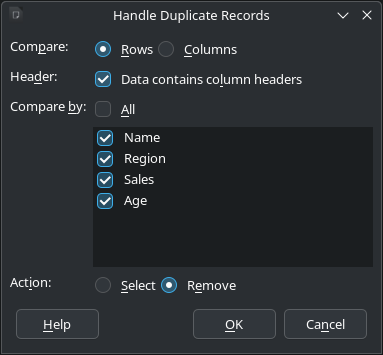
Screenshot of Handle Duplicate Records dialog

Furthermore, many improvements were made to all Impress templates, which received visible elements, such as the font colour being set to black, in Master Notes and Handout. Objects could be centred on the Impress slide or Draw page in a single step, and the automatic repeating of slides could be activated in windowed mode. Finally, overflowing text in presenter notes was no longer cut off when printing.

Please confirm that you want to play a YouTube video. By accepting, you will be accessing content from YouTube, a service provided by an external third party.

YouTube privacy policy

If you accept this notice, your choice will be saved and the page will refresh.

Meanwhile, LibreOffice 25.8 was released on August 20. It brought new performance and features to the suite. In the User Interface, the Welcome/What’s New dialog began offering access to the user interface picker and appearance options, which allowed new users to leverage LibreOffice’s flexible UI and personalise the look and feel according to their preferences. The release also provided better interoperability with Microsoft Office files, offering more accurate handling of DOCX, XLSX, and PPTX files with fewer formatting issues, thanks to changes such as:

  • A complete overhaul of word hyphenation and spacing
  • Font management in Impress updated to be compatible with PowerPoint files
  • The addition of new functions in Calc: CHOOSECOLS, CHOOSEROWS, DROP, EXPAND, HSTACK, TAKE, TEXTAFTER, TEXTBEFORE, TEXTSPLIT, TOCOL, TOROW, VSTACK, WRAPCOLS, and WRAPROWS

There were, of course, other important new features, such as the ability to export to the PDF 2.0 format, and several new ScriptForge library services.

Please confirm that you want to play a YouTube video. By accepting, you will be accessing content from YouTube, a service provided by an external third party.

YouTube privacy policy

If you accept this notice, your choice will be saved and the page will refresh.

Performance

Throughout 2025, the LibreOffice community continued to work on improved performance in the suite. In LibreOffice 25.2, the speed of font previews in Calc was greatly improved. Additionally, the speed of saving from XLS to ODS was greatly improved after the impact of increasing the supported number of columns to 16k, and saving ODS files with large merged ranges became faster. Spreadsheets with lots of conditional formatting opened and saved much faster, while spreadsheets with lots of comments also saved much faster. Finally, the speed of loading XLS files was greatly improved after the impact of increasing the supported number of columns to 16k.

In LibreOffice 25.8, performance was upgraded so that everything ran faster, from startup to scrolling through large documents, with significant speed improvements delivered on less powerful machines. In benchmark tests, Writer and Calc opened files up to 30% faster. Optimised memory management allowed for smoother operation on virtual desktops and thin clients.

Quality Assurance

For every release, the LibreOffice Quality Assurance community produced Alpha, Beta and Release Candidate versions, giving users the chance to test the software (and report bugs) well in advance of the final release. Throughout the years, thousands of bugs were confirmed, triaged and resolved. The QA team wrote monthly reports about its activity on the QA blog.
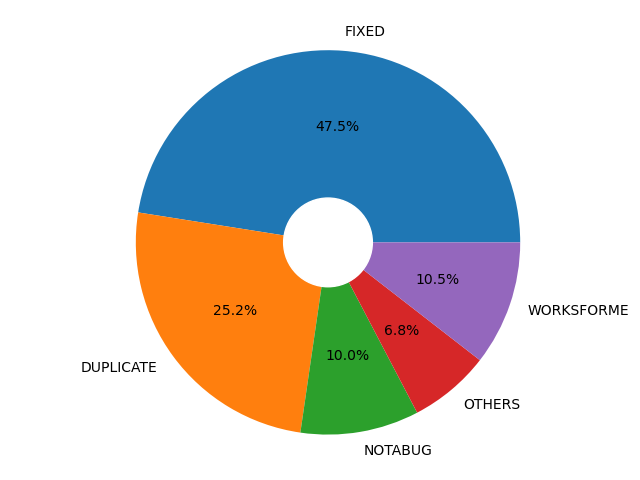
Pie chart of fixed bugs

Accessibility

In LibreOffice 25.2, the Accessibility Sidebar featured improved warning and error levels, along with a new option to ignore specific warnings. Additionally, user interface elements were updated to report an accessible identifier that can be utilised by assistive technologies.

Platform-specific enhancements included on Windows, where accessibility was automatically enabled whenever a tool querids information on the accessibility level, and accessible relations were now correctly reported. Meanwhile, on Linux, the positions of UI elements, including those on Wayland, were accurately reported on the accessibility level.

LibreOffice 25.8 added an accessibility check for links and references in header/footer. Menus in the File ▸ Templates ▸ Manage Templates dialog became screen reader accessible on Windows. Support for the IAccessible2 “text-indent” attribute was added, which could be used by assistive technology like screen readers to report the indent of a paragraph’s first line. Additionally, the table design view in Base no longer became unresponsive when a screen reader was active on Windows. Finally, comboboxes and other controls inside toolbars were also represented in the accessibility tree of the application.
Like what we do? Support the LibreOffice project and The Document Foundation – make a donation, or get involved and help our volunteers. Thank you!

Video: Join the LibreOffice community!

LibreOffice is the free, private, open source office suite – and successor to OpenOffice. It’s made by a worldwide community, and you can be part of it! 😊 Boost your skillset, learn new people, and have fun – find out what you can do for LibreOffice.

(This video is also available on PeerTube.)

Please confirm that you want to play a YouTube video. By accepting, you will be accessing content from YouTube, a service provided by an external third party.

YouTube privacy policy

If you accept this notice, your choice will be saved and the page will refresh.

Euro-Office, open standards, and native ODF

A welcome commitment to open standards — and why it should end with ODF as Euro-Office’s native document format.

The Euro-Office pre-announcement has generated considerable coverage across the European press over the past few days. The Document Foundation welcomes the attention that open standards are receiving — and welcomes still more the commitment the announcement makes to them. Before the discussion settles, we would like to clarify one point and state one expectation.

Several reports have described Euro-Office as “the first European open source office suite.” Reading the pre-announcement carefully, we do not find the coalition making that claim, and it is not one we would endorse. Europe has been building free and open source office software for many years: LibreOffice, developed by this Foundation and a worldwide community, is itself European, mature, and far from alone.

The “first” framing appears to have emerged in the speed of a launch day rather than in the text of the announcement. We note it not to claim precedence — precedence is not the point — but because accuracy serves the cause of open standards better than enthusiasm alone.

Read on its merits, the announcement gives a great deal to welcome. The promise to improve support for the OpenDocument Format is precisely what the European free software community has long asked for, and we take it in good faith and with genuine appreciation. We have always held that sovereignty begins with the format, not with the logo on the application — and a coalition that understands this is one worth encouraging.

We would also state an expectation, in the spirit of encouragement rather than demand. Improved support is a beginning, not a destination. A format that is merely supported is one a suite can read and write as a courtesy, while a native format is the one in which its documents are created, stored, and trusted across the years — and that is precisely where digital sovereignty is won or lost.

The only destination consistent with the sovereignty Euro-Office invokes is ODF as its native document format. A genuinely European, genuinely sovereign office suite cannot treat the open standard as a concession to outsiders, it has to speak ODF as its mother tongue. The Document Foundation looks forward to that moment, and will be glad to acknowledge it when it comes.

LibreOffice project and community recap: May 2026

Monthly recap banner

Here’s our summary of updates, events and activities in the LibreOffice project in the last four weeks – click the links to learn more…

  • We started May by announcing the new LibreOffice website. Our previous website was looking rather old and becoming difficult to maintain, so the team at TDF – with help of the wider LibreOffice community – has been working on a redesign, based on newer technology.

Announcing the new LibreOffice website

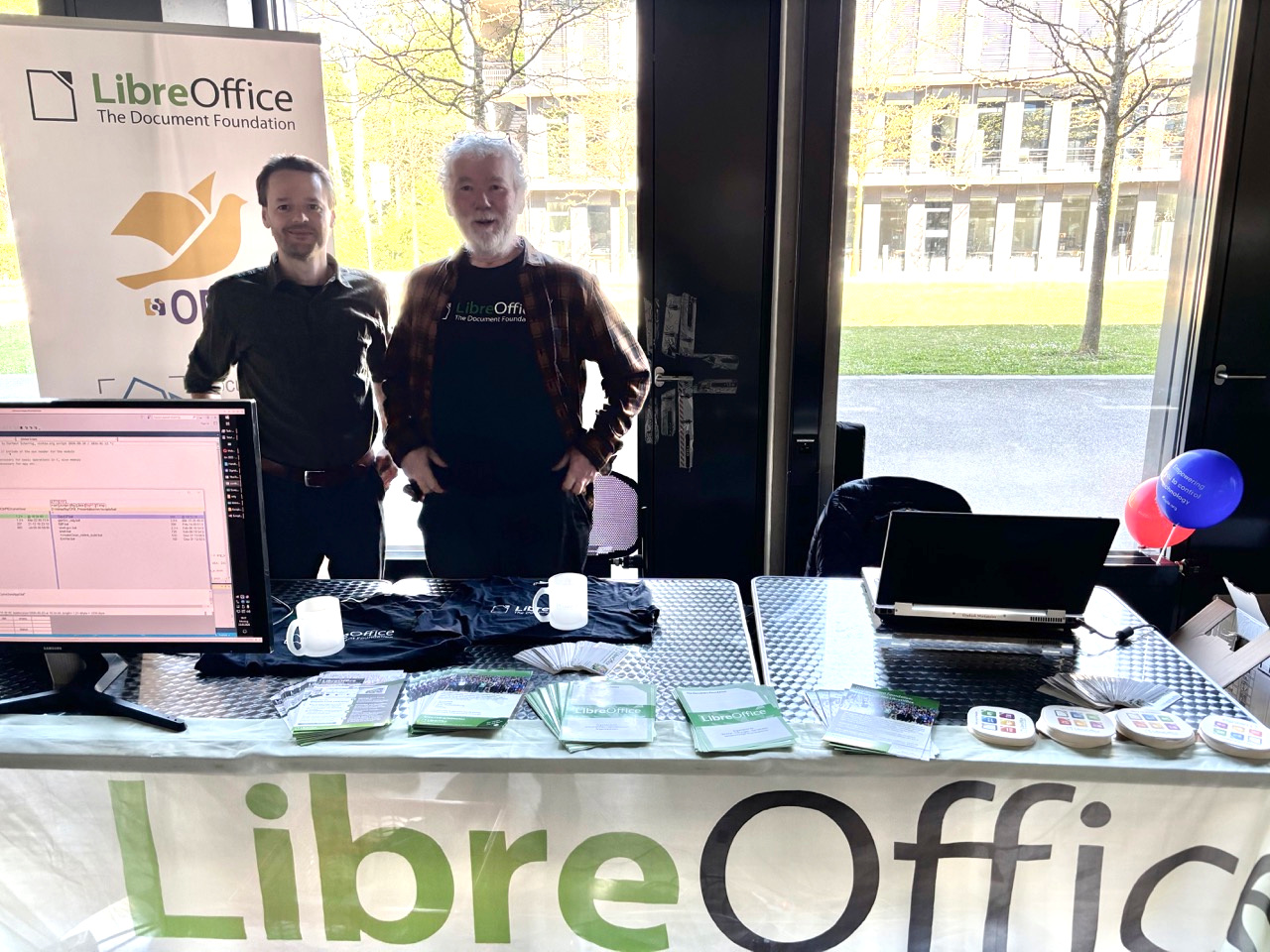
LibreOffice stand at the Augsburger Linux Info-Tag

ODF vs OOXML, an issue that should never have existed

GSoC logo

  • In the middle of the month, we announced LibreOffice 25.8.7, the final maintenance release of the LibreOffice 25.8 family. From here we will focus on maintaining the 26.2 branch, and are preparing for 26.8, our next major release (due in August).

LibreOffice 25.8 banner

  • The vast majority of income to The Document Foundation, the non-profit behind the LibreOffice project and community, is from donations from end users. We made a new video explaining how donations are used to support the community that makes the software.

Please confirm that you want to play a YouTube video. By accepting, you will be accessing content from YouTube, a service provided by an external third party.

YouTube privacy policy

If you accept this notice, your choice will be saved and the page will refresh.

  • Next, we started posting sections from TDF’s Annual Report 2025, starting with Native Language Projects. A huge thanks to the hundreds of people who make LibreOffice available is so many languages around the world! 😊

Annual Report banner with group photo from LibreOffice Conference

New Web and Mobile Strategy for LibreOffice

Like what we do? Support LibreOffice with a donation – or join our community and help to make LibreOffice even better! Also keep in touch – follow us on Mastodon, Bluesky, Reddit and Facebook.

Join the LibreOffice team as a paid system administrator, working on TDF’s infrastructure (full-time, remote, m/f/d)

Love LibreOffice? Got experience with infrastructure and system administration? We are The Document Foundation (TDF), the non-profit entity behind LibreOffice. We’re passionate about free software, the open source culture and about bringing new people with fresh ideas into our project.

To assist the LibreOffice community with its work, we are looking for a full-time (remote) Infrastructure and System Administrator, to start as soon as possible.

Here’s what you’ll do

  • System orchestration and OS management: Orchestrate, deploy, and maintain all internal and external systems, specifically standard and customised Linux operating systems, with the majority of machines running Debian GNU/Linux. We currently run SaltStack, but proposals for different ways to handle config management and deployment are welcome.
  • Virtualisation and storage infrastructure: Manage virtualisation platforms and hypervisors (KVM/QEMU). Experience with GlusterFS (for the backup system) is a plus, but not mandatory.
  • Database, cloud, and App Administration: Administer database servers such as MariaDB and PostgreSQL, cloud storage repositories (such as Nextcloud), web applications, email services, and developer tooling.
  • Network and hardware maintenance: Maintain core physical and cloud network infrastructure, including routers, switches, and NAS storage, amongst them devices from MikroTik.
  • Security and network access: Oversee firewalls, intrusion detection, antivirus, IP reputation, global mirror systems, and secure VPNs for users and machines.
  • Identity and access management: Deploy and manage single sign-on (SSO) solutions, directory services, domain names, DNS zones, and SSL certificates (PKI).
  • Ensure stable operations and monitoring: Together with teammates and volunteers, ensure stable infrastructure availability, manage log analysis, handle emergencies, and coordinate with external providers during outages.
  • Patch management: Execute timely deployments of security and software updates within scheduled maintenance windows.
  • Team coordination and documentation: Lead and coordinate the infrastructure team, volunteer contributors, and third-party vendors, while keeping technical documentation up to date.
  • Data protection and disaster recovery: Implement backup and point-in-time disaster recovery solutions, and manage infrastructure-related GDPR compliance in cooperation with privacy officers.

What we want from you

  • Very good sysadmin and infra maintenance skills on Linux
  • Good team-playing abilities
  • Speaking and writing English

As always, TDF will give some preference to individuals who have previously shown a commitment to TDF, including but not limited to members of TDF. Not being a member does not exclude any applicants from consideration.

Join us!

All jobs at The Document Foundation are remote jobs, where you can work from your home office or a co-working space. The work time during the day is flexible, apart from a few fixed meetings. The role is offered as full-time (ideally 40 hours per week). While we prefer full-time for the role, part-time applications, or proposals to grow the hours over time, will be considered. Candidates that are resident in Germany will be employed directly by TDF. Otherwise, external payroll services will be used if available in the candidate’s country of residence.

Are you interested? Get in touch!

TDF welcomes applications from all suitably qualified persons regardless of their race, sex, gender, disability, religion/belief, sexual orientation or age. Don’t be afraid to be different, and stay true to yourself. We like you that way! 😊

We’re looking forward to receiving your application, including information about you (your resume), when you are available for the job, and of course your financial expectations. Please provide details about your experience and send us an e-mail to sysadmin@documentfoundation.org no later than July 6, 2026 (end of day, Berlin time). If you haven’t received feedback by August 3, 2026, your application could not be considered.

Also note: we only accept applications from the applicant, and not from any intermediary. We do not accept agency resumes. Please do not forward resumes to any recruiting alias or employee.

The Document Foundation Releases LibreOffice 26.2.4

Berlin, 5 June 2026 – The Document Foundation today announced the release of LibreOffice 26.2.4, the fourth maintenance update to the LibreOffice 26.2 branch. Building on the major feature release published on February 4, 2026, this update delivers targeted bug fixes and stability improvements contributed by a global community of developers and QA engineers.

LibreOffice 26.2.4 is available for immediate download at libreoffice.org/download/ for Windows, macOS, and Linux.

Users of LibreOffice 25.8.x should update to LibreOffice 26.2.4 as LibreOffice 25.8 branch will reach end of life on June 12, and after that date the software will not receive security updates. In late August 2026, The Document Foundation will announce LibreOffice 26.8.

LibreOffice 26.2 introduced a broad set of improvements to daily productivity workflows, including Markdown import and export, connector shapes in Calc, multi-user Base, faster EPUB export, and mandatory Skia rendering on macOS and Windows for better graphics performance. LibreOffice 26.2.4 consolidates these advances with a focused set of fixes, addressing issues identified by users and testers since the initial release.

List of fixes in RC1: wiki.documentfoundation.org/Releases/26.2.4/RC1. List of fixes in RC2: wiki.documentfoundation.org/Releases/26.2.4/RC2.

LibreOffice users, free software advocates and community members can support The Document Foundation and the LibreOffice project with a donation at www.libreoffice.org/donate.

The Document Foundation 2026
Proudly powered by WordPress | Theme: Refined Magazine Pro by Candid Themes.