Berlin, 31 October 2024 – LibreOffice 24.2.7, the seventh and final planned minor update to the LibreOffice 24.2 branch, is available on our download page for Windows, macOS and Linux.
The release includes over 50 bug and regression fixes over LibreOffice 24.2.6 [1] to improve the stability and robustness of the software, as well as interoperability with legacy and proprietary document formats. LibreOffice 24.2.7 is aimed at mainstream users and enterprise production environments.
LibreOffice is the only office suite with a feature set comparable to the market leader, and offers a range of user interface options to suit all users, from traditional to modern Microsoft Office-style. The UI has been developed to make the most of different screen form factors by optimizing the space available on the desktop to put the maximum number of features just a click or two away.
LibreOffice for Enterprises
For enterprise-class deployments, TDF strongly recommends the LibreOffice Enterprise family of applications from ecosystem partners – for desktop, mobile and cloud – with a range of dedicated value-added features, long term support and other benefits such as SLAs: LibreOffice in Business.
Every line of code developed by ecosystem companies for enterprise customers is shared with the community on the master code repository and contributes to the improvement of the LibreOffice Technology platform.
Availability of LibreOffice 24.2.7
LibreOffice 24.2.7 is available from our download page. Minimum requirements for proprietary operating systems are Windows 7 SP1 and macOS 10.15. Products based on LibreOffice Technology for Android and iOS are listed here: www.libreoffice.org/download/android-and-ios/.
This is planned to be the last minor update to the LibreOffice 24.2 branch, which reaches end-of-life in November. All users are then recommended to upgrade to the LibreOffice 24.8 stable branch.
LibreOffice users, free software advocates and community members can support The Document Foundation by making a donation on our donate page.
FOSDEM 2025 will be only in person, taking place on Saturday, February 1, and Sunday, February 2. LibreOffice Technology DevRoom is scheduled for the morning of Saturday, February 1, from 10AM to 2PM.
IMPORTANT DATES TO REMEMBER
Submission open: 30th October 2024
Submission deadline: 1st December 2024 at 11:59PM CET
Acceptance notifications: 6th December 2024
Final confirmation deadline: 12th December 2024
Final schedule announcement: 15th December 2024
Devroom: 1st February 2025 from 10AM to 2PM
Please note that the submission deadline is managed by the FOSDEM team and not by the devroom managers, which means that after that deadline nothing will be accepted.
We might update this call for papers with further details, as soon as we receive them from FOSDEM organizers. Please check TDF blog and social media channels on a regular basis.
CALL FOR PAPERS
We are inviting proposals for talks about “LibreOffice Technology, a development platform for desktop, mobile and cloud office suites“.
Main topics are LibreOffice development, localization, QA, UX, documentation, extensions, migrations and general advocacy, plus the native document format ODF. Please keep in mind that product pitches are not allowed at FOSDEM.
In order to fit as many presenters as possible in the schedule, the length of talks will be limited to a maximum of 20 minutes, including questions, according to the number of submissions.
TALK SUBMISSIONS
FOSDEM Pretalx system will be open for applications starting from October the 30th, 2024.
To submit a talk, please visit the FOSDEM 2025 Pretalx website: https://pretalx.fosdem.org/fosdem-2025/cfp. Please select “LibreOffice” as the *track* and ensure you include all the requested information when submitting a proposal: the title of the talk, a short abstract (one / two paragraphs), some information about yourself (name, bio and photo, but please do remember that your profile might be already stored in Pretalx).
If you already have a Pretalx account from last year, even if your talk was not accepted, please reuse it. Create an account if, and only if, you don’t have one from a previous year. The system is the same used for LibreOffice Conference, so you should not have issues with Pretalx, but in case you have please contact italo at libreoffice.org for help.
All presentations will be recorded and streamed. Sending your proposal implies giving permission to be recorded.
For accepted talks, speakers will receive an email to confirm that the proposal has been accepted. They may expect additional emails with more instructions, for instance to confirm their travel schedule.
CONTACTS
Italo Vignoli: italo at documentfoundation.org
Michael Meeks: michael.meeks at collabora.com
The Annual Report of The Document Foundation describes the foundation’s activities and projects, especially in regard to LibreOffice and the Document Liberation Project.
We’ve been posting sections of the 2023 report here on the blog, and now the full version is available in PDF format on TDF’s Nextcloud server in two different versions: low resolution (6.4MB) and high resolution (43.7MB). The Annual Report is based on the German version presented to the authorities.
The document has been entirely created with free open source software: written contents have obviously been developed with LibreOffice Writer (desktop) and collaboratively modified with LibreOffice Writer (online), charts have been created with LibreOffice Calc and prepared for publishing with LibreOffice Draw, drawings and tables have been developed or modified (from legacy PDF originals) with LibreOffice Draw, images have been prepared for publishing with GIMP, and the layout has been created with Scribus based on the existing templates.
We at The Document Foundation are very grateful to all contributors to our projects and communities in 2023 – none of this would be possible without you!
This is a key event that brings together the LibreOffice community – supporting the leading FOSS office suite – with a large number of stakeholders: large open source projects, international organizations and representatives from EU institutions and European government departments.
After the opening session in the morning of the 10 October, which includes institutional presentations from the Minister for Digitalisation, the Ministry of the Economy and the European Commission’s OSPO, there will be tracks about LibreOffice covering development, quality, security, documentation, localization, marketing and enterprise deployments, and tracks about open source covering technologies in education, OSS applications and cybersecurity. Another session will focus on OSPOs (Open Source Programme Officers).
The LibreOffice and Open Source Conference Luxembourg 2024 provides a platform to discuss the latest technical developments, community contributions, and the challenges facing open source software and communities of which TDF, LibreOffice and its community are important components. Professionals, developers, volunteers and users from various fields will share their experiences and collaborate on the future direction of the leading office suite.
Policy and decision makers will find counterparts from all over Europe with which they will be able to exchange ideas and experiences that will help them to promote and implement open source software in public, education and private sector organizations.
On 11 and 12 October, there will also be workshops focusing on different aspects of LibreOffice development, targeted to undergraduate Computer Science students or anyone who knows programming, and wants to become familiar with a large scale real world open source software project. To be able to better support the participants we limited the number of seats to 20 so register for the workshops as soon as possible to reserve your place.
Everyone is encouraged to register and participate in the conference to engage with the open source community, learn from different experts and contribute to meaningful discussions. Please note that, to avoid waste, we will plan for food, drinks and other free items for registered attendees so help us to cater for your needs by registering in time.
Free Software (like LibreOffice) is about far more than just zero-cost. It’s about the freedom to use, share and modify the software that we all rely on. Our friends over at the Free Software Foundation Europe (FSFE) write:
The European Commission has cut important funds for Free Software. The non-transparent decision shows the need for sustainable long-term funding to allow the EU to control its own technology. Raise your voice and take part in an ongoing consultation to ask for sustainable long-term funds for software freedom.
They provide information on how to participate in the consultation (which closes on 20 September!) so give them a hand.
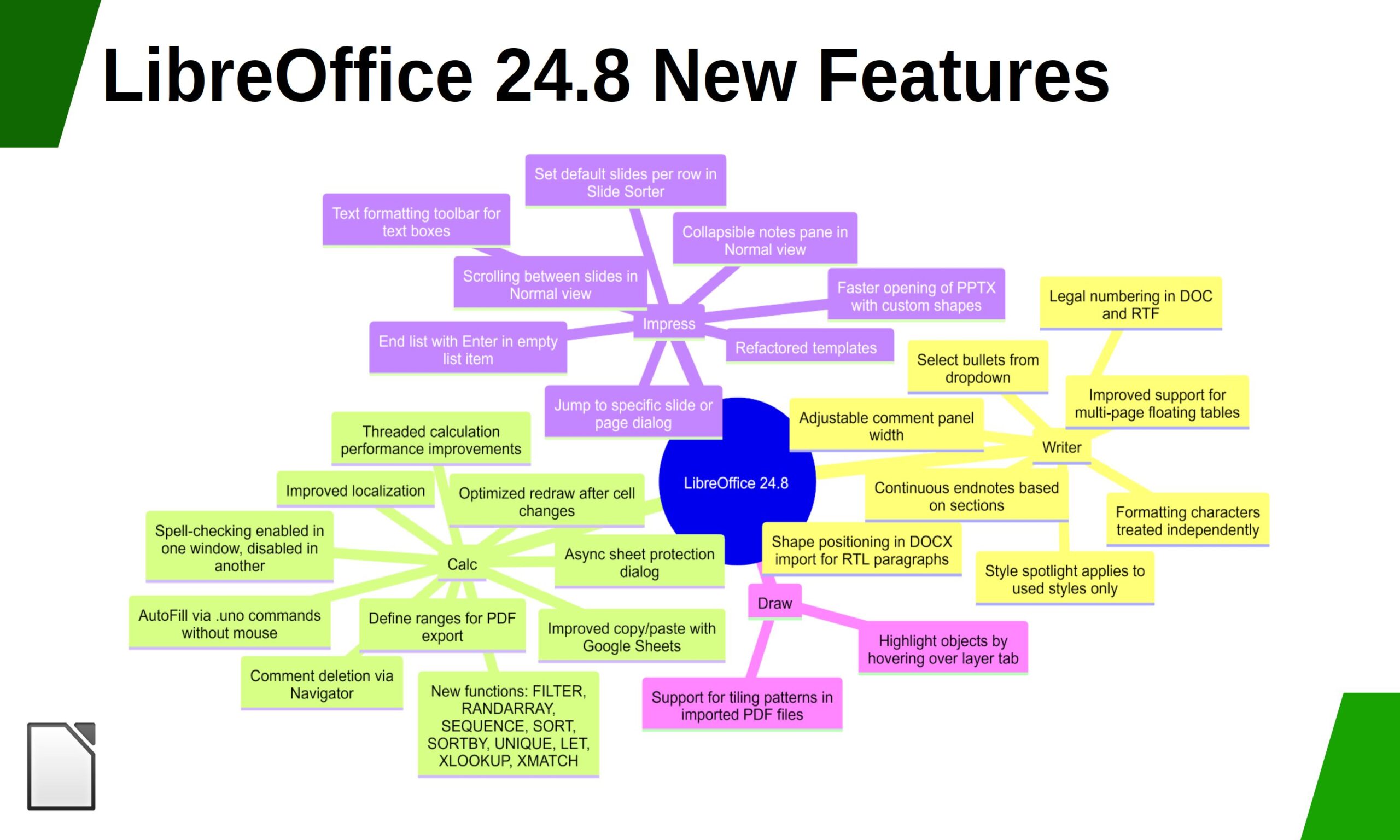
The LibreOffice 24.8 family is optimised for the privacy-conscious office suite user who wants full control over the information they share
Berlin, 12 September 2024 – LibreOffice 24.8.1, the first minor release of the LibreOffice 24.8 family of the free, volunteer-supported office suite for Windows (Intel, AMD and ARM), macOS (Apple and Intel) and Linux, is available at www.libreoffice.org/download. For users who don’t need the latest features and prefer a more tested version, TDF maintains the previous LibreOffice 24.2 family, with several months of back-ported fixes. The current version is LibreOffice 24.2.6.
LibreOffice is the only software for creating documents that contain personal or confidential information that respects the privacy of the user – ensuring that the user is able to decide if and with whom to share the content they create. As such, LibreOffice is the best option for the privacy-conscious office suite user, and offers a feature set comparable to the leading product on the market.
In addition, LibreOffice offers a range of interface options to suit different user habits, from traditional to modern, and makes the most of different screen sizes by optimising the space available on the desktop to put the maximum number of features just a click or two away.
The biggest advantage over competing products is the LibreOffice Technology Engine, the single software platform on which desktop, mobile and cloud versions of LibreOffice – including those from ecosystem companies – are based. This allows LibreOffice to provide a better user experience and to produce identical and fully interoperable documents based on the two available ISO standards: the Open Document Format (ODT, ODS and ODP) and the proprietary Microsoft OOXML (DOCX, XLSX and PPTX). The latter hides a great deal of artificial complexity, which can cause problems for users who are confident that they are using a true open standard.
End users looking for support will be helped by the immediate availability of the LibreOffice 24.8 Getting Started Guide, which can be downloaded from the following link: books.libreoffice.org. In addition, they will be able to get first-level technical support from volunteers on the user mailing lists and the Ask LibreOffice website: ask.libreoffice.org.
Please confirm that you want to play a YouTube video. By accepting, you will be accessing content from YouTube, a service provided by an external third party.
If you accept this notice, your choice will be saved and the page will refresh.
LibreOffice for Enterprise
For enterprise-class deployments, TDF strongly recommends the LibreOffice Enterprise family of applications from ecosystem partners – for desktop, mobile and cloud – with a wide range of dedicated value-added features and other benefits such as SLAs: www.libreoffice.org/download/libreoffice-in-business/.
Every line of code developed by ecosystem companies for enterprise customers is shared with the community on the master code repository and improves the LibreOffice technology platform. Products based on LibreOffice Technology are available for all major desktop operating systems (Windows, macOS, Linux and ChromeOS), mobile platforms (Android and iOS) and the cloud.
The Document Foundation has developed a migration protocol to help companies move from proprietary office suites to LibreOffice, based on the provision of an LTS (long-term support) enterprise-optimised version of LibreOffice, plus migration consulting and training provided by certified professionals who offer value-added solutions that are consistent with proprietary offerings. Reference: www.libreoffice.org/get-help/professional-support/.
In fact, LibreOffice’s mature code base, rich feature set, strong support for open standards, excellent compatibility and LTS options from certified partners make it the ideal solution for organisations looking to regain control of their data and break free from vendor lock-in.
LibreOffice 24.8.1 availability
LibreOffice 24.8.1 is available from www.libreoffice.org/download/. Minimum requirements for proprietary operating systems are Microsoft Windows 7 SP1 (no longer supported by Microsoft) and Apple macOS 10.15. Products based on LibreOffice technology for Android and iOS are listed at www.libreoffice.org/download/android-and-ios/.
LibreOffice users, free software advocates and community members can support The Document Foundation by making a donation at www.libreoffice.org/donate.