Announcing Open Badges for LibreOffice contributors!

LibreOffice is made by volunteers and certified developers across the globe, and today we’re announcing a new system to credit their work and show appreciation: Open Badges. So what are they?

In a nutshell, Open Badges are PNG images that are awarded to contributors for reaching a certain threshold – such as a number of commits to the codebase, or answering questions on Ask LibreOffice. But these images are something special: they contain metadata describing the contributor’s work, which can be verified using an external service. Open Badges are used by other free software projects, such as Fedora.

We at The Document Foundation – the non-profit entity behind LibreOffice – will start issuing customised badges to contributors, who can then proudly display them on websites or social media. And because of the embedded metadata, contributors can use the badges as proof of their work. If you’ve been a long-time contributor to LibreOffice and are in the job market, use your badge to highlight your involvement in a large open source project!

Starting off: Ask LibreOffice contributors

The first set of badges go to the nine people on Ask LibreOffice, our community assistance website, who’ve posted over 100 answers. We’ll be in touch personally with the badges! Their usernames:

  • Ratslinger
  • ajlittoz
  • Mike Kaganski
  • Opaque
  • Lupp
  • erAck
  • RGB-es
  • ebot
  • JohnSUN

Stay tuned to this blog for more Open Badges awards!

TDF new Board of Directors

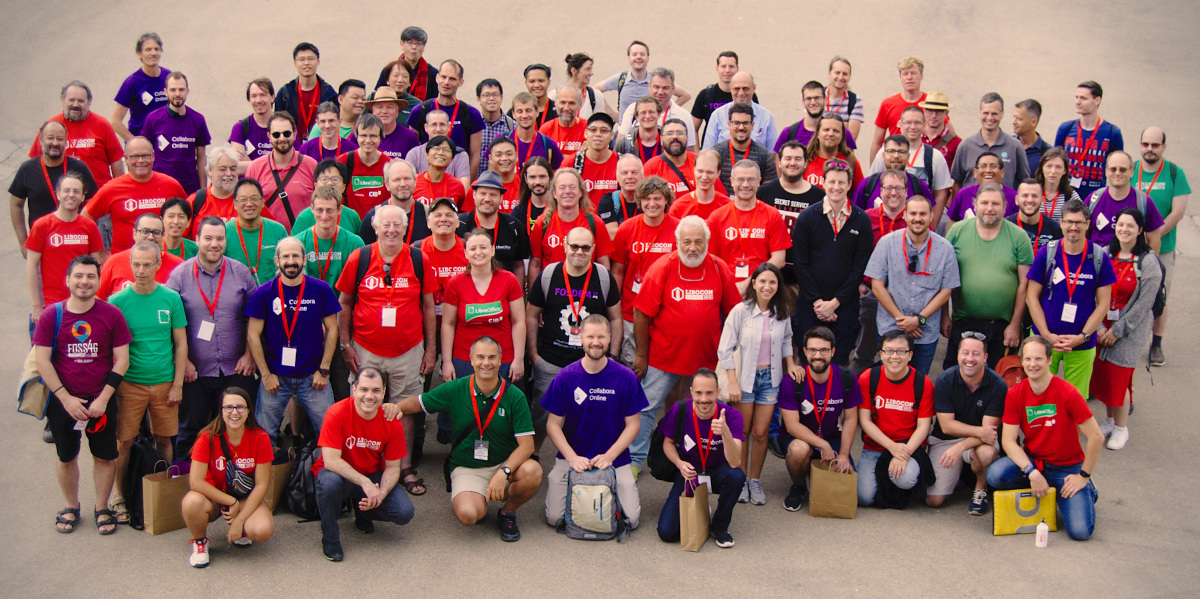
TDF Board of Directors (old and new), Membership Committee and Team members in Brussels, just before FOSDEM 2020 (Marina Latini and Sophie Gautier arrived after the meeting, while Osvaldo Gervasi did not attend FOSDEM, so they are all missing from the picture)

The new Board of Directors of The Document Foundation has just started the two year term on February 18, 2020. Members are: Michael Meeks, Thorsten Behrens, Franklin Weng, Daniel Rodriguez, Cor Nouws, Lothar Becker and Emiliano Vavassori. Deputies are: Nicolas Christener and Paolo Vecchi.

Five people have been elected for the first time to the Board of Directors: Daniel Armando Rodriguez from Posadas in Argentina; Lothar Becker from Karlsruhe in Germany; Emiliano Vavassori from Bergamo in Italy; Nicholas Christener from Bern in Switzerland; and Paolo Vecchi from Luxembourg (in Luxembourg).

During the first meeting of the Board of Directors, the nine members have elected Lothar Becker as Chairman and Franklin Weng as Deputy Chairman. In the meantime, also the responsibilities and areas of oversight have been discussed and decided.

At the same time, six people – who have served as board members and deputies during the previous term(s) – have left the board, but will continue their activity as TDF Members: Marina Latini, Chairwoman; Björn Michaelsen, Deputy Chairman; Eike Rathke, Member; and Jan Holešovský, Simon Phipps and Osvaldo Gervasi, Deputies.

Each one of these six people was responsible for several BoD activities:

  • Marina Latini: QA, Documentation, and Certification (and other business development activities) after four years of service (BoD);
  • Björn Michaelsen: Releases (including schedules), Events, and Affiliations after eight years of service (BoD);
  • Eike Rathke: Development, and Contracts/Legal (hiring, taxes, compliance, GDPR, trademarks and brands) after eight years of service (BoD/MC);
  • Jan Holešovský: Infrastructure, and Documentation after six years of service (BoD/MC);
  • Simon Phipps: License, Affiliations, and Contracts/Legal (hiring, taxes, compliance, GDPR, trademarks and brands) after six years of service (BoD/MC);
  • Osvaldo Gervasi: Documentation, and Native Language Projects (localization, marketing, non-English QA activities, etc) after four years of service (BoD).

Being a Board member means donating each year several weeks of activity to TDF – for full day face-to-face meetings (twice a year, at FOSDEM in Brussels and LibOCon), and for bi-weekly calls (which usually last a couple of hours) – to manage the foundation and administer the budget, mostly based on donations.

We are deeply grateful to all of these for their dedication, contribution to decision making and for all of their volunteer time spent in BoD duties, as well as for their ongoing contribution to the project.

March 8, International Women’s Day

If we must celebrate a day for women, let us celebrate freedom from stereotypes, from expectations, from idolisation, from sacrifice…

Stop congratulating women for being the secret behind a successful man… Start saluting them for being successful.

Stop saying the mother is sacred for all the sacrifices she makes… Try to reduce those sacrifices!

Stop telling women they are beautiful… Try telling them it’s not important to be beautiful!

Stop praising her roles as mother, wife, daughter, sister… Celebrate her as an individual, a person, independent of relationships.

Stop justifying her necessity to multi task… Give her a chance not to!

Stop these constructs which are aimed at making her strive for an impossible balance… Let her be inadequate… And happy!

Stop making her look at herself through a conveniently male viewpoint.

Let her be imperfect, whimsical, irresponsible, boorish, lazy, fierce, opinionated, loud, flabby, ungroomed, adventurous, unpredictable, unprepared, impractical…

LET HER BE

(attribution of these words seem to be impossible, but happy to update it with the original author)

LibreOffice power feature: join text boxes after importing PDFs

Although PDF is primarily used as a read-only format, there are tools for editing PDFs – and indeed, many people pay quite a bit of money for these tools, such as Adobe Acrobat Pro.

But there are alternatives! LibreOffice Draw provides a powerful PDF editor, for free, and since LibreOffice 6.4 it has a great feature to speed up editing: the ability to consolidate (join) multiple text boxes. This is especially useful if you’ve imported a PDF, and the text content is spread across multiple text boxes, making it hard to work with.

Let’s see it in action. Imagine you’ve opened a PDF document in LibreOffice Draw, and there are lots of separate text boxes, like this:

This is fiddly to work with – wouldn’t it be great if you could join all of these text boxes together, to edit them as a single chunk of text? Well, in LibreOffice 6.4, you can. Just select all of the text boxes, using the shift key while selecting them, then right-click and choose Consolidate Text in the context menu:

Now, the three text boxes are joined into one, so you can edit the text as a single item:

Download LibreOffice and try it out!

See the online help for more tips and guides, and Ask LibreOffice if you have any questions!

Our new extensions and templates page is getting ready!

Our old Extensions and Templates Website has worked well over the years. It is one of the key and most frequented websites of the LibreOffice project, as it enables users to enhance the functionality of LibreOffice with add-ons and plug-ins, while providing an easy way for authors to improve LibreOffice.

We’d like to express a special thanks to Andreas Mantke for implementing, designing and maintaining it in first place! It was his initiative to come up with such a website and he has spent countless hours over the past years to maintain the site to the benefit of our community. Kudos and thank you so much for your help and dedication!

As we look forward, we’ve been thinking about how to progress, while building on some of the other technologies we use.

After research and evaluation of various options, we’ve made the decision to update the website and base it on SilverStripe, the content management system we use for the main LibreOffice website. Our goals include:

  • Streamlined design
  • Improved usability for authors and users
  • Make extensions very prominent
  • Make it easy to localise in many languages

In the last few months, we’ve been working on a new site and workflow, and today we’d like to share the current progress, and provide some information on what’s going on under the hood. Christian Lohmaier talks about the new website, which will be available soon…


Initial setup

We decided to use a much more reduced and simplified setup for this. With fewer tools to maintain, the easier it is to add improvements along the way.

We’ve made the decision to go with SilverStripe, since that is a CMS we are already familiar with since we are already using it for our main website. It has a Model View Controller design that is easy to grasp and extend by anyone who knows some PHP and html and CSS.

The separate backend (administrative interface) and frontend (what a visitor using the site sees) allows us to streamline the workflow and improve error handling.

Having the data completely decoupled from the representation will allow us to revamp the site as new ideas come along or potential problems will surface. One of our goals is to simplify the user interface and also allow for translation and localization of both the extensions as well as the whole site from the very beginning. Extension maintainers can translate their listing into the language of their main target language.

Discoverability

Similarly, users told us that they wanted their extensions to be even easier to discover, so for this we decided to go with a curated list of tags as the main categorization/classification. We learned from other tag-using systems (like ask) that freeform tags would require a high level of discipline from content creators to not create too specific or too similar tags to make for a useful search tool.

Having a curated list of tags also allows for translation of the tags, further improving the experience for our non-English speaking endusers. This also will allow us to get rid of the rather arbitrary split into templates and extensions, but rather have a more targeted listings.

And since we’re already using SilverStripe in combination with TDF’s Single Sign-On solution, current users of our SSO can easily access the new site.

Creating and editing

To illustrate the keep-it-simple approach, here is what an extension maintainer would see once logged in to edit or create an extension entry:

And here’s what creation of a new entry would look like:

While some people might think that this is not the most exciting user interface, and that it also boxes the user in, well: that is the whole point about it!

Just like on the current site, we kept the concept of having a main extension entry along with individual releases that might be limited to a certain language or a specific operating system:

Moderation

The new sites provides some features also for extension moderators with a more expansive admin interface in which they would have access to reports and where they can add and maintain the list of available tags, and do other similar tasks.

In the next post we’ll dig a little deeper into the more technical stuff like the data model and templating systems. That will then provide the required knowledge to not just give feedback on the current design (both visual as well as from a low-level perspective), but already provide concrete improvements in form of patches.

As we’re a volunteer-driven, community project, we really appreciate any help – so if you want to give us a hand, join our website mailing list and drop us a line. We look forward to hearing from you!

The Document Foundation announces LibreOffice 6.4.1

Berlin, February 27, 2020 – The Document Foundation announces LibreOffice 6.4.1, the 1st minor release of the LibreOffice 6.4 family, targeted at technology enthusiasts and power users. LibreOffice 6.4.1 includes 80 bug fixes and improvements to document compatibility.

LibreOffice 6.4.1 represents the bleeding edge in term of features for open source office suites, and as such is not optimized for enterprise class deployments, where features are less important than robustness. Users wanting a more mature version can download LibreOffice 6.3.5, which includes some months of back-ported fixes.

LibreOffice 6.4.1’s change log pages are available on TDF’s wiki: https://wiki.documentfoundation.org/Releases/6.4.1/RC1 (changed in RC1) and https://wiki.documentfoundation.org/Releases/6.4.1/RC2 (changed in RC2).

LibreOffice’s individual users are helped by a global community of volunteers: https://www.libreoffice.org/get-help/community-support/. On the website and the wiki there are guides, manuals, tutorials and HowTos. Donations help us to make all of these resources available.

LibreOffice in business

For enterprise class deployments, TDF strongly recommend sourcing LibreOffice from one of the ecosystem partners to get long-term supported releases, dedicated assistance, custom new features and other benefits, including Service Level Agreements (SLAs). Also, the work done by ecosystem partners flows back into the LibreOffice project, benefiting everyone.

Also, support for migrations and trainings should be sourced from certified professionals who provide value-added services which extend the reach of the community to the corporate world and offer CIOs and IT managers a solution in line with proprietary offerings.

In fact, LibreOffice – thanks to its mature codebase, rich feature set, strong support for open standards, excellent compatibility and long-term support options from certified partners – represents the ideal solution for businesses that want to regain control of their data and free themselves from vendor lock-in.

Availability of LibreOffice 6.4.1

LibreOffice 6.4.1 is immediately available from the following link: https://www.libreoffice.org/download/. Minimum requirements are specified on the download page. TDF builds of the latest LibreOffice Online source code are available as Docker images: https://hub.docker.com/r/libreoffice/online/.

LibreOffice Online is fundamentally a server-based platform, and should be installed and configured by adding cloud storage and an SSL certificate. It might be considered an enabling technology for the cloud services offered by ISPs or the private cloud of enterprises and large organizations.

All versions of LibreOffice are built with document conversion libraries from the Document Liberation Project: https://www.documentliberation.org.

Support LibreOffice

LibreOffice users are invited to join the community at https://ask.libreoffice.org, where they can get and provide user-to-user support. People willing to contribute their time and professional skills to the project can visit the dedicated website at https://whatcanidoforlibreoffice.org.

LibreOffice users, free software advocates and community members can provide financial support to The Document Foundation with a donation via PayPal, credit card or other tools at https://www.libreoffice.org/donate.