Thanks to Franklin Weng, who has launched the idea, coordinated the project and provided the Chinese localization, and to the Japanese localization of Naruhiko Ogasawara, the Spanish localization of Daniel Armando Rodriguez and the Italian localization of Italo Vignoli, we offer a small Easter Game to play around the concept of Software and Document Freedom, and the Open Document Format. Of course, with billions of people confined in their houses because of the COVID-19 pandemic, there is nothing to celebrate, so this is just a nice and gentle way to stress the importance of open document standards for our community. Click on the eggs to launch the Easter Game.
LibreOffice’s native file format is OpenDocument, a fully open and standardised format that’s great for sharing documents and long-term data storage. Of course, LibreOffice does its best to open files made by other office software as well, even if they’re stored in pseudo-“standards” with cryptic and obfuscated contents. Compatibility with PowerPoint PPT(X) presentations is therefore a challenge, but developers are working hard on improvements…
Everyone is invited to participate in the PowerPoint support initiative, either in development or testing. If you are interested in joining, please send an email to ilmari.lauhakangas@libreoffice.org.
Macros help users to automate common tasks in LibreOffice. In September 2019 we announced a new team in our community to work on macro support. A progress report was published in November 2019, so let’s review everything that happened since then.
If you are interested in contributing to the macro team (development, testing or documentation), we’d love to hear from you – please send an email to ilmari.lauhakangas@libreoffice.org and we’ll get in touch.
Wiki docs
Thanks to Nathan Ullberg, many wiki articles previously only available in French can now be read in English as well. Nathan also updated existing articles and created an article about manipulating LineShape objects in Impress. Detailed lists of his work can be found on his wiki user page.
Thanks to everyone who worked on these tasks! Everyone is welcome to join our community and get involved – just email ilmari.lauhakangas@libreoffice.org and we’ll get back to you.
News from the documentation community: The Help project of LibreOffice underwent a major revamp in the last couple of years, with the introduction of the browser-based Help replacing the old Writer-Web solution. Still, editing the Help XML files (XHP) continued to be very hard for any volunteer or skilled developer, due to the specifics of the XML dialect and time required to be proficient in writing Help pages, which continued to be a major block for any individual.
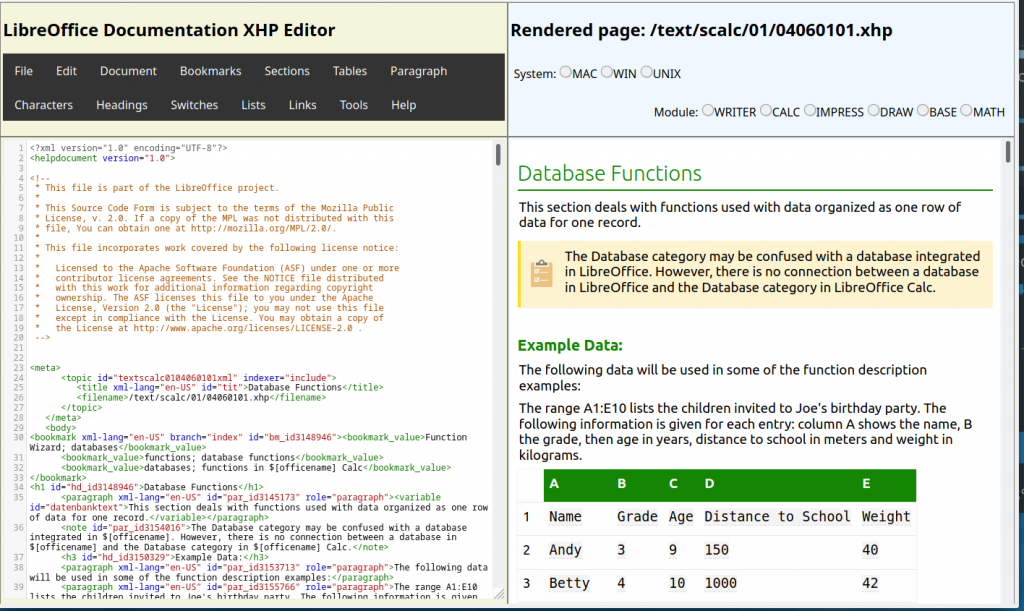
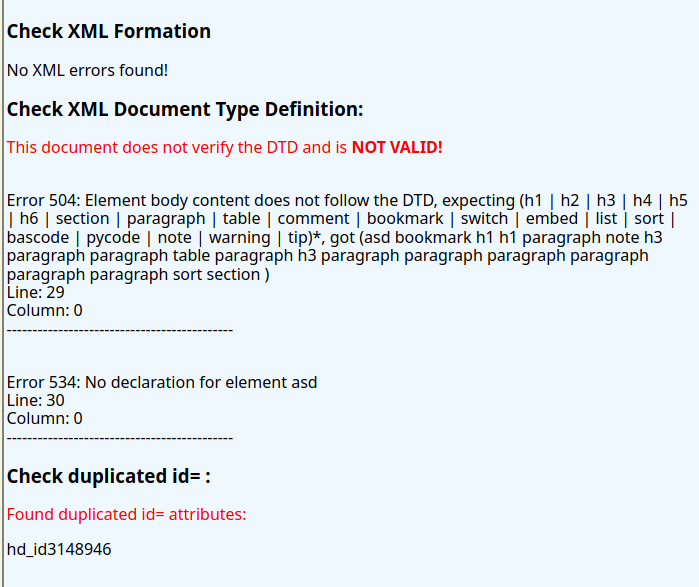
To address the issue, we developed an online editor to assist and make textual editing quicker for any Help writer, by featuring the possibility of rendering the help page at once, at the click of a button. Also, we implemented a series of checking, including XML validity and the verification of ID unicity, crucial for translation.
Editor main screen with page loaded
The Help editor is available at https://newdesign.libreoffice.org/xhpeditor/index.php and contains features that greatly improve and simplify the XHP editing process. For instance, the menu allows users to write content in plain text and the wrap each text segment into the proper XHP tag. For example, after writing a paragraph in plain text, select the text and choose menu Paragraph – <paragraph> to wrap the text into a paragraph tag with the benefit of adding a unique identifier for the paragraph, which is vital for the translation process of LibreOffice Help.
Another nice feature is the editor autocompletion, which allows user to type only the start of a tag name and the editor suggests the rest of the name, sparing the energy spent in typing the whole tag name. When adding any tag to the text, the autoclose feature adds the closing tag automatically. Users can also press F11 to display the editing area in the whole browser area, enlarging the editing space, or even press Ctrl+F to open a search and replace window in the editor.
Help page verification
You can open and save a local XHP file and select Tool – Render page to have it displayed in the browser area. Or you can copy the XHP plain text and paste in the editor area to continue edition. The XHP editor uses CodeMirror, a popular JavaScript editor with many, many interesting features.
Detailed instructions and a short User manual are available in the wiki page https://wiki.documentfoundation.org/DocumentationHelpEditor and can also be accessed from the editor Help menu. To read the XHP dialect reference , use menu Help > XHP Reference.
We hope the editor will encourage volunteers to address the challenge of writing and updating the Help pages. We are eager to receive suggestion and contributions to the editor project. Come and join us!
Members of The Document Foundation – the non-profit entity behind LibreOffice – help to steer the project, vote for the Board of Directors, and spread the word. Today we’re talking to Leif-Jöran Olsson, who has recently become a member of TDF…
To start with, tell us a bit about yourself!
I am from beautiful Sweden, more precisely from the land of deep forests and white rivers in the middle of the country.
I work as a research engineer and IT operations supervisor at the Swedish Language Bank (a language technology research institute) daytime. I also run the consultancy company Frirogramvarusyndikatet.se, which among other things provides IT admin to TDF, and is a Collabora Productivity partner.
I am soon to become a grandfather for the first time. So, exciting times ahead.
What are you working on in the LibreOffice project right now?
Translations are ongoing, and the review of the grammar and spell checking infrastructure is running since last year. But the largest contribution in time and effort is the current work on a LibreOffice Online-based Sailfish OS app (like the ones for Android and iOS).
Why did you decide to become a member of TDF?
After promoting LibreOffice for many years, we decided to do a significant push for LibreOffice Online in late 2016. And since we from that time also provided IT admin services to TDF, I have been hanging around at hackfests etc.
But since the membership obligations are more towards personal contributions, I did not feel that I contributed enough to become a member. So in addition to becoming a Collabora Productivity partner at the FOSDEM hackfest 2018, I started to think about what I could do as personal contributions.
Since I work with language technology, I prepared for a review of the grammar and spell checking infrastructure in LibreOffice. In the dark ages I actually did a Swedish dictionary extension for the release of OpenOffice 3 with the new packaging format. I also started to contribute to the Swedish translations of LibreOffice. This is something I also do for other projects like Nextcloud, OTRS, SailfishOS, Matomo etc.
Anything else you plan to do in the future? What does LibreOffice really need right now?
I will also try to get closer to the standardisation and evolvement of the Open Document Format specification, since I have experience from SIS the Swedish part of ISO. In addition, as an eXist-db core developer, XML is close to my heart.
We need to get closer to valuing/counting all contributions equally. I felt the translations were not counted as real contributions in the way code is (and I say this with a free software coding experience of 25+ years). This makes me a bit sad that we are not ahead of other projects in this aspect. But let us start changing this with the very positive 10/20 years celebrations with a grand Fest Noz now. Kenavo / på återseende!
Thanks to Leif for all his contributions! And to anyone else reading this who’s involved in the LibreOffice project and community, consider becoming a member:
Please confirm that you want to play a YouTube video. By accepting, you will be accessing content from YouTube, a service provided by an external third party.
Organizers of the openSUSE + LibreOffice Conference had a meeting this week to discuss various topics surrounding COVID19 and how it may affect the conference and planning for it. At this point, it is uncertain what restrictions governments may keep in place in the coming months. While October is some months away, there are many aspects we are considering as to how to run the event, including travel restrictions, flights, hotel and venue availability, event capacity and our community members’ ability to attend the conference. We hope to make a decision about the conference at the latest by mid-June.
In these difficult times, we want to assure our communities that we are actively engaged in a good outcome for all members, sponsors and interested parties involved with a successful openSUSE + LibreOffice Conference. We are looking at alternatives for the conference like possibly doing a virtual conference and exploring what tools might help us to achieve this should we decide it’s a viable option.
Please remember that the Call for Papers is open and people can submit their talks until July 21. We are moving forward, assuming the conference will take place as planned from October 13 to October 16 in Nurnberg, and will keep our communities informed of any decisions we make regarding the plans for the conference and any alternative options like a virtual conference. Stay safe, healthy and strong during these hard times and we hope to see all of you later this year; celebrating together our anniversary under much better circumstances!

 Thanks to Franklin Weng, who has launched the idea, coordinated the project and provided the Chinese localization, and to the Japanese localization of Naruhiko Ogasawara, the Spanish localization of Daniel Armando Rodriguez and the Italian localization of Italo Vignoli, we offer a small Easter Game to play around the concept of Software and Document Freedom, and the Open Document Format. Of course, with billions of people confined in their houses because of the COVID-19 pandemic, there is nothing to celebrate, so this is just a nice and gentle way to stress the importance of open document standards for our community. Click on the eggs to launch the Easter Game.