Let’s celebrate with LibreOffice 5.2.4

Berlin, December 22, 2016 – The Document Foundation (TDF) announces the availability of LibreOffice 5.2.4still, the fourth minor release of the LibreOffice 5.2 family. Based on the upcoming announcement of LibreOffice 5.3, all users can start to update to LibreOffice 5.2.4 from LibreOffice 5.1.6 or previous versions.

TDF suggests deploying LibreOffice in large organizations, public administrations and enterprises with the backing of professional support by certified people (a list is available at: http://www.libreoffice.org/get-help/professional-support/).

Road to LibreOffice 5.3

With the availability of LibreOffice 5.3 RC1, the project has entered the last stage of the road to LibreOffice 5.3, which will be announced on February 1st, 2017. In the meantime, we have announced the UI concept: https://blog.documentfoundation.org/blog/2016/12/21/the-document-foundation-announces-the-muffin-a-new-tasty-user-interface-concept-for-libreoffice/.

Users can start learning about the new exciting features on LibreOffice 5.3 Release Notes page (https://wiki.documentfoundation.org/ReleaseNotes/5.3). The page will be updated until the very last minute.

Download LibreOffice

LibreOffice 5.2.4 is immediately available for download from the following link: http://www.libreoffice.org/download/libreoffice-fresh/.

LibreOffice users, free software advocates and community members can support The Document Foundation with a donation at http://donate.libreoffice.org.

Several companies sitting on TDF Advisory Board (http://www.documentfoundation.org/governance/advisory-board/) are providing either value added Long Term Supported versions of LibreOffice or consultancy services for migrations and trainings, based on best practices distilled by The Document Foundation.

The Document Foundation announces the MUFFIN, a new tasty user interface concept for LibreOffice

muffinBerlin, December 21, 2016 – The Document Foundation announces the MUFFIN, a new tasty user interface concept for LibreOffice, based on the joint efforts of the development and the design teams, supported by the marketing team. MUFFIN is an acronym for My User Friendly & Flexible INterface, and focuses on the three areas suggested by LibreOffice users during the development of the concept:

  1. My: LibreOffice users want a “personal” UI, with different options capable of adapting to the user’s personal habits, and not a single UI without options.

  2. User Friendly: of course, any UI should be as user friendly as possible, but LibreOffice users have clearly asked for a “modular” UI, where they can set their own level of user friendliness, and not a single UI without options.

  3. Flexible: the increasing number of LibreOffice users deploying the software on different hardware platforms (for instance, a desktop and a laptop), each one with different characteristics and screen size and resolution, have asked for a UI that can be tweaked to leverage the screen real estate, and not a single UI without options.

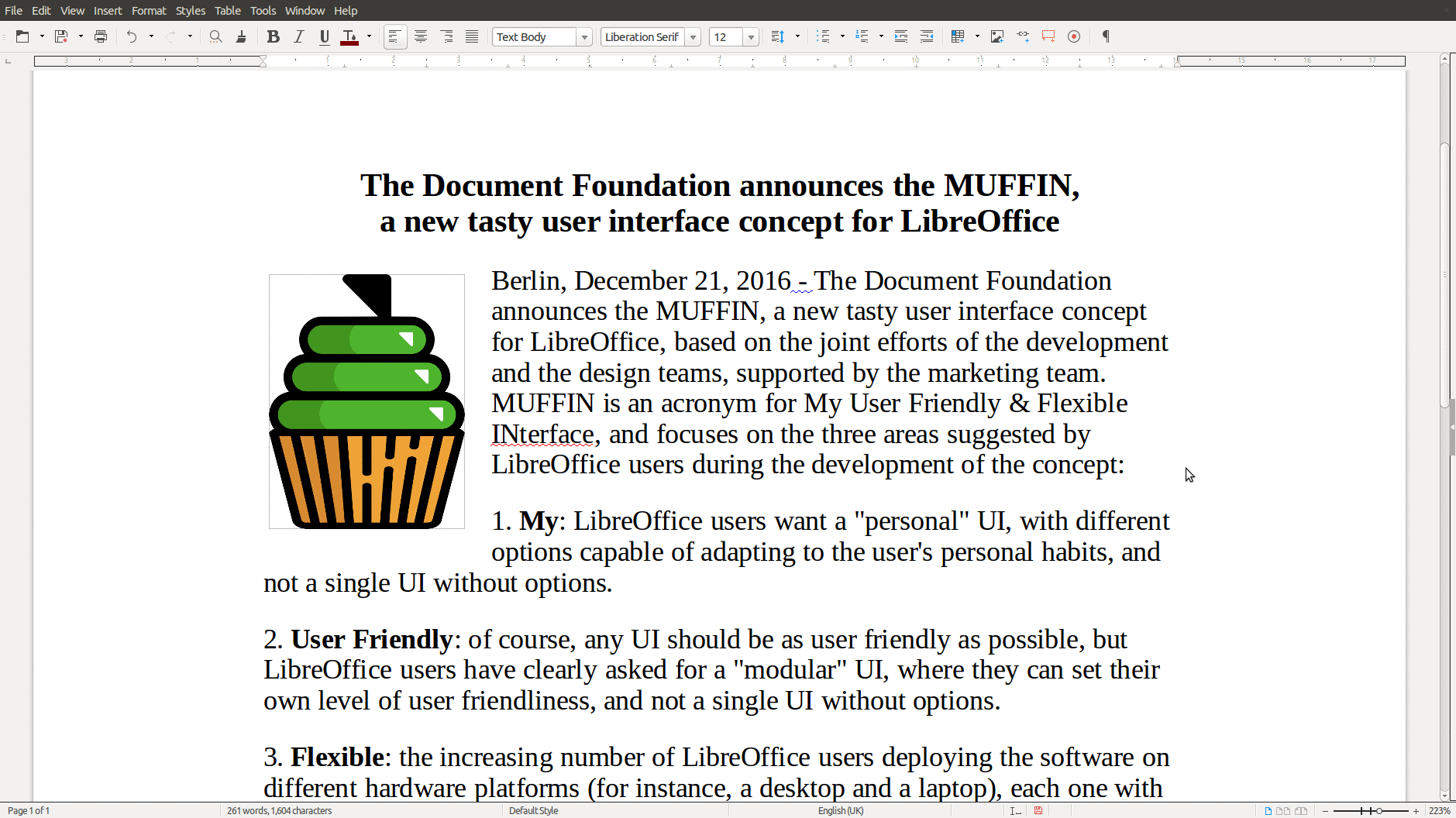
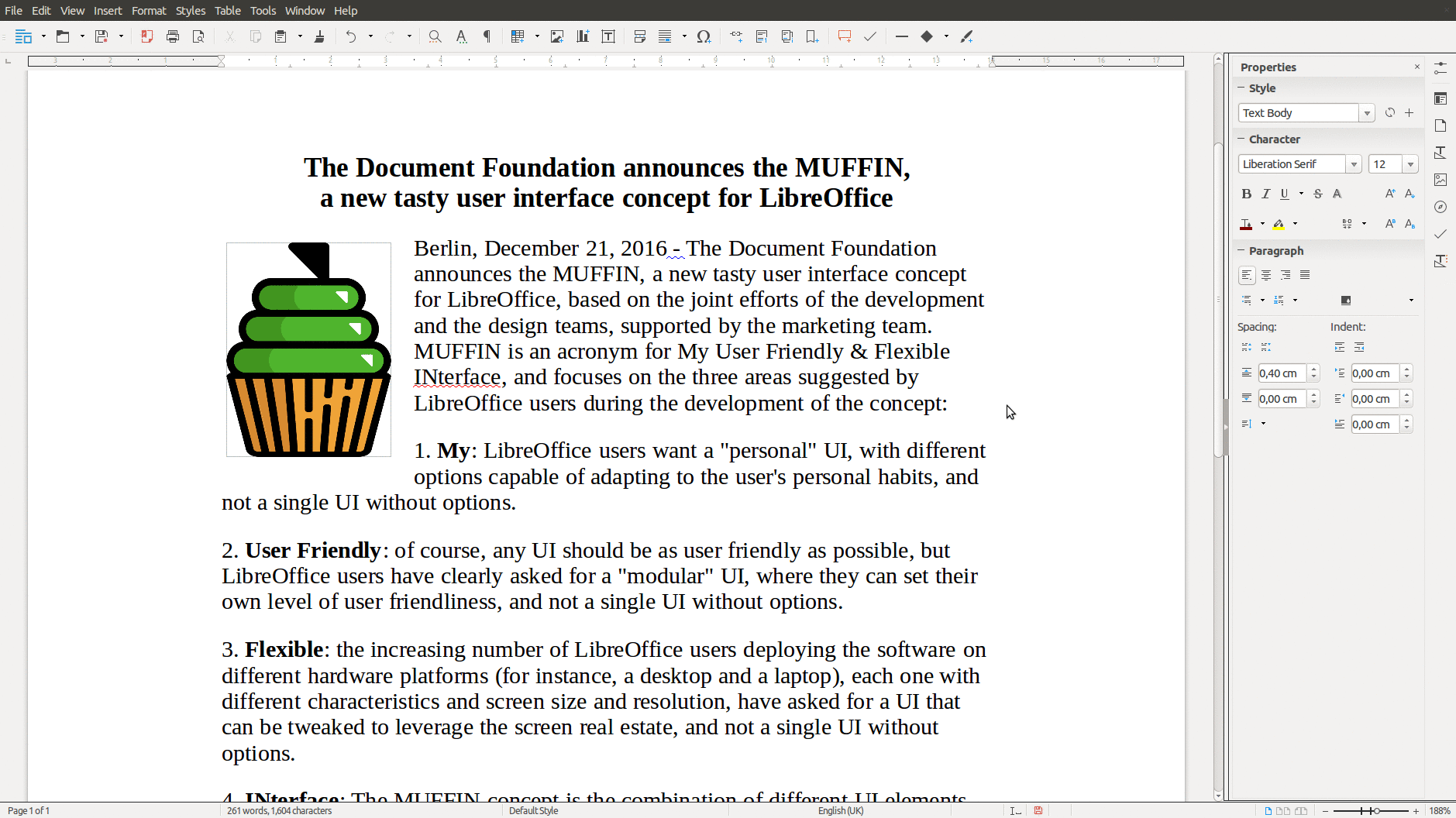
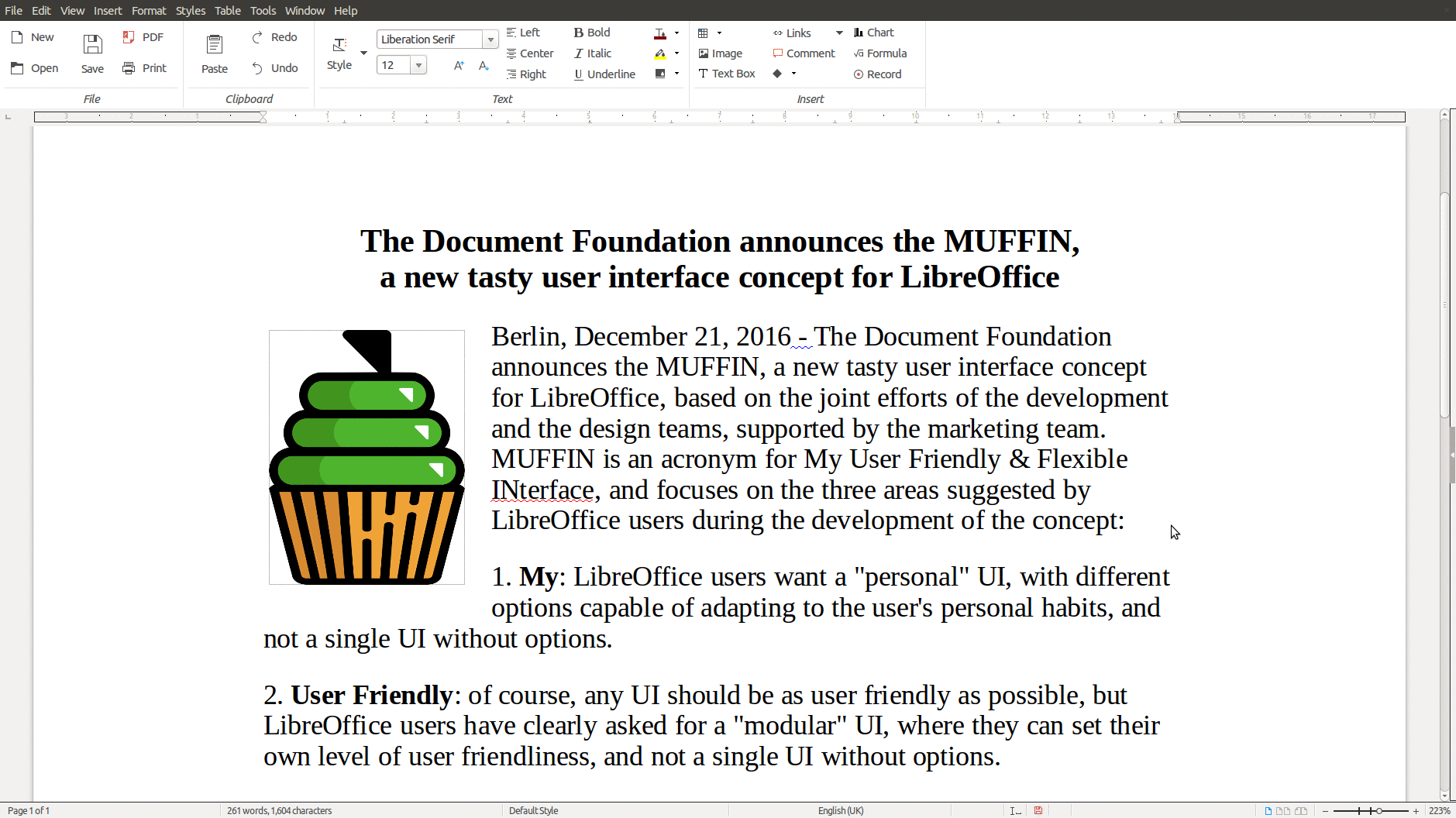
INterface: The MUFFIN concept is the combination of different UI elements, which are going to be available starting from LibreOffice 5.3 either as a standard or experimental feature: the Default UI (with toolbars), a Single Toolbar UI, the Sidebar with a Single Toolbar, and the new Notebookbar (experimental, and not recommended for production use). Each UI layout has been thought to serve a different cluster of LibreOffice users.

LibreOffice Writer with Standard Toolbar
LibreOffice Writer with Single Toolbar
LibreOffice Writer with Sidebar
LibreOffice Writer with Notebookbar

The rationale behind the MUFFIN is further explained in a marketing backgrounder [PDF] and in a specific blog post on TDF Design Blog.

LibreOffice has a new Extensions & Templates website

Berlin, December 14, 2016 – The Document Foundation announces the new Extensions & Templates website, which offers an improved user experience to both developers and end users: https://extensions.libreoffice.org. The resource is now based on the latest version of the Plone open source Content Management System, and has been both coordinated and developed by Andreas Mantke, deputy member of the board at The Document Foundation.

“Two of LibreOffice’s most distinctive characteristics are the possibility of adding features through extensions, and improving quality and consistency of documents thanks to templates”, says Andreas Mantke. “After six years, we decided to refresh the existing resource, to make it easier for developers to upload their files, and for end users to search and download them. I’d love to see an increasing number of contributors uploading extensions and templates”.

extensionsLibreOffice Extensions & Templates website offers 304 extensions, with 678 different releases, and 339 templates, with 376 releases. The three most popular extensions are: “Clipart gallery of danger signs”, “Copy only visible cells” and “LanguageTool”. The three most popular templates are: “Personal Budget Template”, “Simple FAX Template” and “LibreOffice Presentation Templates”. A large number of available resources have been contributed by end users.

LibreOffice users, free software advocates and community members can support The Document Foundation with a donation at http://donate.libreoffice.org.

Month of LibreOffice, November 2016: The results!

Yes, the Month of LibreOffice has come to an end – and what a great month it was. We celebrated contributions from all over the world, in many different areas of the project: development, translations, user support, quality assurance, documentation and social media. Everyone is working hard on the LibreOffice 5.3 release – and we’re really grateful for all the effort!

So, onto the numbers:

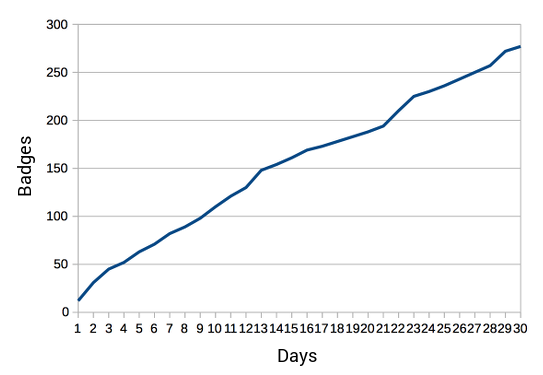
» Badges awarded: 277 (click to view)

You can see all the work going on in the different projects. These are contributions from our community, as we really want to show our appreciation for community members in the Month of LibreOffice, but of course there are many other people doing paid work on LibreOffice as well. Congratulations to everyone who got a badge – click the links under the names to share on social media or get an image for your blog, website or CV!

Then we have the barnstars:

» Barnstars awarded: 24 (click to view)

Barnstars let community members show appreciation for one another, with bronze for small jobs, silver for bigger ones, and gold for especially notable contributions. If you got a barnstar, don’t be shy and let the world know!

Here’s a chart showing the badge count throughout the 30 days. You can see that it climbed steadily, with new names being added each day. This shows how healthy and thriving the LibreOffice project is:

Finally, if you’re a LibreOffice user and this has tempted you to get involved, welcome to the project! Even if you can only spare an hour or so each week, you can really make a difference with development, design, documentation, testing, marketing and helping other users. We look forward to working with you!

LibreOffice contributor video interviews

Our “join the LibreOffice community” video includes snippets from interviews with LibreOffice contributors. Want to see the three interviews in full? Here’s the playlist – click the icon in the top-left to switch between the videos…

Please confirm that you want to play a YouTube video. By accepting, you will be accessing content from YouTube, a service provided by an external third party.

YouTube privacy policy

If you accept this notice, your choice will be saved and the page will refresh.