Coming up: the Month of LibreOffice, May 2018!

Joining an open source project is awesome, for many reasons. You get to:

  • Talk to, meet and share ideas with people around the world
  • Build up valuable skills that could be useful in a future career
  • Make the world a better place, by improving software for everyone to use

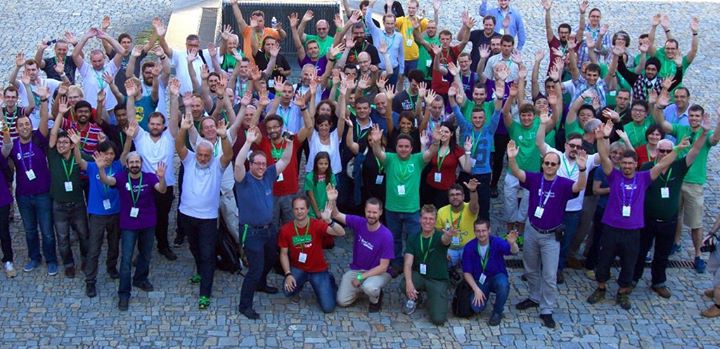
In the case of LibreOffice, you can join us at our yearly conference too! Here’s our community posing for a photo in Brno, Czech Republic:

LibreOffice Conference 2016

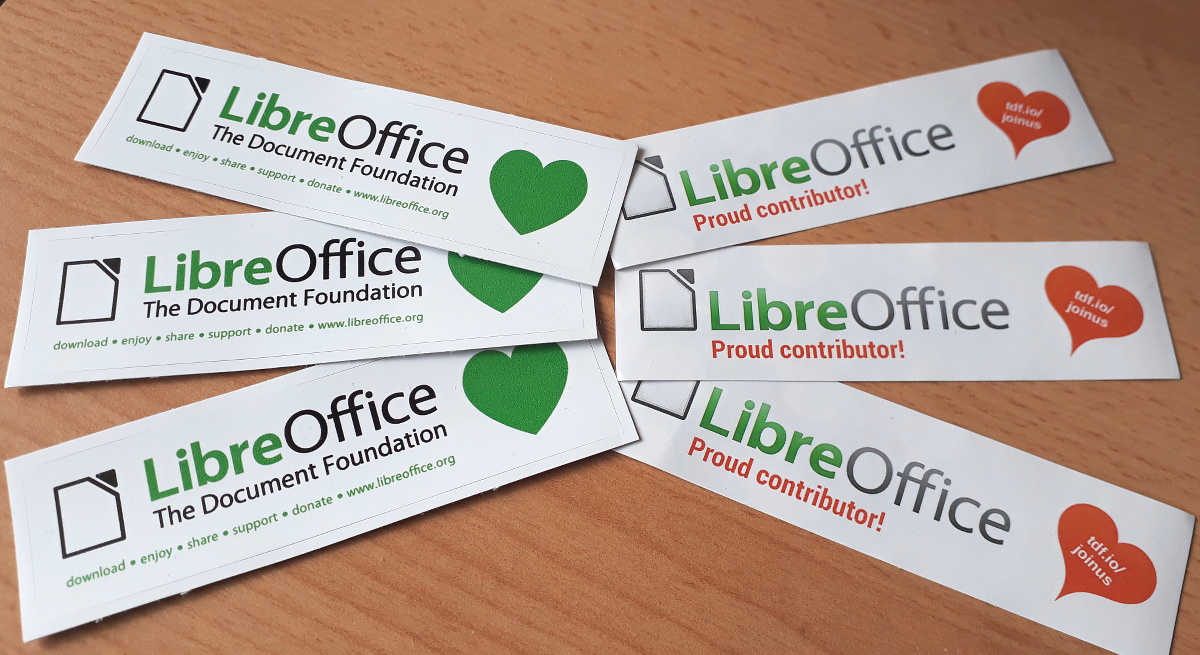
In May, we’ll be celebrating contributions all across the project with a “Month of LibreOffice”. Everyone who helps out with development, design, documentation, QA, marketing, translations and user support will get a big “thank you” from us, and a nifty sticker pack in the post:

(Oh, and there’s an extra special surprise as well, but more on that later!) We’ll post full details on May 1st, but in the meantime, you can find out more about joining the project on our Get Involved page. You don’t have to be a software developer – you can help out in many other areas as well. See you soon!

LibreOffice and Google Summer of Code 2018 – get involved!

Google Summer of Code (GSoC) is a yearly programme in which Google funds university students to work on free and open source software projects. LibreOffice has benefited from this – last year 10 students were accepted into GSoC to do various programming jobs, helping to improve the software.

GSoC students are assisted by experienced “mentors” in the LibreOffice community, as 2016 student Jaskaran Veer Singh explains:

Please confirm that you want to play a YouTube video. By accepting, you will be accessing content from YouTube, a service provided by an external third party.

YouTube privacy policy

If you accept this notice, your choice will be saved and the page will refresh.

For 2018, LibreOffice is again an organisation in the GSoC programme, so if you’re a university student and want to get experience working on a well-known free software project, while also being paid for your efforts, get involved! But don’t delay: the application period runs until March 27, so it’s not far off.

To get started, check out some ideas for projects you can work on. Each project describes what’s involved, the skills required, and the mentor you can contact to get help. If you see something you’d like to work on, contact the mentor as soon as possible! Then you can discuss how to proceed.

After that, read the general GSoC 2018 page on our wiki, which provides more information on the GSoC programme and tells you how to apply. So, check out the ideas, talk to the mentors, and good luck with your projects!

How LibreOffice and TDF are helping other open source projects

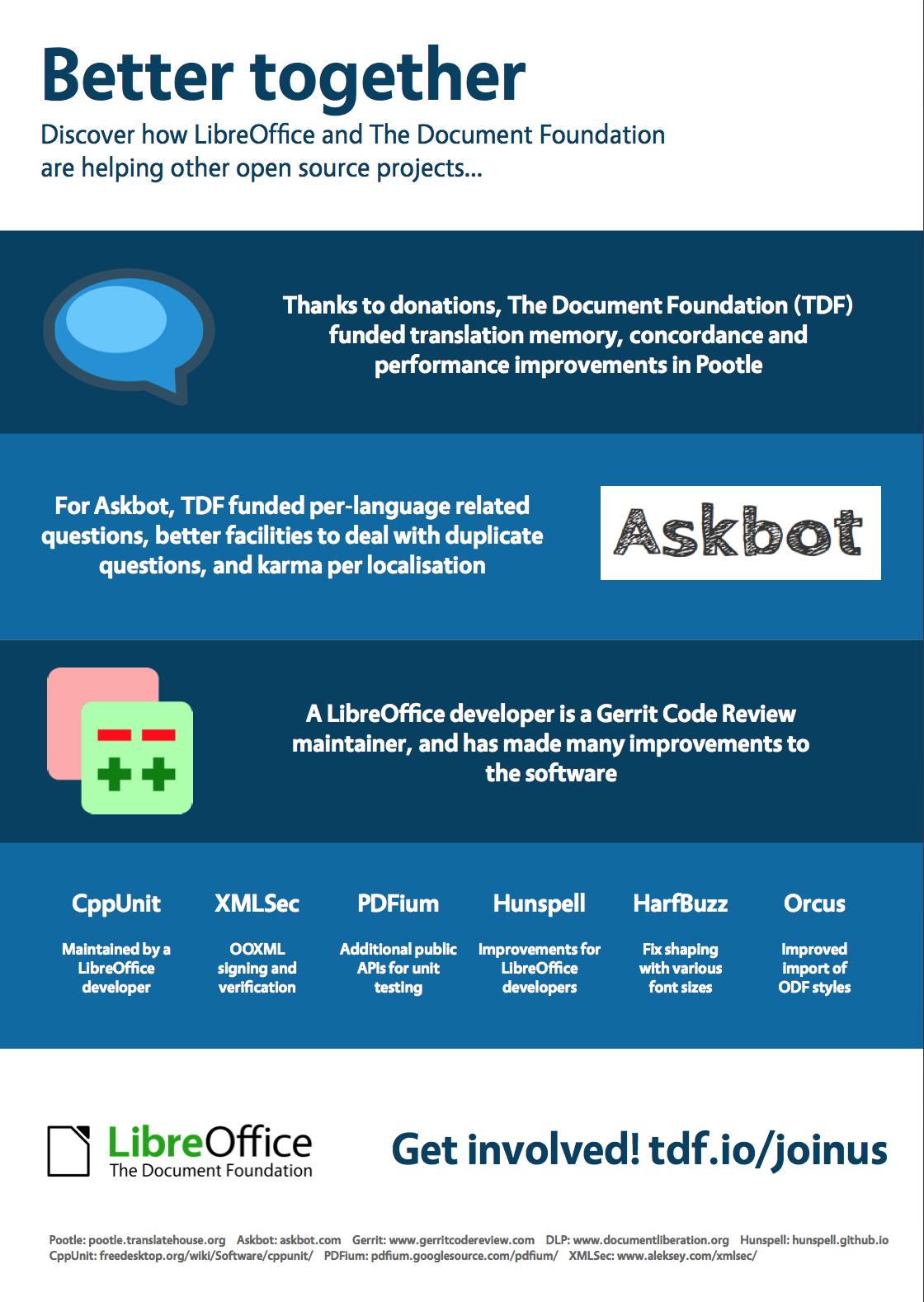
Free and open source software (FOSS) is all about sharing and working together. And while LibreOffice focuses on being the best open source office suite, our community also helps out with other related FOSS projects (just like many other projects help us!). We’ve made an infographic showing “upstream” contributions from LibreOffice developers and The Document Foundation – click to see a bigger version…

Your donations have helped us to achieve much of this – so a big thank you to everyone who has donated to our project and community!

Sunday Marketing #6

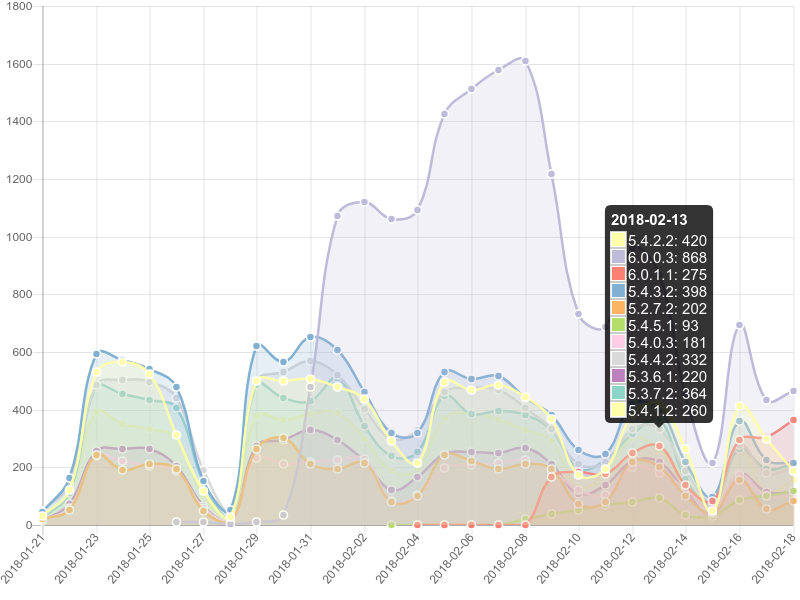
Last week, we have published the crash report chart just two days after the announcement of LibreOffice 6.0.1, to show the impact of the new version on the issues reported by Windows users.

Ten days after the announcement the impact is even more visible, and the chart on the left shows that the situation is now under control.

The trend shows how important is for LibreOffice users to quickly update to the last available version to reduce the number of potential issues.

LibreOffice community focus: Development

Over the past few weeks, we’ve talked to the documentation, localisation, QA (quality assurance) and design communities about their preparations for LibreOffice 6.0, which is due to be released this week. For our final Community Focus, we turn to the developer community, which has helped to implement many of the new features you can see in the release notes.

How does the community work on new features?

Development in LibreOffice is achieved using a wide variety of tools and services, which is a testament to the maturity and longevity of the project. The LibreOffice developer toolkit is best summarized by going through the lifespan of a single patch:

1. Communication. When a user would like to see a new feature in LibreOffice, or identifies a problem, he/she has one of several options to bring it up:

  • Bugzilla: We use our own self-hosted Bugzilla instance. This one of the biggest installations of Bugzilla out there. If you don’t want to report a new issue but would like to contribute towards existing ones, we collect and sort bugs based on skill, difficulty and topic. We also provide a list of EasyHacks that new contributors are encouraged to tackle for a start.
  • E-mail lists: We have several e-mail lists used for general discussion, reports, help and development, the two most important are: libreoffice@lists.freedesktop.org (developers) and users@global.libreoffice.org (users). Here’s how to sign up to the lists.
  • IRC: Core and not-so-core LibreOffice hackers usually hang around in the #libreoffice and #libreoffice-dev channels on the Freenode IRC network. You are welcome to join and ask for help, guidance and general support in there.
  • Telegram, QA, Twitter, etc: We are present on many other online services – global or localized for your community. Check the full list here.

Users, developers and project members usually roam these communication channels and both development and general discussion is taking place. Communication is key. Then the next part is…

2. Development. During this phase the most important tools in the LibreOffice developers’ toolkit are:

  • Git: The LibreOffice source code is self-hosted using Git and is available here. Getting started with LibreOffice and Git is outlined on this page, and an easy build set-up can be achieved using the logerrit tool that we provide.
  • Wiki: The Wiki is a good place to look for information and refine your question before reaching out.
  • Code search: You can easily search (grok) the codebase and reference parts of code in your inquiries to developers using the Opengrok installation.

3. Next steps. Once general agreement has been achieved on how to implement a new feature or fix a specific bug, the following services are used:

  • Gerrit: Core developers and newcomers alike collaborate on the shared code base, using the communication channels outlined before, and Gerrit code review. The Gerrit procedure is recommended for all submissions and all projects that are part of the LibreOffice realm. Signing up on our self hosted Gerrit is crucial to the development process and getting you code admitted into the project.
  • Jenkins and Tinderboxes: Once a specific patch is submitted via Gerrit, a set of automatic continuous integration QA&build tests are being run for all supported platforms, and any defects or regressions will be reported automagically along with feedback from other developers.

An overview of our most critical infrastructure used for development and release engineering is available on this site, while the Wiki has a list of additional services.

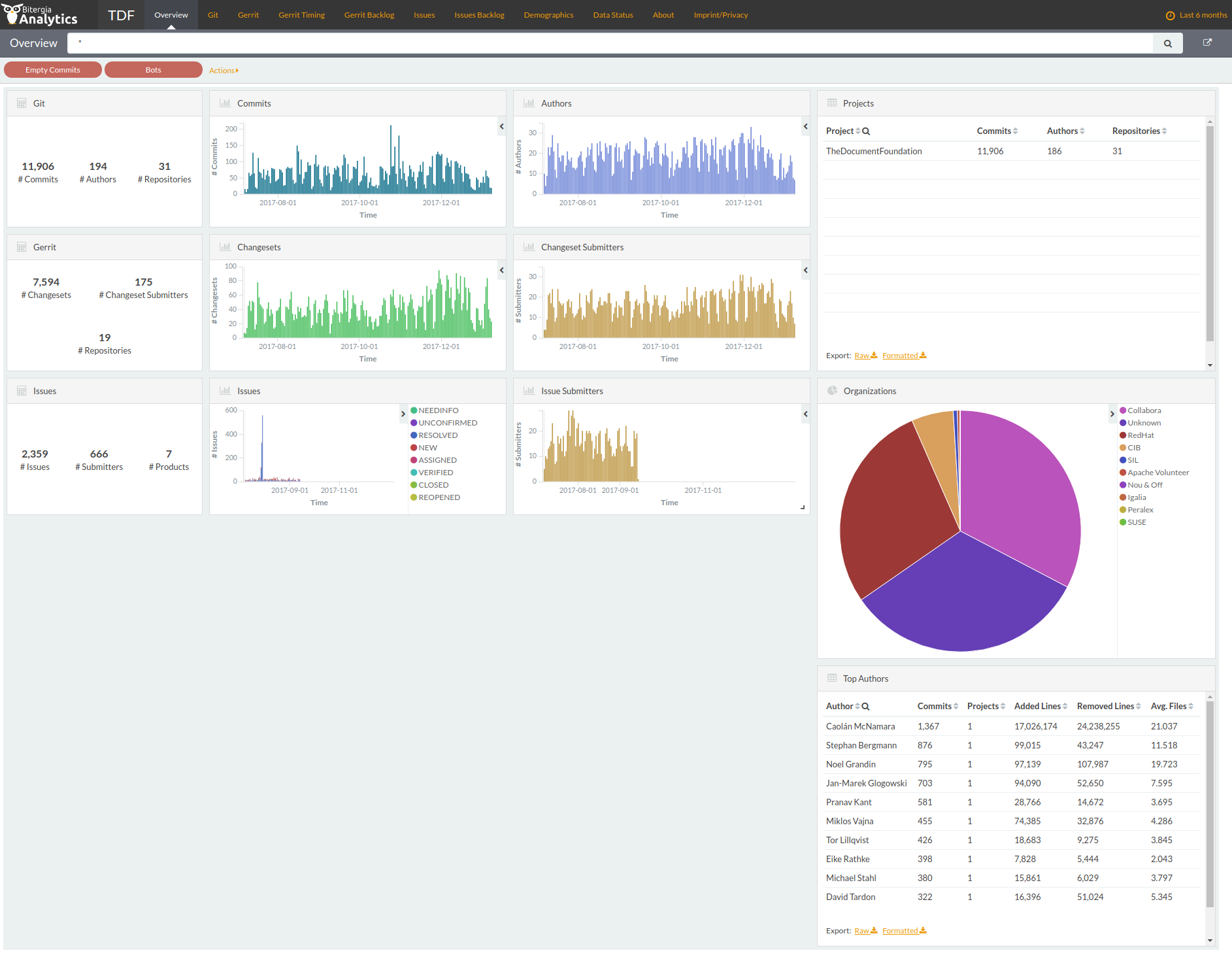
Another useful tool – a new addition to the toolkit – is the LibreOffice dashboard. You can use it to inspect the development, release and lifecycle of LibreOffice core and its associated repos with a bird’s-eye view.

So that’s the final Community Focus – a big thanks to all developers and testers who’ve helped to add the many great new features in LibreOffice 6.0! (And thanks to Teodor Mircea Ionita for his help with this post.) Stay tuned to this blog for the official announcement of the new release…


Sunday Marketing #2

In 2017, The Document Foundation has announced the availability of a Dashboard, based on data gathered from several development-related repositories. It is a very useful resource for marketing, as it can be configured to provide either an overview of the project or several detailed charts which can be used to get a more precise picture of what has happened in term of commits, committers, organizations, and issues. The time span covered by the dashboard can be set by the user, from days to years.

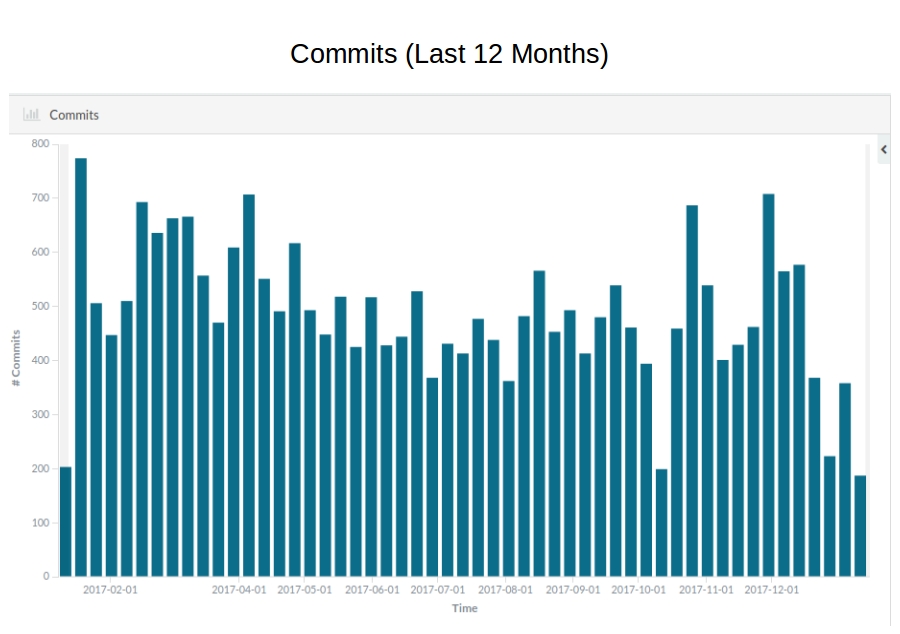
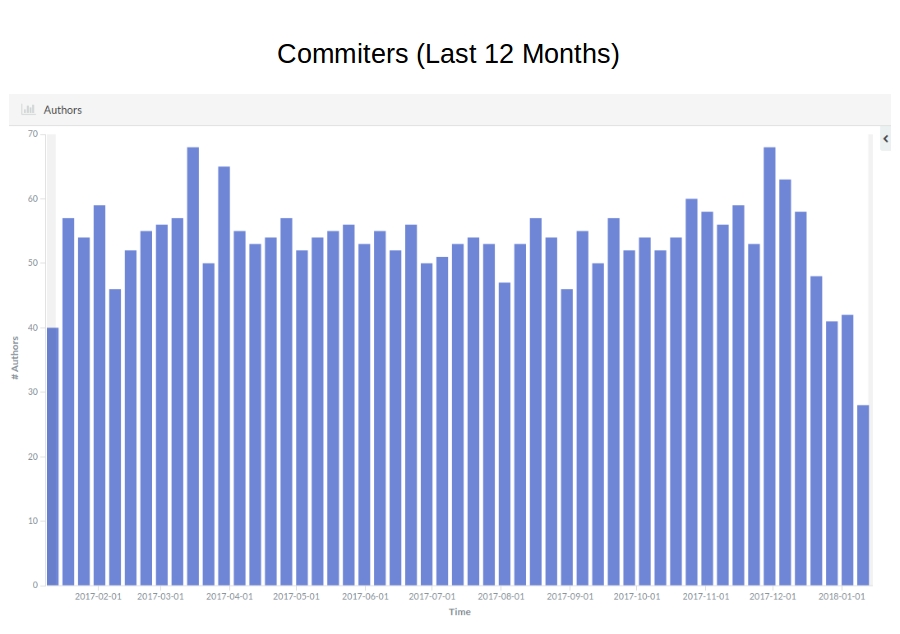
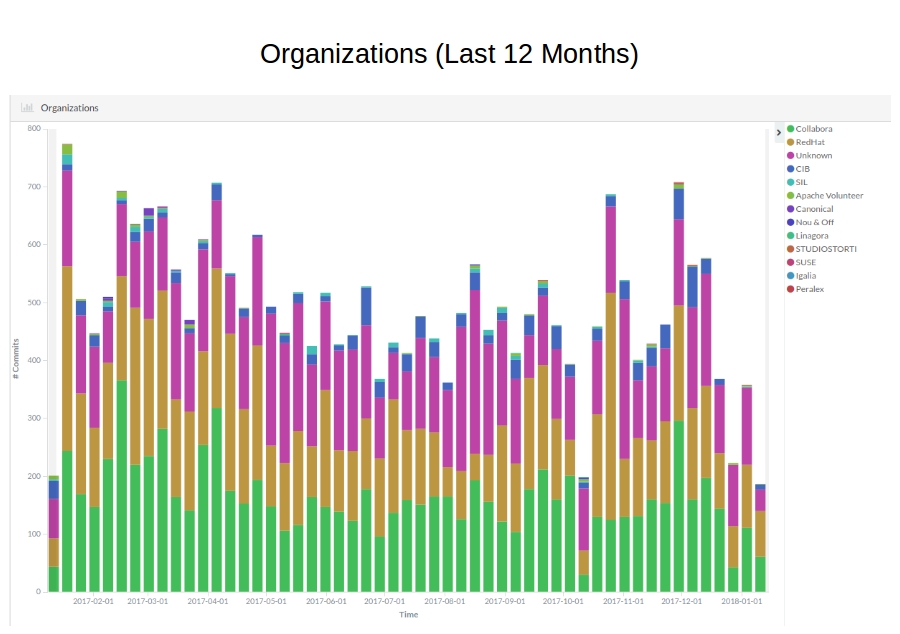
The three histograms show trends related to commits, committers and organizations during the last 12 months (clicking on the thumbnails will open a large image, easier to read).

Commits and committers show a rather stable trend, which confirms the maturity of the project. The very few lows in commits are either seasonal or related to the LibreOffice Conference, when core developers are spending most of their time on knowledge sharing rather than on code hacking.

The organizations’ histogram adds the affiliation bit to commits. Collabora, Red Hat and independent volunteer developers (marked as “unknown” in the legend) are the three largest group of contributors, followed by CIB and SIL. Of course, we would like to see more contributions from developers paid by large organizations deploying LibreOffice for personal productivity.

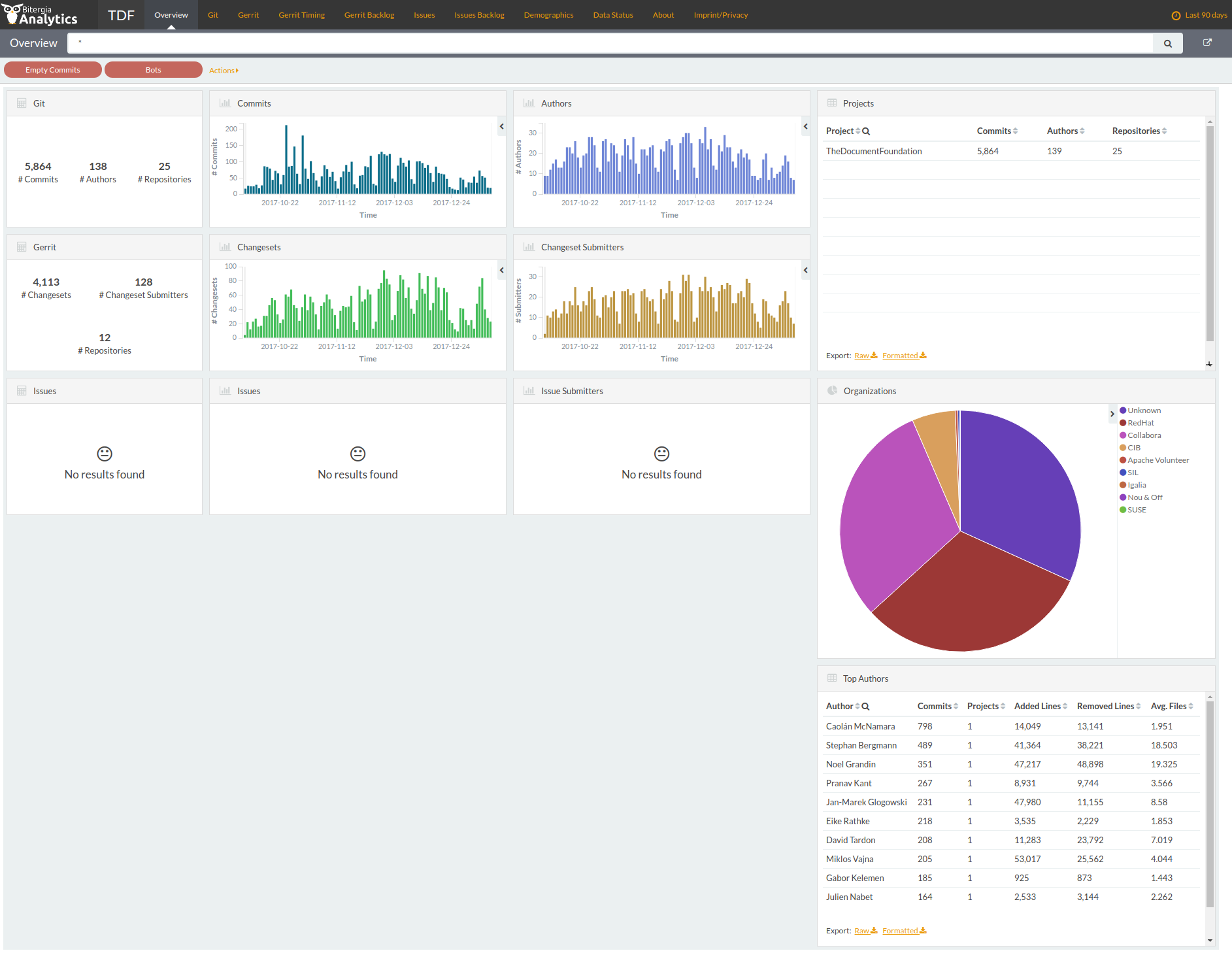
The following four thumbnails show the dashboard home configured for the following time intervals: 2 years, 1 year, 6 months and 90 days. They provide some interesting insights.