TDF supports the “Munich stays free” alliance

Following the recent decision by Munich’s City Council to step back to closed source and proprietary software, at a large cost to taxpayers, a group of free and open source software (FOSS) supporters have created a website explaining the importance of FOSS in public administrations.

The German website, called München bleibt frei (Munich stays free), lists numerous benefits of FOSS, including:

  • Independence from a single software vendor
  • Boost to local industry (because anyone can improve FOSS)
  • Sustainability
  • Security and data protection

The Document Foundation supports this position. Our previous statement on the situation in Munich can be found here.

Final week of the Month of LibreOffice, November 2017!

Yes, we’re into the final week of this Month of LibreOffice, which gives thanks (and stickers) to our great worldwide community for all their hard work! Here’s how many stickers have been awarded so far:

256

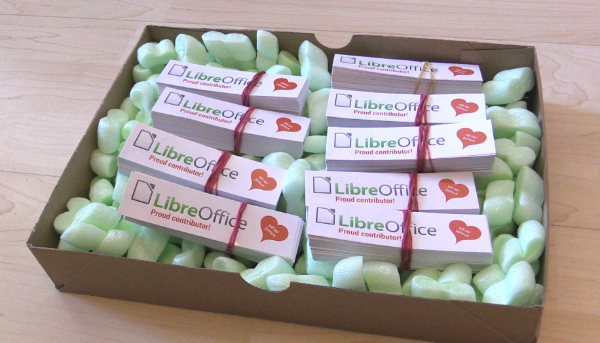
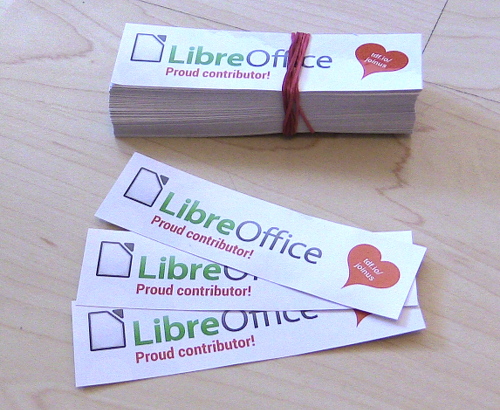
Click the number to see if your (user)name is on the list – and if so, you’ll soon be able to get a shiny sticker for your computer kit! Here they are, waiting to be claimed:

But if you’re not yet on the list, you still have time to get involved with LibreOffice, help make the software better for millions of users around the world, and grab a sticker from us as thanks for your work. Plus, you build up experience of working in a friendly and well-known open source project! Read on to see ways you can help…

How to get a sticker

  • Help to confirm bugs: go to our Bugzilla page and look for new bugs. If you can recreate one, add a comment like “CONFIRMED on Windows 10 and LibreOffice 5.4.2”. (Make sure you’re using the latest version of LibreOffice.)
  • Contribute code: The codebase is big, but there are lots of places to get involved with small jobs. See our Developers page on the website and this page on the wiki to get started. Once you’ve submitted a patch, if it gets merged we’ll send you a sticker!
  • Translate the interface: LibreOffice is available in a wide range of languages, but its interface translations need to be kept up-to-date. Or maybe you want to translate the suite to a whole new language? Get involved here.
  • Write documentation: Another way to earn a badge is to help the LibreOffice documentation team. Whether you want to update the online help or add chapters to the handbooks, here’s where to start.
  • Answer questions from users: Over on Ask LibreOffice there are many users looking for help with the suite. We’re keeping an eye on that site so if you give someone useful advice, you can claim a shiny sticker.
  • Spread the word: Tell everyone about LibreOffice on Twitter! Just say why you love it or what you’re using it for, add the #libreoffice hashtag, and at the end of the month you can claim a sticker. (We have a maximum of 100 stickers for this category, in case the whole internet starts tweeting!)

Second Bug Hunting Session for LibreOffice 6.0

After the first Bug Hunting Session for LibreOffice 6.0, which was held on October 20th 2017, we’re glad to announce the Second Bug Hunting Session on November 27th – this time being held on a Monday, for the first time!

LibreOffice 6.0 will be announced at the end of January 2018, and so far, almost 800 bugs have been fixed in this version, with more than 700 people reporting, triaging or fixing those bugs. More info can be found here. Besides that, a large number of new features, which are summarized in the release notes, have been added.

In order to find, report and triage bugs, the tests during the Second Bug Hunting Session will be performed on the first Beta version of LibreOffice 6.0, which will be available on the pre-releases server a few days before the event. Builds will be available for Linux (DEB and RPM), macOS and Windows, and will run in parallel with the production version.

Mentors will be available on November 27th 2017, from 8AM UTC to 10PM UTC for questions or help in the IRC channel: #libreoffice-qa (connect via webchat). Of course, hunting bugs will be possible also on other days, as the builds of this particular Beta release (LibreOffice 6.0.0 Beta1) will be available until mid December.

And it’s still the Month of LibreOffice!

Throughout November we’ve been running a Month of LibreOffice, awarding cool stickers to contributors across the project. The Bug Hunting Session is your chance to get a sticker for your laptop or PC – so get involved and help us make LibreOffice 6.0 the best release yet! See here for more about the Month of LibreOffice.

And there’s more information about how to hunt bugs in LibreOffice 6.0 Beta1 in this wiki page.

Video: Bjoern Michaelsen talks about growing the LibreOffice community

Bjoern Michaelsen is on the Board of Directors at The Document Foundation. We talked to him at the recent LibreOffice Conference in Rome about the challenges of growing a community. Also, we look ahead to some new ideas for hackfests.

Please confirm that you want to play a YouTube video. By accepting, you will be accessing content from YouTube, a service provided by an external third party.

YouTube privacy policy

If you accept this notice, your choice will be saved and the page will refresh.

World Usability day – and making LibreOffice’s UX shine

Today is World Usability Day, beginning events around the world that “bring together communities of professional, industrial, educational, citizen, and government groups for our common objective: to ensure that the services and products important to life are easier to access and simpler to use.”

Starting today, and over the next few days, there will be 73 events across the globe, celebrating progress in user experience (UX) and educating everyone about how good design and usability affects our daily lives. Click here to find an event near you, and see this page to learn how to get involved.

UX at LibreOffice

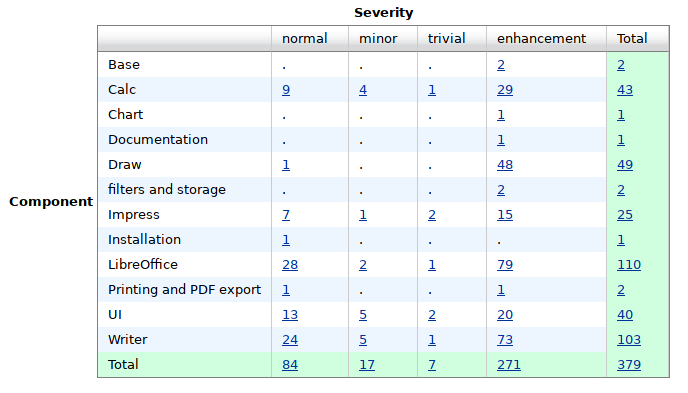
Meanwhile, the LibreOffice design team is active in many areas relating to UX. One of the tasks is to respond to bug reports or enhancement requests on Bugzilla when UX input is requested with the keyword “needsUXEval”. This request might be just a simple “what do you folks think” or “how do we handle this in general”, through to a proposal for a complete redesign.

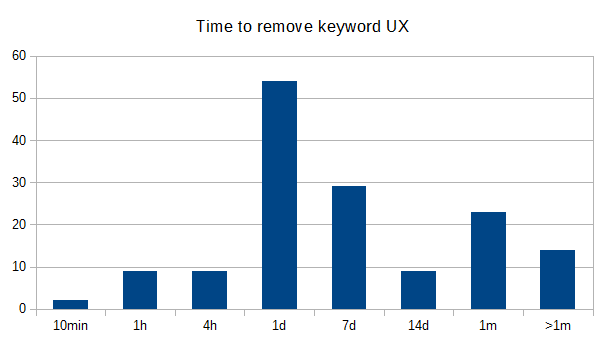
Started with a total number of more than 500 issues the team got the number down to 380 in the last year. And most tickets have been answered within one day!

Join the party

Most conversation is done on Bugzilla, where every opinion is valued. Some issues need a closer look and are discussed in the weekly meetings. Your contribution at both places would be highly appreciated!

Get involved with our UX communityand you can make a big difference for millions of end users around the world.

Month of LibreOffice, November 2017: First week’s results

On the 1st of November we started a new Month of LibreOffice, celebrating contributions from our worldwide community. Everyone who helps out with the project gets a chance to win a cool sticker. So, one week in, how are we doing?

Well, so far 137 stickers have been awarded! That’s a great start, and you can see all the details on this wiki page. It shows usernames from various tools used in LibreOffice development, and we update it every day. You can see that we’ve had code contributions from several people – but of course, these are just community contributions. Click here to see full development stats including patches from people who’re paid to work on the codebase.

Meanwhile, our QA and localisation communities have been especially busy in the run-up to LibreOffice 6.0, which is due to be released in late January. And then our diligent Ask LibreOffice community has done great work answering questions from users and helping them to fix problems. Finally, we’re seeing useful documentation updates (especially on the wiki) and word-spreading on Twitter as well.

Thanks to everyone who has helped out so far! But there are still three weeks to go – so if you want to improve LibreOffice and get a shiny sticker for your laptop or PC, read on to see how you can help…

How to get a sticker

There are many ways you can help the LibreOffice project and claim a sticker:

  • Help to confirm bugs: go to our Bugzilla page and look for new bugs. If you can recreate one, add a comment like “CONFIRMED on Windows 10 and LibreOffice 5.4.2”. (Make sure you’re using the latest version of LibreOffice.)
  • Contribute code: The codebase is big, but there are lots of places to get involved with small jobs. See our Developers page on the website and this page on the wiki to get started. Once you’ve submitted a patch, if it gets merged we’ll send you a sticker!
  • Translate the interface: LibreOffice is available in a wide range of languages, but its interface translations need to be kept up-to-date. Or maybe you want to translate the suite to a whole new language? Get involved here.
  • Write documentation: Another way to earn a badge is to help the LibreOffice documentation team. Whether you want to update the online help or add chapters to the handbooks, here’s where to start.
  • Answer questions from users: Over on Ask LibreOffice there are many users looking for help with the suite. We’re keeping an eye on that site so if you give someone useful advice, you can claim a shiny sticker.
  • Spread the word: Tell everyone about LibreOffice on Twitter! Just say why you love it or what you’re using it for, add the #libreoffice hashtag, and at the end of the month you can claim a sticker. (We have a maximum of 100 stickers for this category, in case the whole internet starts tweeting!)