The post, published on 18 July 2025, which explained why an artificially complex XML schema, such as that used by Microsoft 365 (formerly Microsoft Office) files, is in fact a subtle tool for locking in users because it is invisible and impossible to detect without in-depth study, was picked up by various IT media outlets. This was probably because it explained a problem that everyone faces without having the tools to solve it in a way that was accessible to everyone.
Some of these articles sparked a debate between those who supported my thesis and those who defended Microsoft, the true champions of lock-in, who claimed that the complexity of the XML schema was not artificial but rather a reflection of the complexity of the documents themselves.
This complexity relates to various factors, such as size (number of pages), structure (text, tables, graphs and images), content management (data entry by multiple people and systems) and customisation through metadata. These factors influence the management, classification and storage of the document itself.
The different approaches to complexity management between ODF and OOXML
However, the ODF and OOXML formats handle this complexity in completely different ways. In the first case, the XML schema seeks to simplify the work of developers and users by ensuring that both sets of requirements are met. Developers have all the descriptive tools related to document complexity at their disposal, and users can distinguish between descriptive elements and content because the two are almost always separate. The content is also consistent in syntax with the document.
In the second case, the XML schema does nothing to simplify the developer’s task and complicates the user’s task by putting all the elements – description and content – together without any apparent logic. This makes the two difficult or even impossible to distinguish.
The complexity of the OOXML format is linked to its design and was deliberately created to make the format more difficult for non-Microsoft software developers to implement. Compatibility issues are caused by a veritable “maze” of tags used even for the simplest content, which binds users to the Microsoft ecosystem in the first example of standard-based lock-in.
Added to this is the widespread use of convoluted descriptions, such as those relating to dates, which are linked to a bug introduced by Visicalc and still present in Excel 67 years after it was discovered, and the arbitrary separation of content, such as sentences or even words that are broken between two content elements. The format reflects the internal data structures and legacy features of Microsoft Office. It uses non-standard language encodings and units of measurement, as well as inconsistent naming conventions and rules between modules. It also uses abstruse tag names that are difficult to decipher.
The XLSX case
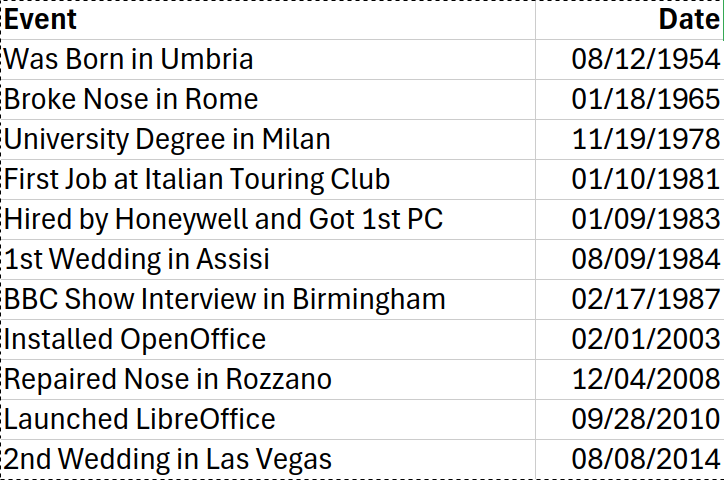
To illustrate the difference in complexity between the ODF and OOXML XML schemas, I created a simple spreadsheet containing dates from my life that are either significant or ironic. These include the date I broke my nose, the date it was repaired, and the date I re-married my wife in Las Vegas to celebrate the 30th anniversary of the marriage with an informal ceremony (a drive-through wedding in a limousine).
This is a screenshot of the spreadsheet:
To perform the analysis, I duplicated and renamed the two files, replacing the original extension with “ZIP”, and then unzipped them to create two folders containing all the files of the respective XML schemas.
The LibreOffice folder contains three subfolders and six files, one of which is called content.xml and immediately catches the eye due to its evocative name. Opening it reveals all the contents, while the other files contain instructions for displaying the spreadsheet correctly.
This is the significant portion of the LibreOffice content.xml file:
<office:body>
<office:spreadsheet>
<table:calculation-settings table:case-sensitive=”false” table:automatic-find-labels=”false” table:use-regular-expressions=”false” table:use-wildcards=”true”>
<table:iteration table:maximum-difference=”0.0001″/>
</table:calculation-settings>
<table:table table:name=”Foglio1″ table:style-name=”ta1″>
<office:forms form:automatic-focus=”false” form:apply-design-mode=”false”/>
<table:table-column table:style-name=”co1″ table:default-cell-style-name=”ce2″/>
<table:table-column table:style-name=”co2″ table:default-cell-style-name=”ce4″/>
<table:table-column table:style-name=”co3″ table:number-columns-repeated=”16382″/>
<table:table-row table:style-name=”ro1″>
<table:table-cell table:style-name=”ce1″ office:value-type=”string” calcext:value-type=”string”>
<text:p>Event</text:p>
</table:table-cell>
<table:table-cell table:style-name=”ce3″ office:value-type=”string” calcext:value-type=”string”>
<text:p>Date</text:p>
</table:table-cell>
</table:table-row>
<table:table-row table:style-name=”ro1″>
<table:table-cell office:value-type=”string” calcext:value-type=”string”>
<text:p>Was Born in Umbria</text:p>
</table:table-cell>
<table:table-cell table:style-name=”ce7″ office:value-type=”date” office:date-value=”1954-08-12″ calcext:value-type=”date”>
<text:p>08/12/1954</text:p>
</table:table-cell>
</table:table-row>
<table:table-row table:style-name=”ro1″>
<table:table-cell office:value-type=”string” calcext:value-type=”string”>
<text:p>Broke Nose in Rome</text:p>
</table:table-cell>
<table:table-cell table:style-name=”ce7″ office:value-type=”date” office:date-value=”1965-01-18″ calcext:value-type=”date”>
<text:p>01/18/1965</text:p>
</table:table-cell>
</table:table-row>
<table:table-row table:style-name=”ro1″>
<table:table-cell office:value-type=”string” calcext:value-type=”string”>
<text:p>University Degree in Milan</text:p>
</table:table-cell>
<table:table-cell table:style-name=”ce7″ office:value-type=”date” office:date-value=”1978-11-19″ calcext:value-type=”date”>
<text:p>11/19/1978</text:p>
</table:table-cell>
</table:table-row>
<table:table-row table:style-name=”ro1″>
<table:table-cell office:value-type=”string” calcext:value-type=”string”>
<text:p>First Job at Italian Touring Club</text:p>
</table:table-cell>
<table:table-cell table:style-name=”ce7″ office:value-type=”date” office:date-value=”1981-01-10″ calcext:value-type=”date”>
<text:p>01/10/1981</text:p>
</table:table-cell>
</table:table-row>
<table:table-row table:style-name=”ro1″>
<table:table-cell office:value-type=”string” calcext:value-type=”string”>
<text:p>Hired by Honeywell and Got 1st PC</text:p>
</table:table-cell>
<table:table-cell table:style-name=”ce7″ office:value-type=”date” office:date-value=”1983-01-09″ calcext:value-type=”date”>
<text:p>01/09/1983</text:p>
</table:table-cell>
</table:table-row>
<table:table-row table:style-name=”ro1″>
<table:table-cell office:value-type=”string” calcext:value-type=”string”>
<text:p>1st Wedding in Assisi</text:p>
</table:table-cell>
<table:table-cell table:style-name=”ce7″ office:value-type=”date” office:date-value=”1984-08-09″ calcext:value-type=”date”>
<text:p>08/09/1984</text:p>
</table:table-cell>
</table:table-row>
<table:table-row table:style-name=”ro1″>
<table:table-cell office:value-type=”string” calcext:value-type=”string”>
<text:p>BBC Show Interview in Birmingham</text:p>
</table:table-cell>
<table:table-cell table:style-name=”ce7″ office:value-type=”date” office:date-value=”1987-02-17″ calcext:value-type=”date”>
<text:p>02/17/1987</text:p>
</table:table-cell>
</table:table-row>
<table:table-row table:style-name=”ro1″>
<table:table-cell office:value-type=”string” calcext:value-type=”string”>
<text:p>Installed OpenOffice</text:p>
</table:table-cell>
<table:table-cell table:style-name=”ce7″ office:value-type=”date” office:date-value=”2003-02-01″ calcext:value-type=”date”>
<text:p>02/01/2003</text:p>
</table:table-cell>
</table:table-row>
<table:table-row table:style-name=”ro1″>
<table:table-cell office:value-type=”string” calcext:value-type=”string”>
<text:p>Repaired Nose in Rozzano</text:p>
</table:table-cell>
<table:table-cell table:style-name=”ce7″ office:value-type=”date” office:date-value=”2008-12-04″ calcext:value-type=”date”>
<text:p>12/04/2008</text:p>
</table:table-cell>
</table:table-row>
<table:table-row table:style-name=”ro1″>
<table:table-cell office:value-type=”string” calcext:value-type=”string”>
<text:p>Launched LibreOffice</text:p>
</table:table-cell>
<table:table-cell table:style-name=”ce7″ office:value-type=”date” office:date-value=”2010-09-28″ calcext:value-type=”date”>
<text:p>09/28/2010</text:p>
</table:table-cell>
</table:table-row>
<table:table-row table:style-name=”ro1″>
<table:table-cell office:value-type=”string” calcext:value-type=”string”>
<text:p>2nd Wedding in Las Vegas</text:p>
</table:table-cell>
<table:table-cell table:style-name=”ce7″ office:value-type=”date” office:date-value=”2014-08-08″ calcext:value-type=”date”>
<text:p>08/08/2014</text:p>
</table:table-cell>
</table:table-row>
<table:table-row table:style-name=”ro2″ table:number-rows-repeated=”1048563″>
<table:table-cell table:number-columns-repeated=”2″/>
</table:table-row>
<table:table-row table:style-name=”ro2″>
<table:table-cell table:number-columns-repeated=”2″/>
</table:table-row>
</table:table>
<table:named-expressions/>
</office:spreadsheet>
</office:body>
This is an XML file of reasonable complexity. Even someone without technical knowledge can identify the contents of the two columns with a little effort. The file is in an understandable format for dates, text strings and tags (table row, table cell, text and date value).
The Microsoft 365 folder contains three subfolders and the [Content_Types].xml file. Opening this file reveals information about the other files, including those in the subfolders. It also shows that the contents should be found in the sheet1.xml file, which is hidden in the worksheets folder, which is hidden in the xl folder. There is no technical reason for this game of hide-and-seek other than to make the internal structure of the XLSX file more complicated.
The significant part of the Microsoft 365 sheet1.xml file is as follows:
<dimension ref=”A1:B12″/>
<sheetViews>
<sheetView tabSelected=”1″ workbookViewId=”0″>
<selection activeCell=”B1″ sqref=”B1:B1048576″/>
</sheetView>
</sheetViews>
<sheetFormatPr defaultRowHeight=”15″/>
<cols>
<col min=”1″ max=”1″ width=”34.140625″ style=”2″ bestFit=”1″ customWidth=”1″/>
<col min=”2″ max=”2″ width=”11.7109375″ style=”4″ bestFit=”1″ customWidth=”1″/>
</cols>
<sheetData>
<row r=”1″ spans=”1:2″>
<c r=”A1″ s=”1″ t=”s”>
<v>0</v>
</c>
<c r=”B1″ s=”3″ t=”s”>
<v>1</v>
</c>
</row>
<row r=”2″ spans=”1:2″>
<c r=”A2″ s=”2″ t=”s”>
<v>2</v>
</c>
<c r=”B2″ s=”4″>
<v>19948</v>
</c>
</row>
<row r=”3″ spans=”1:2″>
<c r=”A3″ s=”2″ t=”s”>
<v>3</v>
</c>
<c r=”B3″ s=”4″>
<v>23760</v>
</c>
</row>
<row r=”4″ spans=”1:2″>
<c r=”A4″ s=”2″ t=”s”>
<v>4</v>
</c>
<c r=”B4″ s=”4″>
<v>28813</v>
</c>
</row>
<row r=”5″ spans=”1:2″>
<c r=”A5″ s=”2″ t=”s”>
<v>5</v>
</c>
<c r=”B5″ s=”4″>
<v>29860</v>
</c>
</row>
<row r=”6″ spans=”1:2″>
<c r=”A6″ s=”2″ t=”s”>
<v>6</v>
</c>
<c r=”B6″ s=”4″>
<v>30560</v>
</c>
</row>
<row r=”7″ spans=”1:2″>
<c r=”A7″ s=”2″ t=”s”>
<v>7</v>
</c>
<c r=”B7″ s=”4″>
<v>30933</v>
</c>
</row>
<row r=”8″ spans=”1:2″>
<c r=”A8″ s=”2″ t=”s”>
<v>8</v>
</c>
<c r=”B8″ s=”4″>
<v>31825</v>
</c>
</row>
<row r=”9″ spans=”1:2″>
<c r=”A9″ s=”2″ t=”s”>
<v>9</v>
</c>
<c r=”B9″ s=”4″>
<v>37623</v>
</c>
</row>
<row r=”10″ spans=”1:2″>
<c r=”A10″ s=”2″ t=”s”>
<v>10</v>
</c>
<c r=”B10″ s=”4″>
<v>39550</v>
</c>
</row>
<row r=”11″ spans=”1:2″>
<c r=”A11″ s=”2″ t=”s”>
<v>11</v>
</c>
<c r=”B11″ s=”4″>
<v>40449</v>
</c>
</row>
<row r=”12″ spans=”1:2″>
<c r=”A12″ s=”2″ t=”s”>
<v>12</v>
</c>
<c r=”B12″ s=”4″>
<v>41859</v>
</c>
</row>
</sheetData>
<pageMargins left=”0.7″ right=”0.7″ top=”0.75″ bottom=”0.75″ header=”0.3″ footer=”0.3″/>
It’s an extremely cryptic XML file. Apart from a few tags – col, row, sheetview and sheetdata – the XML schema is completely incomprehensible. Where are the dates? Where are the event descriptions?
They are actually there, but I challenge anyone to find them unless they know that Excel describes them with a sequential number starting from 1 January 1900. For 29 February 1900, it adds one, despite this being a “phantom” day that the programme – which is incompatible with the Gregorian calendar, a standard recognised even by the Chinese and Muslims – stubbornly continues to consider as existing, even though the “leap year bug” was discovered by Bob Bemer in 1958.
Therefore, in Excel, 19948 corresponds to 12 August 1954, but in reality it is 13 August 1954. The other dates are obviously 23,760; 28,813; 29,860; 30,560; 30,933; 31,825; 37,623; 39,550; 40,449; and 41,859. This is intuitive and easy to calculate, and above all it is imposed by the complexity of the document. Bullshit.
However, the mystery of the event descriptions remains. According to sheet1.xml, they do not exist since they do not appear in any way, not even as a reference. It is as if the spreadsheet consisted only of the second column.
So, I return to the [Content_Types].xml file and open the XML files in the order they are listed, searching for them in the subfolders.
<Types xmlns=”http://schemas.openxmlformats.org/package/2006/content-types”>
<Default Extension=”rels” ContentType=”application/vnd.openxmlformats-package.relationships+xml”/>
<Default Extension=”xml” ContentType=”application/xml”/>
<Override PartName=”/xl/workbook.xml” ContentType=”application/vnd.openxmlformats-officedocument.spreadsheetml.sheet.main+xml”/>
<Override PartName=”/docProps/core.xml” ContentType=”application/vnd.openxmlformats-package.core-properties+xml”/>
<Override PartName=”/docProps/app.xml” ContentType=”application/vnd.openxmlformats-officedocument.extended-properties+xml”/>
<Override PartName=”/xl/worksheets/sheet1.xml” ContentType=”application/vnd.openxmlformats-officedocument.spreadsheetml.worksheet+xml”/>
<Override PartName=”/xl/theme/theme1.xml” ContentType=”application/vnd.openxmlformats-officedocument.theme+xml”/>
<Override PartName=”/xl/styles.xml” ContentType=”application/vnd.openxmlformats-officedocument.spreadsheetml.styles+xml”/>
<Override PartName=”/xl/sharedStrings.xml” ContentType=”application/vnd.openxmlformats-officedocument.spreadsheetml.sharedStrings+xml”/>
</Types>
Just as I was about to give up hope, I finally found the event descriptions in the sharedStrings.xml file. The file contains the following:
<sst xmlns=”http://schemas.openxmlformats.org/spreadsheetml/2006/main” count=”13″ uniqueCount=”13″>
<si>
<t>Event</t>
</si>
<si>
<t>Date</t>
</si>
<si>
<t>Was Born in Umbria</t>
</si>
<si>
<t>Broke Nose in Rome</t>
</si>
<si>
<t>University Degree in Milan</t>
</si>
<si>
<t>First Job at Italian Touring Club</t>
</si>
<si>
<t>Hired by Honeywell and Got 1st PC</t>
</si>
<si>
<t>1st Wedding in Assisi</t>
</si>
<si>
<t>BBC Show Interview in Birmingham</t>
</si>
<si>
<t>Installed OpenOffice</t>
</si>
<si>
<t>Repaired Nose in Rozzano</t>
</si>
<si>
<t>Launched LibreOffice</t>
</si>
<si>
<t>2nd Wedding in Las Vegas</t>
</si>
</sst>
If Sheet1.xml was cryptic, this is downright incomprehensible. I would like to know how the events are related to the dates within the sheet1.xml file through the different tags used in the two files: <t> and <v>. There are no cross-references linking the two elements, and if there are any, I challenge anyone to explain them to me in a way that I can understand and justify the mysterious format of these references.
Unfortunately, the reality is what I have already tried to explain without going into technical detail, as I have done in this post and will do in the next one dedicated to the DOCX case. Microsoft has developed an unnecessarily complex format – if LibreOffice can handle the information more simply, I don’t understand why Microsoft 365 can’t do the same – with the aim of making it extremely difficult to emulate the OOXML format without reverse engineering, which is widely used in some countries.
Furthermore, office suites that use reverse engineering to adopt OOXML as their native format merely help Microsoft to defend its market share by promoting a proprietary format that goes against users’ interests and their right to ownership and control of the content they have developed, generally referred to as digital sovereignty.
Users should learn to protect their rights by choosing an open, standard format such as ODF. This guarantees control over content and all that this entails, including protection of privacy, proper management of sensitive data and the ability to decide what to share and with whom.
This is a format whose development process, features and version are known, and whose description corresponds to what happens on the user’s PC, so even the least technical user can understand when a problem occurs and, in many cases, solve it.
In short, it is the standard document format that we would all like to have, but which only a minority use due to a lack of knowledge about the reality of the OOXML format, and the messianic trust that many have in Microsoft. This leads them to believe that there cannot be a commercial strategy behind the document format that protects the company’s interests at the expense of users.

 The Open Source Conference 2025 will take place the 1st of October 2025 in Belval, Esch-sur-Alzette, Luxembourg, following a very successful first edition in 2024 in combination with the LibreOffice Conference. Open Source software, together with data sovereignty, form the basis to achieve Digital Sovereignty as an inclusive effort where all the participants cooperate to create the tools we need to protect our data, while sharing the technologies that improve everyone’s digital lives. This year’s main tracks provide the opportunity to share the experiences of those that have chosen to produce and implement Open Source tools and platforms that improve security, resilience and data protection.