LibreOffice Tips & Tricks: Replacing Microsoft Fonts

Fonts are one of the main culprits of LibreOffice interoperability problems with Microsoft Office documents, when viewed from the end user’s point of view. In fact, Microsoft Office document are often using one of the default fonts – either the old “Core Fonts for the Web” (deprecated in 2002, but still in use) or the new “ClearType Fonts” (launched in 2000, and now adopted by Windows and Office) – which are not always available in LibreOffice, as they are proprietary and cannot be distributed with open source software. Also, in the case of ClearType fonts, the license is strictly connected to the Windows and/or Office license, so to legitimately use them with LibreOffice you need a Windows license where they are included.

When LibreOffice opens a Microsoft Office document, it will replace the fonts which are not available with one of the default Liberation fonts, which are metrically compatible with Arial (Liberation Sans), Courier New (Liberation Mono) and Times New Roman (Liberation Serif), but will have an impact on the visual appearance of the document if they replace a different font (in this case, the user will usually start to complain loudly about LibreOffice, without even checking if the contents are still there…).

To reduce the impact of this problem, which cannot be eliminated, at least until users stop using fonts creatively, LibreOffice offers a specific feature, a font replacement table that can be configured according to the user’s needs, and is among the program’s options. If the table is configured correctly, LibreOffice replaces the fonts with those metrically compatible – or simply more similar – defined by the user, and this in most cases will prevent the document from looking different. Luckily, there is a large number of free open source fonts available, with some specifically developed to replace Microsoft fonts as in the case of Croscore Fonts, from several online repositories. I suggest Google Fonts, as the website provides not only the font files but also all the associated legal resources, including the license.

My LibreOffice font replacement table, which has been developed over the years, includes the following font pairs (the first is replaced by the second, which is installed on my Linux PCs): Arial -> Arimo, Calibri-> Carlito, Cambria -> Caladea, Consolas -> Inconsolata, Courier New -> Cousine, Franklin Gothic -> Libre Franklin, Georgia -> Neuton, Gill Sans -> Cabin, Impact -> Oswald, Palatino -> Crimson Text, Perpetua -> Lustria, Times New Roman -> Tinos, Twentieth Century -> Spartan, and Verdana -> PT Sans. This is how it looks in LibreOffice:

Installing fonts is rather easy, but for those who are not familiar with the procedure there are a couple of articles which provide a quick tutorial: Windows & macOS, and Linux.

LibreOffice 7.0.1 available for download

Berlin, September 3, 2020 – LibreOffice 7.0.1, the first minor release of the LibreOffice 7.0 family, targeted at technology enthusiasts and power users, is now available for download from https://www.libreoffice.org/download/. LibreOffice 7.0.1 includes around 80 bug fixes and improvements to document compatibility.

The most significant new features of the LibreOffice 7.0 family are: support for OpenDocument Format (ODF) 1.3; Skia graphics engine and Vulkan GPU-based acceleration for better performance; and carefully improved compatibility with DOCX, XLSX and PPTX files.

LibreOffice offers the highest level of compatibility in the office suite arena, starting from native support for the OpenDocument Format (ODF) – with better security and interoperability features – to wide support for proprietary formats.

LibreOffice 7.0.1 represents the bleeding edge in term of features for open source office suites. Users wanting the robustness of a more mature version optimized for enterprise class deployments can still download LibreOffice 6.4.6.

For enterprise class deployments, TDF strongly recommends sourcing LibreOffice from one of the ecosystem partners, to get long-term supported releases, dedicated assistance, custom new features and other benefits, including SLAs (Service Level Agreements): https://www.libreoffice.org/download/libreoffice-in-business/.

Support for migrations and training should be sourced from certified professionals who provide value-added services which extend the reach of the community to the corporate world. Also, the work done by ecosystem partners flows back into the LibreOffice project, and this represents an advantage for everyone.

LibreOffice – thanks to its mature codebase, rich feature set, support for open standards, excellent compatibility and long-term support options – represents the ideal solution for businesses that want to regain or keep control of their data and free themselves from vendor lock-in.

LibreOffice individual users are supported by a global community of volunteers: https://www.libreoffice.org/get-help/community-support/. On the website and the wiki there are guides, manuals, tutorials and HowTos. Donations help us to make all of these resources available.

LibreOffice users are invited to join the community at https://ask.libreoffice.org, where they can get and provide user-to-user support. People willing to contribute their time and professional skills to the project can visit the dedicated website at https://whatcanidoforlibreoffice.org.

LibreOffice users, free software advocates and community members can provide financial support to The Document Foundation with a donation via PayPal, credit card or other tools at https://www.libreoffice.org/donate.

Availability of LibreOffice

LibreOffice 7.0.1 and 6.4.6 are immediately available from the following link: https://www.libreoffice.org/download/. Minimum requirements are specified on the download page. LibreOffice Online source code is available as Docker image: https://hub.docker.com/r/libreoffice/online/.

LibreOffice 7.0.1’s change log pages are available on TDF’s wiki: https://wiki.documentfoundation.org/Releases/7.0.1/RC1 (changed in RC1) and https://wiki.documentfoundation.org/Releases/7.0.1/RC2 (changed in RC2).

All versions of LibreOffice are built with document conversion libraries from the Document Liberation Project: https://www.documentliberation.org.
Announcement of LibreOffice 6.4.6

Berlin, August 13, 2020 – The Document Foundation announces the availability of LibreOffice 6.4.6, the 6th minor release of the LibreOffice 6.4 family, targeted at all users relying on the best free office suite ever for desktop productivity. LibreOffice 6.4.6 includes bug fixes and improvements to document compatibility and interoperability with software from other vendors.

LibreOffice 6.4.6 is optimized for use in every environment, even by more conservative users, as it now includes several months of work on bug fixes. Users of LibreOffice 6.3.6 and previous versions should update to LibreOffice 6.4.6, as this is now the best choice in term of robustness for their productivity needs.

For enterprise class deployments, TDF strongly recommends sourcing LibreOffice from one of the ecosystem partners, to get long-term supported releases, dedicated assistance, custom new features and other benefits, including SLAs (Service Level Agreements): https://www.libreoffice.org/download/libreoffice-in-business/. Also, the work done by ecosystem partners flows back into the LibreOffice project, and this represents an advantage for everyone.

LibreOffice individual users are supported by a global community of volunteers: https://www.libreoffice.org/get-help/community-support/. On the website and the wiki there are guides, manuals, tutorials and HowTos. Donations help us to make all of these resources available.

Availability of LibreOffice 6.4.6

LibreOffice 6.4.6 is immediately available from the following link: https://www.libreoffice.org/download/. Minimum requirements are specified on the download page. TDF builds of the latest LibreOffice Online source code are available as Docker images: https://hub.docker.com/r/libreoffice/online/.

LibreOffice 6.4.6’s change log pages are available on TDF’s wiki: https://wiki.documentfoundation.org/Releases/6.4.6/RC1 (changed in RC1) and https://wiki.documentfoundation.org/Releases/6.4.6/RC2 (changed in RC2).

All versions of LibreOffice are built with document conversion libraries from the Document Liberation Project: https://www.documentliberation.org.
Support LibreOffice

LibreOffice users are invited to join the community at https://ask.libreoffice.org, where they can get and provide user-to-user support. People willing to contribute their time and professional skills to the project can visit the dedicated website at https://whatcanidoforlibreoffice.org.

LibreOffice users, free software advocates and community members can provide financial support to The Document Foundation with a donation via PayPal, credit card or other tools at https://www.libreoffice.org/donate.

TDF Annual Report 2019

The Annual Report of The Document Foundation for the year 2019 is now available in PDF format from TDF Nextcloud in two different versions: low resolution (6.4MB) and high resolution (53.2MB). The annual report is based on the German version presented to the authorities in April.

The 54 page document has been entirely created with free open source software: written contents have obviously been developed with LibreOffice Writer (desktop) and collaboratively modified with LibreOffice Writer (online), charts have been created with LibreOffice Calc and prepared for publishing with LibreOffice Draw, drawings and tables have been developed or modified (from legacy PDF originals) with LibreOffice Draw, images have been prepared for publishing with GIMP, and the layout has been created with Scribus based on the existing templates.

All pictures are licensed under the Creative Commons Attribution-Share Alike 4.0 License, courtesy of TDF Members from Albania, Brasil, Czech Republic, Germany, Italy, Japan, Nepal, Paraguay, Taiwan, Uganda and Turkey. Stock photos are CC0 by Pixabay.

Lothar Becker, Chairman of TDF Board of Directors, has written in the welcome address:

What we have achieved so far goes beyond the most optimistic forecasts of the project’s founders back in 2010. After ten years, the challenge is still to further grow the project by leveraging the contributions of both volunteers and ecosystem members, engage new enthusiastic supporters in both areas, and increase the number of happy users worldwide. Our manifesto, the vision behind all our work, has to evolve in a new era of office productivity, with versions of LibreOffice on the desktop, in the cloud and on mobile devices!

I look forward to another great year for our global community, even with the current challenge of lockdowns in many locations, and the lack of in-person meetings and events because of the pandemic. I’m proud, honored and humbled to be part of this amazing project, and invite you all to keep on contributing to it in one of the many possible ways, and have fun together while achieving our common dream!

Announcement of LibreOffice 7.0

LibreOffice 7.0: the new major release of the best FOSS office suite ever is available on all OSes and platforms, and provides significant new features

Berlin, August 5, 2020 – The LibreOffice Project announces the availability of LibreOffice 7.0, a new major release providing significant new features: support for OpenDocument Format (ODF) 1.3; Skia graphics engine and Vulkan GPU-based acceleration for better performance; and carefully improved compatibility with DOCX, XLSX and PPTX files.

  • Support for ODF 1.3. OpenDocument, LibreOffice’s native open and standardised format for office documents, has recently been updated to version 1.3 as an OASIS Technical Committee Specification. The most important new features are digital signatures for documents and OpenPGP-based encryption of XML documents, with improvements in areas such as change tracking, and additional details in the description of elements in first pages, text, numbers and charts. The development of ODF 1.3 features has been funded by donations to The Document Foundation.
  • Skia graphics engine and Vulkan GPU-based acceleration. The Skia graphics engine has been implemented thanks to sponsorship by AMD, and is now the default on Windows, for faster performance. Skia is an open source 2D graphics library which provides common APIs that work across a variety of hardware and software platforms, and can be used for drawing text, shapes and images. Vulkan is a new-generation graphics and compute API with high-efficiency and cross-platform access to modern GPUs.
  • Better compatibility with DOCX, XLSX and PPTX files. DOCX now saves in native 2013/2016/2019 mode, instead of 2007 compatibility mode, to improve interoperability with multiple versions of MS Office, based on the same Microsoft approach. Export to XLSX files with sheet names longer than 31 characters is now possible, along with exporting checkboxes in XLSX. The “invalid content error” message was resolved when opening exported XLSX files with shapes. Finally, there were improvements to the PPTX import/export filter.
    LibreOffice offers the highest level of compatibility in the office suite arena, starting from native support for the OpenDocument Format (ODF) – with better security and interoperability features over proprietary formats – to almost perfect support for DOCX, XLSX and PPTX files. In addition, LibreOffice includes filters for many legacy document formats, and as such is the best interoperability tool in the market.

Summary of Other New Features [1]

GENERAL

  • New icon theme, the default on macOS: Sukapura
  • New shapes galleries: arrows, diagrams, icons and more…
  • Glow and soft edge effects for objects

WRITER

  • Navigator is easier to use, with more context menus
  • Semi-transparent text is now supported
  • Bookmarks can now be displayed in-line in text
  • Padded numbering in lists, for consistency
  • Better handling of quotation marks and apostrophes

CALC

  • New functions for non-volatile random number generation
  • Keyboard shortcut added for autosum

IMPRESS & DRAW

  • Semi-transparent text is supported here too
  • Subscripts now return to the default of 8%
  • PDFs larger than 500 cm can now be generated

LibreOffice Technology

LibreOffice 7.0’s new features have been developed by a large community of code contributors: 74% of commits are from developers employed by companies sitting in the Advisory Board, such as Collabora, Red Hat and CIB, plus several other organizations, and 26% are from individual volunteers.

In addition, there is a global community of individual volunteers taking care of other fundamental activities, such as quality assurance, software localization, user interface design and user experience, editing of help content and documentation, along with free software and open document standards advocacy.

A video summarizing the top new features in LibreOffice 7.0 is available on YouTube: https://www.youtube.com/watch?v=XusjjbBm81s and also on PeerTube: https://tdf.io/lo70peertube

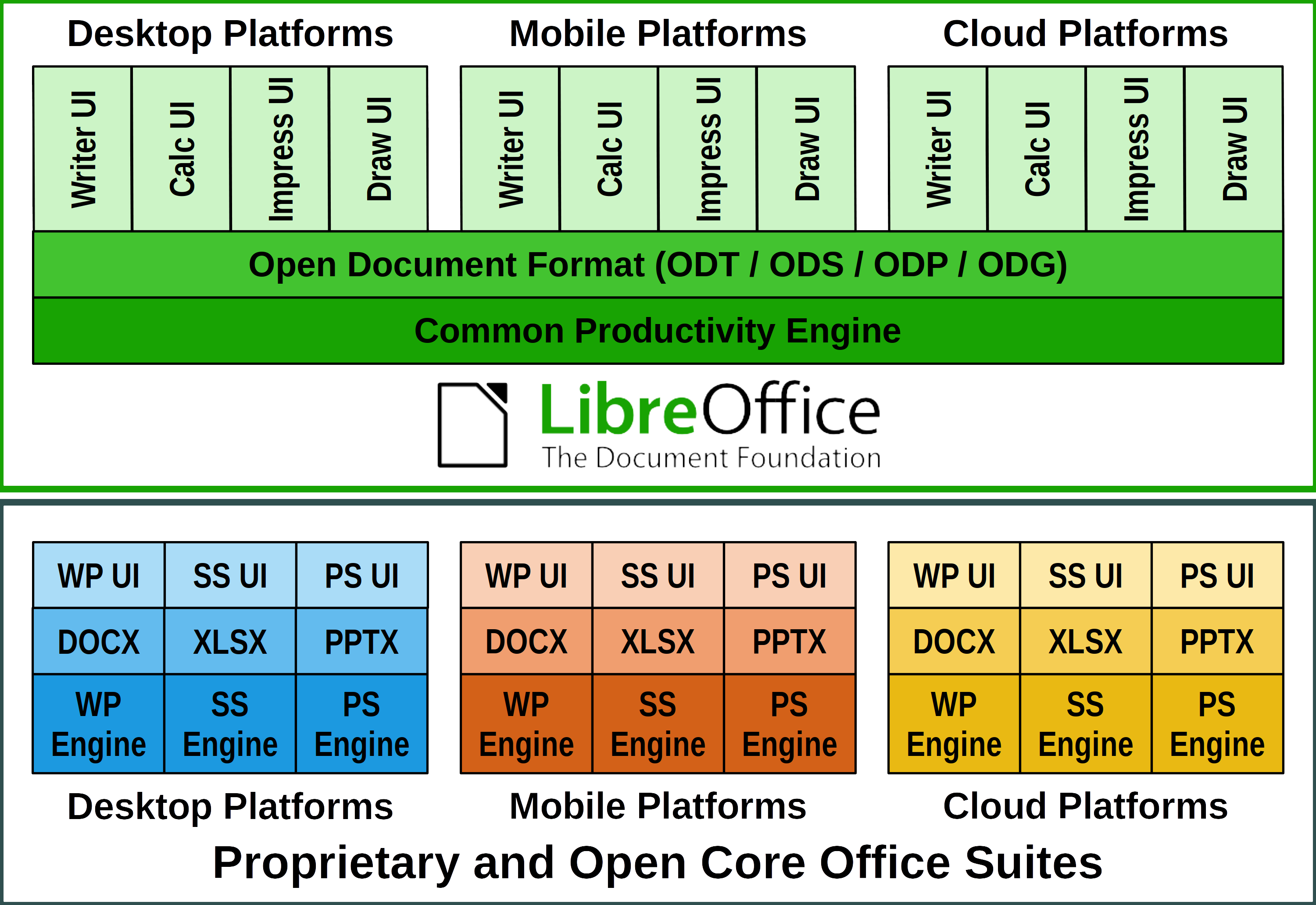
Products based on LibreOffice Technology are available for all major desktop operating systems (Windows, macOS, Linux and ChromeOS), for the cloud and for mobile platforms. They are released by The Document Foundation, and by ecosystem companies contributing to software development.

LibreOffice for End Users

LibreOffice 7.0 represents the bleeding edge in term of features for open source office suites, and as such is targeted at technology enthusiasts, early adopters and power users. The Document Foundation does not provide any technical support for users, although they can get help from other users on mailing lists and the Ask LibreOffice website: https://ask.libreoffice.org

For users whose main objective is personal productivity and therefore prefer a release that has undergone more testing and bug fixing over the new features, The Document Foundation maintains the LibreOffice 6.4 family, which includes some months of back-ported fixes. The current version is LibreOffice 6.4.5.

LibreOffice in Business

For enterprise-class deployments, TDF strongly recommends sourcing LibreOffice from one of the ecosystem partners, to get long-term supported releases, dedicated assistance, custom new features and other benefits, including SLA (Service Level Agreements): https://www.libreoffice.org/download/libreoffice-in-business/. The work done by ecosystem partners is an integral part of LibreOffice Technology.

For migrations from proprietary office suites and training, professional support should be sourced from certified professionals who provide value-added services which extend the reach of the community to the corporate world, and offer CIOs and IT managers a solution in line with proprietary offerings. Reference page: https://www.libreoffice.org/get-help/professional-support/.

In fact, LibreOffice – thanks to its mature codebase, rich feature set, strong support for open standards, excellent compatibility and long-term support options from certified partners – represents the ideal solution for businesses that want to regain control of their data and free themselves from vendor lock-in.

Availability of LibreOffice 7.0

LibreOffice 7.0 is immediately available from the following link: https://www.libreoffice.org/download/. Minimum requirements for proprietary operating systems are Microsoft Windows 7 SP1 and Apple macOS 10.12. Builds of the latest LibreOffice Online source code are available as Docker images from TDF: https://hub.docker.com/r/libreoffice/online/

LibreOffice Technology based products for Android and iOS are listed here: https://www.libreoffice.org/download/android-and-ios/, while for App Stores and ChromeOS are listed here: https://www.libreoffice.org/download/libreoffice-from-microsoft-and-mac-app-stores/

LibreOffice users, free software advocates and community members can support The Document Foundation with a donation at https://www.libreoffice.org/donate

LibreOffice 7.0 is built with document conversion libraries from the Document Liberation Project: https://www.documentliberation.org

[1] A more comprehensive list of LibreOffice 7.0 new features is available on the Release Notes wiki page: https://wiki.documentfoundation.org/ReleaseNotes/7.0

Press Kit

The press kit with press release and high-resolution images and screenshots, is available here: https://tdf.io/lo70presskit

LibreOffice Tips & Tricks: Converting 4:3 Slides into 16:9 Slides

(clicking on the image will open a large view of the same)

Today, the majority of screens and projectors is using the 16:9 aspect ratio, while in the past has been using the 4:3 aspect ratio. So, many people have a large number of slide decks based on the old 4:3 aspect ratio, which have to be converted to the new 16:9 aspect ratio. Using LibreOffice Impress in the right way, which means that all slides are based on a slide template, the conversion procedure is rather trivial, and this blog post provides a step by step tutorial.

Of course, we start by opening the old 4:3 slide deck, and switching to the Slide Sorter view. We select all slides using the Edit > Select All menu command, and then we copy all slides using the Edit > Copy menu command.


To create the new 16:9 slide deck, we use the File > New > Templates… menu command. From the Templates window, which opens on top of the 4:3 slide deck, we select a 16:9 template. In this case, we will open the “tdf-greenliberation” template on the lower right corner of the Templates window.


The new 16:9 slide deck will open showing the title slide, but we will switch to the Slide Sorter view to paste the 4:3 slides.


You have to select one of the slide thumbnails before using the Edit > Paste menu command.


A dialog windows will show up almost immediately, asking if you want to scale the objects to reflet the different slide size of the target document. The answer is NO.

The result will be the following. All the pasted 4:3 slides will now have the 16:9 aspect ratio, but the slide master will still be the old one. This is expected, so no need to panic.


Using the Master Slides section in the Sidebar, and right clicking on the template of choice, you can change the aspect of all slides at once.


Using the same procedure, you can change the aspect of individual slides to reflect specific needs. For instance, this is the tile slide after the Title Master has been applied.


Some slides will still need some specific tweaks to make their aspect compatible with the new slide master. For instance, the size of this text has to be reduced to avoid overlaps with slide master elements.


Of course, all visual elements have to be resized, as they will use more vertical space than allowed by the 16:9 aspect ratio, or moved, to maintain the visual appearance.


Once all slides have been edited, this will be the final result. Believe me, it takes more time to describe the process than to apply it to a slide deck.