LibreOffice 7.3.2 Community available for download

Berlin, March 31, 2022 – LibreOffice 7.3.2 Community, the second minor release of the LibreOffice 7.3 family, targeted at technology enthusiasts and power users, is available for download from https://www.libreoffice.org/download/.

The LibreOffice 7.3 family offers the highest level of compatibility in the office suite market segment, starting with native support for the OpenDocument Format (ODF) – beating proprietary formats in the areas of security and robustness – to superior support for DOCX, XLSX and PPTX files.

Microsoft files are still based on the proprietary format deprecated by ISO in 2008, which is artificially complex, and not on the ISO approved standard. This lack of respect for the ISO standard format may create issues to LibreOffice, and is a huge obstacle for transparent interoperability.

LibreOffice for enterprise deployments

For enterprise-class deployments, TDF strongly recommends the LibreOffice Enterprise family of applications from ecosystem partners, with long-term support options, professional assistance, custom features and Service Level Agreements: https://www.libreoffice.org/download/libreoffice-in-business/.

LibreOffice Community and the LibreOffice Enterprise family of products are based on the LibreOffice Technology platform, the result of years of development efforts with the objective of providing a state of the art office suite not only for the desktop but also for mobile and the cloud.

Products based on LibreOffice Technology are available for major desktop operating systems (Windows, macOS, Linux and Chrome OS), mobile platforms (Android and iOS) and the cloud. They may have a different name, according to each company brand strategy, but they share the same LibreOffice unique advantages, robustness and flexibility.

Availability of LibreOffice 7.3.2 Community

LibreOffice 7.3.2 Community represents the bleeding edge in term of features for open source office suites. For users whose main objective is personal productivity and therefore prefer a release that has undergone more testing and bug fixing over the new features, The Document Foundation provides LibreOffice 7.2.6.

LibreOffice 7.3.2 change log pages are available on TDF’s wiki: https://wiki.documentfoundation.org/Releases/7.3.2/RC1 (changed in RC1) and https://wiki.documentfoundation.org/Releases/7.3.2/RC2 (changed in RC2). Over 80 bugs and regressions have been solved.

LibreOffice Technology based products for Android and iOS are listed here: https://www.libreoffice.org/download/android-and-ios/, while for App Stores and ChromeOS are listed here: https://www.libreoffice.org/download/libreoffice-from-microsoft-and-mac-app-stores/

LibreOffice individual users are assisted by a global community of volunteers: https://www.libreoffice.org/get-help/community-support/. On the website and the wiki there are guides, manuals, tutorials and HowTos. Donations help the project to make all of these resources available.

LibreOffice users are invited to join the community at https://ask.libreoffice.org, where they can get and provide user-to-user support. People willing to contribute their time and professional skills to the project can visit the dedicated website at https://whatcanidoforlibreoffice.org.

LibreOffice users, free software advocates and community members can provide financial support to The Document Foundation with a donation via PayPal, credit card or other tools at https://www.libreoffice.org/donate.

LibreOffice 7.3.2 is built with document conversion libraries from the Document Liberation Project: https://www.documentliberation.org.

Writer Guide 7.3

Writer Guide 7.3 comes with the latest updates for LibreOffice Community 7.3

The Documentation team is happy to announce the immediate availability of the Writer Guide 7.3.

This user guide has been updated from Writer Guide 7.2. It covers changes that are visible in the LibreOffice Writer user interface and additional information from earlier releases, including:

  • Enhancements to Track Changes (Chapter 3). More details are in the Release Notes.
  • Added details about the Print dialog in macOS (Chapter 7).
  • Updated details about Templates dialog (Chapter 10).
  • Updated list terminology in Chapter 11 and anywhere else lists are mentioned.
  • Minor rewording and replacement figures in several chapters.

LibreOffice 7.3 Community includes many changes not visible in the user interface. These changes include further improvements in interoperability with Microsoft’s proprietary file formats, including new features targeted at users migrating from Microsoft Office to LibreOffice, or exchanging documents between the two office suites. These improvements include:

  • New handling of change tracking in tables and when text is moved.
  • Performance improvements when opening large DOCX and XLSX/XLSM files, improved rendering speed of some complex documents, and new rendering speed improvements when using the Skia back-end introduced with LibreOffice 7.1.
  • Improvements to import/export filters.
  • ScriptForge libraries, which make it easier to develop macros, have been extended with various features.

LibreOffice Community 7.3 release notes are here: https://wiki.documentfoundation.org/ReleaseNotes/7.3.

This update was possible with the volunteer work of Jean H. Weber and Kees Kriek from the LibreOffice Documentation Team.  A big thank you to Jean and Kees for their wonderful work.

Jean Weber
Kees Kriek


Donwload the LibreOffice Writer Guide 7.3 from the Documentation website and the LibreOffice Bookshelf.

The LibreOffice Documentation Team is devoted to produce the best documentation for LibreOffice and is open to everyone interested in contributing to our collective effort.

The Document Foundation supports the “Deutschlandstipendium”

In 2019, the German LibreOffice community sadly lost one of its most active members, Klaus-Jürgen Weghorn. In his memory, The Document Foundation (the non-profit foundation behind LibreOffice) has decided to support a student through the Deutschlandstipendium initiative:

With the Deutschlandstipendium, the German government is expanding student funding through a program that is also kick-starting a new scholarship culture in Germany. The federal government and private sponsors – companies, associations, foundations and individuals – work together to support high-achieving students. In this way, civil society is taking responsibility for talented young people and making a contribution to Germany’s future.

We are in contact with the student and will report more here on the blog.

LibreOffice ecosystem interview: Michael Meeks at Collabora Productivity

Following our interviews with Caolán McNamara at Red Hat and Thorsten Behrens at allotropia, today we’re talking to Michael Meeks from Collabora Productivity:

Tell us a bit about yourself!

I’m Michael Meeks, a Christian, husband and enthusiastic open source developer. I run Collabora’s Office division with the assistance of an amazing team – leading our Collabora Online and Office products, and supporting customers and partners. I’ve served as a Director of the The Document Foundation from its founding until recently, and have contributed to both the OpenDocument Format and OOXML standardization.

I’d started some decades ago working on the Linux desktop in the GNOME project around the Gnumeric spreadsheet, first as a volunteer, then for Ximian – which was involved in the open-sourcing of OpenOffice.org. Since then, I’ve been involved with improving the codebase, although the name of my employer has changed from Ximian, Novell, Attachmate, Micro Focus, SUSE – and finally being spun out alongside a brave and talented subset of the SUSE LibreOffice team to Collabora Productivity some nine years ago.

What does Collabora Productivity provide in the LibreOffice ecosystem?

One big piece we do is improving the awesome LibreOffice Technology core engine / APIs, and performance for Collabora Online – which provides a real alternative to Microsoft Office 365 – with collaborative editing in the browser. We spend time working hard on integrations with popular open source products like Nextcloud, ownCloud, Seafile, EGroupware, and proprietary ones such as HiDrive, Filr – as well as helping hosting providers like Strato provide LibreOffice Technology to their users en-masse.

Around Collabora Online, we have a mission to allow you to control your documents. That means full control from open source software, open standard file formats, through to on-premise hosting, and full network control. It is encouraging to see the growing consensus these days between e.g. The European Pirate Party (enthusiastic Collabora Online users) talking positively about the importance of Digital Sovereignty, and at another pole – for instance, the head of the UK’s MI6 warning on the BBC:

“The data-trap is this: that if you allow another country to gain access to really critical data about your society, over time that will erode your sovereignty.”

For Collabora’s customers, we also take a new LibreOffice version each year and freeze this as our Long-Term Support (LTS) base; we create many hundreds of fixes and feature patches which we contribute up-stream, as well as back-porting the latest fixes to our enterprise branch: much as is done for an enterprise Linux distribution. We sell that toegher with services and support as Collabora Office. We also maintain a tool (Collabora OLE Automation Tool) to ease migration of vertical applications that use Visual Basic / OLE2 integration that makes LibreOffice behave like Microsoft Office via COM. In addition, we maintain Collabora Office and LibreOffice Windows Group Policy Templates – these make it easy to manage lots of LibreOffice machines via Group Policy.

Another strand of work is re-packaging Collabora Online / LibreOffice Technology as responsive mobile apps for Android and iOS, as well as Chrome OS. By delivering LibreOffice-based document editing to everyone’s browsers, PCs and mobile devices, we give people a real alternative that lets them choose their own document formats, security profile and threat model – real digital sovereignty.

What has Collabora been working on in LibreOffice 7.3?

We’ve been working on lots of things: some of the team have done a lot for interoperability, e.g. Miklos improving writer’s paragraph styling, or Dennis making charts more compatible, or Sarper re-working our PowerPoint header/footer interoperability. There is a constant stream of improvements based on customer feedback here.

Another big set of improvements in LibreOffice 7.3 are from Lubos and Noel around the performance of file opening, rendering, editing of documents as well as improving calculation threading. One particularly important piece here was the work done to very significantly improve performance of lots of editors in a single file – which has been back-ported to make Collabora Online very much faster in our latest releases.

We are looking forward to upgrading to LibreOffice 7.3 in the next months, and not having to carry these back-ports forward.

What new features are you particularly happy with?

I’ve been really pleased with the work we’ve done alongside AMD around Skia rendering – in LibreOffice 7.3 we make that the default for macOS (users, please report any problems), which for the first time allows us to share a single, modern rendering API between macOS, Linux and Windows for rendering – which is a huge step in the right direction.

What’s more: adding WebP support for images – interestingly, Firefox now requires this as a copy/paste format for images, and it’s long overdue to have this high quality format from Google supported.

Looking beyond this release, what else are you planning to do?

We work continuously on LibreOffice, all around the code from ongoing clean-ups, performance work, unit-tests (particularly important to avoid customer tickets regressing) and so on. We have a few things that are in the works currently.

Another thing that Tomaz, Sarper and Miklos will debut in LibreOffice 7.4 is the start of colour theme support for shapes, to allow us to re-style documents more deeply by changing the theme and palette. This should also help with interoperability and templating.

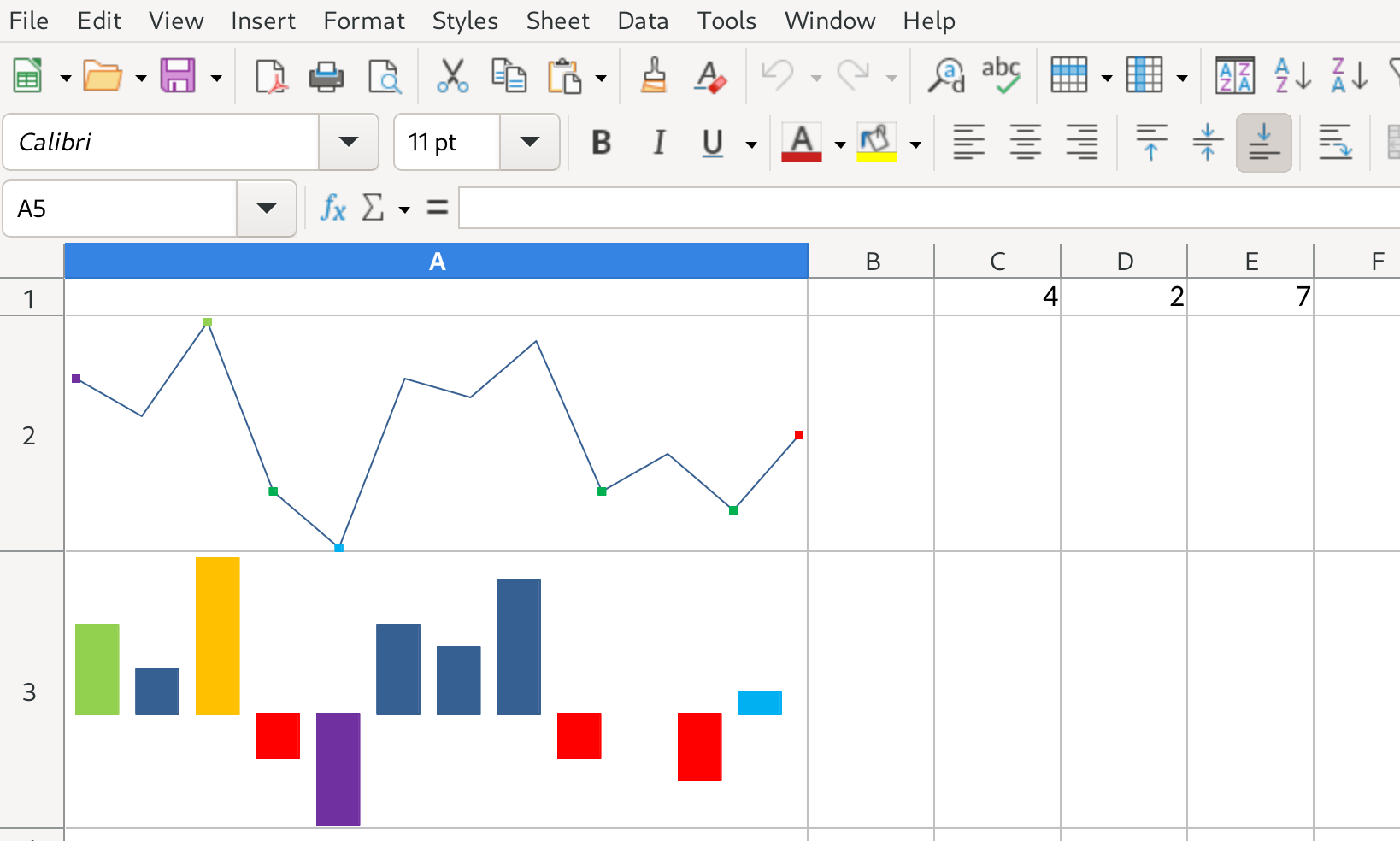
We’ve also added Sparkline support, providing a very pretty and useful way to quickly visualize data for LibreOffice 7.4.

You can read about the history of these from Edward Tufte.

Lubos has been working hard on jumbo sheets – allowing much larger number of columns in sheets (and more rows too) which should make interoperability much smoother for people with large spreadsheets.

And of course lots more – we’re expecting LibreOffice 7.4 to be packed with new and enhanced feature / function from the whole community – and Collabora.

Find out more

Join the Indian LibreOffice community!

Across the globe, LibreOffice communities help to improve the software, translate the user interface, update documentation and spread the word. You can see a list of international projects on this page, and today we’re announcing communication channels for the Indian LibreOffice community!

Check them out – they’re bridged together, so you only need to join one to take part:

So, join in and let’s help to spread the word about LibreOffice – and grow the community – in India!

Of course, it’s a large and diverse country, so here are a few images that reflect its diversity…

Chhatrapati Shivaji Terminus – Amnydv1710, CC-BY-SA


Sikh pilgrim at the Harmandir Sahib (Golden Temple) in Amritsar – Paulrudd, CC-BY-SA


Red Fort – Closer view of the top part of the gate above the Meena Bazaar – Dennis Jarvis, CC-BY-SA


Constitution of India

Build up your skills, and learn exciting new things!

LibreOffice is made by a worldwide community of volunteers, certified developers and many other people. Every summer, we participate in the Google Summer of Code programme: this is focused on introducing contributors to open source software development, and last year LibreOffice received a bunch of new features and improvements thanks to the work of several contributors.

We’re super happy to announce that LibreOffice, once again, is part of this year’s Summer of Code (GSoC). If you’re a contributor, want to improve your programming skills and receive a financial stipend to implement new features in LibreOffice, get involved! You can get in contact with us, show us that you’ve learnt the basics by working on an Easy Hack from the category “difficultyInteresting”, and then propose your project(s). We’re looking forward to hearing from you and seeing your work!

Click here to get started