LibreOffice 7.2 Community is strong on interoperability
Over 60% of code commits for the brand new version of the best free and open source office suite are focused on interoperability with Microsoft’s proprietary file formats
 Berlin, August 19, 2021 – LibreOffice 7.2 Community, the new major release of the volunteer-supported free office suite for desktop productivity, is available from https://www.libreoffice.org/download. Based on the LibreOffice Technology platform for personal productivity on desktop, mobile and cloud, it provides a large number of interoperability improvements with Microsoft’s proprietary file formats. In addition, LibreOffice 7.2 Community offers numerous performance improvements in handling large files, opening certain DOCX and XLSX files, managing font caching, and opening presentations and drawings that contain large images. There are also drawing speed improvements when using the Skia back-end that was introduced with LibreOffice 7.1.
LibreOffice 7.2 is now available natively for Apple Silicon, a series of processors designed by Apple and based on the ARM architecture. Because of the early phase of development on this specific platform, binaries are provided but should not be used for any critical purpose at this stage. Software will be available from the following page: https://download.documentfoundation.org/libreoffice/stable/7.2.0/mac/aarch64/.
LibreOffice and Interoperability
LibreOffice 7.2 Community adds a significant number of improvements to interoperability with legacy DOC files, and DOCX, XLSX and PPTX documents. Microsoft files are still based on the proprietary format deprecated by the ISO in April 2008, and not on the ISO approved standard, so they embed a large amount of hidden artificial complexity. This causes handling issues with LibreOffice, which defaults to a true open standard format (the OpenDocument Format).
The LibreOffice community is happy to have many talented developers who are tackling these issues.
Thanks to the focused development activity from volunteer and sponsored developers, LibreOffice 7.2 takes a significant step forward in terms of transparent interoperability, while maintaining many advantages in terms of resiliency, robustness and compliance with standards – to the benefit of enterprise and individual users.
LibreOffice offers the highest level of compatibility in the office suite market segment, starting with native support for the OpenDocument Format (ODF) – beating proprietary formats in the areas of security and robustness – to superior support for DOCX, XLSX and PPTX files. In addition, LibreOffice provides filters for a large number of legacy document formats, to return ownership and control to users.
LibreOffice 7.2 Community New Features [1]
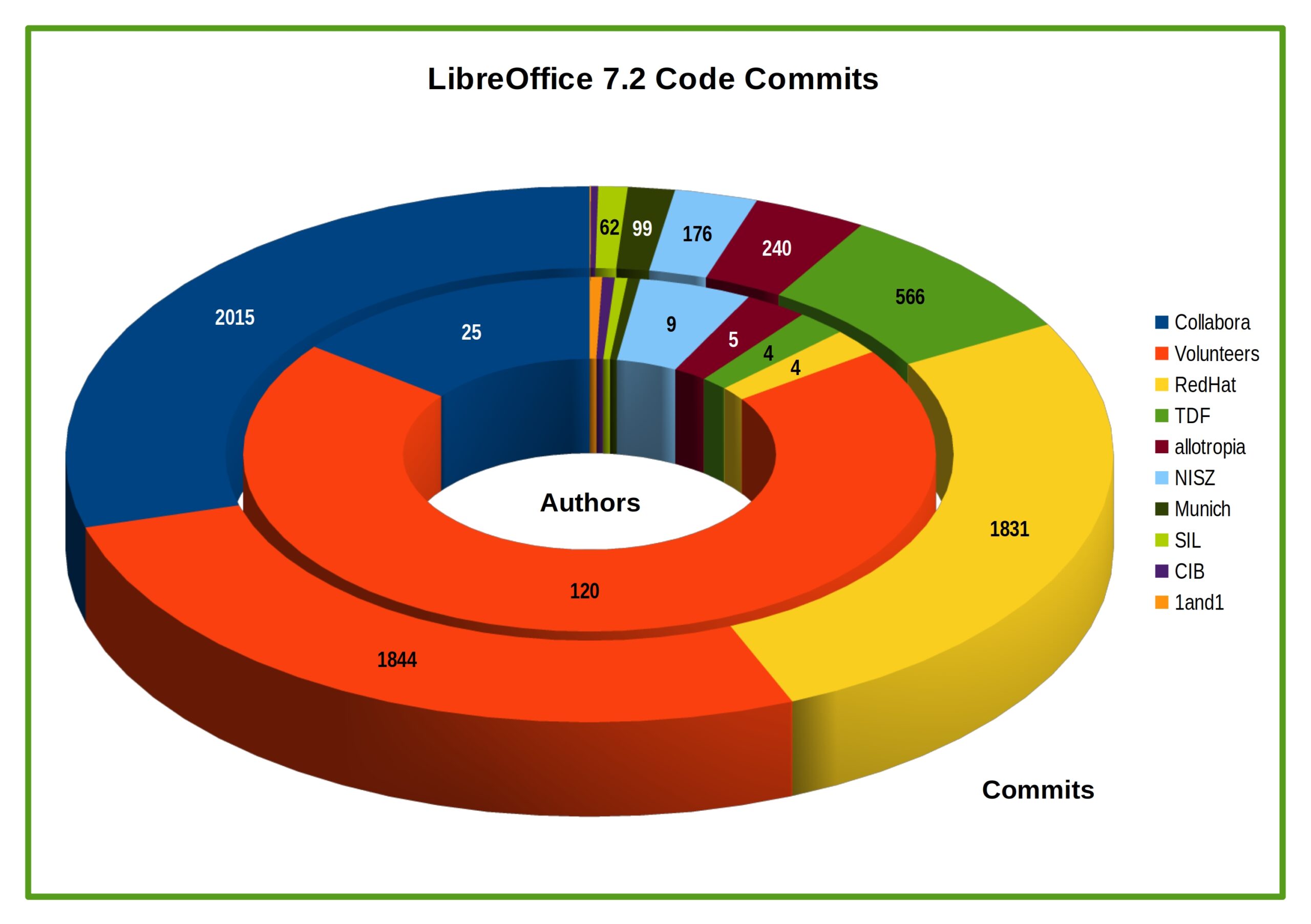 LibreOffice 7.2 Community’s new features have been developed by 171 contributors: 70% of code commits are from 51 developers employed by three companies sitting in TDF’s Advisory Board – Collabora, Red Hat and allotropia – or other organizations (including The Document Foundation), and 30% are from 120 individual volunteers.
In addition, 232 volunteers have provided localizations in 151 languages. LibreOffice 7.2 Community is released in 119 different language versions, more than any other free or proprietary software, and as such can be used in the native language (L1) by over 5.4 billion people worldwide. In addition, over 2.3 billion people speak one of those 119 languages as their second language (L2).
GENERAL
• Popup list to search for menu commands
• Scrollable style picker in the NotebookBar
• Fontwork panel in the Sidebar
• New list view for the templates dialog
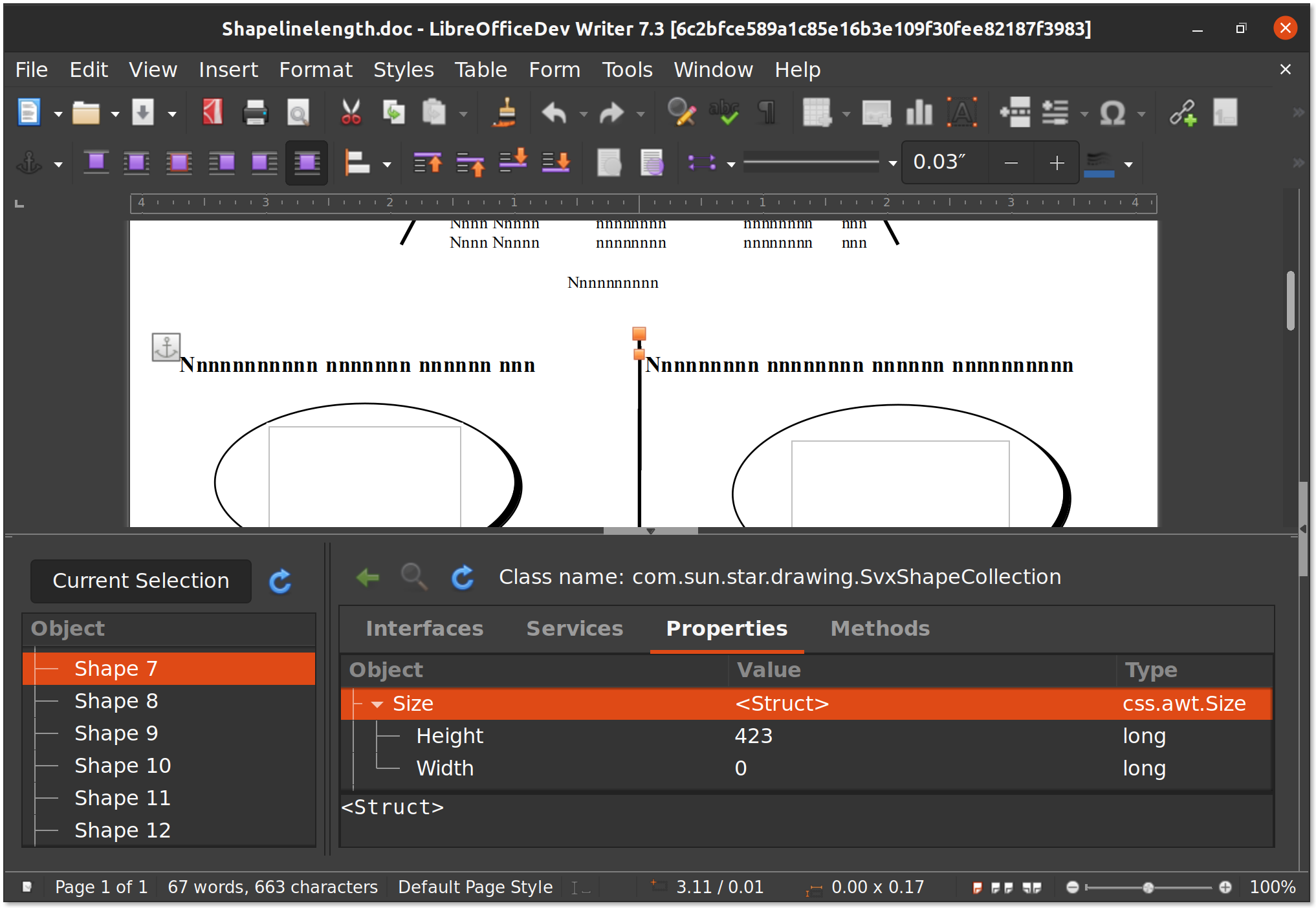
• Built-in “Xray”-like UNO object inspector
WRITER
• Background fills can cover whole pages, beyond margins
• Page styles can now have a gutter margin
• Mail merge shows a warning about nonexistent data sources
• RDF metadata in Style Inspector
• Custom color metadata field shadings
CALC
• Calc now can filter by color in AutoFilter
• HTML tables listed in the External Data dialogue now show captions
• “Fat cross” cursor available in the options
• Type can be selected in “Moving Average” trend lines
IMPRESS & DRAW
• New templates: Candy, Freshes, Grey Elegant, Growing Liberty, Yellow Idea
• Multiple columns now available in text boxes
• Direct access to the scaling factor via the status bar
A video summarizing the top new features in LibreOffice 7.2 Community is available on YouTube: https://www.youtube.com/watch?v=cWmURg_rM2o and PeerTube: https://peertube.opencloud.lu/videos/watch/d9413c81-a568-4a0e-b570-6200fc1d062c.
LibreOffice for Enterprises
For enterprise-class deployments, TDF strongly recommends the LibreOffice Enterprise family of applications from ecosystem partners – for desktop, mobile and cloud – with a large number of dedicated value-added features. These include long-term support options, professional assistance, personalized developments and other benefits such as SLA (Service Level Agreements): https://www.libreoffice.org/download/libreoffice-in-business/.
Despite this recommendation, an increasing number of enterprises are using the version supported by volunteers, instead of the version optimized for their needs and supported by the different ecosystem companies.
Over time, this represents a problem for the sustainability of the LibreOffice project, because it slows down the evolution of the project. In fact, every line of code developed by ecosystem companies for their enterprise customers is shared with the community on the master code repository, and improves the LibreOffice Technology platform.
Products based on LibreOffice Technology are available for major desktop operating systems (Windows, macOS, Linux and Chrome OS), for mobile platforms (Android and iOS), and for the cloud. Slowing down the development of the platform is hurting users at every level, and may ultimately lead to a stagnation of the LibreOffice project.
Migrations to LibreOffice
The Document Foundation has developed a Migration Protocol to support enterprises moving from proprietary office suites to LibreOffice, which is based on the deployment of an LTS version from the LibreOffice Enterprise family, plus migration consultancy and training sourced from certified professionals who offer CIOs and IT managers value-added solutions in line with proprietary offerings. Reference: https://www.libreoffice.org/get-help/professional-support/.
In fact, LibreOffice – thanks to its mature codebase, rich feature set, strong support for open standards, excellent compatibility and long-term support options from certified partners – represents the ideal solution for businesses that want to regain control of their data and free themselves from vendor lock-in.
Availability of LibreOffice 7.2 Community
LibreOffice 7.2 Community is immediately available from the following link: https://www.libreoffice.org/download/. Minimum requirements for proprietary operating systems are Microsoft Windows 7 SP1 and Apple macOS 10.12.
Change Logs: https://wiki.documentfoundation.org/Releases/7.2.0/RC1 (RC1), https://wiki.documentfoundation.org/Releases/7.2.0/RC2 (RC2), https://wiki.documentfoundation.org/Releases/7.2.0/RC3 (RC3).
LibreOffice Technology-based products for Android and iOS are listed here: https://www.libreoffice.org/download/android-and-ios/, while for App Stores and ChromeOS are listed here: https://www.libreoffice.org/download/libreoffice-from-microsoft-and-mac-app-stores/.
For users whose main objective is personal productivity, and therefore prefer a release that has undergone more testing and bug fixing over the new features, The Document Foundation maintains the LibreOffice 7.1 family, which includes some months of back-ported fixes. The current version is LibreOffice 7.1.5.
The Document Foundation does not provide technical support for users, although they can get it from volunteers on user mailing lists and the Ask LibreOffice website: https://ask.libreoffice.org.
LibreOffice users, free software advocates and community members can support The Document Foundation with a donation at https://www.libreoffice.org/donate.
LibreOffice 7.2 is built with document conversion libraries from the Document Liberation Project: https://www.documentliberation.org.
[1] Release Notes: https://wiki.documentfoundation.org/ReleaseNotes/7.2.
Press Kit
Download link: https://nextcloud.documentfoundation.org/s/AgY6G3WAAtsCZrn.