LibreOffice 5.3: A week in stats

We announced LibreOffice 5.3 one week ago, and a lot has happened in the meantime! Here’s a summary of downloads, web page views, social media activity and other statistics. We’ve also compared these to the LibreOffice 5.2 first week stats to see how the project and community is progressing…

410,472 downloads of LibreOffice 5.3

This is a 32% increase over the first week of LibreOffice 5.2 – and note that it only includes downloads from our servers and mirrors, and not other sources (such as Linux distribution package repositories).

378,719 unique visitors to our website

Here we have a major 77% increase over the same period for the last release. In addition, there were 834,959 page views.

3,293 donations to The Document Foundation

Donations help our project and community in many ways – infrastructure, documentation, events, marketing, and more. Compared to the first week of LibreOffice 5.2, the number of donations increased by 79%.

77,878 views of our New Features videos

More big growth here – the videos for LibreOffice 5.2 had 37,252 views in comparison, so this is a 109% increase. A lot of this growth can be attributed to the many news articles on the web that embedded the videos for readers to watch.

Now, how about social media?

30,298 people reached by the announcement on Facebook

Our Facebook community is growing steadily, and here we see a 21% increase over the same statistic for LibreOffice 5.2. The announcement was liked by 851 people and shared 213 times. Meanwhile, our Google+ post received 229 likes (up from 115 for the previous version).

So there’s plenty to be happy about, but there are some areas where we can improve as well:

20,203 impressions from the announcement tweet

This is a 42% decrease compared to the tweet for LibreOffice 5.2. There are many possible reasons for this decrease, some out of our control, but we’ll revise our strategy for the next release to ensure that the Twittersphere keeps talking about us. Similarly, Reddit activity around the release wasn’t quite as strong this time: links to the LibreOffice 5.3 announcement on the blog received 486 upvotes, compared to 632 for last time, so that’s something to work on as well.

But on the whole, we can see that the project and community is growing well. Thanks to everyone who helped out with marketing, promotion and social media activity around the release!


Download LibreOffice 5.3 here

Announcement of LibreOffice 5.2.5

Berlin, January 26, 2017 – The Document Foundation (TDF) announces LibreOffice 5.2.5 “still”, the fifth minor release of the LibreOffice 5.2 family. Based on the upcoming announcement of LibreOffice 5.3, all users are invited to update to LibreOffice 5.2.5 from LibreOffice 5.1.6 or previous versions.

TDF suggests deploying LibreOffice in large organizations, public administrations and enterprises with the backing of professional support by certified people (a list is available at http://www.libreoffice.org/get-help/professional-support/).

Road to LibreOffice 5.3

LibreOffice 5.3 will be announced in less than a week, on February 1st, 2017. Users can start learning about the new features on LibreOffice 5.3 Release Notes page (https://wiki.documentfoundation.org/ReleaseNotes/5.3).

Download LibreOffice

LibreOffice 5.2.5 is immediately available for download from the following link: http://www.libreoffice.org/download/libreoffice-fresh/. LibreOffice users, free software advocates and community members can support The Document Foundation with a donation at http://donate.libreoffice.org.

Several companies sitting in TDF Advisory Board (http://www.documentfoundation.org/governance/advisory-board/) are providing either value added Long Term Supported versions of LibreOffice or consultancy services for migrations and training, based on best practices distilled by The Document Foundation.

LibreOffice contributor interview: Tamás Bunth

LibreOffice developers, testers, translators and documentation authors are working hard on LibreOffice 5.3, which is due for release in early February. One contributor to the project, Tamás Bunth, has been helping to improve Base, the database front-end of the suite. We caught up with him to ask how he got involved with LibreOffice and what the community is like…

Where do you live, and are you active on IRC channels or social media?

I’m Hungarian, and I live in Budapest. My IRC nickname is Wastack (the name comes from the game Heroes of Might and Magic, one of my favourite games from childhood – Wastack is a barbarian hero). I’m on Facebook too: https://www.facebook.com/btomi96.

Do you work for a LibreOffice-related company or just contribute in your spare time?

I did some work for Libreoffice as a Google Summer of Code (GSoC) student last year. In the future I’ll contribute in my spare time.

How did you get involved with LibreOffice?

One of my roommates in my student hostel suggested that we should try GSoC. I was searching for an end user application written in Java or C++, since these are the languages I’m comfortable with. As I looked at the Easy Hacks I realised that I may be able to solve some of these, and the developer community was helpful as well.

What areas of the project do you normally work on? Anything else you want to tackle?

My GSoC project was to upgrade the internal Firebird database management system, which is used by LibreOffice Base, and solve related bugs, which makes Firebird an experimental feature. Therefore, I got to know the drivers in some detail, and I think I’ll stick to this area in the future.

What was your initial experience of contributing to LibreOffice like?

When I first looked at the C++ code in the repository, it was scary, since even a simple string is called OUString. After that I found some UNO interfaces, and I really don’t know what was going on there. Of course, after some time and guidance from my mentor things got much clearer.

Which is your preferred text editor – and why?

Vim is my favourite. Well, I don’t now many other editors, but Vim is highly customisable. I like the recording feature too.

What do you do when you’re not working on LibreOffice?

I am a 2nd year Bachelor of Science student of Budapest University of Technology and Economics. In my free time I go rowing. This year I got 4th place on the National Championship of Hungary in eights crew. I’ve achieved two first places there, but I’ve never been in an international race. It is one of my future goals.

Any other hobbies or projects you’re working on?

When I still have some free time, I like writing little computer games. I started with a simple snake game using Flash several years ago, which was followed by a Tetris with Java Swing and a multiplayer Tron game using TCP (still Java). Currently, I have an incomplete project of a browser game, where you have to move simultaneously with figures on a map. It is written in JavaScript, with Node.js on the server side.

Thanks Tamás! And thanks to everyone else who’s working on making LibreOffice 5.3 the best release yet. If you’re reading this and want to join a friendly and busy community promoting open standards and document liberation, get involved!

LibreOffice contributor interview: Hazel Russman


A new year begins, and we kick off with our first LibreOffice contributor interview of 2017. This time we’re talking to Hazel Russman who helps out with documentation and translations…

Where do you live, and are you active on social media?

I’m British and live in North London. I don’t do social media but I have a web page at www.hrussman.entadsl.com.

Do you work for a LibreOffice-related company or just contribute in your spare time?

I’m retired. I help out the documentation team mainly as a translator and proofreader.

How did you get involved with LibreOffice?

I wrote a novel some years ago and used OpenOffice.org to get it into shape for self-publishing. I wanted to give something back, and the OOo site suggested that time might be more valuable than money. When LibreOffice forked off, I moved over to their team.

What areas of the project do you normally work on? Anything else you want to tackle?

I’ve done quite a bit of translation from German into English, especially for Base, which has an excellent German handbook. Until I translated it, there was hardly anything on Base in English. English is my native language, but I grew up in a German-speaking home. My parents were refugees from Hitler. I’m also quite well known on the team as a proofreader.

What was your initial experience of contributing to LibreOffice like?

Interesting and very satisfying. But I’ve never been much interested in socialising online.

Which is your preferred text editor, and why?

For plain text, I like gVim. It has all the Vim keyboard commands but also graphical controls. The best of both worlds, you might say. I do a bit of coding in my spare time and for that I use Geany. Both Vim and Geany do syntax checking, which is a great help.

What do you do when you’re not working on LibreOffice?

Lots of things! I have a dog who takes up a lot of my time. I am active in my local church and play the cello as part of an instrumental group attached to the church’s gospel choir. I am also quite active on Linux Questions, which is the only social networking that I can be bothered with.

Thanks Hazel! We’ll be posting more interviews over the coming weeks and months, so if you want to join the LibreOffice community, pop over to tdf.io/joinus and choose how you want to get involved. We look forward to your input and contributions!

Let’s celebrate with LibreOffice 5.2.4

Berlin, December 22, 2016 – The Document Foundation (TDF) announces the availability of LibreOffice 5.2.4still, the fourth minor release of the LibreOffice 5.2 family. Based on the upcoming announcement of LibreOffice 5.3, all users can start to update to LibreOffice 5.2.4 from LibreOffice 5.1.6 or previous versions.

TDF suggests deploying LibreOffice in large organizations, public administrations and enterprises with the backing of professional support by certified people (a list is available at: http://www.libreoffice.org/get-help/professional-support/).

Road to LibreOffice 5.3

With the availability of LibreOffice 5.3 RC1, the project has entered the last stage of the road to LibreOffice 5.3, which will be announced on February 1st, 2017. In the meantime, we have announced the UI concept: https://blog.documentfoundation.org/blog/2016/12/21/the-document-foundation-announces-the-muffin-a-new-tasty-user-interface-concept-for-libreoffice/.

Users can start learning about the new exciting features on LibreOffice 5.3 Release Notes page (https://wiki.documentfoundation.org/ReleaseNotes/5.3). The page will be updated until the very last minute.

Download LibreOffice

LibreOffice 5.2.4 is immediately available for download from the following link: http://www.libreoffice.org/download/libreoffice-fresh/.

LibreOffice users, free software advocates and community members can support The Document Foundation with a donation at http://donate.libreoffice.org.

Several companies sitting on TDF Advisory Board (http://www.documentfoundation.org/governance/advisory-board/) are providing either value added Long Term Supported versions of LibreOffice or consultancy services for migrations and trainings, based on best practices distilled by The Document Foundation.

The Document Foundation announces the MUFFIN, a new tasty user interface concept for LibreOffice

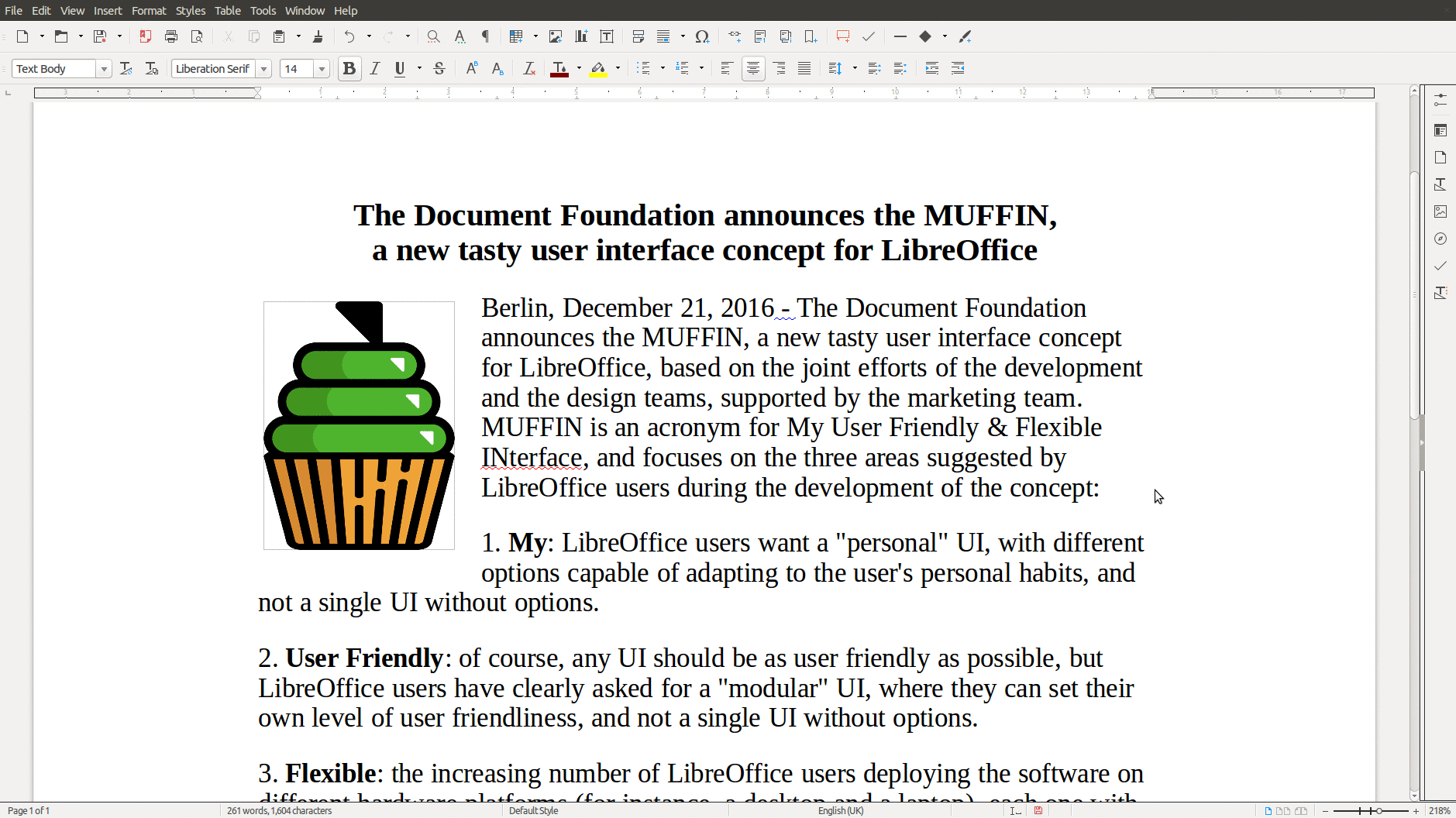
muffinBerlin, December 21, 2016 – The Document Foundation announces the MUFFIN, a new tasty user interface concept for LibreOffice, based on the joint efforts of the development and the design teams, supported by the marketing team. MUFFIN is an acronym for My User Friendly & Flexible INterface, and focuses on the three areas suggested by LibreOffice users during the development of the concept:

  1. My: LibreOffice users want a “personal” UI, with different options capable of adapting to the user’s personal habits, and not a single UI without options.

  2. User Friendly: of course, any UI should be as user friendly as possible, but LibreOffice users have clearly asked for a “modular” UI, where they can set their own level of user friendliness, and not a single UI without options.

  3. Flexible: the increasing number of LibreOffice users deploying the software on different hardware platforms (for instance, a desktop and a laptop), each one with different characteristics and screen size and resolution, have asked for a UI that can be tweaked to leverage the screen real estate, and not a single UI without options.

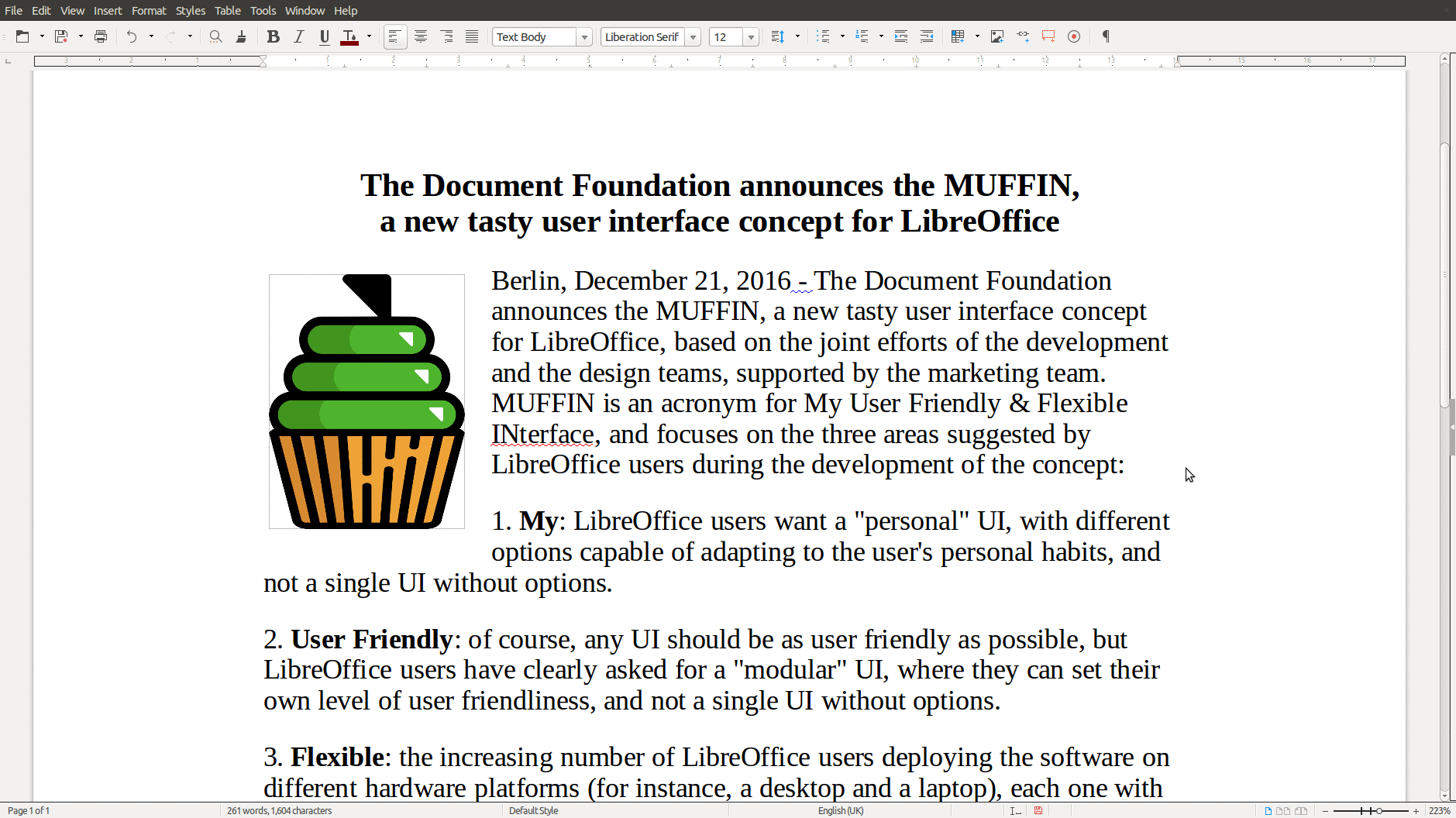
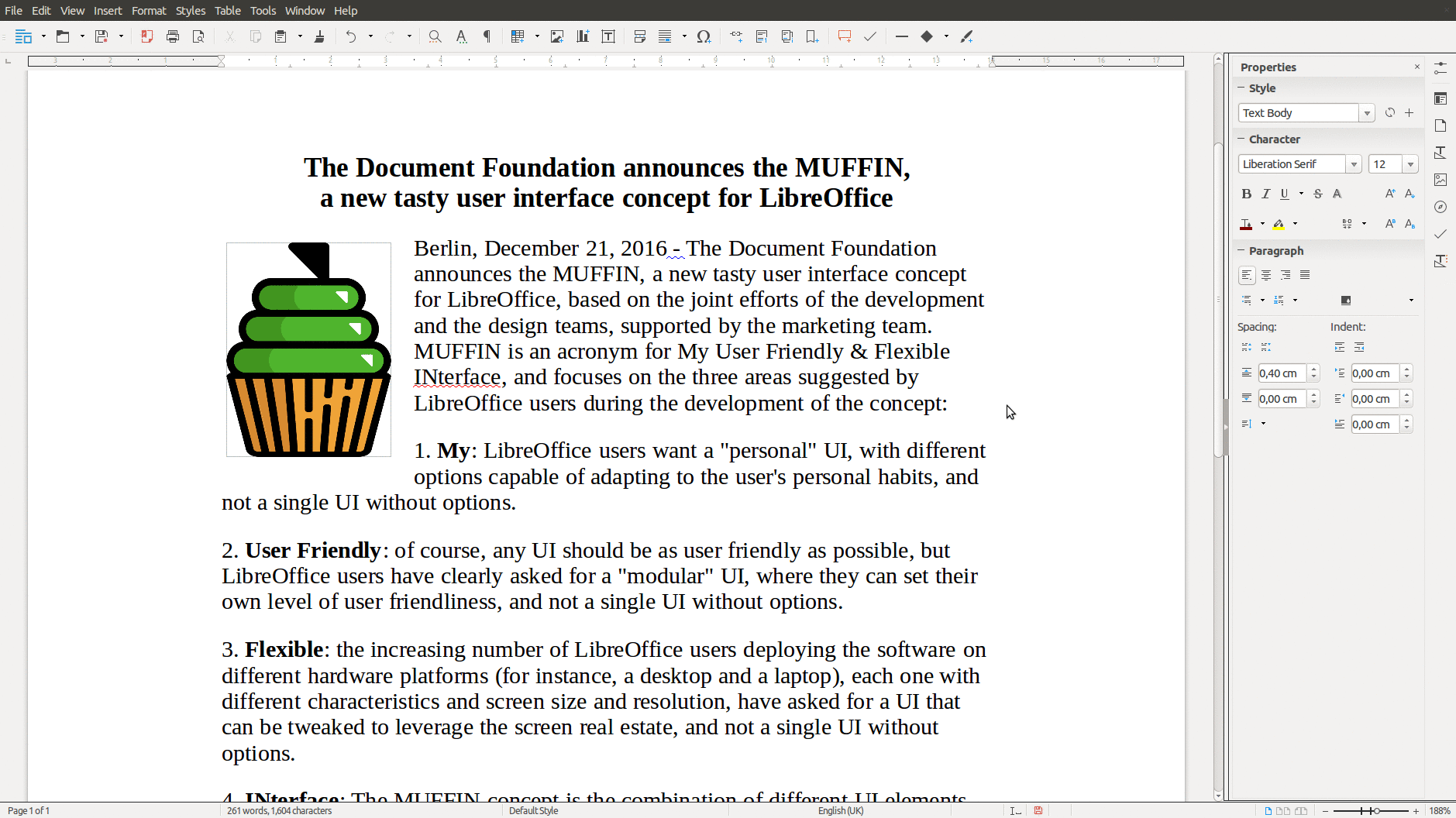
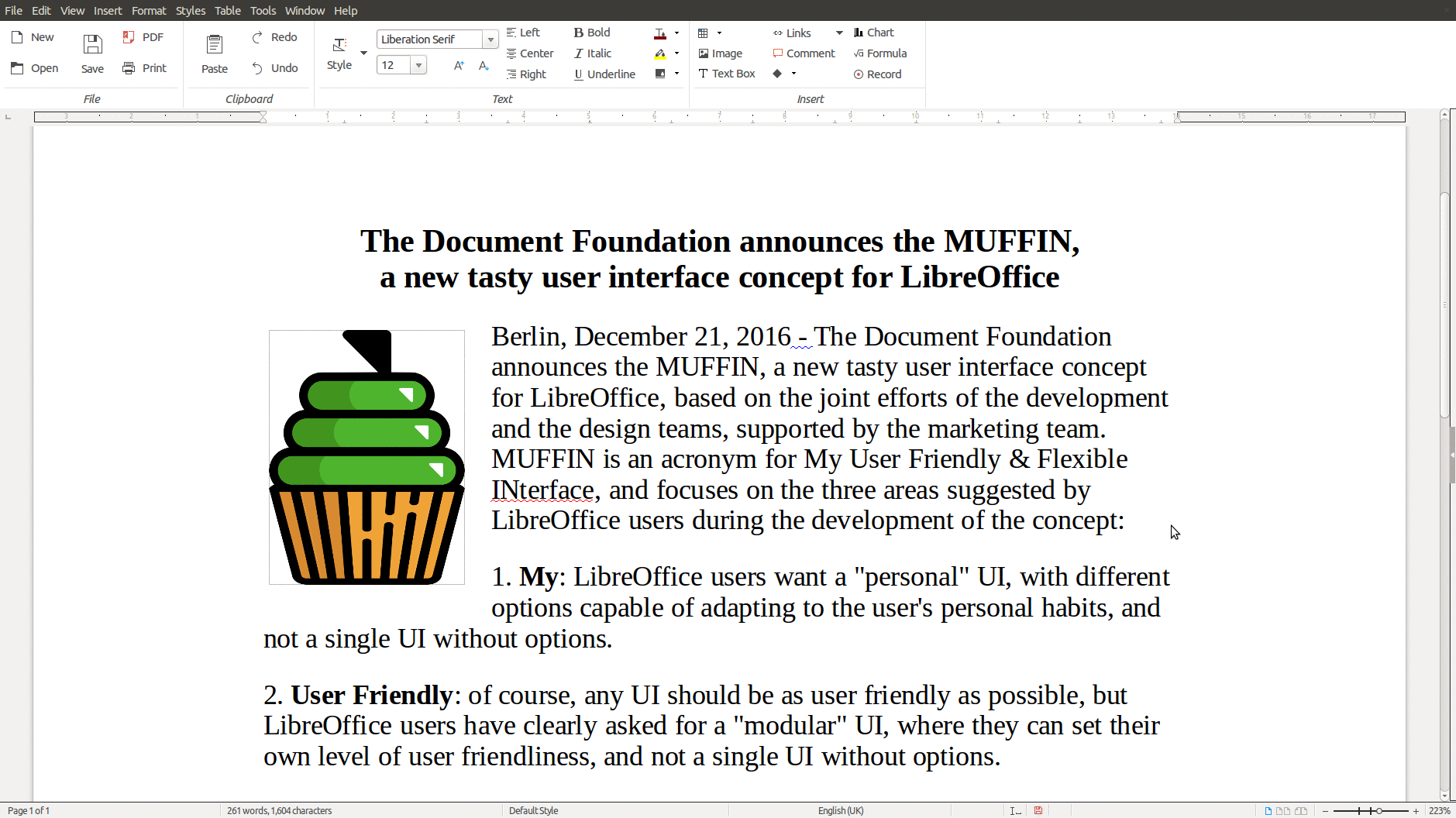
INterface: The MUFFIN concept is the combination of different UI elements, which are going to be available starting from LibreOffice 5.3 either as a standard or experimental feature: the Default UI (with toolbars), a Single Toolbar UI, the Sidebar with a Single Toolbar, and the new Notebookbar (experimental, and not recommended for production use). Each UI layout has been thought to serve a different cluster of LibreOffice users.

LibreOffice Writer with Standard Toolbar
LibreOffice Writer with Single Toolbar
LibreOffice Writer with Sidebar
LibreOffice Writer with Notebookbar

The rationale behind the MUFFIN is further explained in a marketing backgrounder [PDF] and in a specific blog post on TDF Design Blog.