The most mature and capable code-base, outside of Microsoft, to interoperate with Microsoft’s proprietary document formats
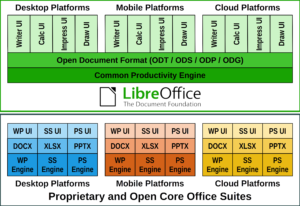 LibreOffice Technology is the result of ten years of intensive activity on the software’s open source code, coordinated by the Engineering Steering Committee and carried out by developers, software engineers, security experts, and interface and user experience specialists of many affiliations.
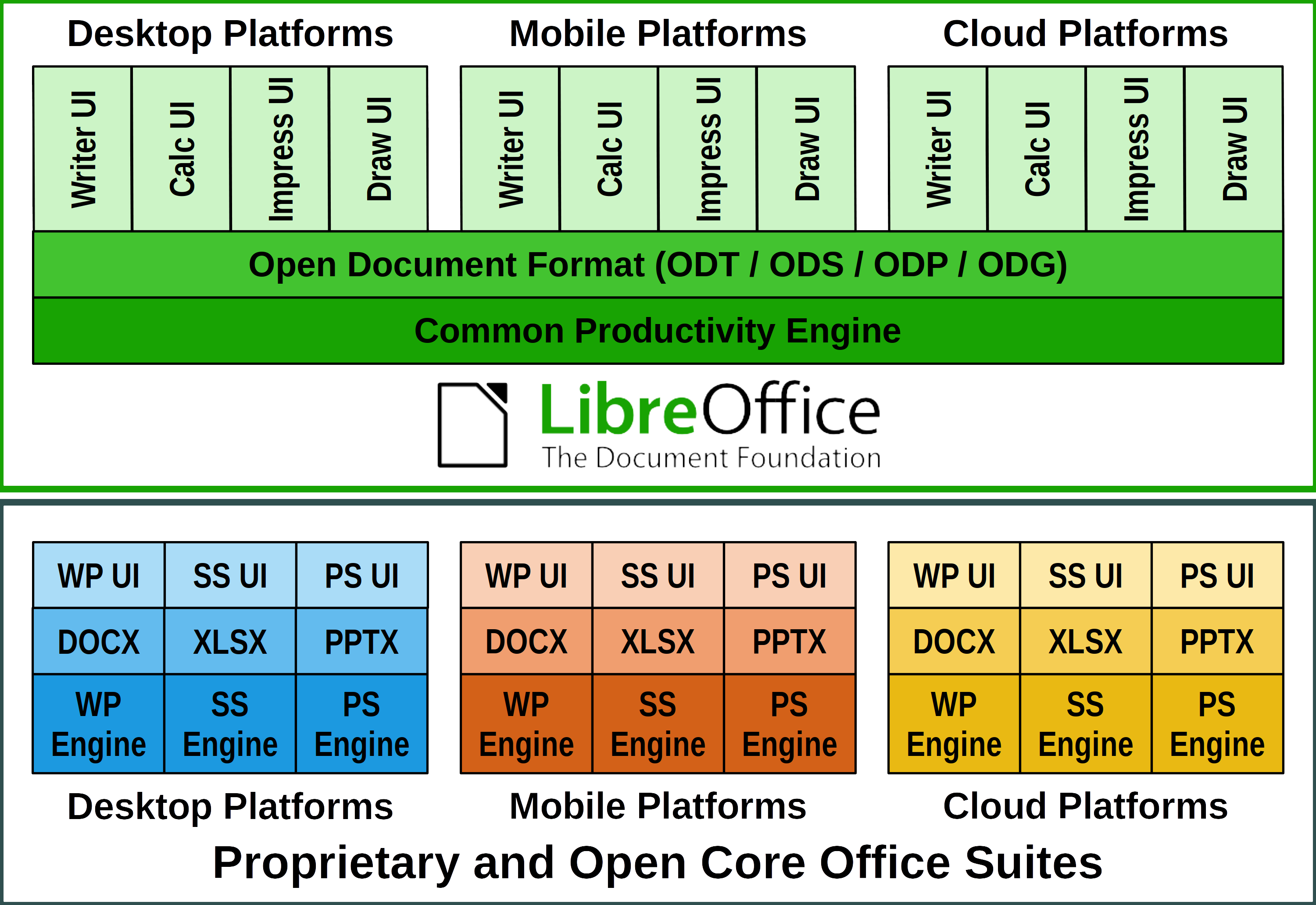
The goal of this evolutionary process was to create a single software platform for individual productivity on desktop, mobile and the cloud: the only approach able to offer users the interoperability features that enable transparent sharing of all content, and independence from single commercial vendors and vendor lock-in strategies.
This is the opposite approach to all other proprietary and open core office suites, which have developed different versions for each platform trying to replicate the functionality, but only succeeding in part, so that – for example – the internal structure of documents (which is not visible to users) is different for each application.
The evolutionary process from product to platform
The source code inherited from OpenOffice – with a heritage stretching back decades – was too complex for the average developer and had a build environment that was difficult to create and manage. It was therefore essential to mentor new developers, to reduce the learning curve and speed up the process.
To help newcomers, senior developers invented “Easy Hacks”: simple tasks for people with little or no knowledge of the source code, with the twofold objective of easing the learning curve, and having a number of problems solved without spending their precious time.
Thanks to Easy Hacks, the project managed to attract new code contributors, create a strong base of new developers, increase the number of core developers, and also involve several new “star” contributors capable of working on challenging code cleaning and refactoring tasks.
In a short time, under the stewardship of LibreOffice’s Engineering Steering Committee, developers managed to reduce the software footprint, undertake a long awaited source code renovation with the removal of tens of thousands of lines of dead code (and a large number of deprecated libraries), simplify the build process to the point where it could be automated and translate the majority of German comments into English.
To support the process, the development infrastructure was enhanced with the integration of several components and the update or replacement of existing ones. Today, the process is based on automation – as much as possible – including tests, to free developers’ time for more demanding tasks.
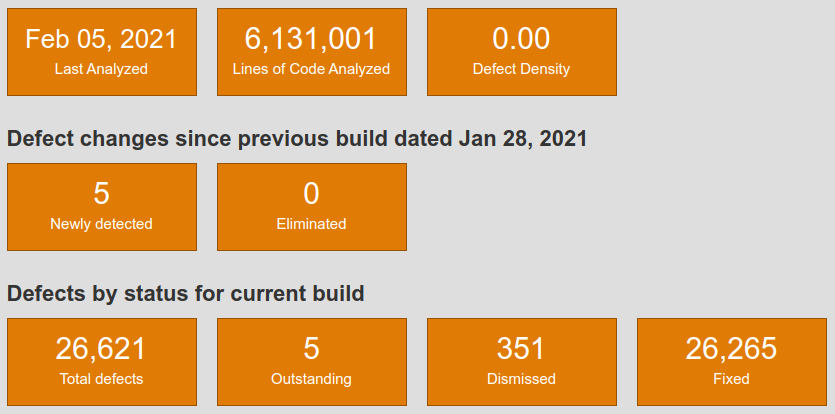
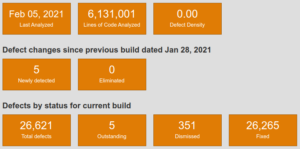 The result is a source code base characterised by one of the lowest defect densities in the industry, according to static analysis tools such as Coverity Scan [1]. The density inherited from OpenOffice – 1.1 errors per 1000 lines of code – has dropped to 0.001, against an average of 0.71 for projects of the same size.
Overall performance was also significantly improved, especially when reading and writing large files in the ODF native document format and in DOCX, XLSX and PPTX proprietary file formats.
Once the bulk of the source code renovation process was completed, developers and UI designers worked on improving the user experience. They reorganized several menus, created new icon sets for Windows and macOS, improved existing icon sets, and extended the user interface options by adding a NotebookBar, with Tabbed, Grouped and Contextual variants.
Last but not least: LibreOffice – thanks to a huge community of volunteers active in localization – is the software for personal productivity available in more native language versions than any other application. Today, the software is released in 119 language versions, with 26 more in development.
New LibreOffice APIs and Scripting Libraries
LibreOffice’s APIs (Application Programming Interfaces) are known for their steep learning curve, which was considered an obstacle for the development of macros within LibreOffice, and for integration projects on mobile and cloud platforms. To solve this issue, developers have created the more accessible LibreOffice Kit APIs and ScriptForge scripting libraries.
LibreOfficeKit is a thin API that provides access to LibreOffice functionality via C/C++ or writing external apps, without having to compile or link to LibreOffice, or learn UNO – the office suite component model – or other complex languages. The Kit allows fast rendering of documents for any application.
ScriptForge is an extensible and robust collection of macro scripting resources for LibreOffice, which can be invoked from user Basic or Python scripts. They help to overcome the LibreOffice API’s challenges, as they offer easy access to and management of windows and documents, automation of Calc sheets, cells and ranges of cells, management of dialogs and their controls, as well as access to data contained in databases.
LibreOffice, a champion of interoperability
 LibreOffice is the most versatile office suite in the market for interoperability, thanks to its outstanding level of compatibility with the OOXML Transitional proprietary file format – the majority of DOCX, XLSX and PPTX files – and to the large number of import and export filters for legacy file formats released by the Document Liberation Project [2].
Given the large number of proprietary Microsoft Office files generated by users, they are managed by teams of developers with specific skills.
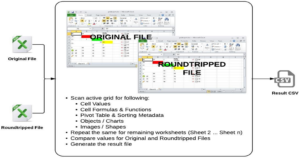
Microsoft Office file are analyzed to spot issues and “roundtripped”: opened and edited with LibreOffice, and saved back in the original format to check for consistency, until all issues are solved and the result is the same, independent of the software used (the image shows the process for XLSX files, but the same applies to DOCX and PPTX).
Interoperability with proprietary Microsoft Office formats is further improved with every new LibreOffice release, to ensure transparent handling of documents independent to the format: standard ODF or proprietary OOXML.
Open Document Format, the true document standard
 LibreOffice Technology is also the best platform for true interoperability thanks to the ISO-standard ODF (Open Document Format), the native file format inherited from OpenOffice. ODF is maintained and further developed thanks to The Document Foundation, which has established the independent COSM [3] project – the Community of ODF Specification Maintainers – to hold funds and retain editors for contributing to standardisation of ODF 1.3 and other future versions.
The ODF standard document format was designed in a vendor neutral manner from the ground-up, using existing standards wherever possible, to achieve a level of interoperability which is still unrivaled. ODF is robust and solid, and is consistent and predictable (i.e. the underlying XML code of the document will always be the same, independent to the program version, the hardware platform and the operating system, and this will make the document easy to visualize and manage on any device).
Products based on LibreOffice Technology
Today, there is a large family of products based on LibreOffice Technology, for the desktop (with community and enterprise-optimized versions), for the cloud, for Android and iOS, and for Chrome OS. LibreOffice Technology is also used within larger products to convert and process document formats. These products are released by different organizations and have different brand names, but share the same common engine to offer users the same unique advantages in term of interoperability, resiliency, robustness and security.
[1] https://scan.coverity.com/
[2] https://www.documentliberation.org/
[3] https://blog.documentfoundation.org/blog/2019/07/02/the-cosm-project/
LibreOffice Technology White Paper is also available as PDF: Download File