The LibreOffice community tries to make the software as accessible as possible – in other words, usable for people with special needs or requirements. Alex Arnaud is working to make the suite more accessible for users with visual impairments, and discusses his experiences and the challenges ahead in our latest interview…
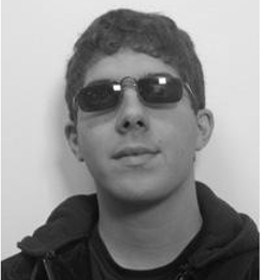 Where are you from, and if you’re active on IRC, what’s your nickname?
I am French, and my IRC nickname is “alexarnaud”.
Do you work for a LibreOffice-related company or just work on it in your spare time?
Alongside the Hypra team, I am based in Paris. I am visually impaired and I use my computer with a screen magnifier and a screen reader. I use, on a daily-basis, the Universal Accessible OS (UAS) based on Debian GNU/Linux both for my professional and personal needs. I used GNOME before (and its magnifier), but given the important efforts that Hypra has poured into this project and the constant improvement of the, I have decided to switch about a year ago.
I’ve been working at Hypra since September 2015 as a project manager, leading the development of the visual-assistance stack (Compiz). I soon intend to join the company as a shareholder as I feel now totally involved in the startup’s ambition: making accessibility a key competitive advantage for Linux, and ultimately expanding the benefits of free software to the general public, beginning with visually impaired people. LibreOffice being one of the cornerstones of free software, I am contributing to the LibreOffice community inside the quality assurance (QA) team, mostly on my working time.
How did you get involved with LibreOffice?
When joining Hypra, my blind friends and colleagues Jean-Philippe and Raphael kept telling me: “Since version 4.3, LibreOffice is regressing on accessibility for blind people”. So far so good – we provide version 4.2 for our customers because it is actually the latest version usable for blind and visually impaired people. But we deem such an evolution is not sustainable on the long-run.
That is why we have decided to get involved, beginning with an accessibility audit on the user side. I’ve looked into all the LibreOffice bugs related to GNU/Linux and accessibility, and checked their validity and updated them as a consequence.
After that I started to become an accessibility bug hunter for the LibreOffice QA team and I have reported lots of bugs related to Writer, Calc and Impress. I see myself as a kind of “whistle-blower” about accessibility inside the community. Most of the sighted-users do not know that software has to be accessible for all people, so my job is raising awareness and hence trying to be a driver of change.
What was your initial experience of contributing to LibreOffice like?
My initial experience with LibreOffice was in 2011. I reported bugs about the accessibility of LibreOffice for Windows – I sent them directly in a mailing list. In 2011, on Windows, it was completely impossible to use LibreOffice with a screen magnifier so I chose to use IBM Lotus Symphony, which was usable for a low-vision person.
What areas of the code do you normally work on? Anything else you want to tackle?
I am a user of the Orca screen reader (the screen reader being also useful for large array of people from the elderly to the visually impaired), so I can easily check if something is accessible for everyone. I focus on the user interface and the communication of LibreOffice with assistive technologies through the AT-SPI2 protocol.
I’m only working on the user side because I don’t know how to compile and how to debug LibreOffice – I just know QA-related things like how to check which version introduces a regression, for example. Testing and reporting bugs is huge work that requires attention and patience. I spent most part of my time tracking features and verifying whether they are usable for disabled people.
What is your vision for the future, or what would you most like to see improved in LibreOffice?
Free software entails a huge ethical and philosophical promise. It drives many expectations and hopes for average users in terms of social inclusion and privacy. It also provides enormous opportunities to reshape the relationships people have with technologies, focusing more on training and support, rather than on the cost of technologies themselves. This is a driver for social change. But to cope with these expectations, I believe we have to make sure that LibreOffice, being one of the cornerstones of free software, enables social inclusion.
Why should we keep adding features if we haven’t them usable for all? Can we accept it if a mainstream project such as LibreOffice keeps excluding people? As a matter of fact, I’ve noticed that there are accessibility bugs, originally coming from the OpenOffice.org code, that were reported more than 5 fives years ago… We can’t let the status quo prevail!
What do you do when you’re not working on LibreOffice?
I spend most of my spare time reading books and listening to radio podcasts to discover more in depth about how the world works. I’m fascinated by Noam Chomsky’s point of view about democracy and information. I find his famous book “Manufacturing Consent – The Political Economy of the Mass Media” extremely clarifying about the role of the media industry in a democratic country.
I also appreciate spending time with other people, with my family and with my friends.
What was the very first program you wrote?
If my memory serves me well, it was a very little social network.
Which is your preferred text editor? And why?
I’ve been using Emacs as my primary text editor since the day I discovered it. It’s really a pleasure for me to work with it because it help me to overcome my vision troubles.
In fact, I use a screen magnifier program that follows the cursor position. In some programs like “man”, “less” and “more” I can’t move the cursor inside the text – and that forces me to use the mouse, which makes my work more difficult.
With Emacs I can read manual pages inside a buffer, and I can use a command-line and move inside it – it is so convenient for me!
Why would you say there are few bug reports related to accessibility on GNU/Linux?
I would forward you to an interesting message posted years ago by Samuel Thibault (main contributor of the Debian accessibility team). For a blind person, if an application is not accessible enough it is completely impossible to report a bug.
Regular users that have disabilities spend more time than people without them, just to do things in their life. Information technology is a bridge between inaccessible hard things (newspaper, administrative things, TV programs, etc) and the accessible digital world.
It is really indispensable for blind people – for example – to be efficient in their lives when finding information related to their city, communicating with people by e-mail (letters are inaccessible), finding their path with GPS, producing and reading documents, finding a job of course – and so much more!
I have a dream: we work on free software, especially in this case LibreOffice, and everyone can work on the accessibility side and improve the life of everyone else. We need more manpower! Here’s a link to the meta-bug related to accessibility stuff on GNU/Linux.
I’m often available on IRC (Freenode network) on the channel of the libreoffice-design team (#libreoffice-design). Please ping me if you have questions relating to accessibility.
Thanks to Arnaud for his time and in-depth answers. For those reading this who want to get involved and help to make LibreOffice more accessible, join us today!