
LibreOffice Conference 2026 schedule is online!
The LibreOffice Conference 2026 will take place in Pordenone, Italy, from September 10 – 12. And now the schedule is online, with:
- 8 conference tracks
- 64 sessions
- 49 speakers
The LibreOffice Conference 2026 will take place in Pordenone, Italy, from September 10 – 12. And now the schedule is online, with:
This is the second part of our interview with the Bundesheer (see here for the first).
From the very beginning, we clearly recognised the need to further develop LibreOffice. Before finalising our plans, we also examined how we could continue to develop the product. Ultimately, we issued a Europe-wide, open call for proposals to secure both support and development capacity for LibreOffice. The way we selected the product enhancements stemmed in part from this preliminary study, because we had identified specific import capabilities and compatibility requirements.
That’s one major aspect: improving interoperability in line with our needs. The other focus was on improving LibreOffice based on ongoing user feedback and feedback regarding collaboration with external organizations. One example of this was the “Notes” bar in Impress. In the past, users had to edit notes in a separate notes view.
We were told very early on that users wanted to be able to do this directly within the slide editing view. This is a very well-known enhancement that we sponsored, which – I think – works very well. In addition, there are many other details, such as scrolling through presentations with the mouse wheel. Previously, you had to keep switching back and forth to the slide overview view to scroll. Now all of this is possible right from within the slide, which simply makes it easier to use and also increases acceptance because users expect it.
I could list many more extensions. We’re not the only ones contributing a great deal to LibreOffice – we see ourselves as part of the community, and we’re happy when the community uses our contributions and when others contribute their own, which we’re of course very happy to use as well. That’s what makes the project so attractive and successful.
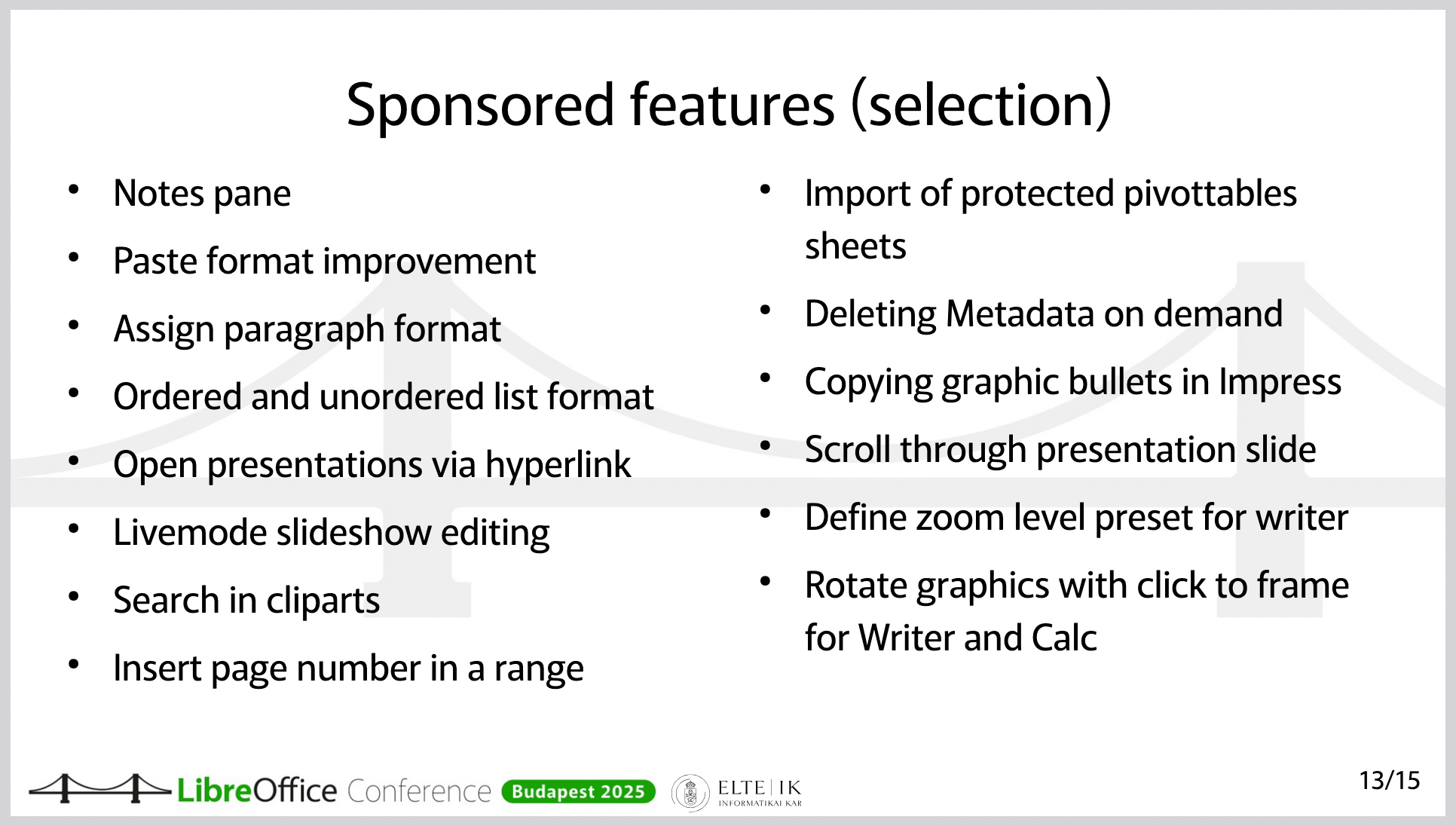
Features and improvements in LibreOffice, sponsored by the Austrian Military (this is a slide from a presentation at the LibreOffice Conference 2025)
We’ve developed extensions for internal use, but there are also several publicly available extensions. One of them integrates our own help page, since we provide targeted help within our internal systems.
On a much larger scale, there’s an extension hosted on GitHub that covers military-tactical symbols. It’s available as open source software, so anyone can use it. This is actually an extension that, although it’s still in “release candidate” status, already works well. The extension is, of course, also suitable for collaboration with other armies. Its functionality is unique. To my knowledge, it’s not available anywhere else.
Yes – one of the advantages of LibreOffice is that the format is ISO-standardised and truly open. You get the best functionality in LibreOffice when you use ODF. We use ODF throughout. It’s clear that our external partners don’t do this to the same extent. This is where LibreOffice benefits from its ability to handle (read and edit) Office Open XML (OOXML) documents as well.
The Austrian Armed Forces protect the Austrian population; to make this possible, we need, for example, systems that function independently of external parties. We have a large number of systems based on open source solutions and many solutions that are platform-independent. This includes the email system.
Therefore, we didn’t have to replace Outlook or Microsoft Exchange.
The switch to LibreOffice in the Austrian Armed Forces stems from the necessity that we must be able to function even when nothing else is working. In other words, we cannot rely on public infrastructure. We cannot rely on our data being processed in another data center.
Therefore, the top priority in this transition – unlike 20 years ago, when people very often considered switching to a free office suite or Linux in the workplace for cost reasons – was digital sovereignty.
As for the costs: It was clear to us from the start that we would have to invest in the product in order to gain the additional functionality we needed and to improve interoperability.
Why did we choose LibreOffice in the first place – after all, there are alternative products? LibreOffice isn’t the only solution. First, LibreOffice uses ODF, the open and standardised file format. That’s very important. Second, LibreOffice is truly fully open source software – it’s not a product that just has an open source “core.” There’s no risk of having to pay for variable enterprise features.
And the fact that this is the case is very closely tied to the foundation of LibreOffice, namely The Document Foundation. The way this open source project is implemented and anchored through the foundation – that’s an important guarantee and a key factor in its reliability for us.
Another point is that there is an ecosystem. There are several companies that offer the services we need. Using open source doesn’t just mean using free software – for us, it means we need maintenance, support, the ability to further develop the software, addressing security vulnerabilities, and secure software deployment. All of this comes with a very mature software product that is constantly being developed. That was a key factor in our decision.
First: There’s a vast amount of information available within the community. It’s important to familiarise yourself with the product. How does LibreOffice work? How does Bugzilla work? Where can I find issues that might not be working but are of interest to me? Where can I find roadmaps for new features, release notes, and so on?
Second: It’s absolutely crucial to properly prepare and fund the resources for a project like this. IT managers have gotten used to rolling out new Office versions without much effort.
However, switching from one office suite to another is actually a massive migration project. This should not be underestimated. It’s not just a matter of installing the software; it requires change management, people to provide support, test the software, and work on new features. It requires the support of service providers. All of this must be prepared in advance. And that’s what sets it apart from previous new office suite releases. You’ll need a project team for this – migration isn’t something you can just do on the side. So, you’ll need proper project organisation and agile change management. How can I provide my users with the necessary knowledge based on their needs? What communication channels do I have to keep my users informed and stay in touch with them?
We – the Austrian Armed Forces – have already received many inquiries about the transition, and we have shared our experiences with numerous organisations. We would be delighted to help build a LibreOffice community for government and enterprise organisations in order to accelerate the collaborative development of LibreOffice.
To that end, I invite you to contact us at libreoffice@bmlv.gv.at.
Many government departments around the world are moving away from vendor lock-in by tech giants, and switching to free and open source software like LibreOffice. This helps with privacy, security, and digital sovereignty. One such example is the Austrian Military (Bundesheer), which has moved 16,000 PCs from Microsoft Office to LibreOffice. We talked to them, to find out why and how they did it…
It began in 2020, with the trend toward running software increasingly in the cloud and less on-premises on devices within companies. At that time, we examined what guarantees existed for running software – specifically Microsoft Office – directly in the workplace without any cloud connection. So the review and preparation began in 2020.
In late 2022 and early 2023, the decision was made to switch to LibreOffice. The goals were to ensure that data never leaves the company and that the office applications can be used without external dependencies.
The decision was structured in such a way that our “corporate leadership” – that is, the Federal Ministry of Defence – could decide, based on the information compiled regarding future software development and cloud dependencies, that we would switch to LibreOffice.
It was actually decided by the Federal Minister’s cabinet and the relevant departments – so at the very top.
After we received the assignment, we carried out the planning to determine how the transition could take place and what needed to happen. The plan included, from an early stage, that we would guide our users to LibreOffice in a timely manner, partly by installing LibreOffice at the user’s request. That is, we made it available, and the users who wanted it could have it installed.
We saw very high adoption rates – not 100%, but about half.
Yes. And the next step we planned was to make its use mandatory, because it’s crucial not only to announce that something new is coming but also to require its use so that people have to start working with the tool early on. Of course, switching from an Office suite that’s been used in the company for over 30 years to a completely new product – even if it looks similar but behaves differently – requires practice.
That’s why we specifically made the use of LibreOffice mandatory in selected services. And we did this as early as 2023, so that users could get familiar with it well in advance. This gave users time to tailor the transition to their own needs and prepare for it, and we didn’t just flip the switch all at once with a “big bang.” The change was announced over the course of several years.
Finally, in December 2024, the use of LibreOffice became mandatory for internal collaboration. This meant we actually provided several years of preparation time to make this transition as smooth as possible.
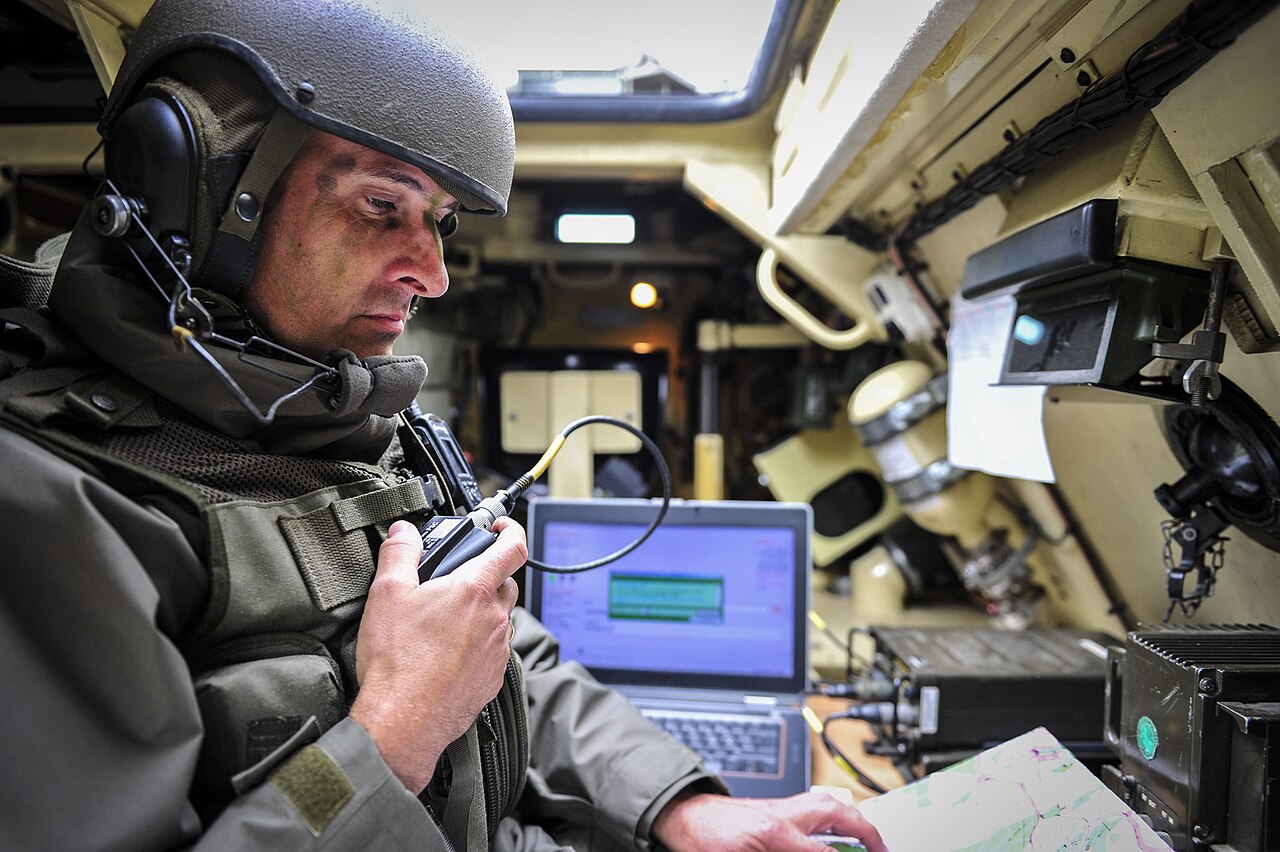
(Photo credits: Bundesheer Fotos, CC BY-NC-SA 2.0)
The 8,000 users mentioned installed the product to see what was coming. That doesn’t mean that all 8,000 of them immediately started using LibreOffice. But it was a good indicator for us to gauge the mood. If 200 people install it, that’s different from when there are so many.
Early on, before we mandated its use, we provided extensive e-learning modules and videos – including what we call “fast tracks” for the individual modules. With these, it was possible to learn the most important changes for Writer, Calc, Impress, and Base within 15 minutes, so users wouldn’t fall into the typical pitfalls. Anyone who invests those 15 minutes will find it much easier to use the software.
We gave users the opportunity to prepare and view these courses and videos on their own at a time of their choosing.
Another important point: We’ve learned that we need to quickly address individual users’ questions – such as those regarding unfamiliar workarounds or missing features – for the benefit of the broader community.
That’s why we specifically looked for suitable communication channels, and we then agreed to publish a so-called “Tip of the Week” about once a week on a very specific, clearly defined topic. And this “Tip of the Week” appears every Monday on the intranet with a current topic. That means anyone who opens their browser on Monday will see the “Tip of the Week.”
It explains topics we covered the previous week. When we release a new version, there’s a “Tip of the Week” featuring the latest features. When we roll out new functions and enhancements – some of which are sponsored by the Austrian Armed Forces – we highlight them in the “Tip of the Week.”
But we also cover usability topics – for example, how to enable the menu bar even when the tabbed interface is selected. How to use presentations across multiple screens, and so on and so forth. We’ve been doing these “Tips of the Week” for two years now, and they’ve been very well received. It’s a great communication tool for us.
A truly open document format requires free public availability, royalty-free standards, and no usage restrictions.
Organizations like the Open Knowledge Foundation and the European Union use several core rules to guarantee long-term data access, system independence, and freedom from single-vendor control.
Core Openness Criteria
Recognized Frameworks
Comparison of ODF and OOXML
When evaluated against the strict criteria for open formats, Open Document Format (ODF) and Office Open XML (OOXML) take fundamentally different approaches.
While both are recognized as official ISO standards, ODF fully satisfies the open standard criteria by design, whereas OOXML features structural and legal complexities that often limit true open implementation.
Comparison Table
|
Criterion |
Open Document Format (ODF) |
Office Open XML (OOXML) |
|---|---|---|
|
Public Specification |
Fully Transparent. Concise, streamlined specifications built using a simplified RelaxNG XML schema |
Highly Complex. Over 6,000 pages of specifications containing fragmented legacy behaviors. |
|
Royalty-Free Status |
Unconditional. Managed under standard royalty-free parameters for universal software design. |
Conditional. Covered under a non-revocable patent promise rather than a traditional license. |
|
No Discrimination |
Complete. Equal implementation across open-source and proprietary suites. |
Functional Barriers. Biased toward Windows-centric legacy and platform-specific behaviors. |
|
Independent Control |
Vendor-Neutral. Managed entirely by OASIS |
Vendor-Influenced. Maintained via ISO, but the structural core remains tightly bound to Microsoft. |
Key Openness Differences
Public Specification & Transparency
Legal & Intellectual Property Rules
Technical Discrimination & System Control
INTERESTING REFERENCE: the Italian definition
The document Linee guida su acquisizione e riuso di software per le pubbliche amministrazioni (Guidelines on the procurement and reuse of software for public administrations), published by AgID in 2021, define an open format in the glossary as follows (translated from Italian):
Open (data) format. This is a public, versioned data format that is comprehensively documented and has no implementation constraints. An open format is one recognised by a standardisation body and maintained collaboratively by several organisations that provide competing implementations, through a transparent process. The format must remain consistent with the declared version.
The guidelines are not an interpretive gloss issued alongside the statute. They are adopted in implementation of articles 68 and 69 of the Codice dell’Amministrazione Digitale, under express delegations contained in the statute itself. They also supersede the earlier AgID circular 63/2013 on the same comparative assessment.
The definition of formato aperto (open format) is therefore not a recommendation that happens to be well drafted. It is the operative legal definition for Italian public administration, and it acquires that force through the statute rather than in spite of it.
Here’s our summary of updates, events and activities in the LibreOffice project in the last four weeks – click the links to learn more…



On 30 July 2026, the United States Cybersecurity and Infrastructure Security Agency published Open Source Software: Security Principles and Practices, a 31-page guidance document for federal civilian agencies. It is available at no cost and marked TLP:CLEAR, meaning it may be shared without restriction.
The document is addressed to US federal agencies, and it fulfils obligations under two executive orders on federal cybersecurity. It covers four areas: using open source solutions, contributing to open source projects, producing open source software, and evaluating open source artificial intelligence models. The observations below concern the first three.
Its analytical content is not jurisdiction-specific, and public administrations elsewhere — including in Europe — will find that it articulates, in the vocabulary of risk management, several positions that the open source community has been arguing for two decades.
What the guidance actually says
The central claim is more precise than the headlines suggest. CISA does not assert that open source software is more secure than proprietary software. It states that OSS is “no more or less risky than other software,” and locates the difference elsewhere: with open source, an organisation can assess code quality and security directly, rather than relying solely on vendor assurances.
This is a claim about verifiability, not about defect rates. It is also the more defensible claim, and the more consequential one for procurement. An agency evaluating proprietary software is evaluating a vendor’s statement about its own product. An agency evaluating open source software is evaluating the product.
The guidance draws the corollary explicitly. Among the benefits it lists for federal agencies is reduced vendor lock-in: open standards and modifiable code, CISA writes, protect agencies from “proprietary dependency traps.” A national cybersecurity authority has placed lock-in inside a security document rather than a competition-policy one. That is a meaningful shift in where this argument is permitted to live.
The C4 Framework
The most practically useful part of the guidance is Appendix A, which sets out the C4 Framework for assessing whether an open source project is trustworthy. Its premise is that, because contributors may be pseudonymous and are bound by no delivery obligation, trustworthiness cannot be assessed from who produced the software. It must be assessed from how the software was produced — which open source development makes visible in a way that closed development does not.
C4 groups the evidence into four categories:
The framework is applied in five steps: identify measurable criteria, determine risk tolerance and weight the criteria, collect observations (with automated tooling where available), evaluate against each criterion, and compare the result to the tolerance.
We would encourage public administrations to apply this framework to LibreOffice. Every category can be answered from public evidence: a continuous commit history since 2010, a published security policy and disclosure process, mandatory peer review, an OSI-approved licence, a documented code of conduct, and a governance structure — The Document Foundation, a German Stiftung with an elected Board of Directors — that is a matter of public record rather than of assertion.
We would encourage administrations to apply the same framework to every candidate solution, including proprietary ones, and to note which questions can be answered and which cannot.
Contributing, and the support question
The guidance also addresses a question that public administrations regularly raise about open source adoption: who is responsible for fixes. CISA’s answer is that no single entity is obliged to provide them, and that agencies should therefore plan accordingly — assigning internal staff, contracting third parties, or both — while following two principles in dealing with upstream projects: collaborate rather than demand, and push fixes upstream.
This is a fair description of how the LibreOffice ecosystem works. Support, long-term maintenance, and custom development are provided by certified developers and certified migration professionals, whose contributions return to the shared codebase and benefit every other deployment. The guidance is right that this requires organisations to plan for it. It is also right that the resulting improvements are shared rather than captured.
CISA further notes that where a project becomes unmaintained, an organisation may as a last resort take over a fork. This option has no equivalent in proprietary software, where end of support arrives on the supplier’s schedule and offers no remedy at all.
A note on scope
 The document does not name any product. CISA states explicitly that it does not endorse commercial entities, products, or services, and nothing in the guidance should be read as an assessment of any particular software. What it provides is a set of criteria. The observation that LibreOffice satisfies them is ours, and rests on evidence that anyone may check.
Open Source Software: Security Principles and Practices is available from CISA: https://www.cisa.gov/resources-tools/resources/open-source-software-security-principles-and-practices
CISA’s announcement: https://www.cisa.gov/news-events/news/cisa-guide-helps-federal-agencies-securely-and-effectively-use-open-source-software