Community Member Monday: Jean-Francois Nifenecker
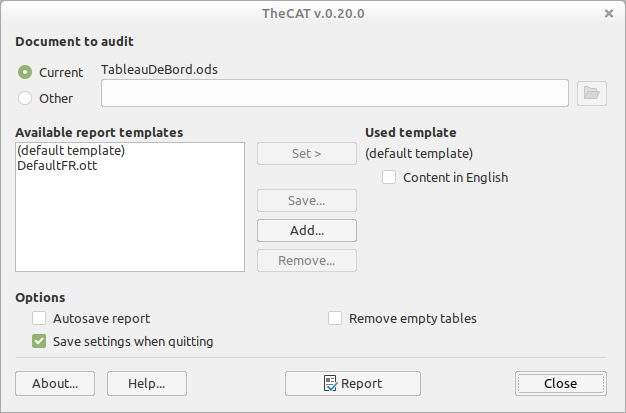
Screenshot of TheCAT LibreOffice extension

Today we’re talking to Jean-Francois Nifenecker, who’s working on LibreOffice extensions and macros, and more…

Tell us a bit about yourself!

I’m 68 years old, freshly retired from a job as a French civil servant (local IT department). I’m married and have three children and nine grandchildren.

I’ve been living in Bordeaux for 35 years now, and I like going to the movie theater, walking, reading and… computing 😄

What are you working on in the LibreOffice project right now?

I’ve been a long time user of OpenOffice.org (since v.1.1.1 in 2005), and then naturally, LibreOffice. Since the beginning, I’ve wanted to learn about the tools I’m using and document them. This is why I’ve written a batch of user docs for OpenOffice.org (14 docs, still available on their web pages).

The user side of the documentation is still something I’m thinking of. But, in parallel, I’ve created a (very) small business to help a friend of mine, regarding migration and training from other office suites to LibreOffice. And then, as I have a programming background (mainly in Pascal and Object Pascal), I have been working on the macro side. This is a part of my business since migrating macros from Excel to Calc can be a chore. Naturally, I’ve spent “some” time into extensions creation (like the one pictured above).

I’ve written a set of reference cards (in French and in English) about BASIC macros programming, that Olivier was kind enough to publish on the extensions site 😄

LibreOffice reference card header

Thus, programming macros and extensions is my main current activity in LibreOffice.
I’ve written a set of “articles” in English for my own use until now, which I grouped under “The LibreOffice Macros Corner” title, with the aim to publish them sometime, when I’ve got time/desire enough to set a website (which is not the case).

Also I’ve got a book (currently in French) on my plate about extension creation. It is a long time project, started two-to-three years ago, which still requires much work. I think such a resource is missing and might help programmers to go one step further.

Why did you choose to join the LibreOffice project, and how was the experience?

I actually saw the project creation after Oracle took over Sun but had not much time to participate when I was still active (I guess I’m still active, but well…).

Anything else you plan to do in the future? What does LibreOffice really need?

My only “skill” is with documentation and macros programming, so I’d continue on this route.

As a heavy user of Writer (among others 😉), I’m missing a few features, but it seems that there aren’t enough resources to satisfy my demands: pages styles inheritance, real table styles instead of a fake one which is more annoying than helping are my main gripes 😄
Unfortunately I can’t help the developers here 🙁

Thanks a lot to Jean-Francois Nifenecker for his contributions and support! And if anyone else wants the features he mentioned, get involved and give us a hand, or consider funding a developer. Then everyone benefits!
Video: What is The Document Foundation, the non-profit behind LibreOffice?

At our recent LibreOffice Conference 2023 in Bucharest, The Document Foundation’s Membership Committee gave a talk about the foundation’s work, its governance, and why it’s important to become a member. Here’s a recording (or if you’d prefer to view on PeerTube, visit this link):

Please confirm that you want to play a YouTube video. By accepting, you will be accessing content from YouTube, a service provided by an external third party.

YouTube privacy policy

If you accept this notice, your choice will be saved and the page will refresh.

146 sticker packs already awarded in the Month of LibreOffice, November 2023

Month of LibreOffice banner

Last week we started the Month of LibreOffice, rewarding contributors in our projects and communities! So, how are we looking after the first seven days?

Well, 146 people have already taken part and can claim their sticker packs at the end of the month. (And possibly some bonus merchandise too!) But if you don’t see your name/username on that page yet, and haven’t taken part, here’s how you can join in:

How to take part

There are many ways you can help out – and as mentioned, you don’t need to be a developer. For instance, you can be a…

  • Handy Helper, answering questions from users on Ask LibreOffice. We’re keeping an eye on that site so if you give someone useful advice, you can claim your shiny stickers.
  • First Responder, helping to confirm new bug reports: Go to our Bugzilla page and look for new bugs. If you can recreate one, add a comment like “CONFIRMED on Windows 11 and LibreOffice 7.6.2”.
  • Drum Beater, spreading the word: Tell everyone about LibreOffice on Mastodon or Twitter! Just say why you love it or what you’re using it for, add the #libreoffice hashtag, and at the end of the month you can claim your stickers.
  • Globetrotter, translating the user interface: LibreOffice is available in a wide range of languages, but its interface translations need to be kept up-to-date. Or maybe you want to translate the suite to a whole new language? Get involved here.
  • Docs Doctor, writing documentation: Whether you want to update the online help or add chapters to the handbooks, here’s where to start.

Keep an eye on this blog and our Mastodon and Twitter accounts during November for more updates!

Binary Stars in LibreOffice Sky: Impress and Draw Guides 7.6 Released !


The community documentation team is happy to announce the immediate availability of the Impress Guide 7.6 and Draw Guide 7.6. The guides are updated to the latest LibreOffice release as a community effort to keep our literature sharp and up to date.

The binary stars of our LibreOffice literature are brought to you by Peter Schofield and members of the documentation team.

Peter Schofield


The Impress Guide covers the main features of Impress, the presentations (slide show) component of LibreOffice. You can create slides that contain text, bulleted and numbered lists, tables, charts, clip art, and other objects. Impress comes with prepackaged text styles, slide backgrounds, and Help. It can open and save to Microsoft PowerPoint formats and can export to PDF, HTML, and numerous graphic formats. This book was written by volunteers from the LibreOffice community.

The Draw Guide introduces the main features of LibreOffice Draw. Draw is a vector graphics drawing tool, although it can also perform some operations on raster graphics (pixels) such as photographs. Using Draw, a wide variety of graphical images can be quickly created.

The guides can be downloaded from the Documentation website as well as the Bookshelf project.

LibreOffice 7.5.8 Community available for download

Berlin, November 2, 2023 – LibreOffice 7.5.8 Community, the last minor release of the LibreOffice 7.5 line, the volunteer-supported free office suite for desktop productivity, is available from https://www.libreoffice.org/download for Windows (Intel/AMD and ARM processors), macOS (Apple Silicon and Intel processors), and Linux [1].

With this release, the LibreOffice 7.5 line is reaching the end of its life, so users should plan the update to LibreOffice 7.6 as soon as the next minor update LibreOffice 7.6.3 will be released in mid November. At that time, LibreOffice 7.6 will have been tested and sought after enough to be ready for all production environments.

For enterprise-class deployments, TDF strongly recommends the LibreOffice Enterprise family of applications from ecosystem partners – for desktop, mobile and cloud – with a large number of dedicated value-added features and other benefits such as SLA (Service Level Agreements): https://www.libreoffice.org/download/libreoffice-in-business/

Availability of LibreOffice 7.5.8 Community

LibreOffice 7.5.8 Community is available from: https://www.libreoffice.org/download/. Minimum requirements for proprietary operating systems are Microsoft Windows 7 SP1 and Apple macOS 10.14. LibreOffice Technology-based products for Android and iOS are listed here: https://www.libreoffice.org/download/android-and-ios/

The Document Foundation does not provide technical support for users, although they can be helped by volunteers on user mailing lists and on the Ask LibreOffice website: https://ask.libreoffice.org

LibreOffice users, free software advocates and community members can support The Document Foundation with a donation at https://www.libreoffice.org/donate

[1] Change log pages: https://wiki.documentfoundation.org/Releases/7.5.8/RC1 and https://wiki.documentfoundation.org/Releases/7.5.8/RC2

Learn new things! Get into the Month of LibreOffice, November 2023

Month of LibreOffice banner

Expand your skillset and gain valuable experience with UX, marketing, documentation, QA and translations – join the Month of LibreOffice, November 2023! Over the next four weeks, hundreds of people around the world will collaborate to improve LibreOffice – and you can help them. There are many ways to get involved, as you’ll see in a second.

But best of all: everyone who contributes to LibreOffice in November can claim a cool sticker pack, and has the chance to win extra LibreOffice merchandise such as mugs, hoodies, T-shirts, rucksacks and more (we’ll choose 10 participants at random at the end):

How to take part

There are many ways you can help out – and as mentioned, you don’t need to be a developer. For instance, you can be a…

  • Handy Helper, answering questions from users on Ask LibreOffice. We’re keeping an eye on that site so if you give someone useful advice, you can claim your shiny stickers.
  • First Responder, helping to confirm new bug reports: Go to our Bugzilla page and look for new bugs. If you can recreate one, add a comment like “CONFIRMED on Windows 11 and LibreOffice 7.6.2”.
  • Drum Beater, spreading the word: Tell everyone about LibreOffice on Mastodon or Twitter! Just say why you love it or what you’re using it for, add the #libreoffice hashtag, and at the end of the month you can claim your stickers.
  • Globetrotter, translating the user interface: LibreOffice is available in a wide range of languages, but its interface translations need to be kept up-to-date. Or maybe you want to translate the suite to a whole new language? Get involved here.
  • Docs Doctor, writing documentation: Whether you want to update the online help or add chapters to the handbooks, here’s where to start.

We’ll be updating this page every few days with usernames across our various services, as people contribute. So dive in, get involved and help make LibreOffice better for millions of people around the world – and enjoy your sticker pack at the end as thanks from us! And who knows, maybe you’ll be lucky enough to win bonus merch as well…

So let’s get going! We’ll be posting regular updates on this blog and our Mastodon and Twitter accounts over the next four weeks – stay tuned…