Community Member Monday: Petr Valach

Members of The Document Foundation help to steer the LibreOffice project and community. Today we’re talking to Petr Valach from the Czech community…

To start, tell us a bit about yourself!

I was born in Brno, but for nearly 30 years I’ve been living in Prague. I work for a software company where I am member of a mobile applications project. But IT isn’t my only hobby. I do lots of things – personally, astronomy and physics are the most important for me. There is nothing quite so interesting. And I am happy when astronomical or astronautical institutions (for example, the International Space Station) use free and open-source software.

I was member of the scout movement, so scouting is one of my “hobbies” too (it’s not a hobby, but lifestyle). In the Czech Republic, there is something special, a mixture of pure scouting with the education system of our boys’ book author, Jaroslav Foglar. He lead his scout group called The Boys from Beaver River for 60 years and wrote over 20 books, which are bestsellers. Indeed, Jaroslav Foglar is the most successful author in the Czech Republic, who directly or indirectly influenced literally everybody here. I am a member of the community associated around him, and member of Foglar’s association. Recently we’ve had meetings in the Foglar group clubhouse every month.

I am a member of the editors of OpenOffice.cz (focused on LibreOffice and OpenOffice.cz) and LinuxEXPRES (focused on free and open-source software generally). I am lead editor at ExoSpace.cz, which supports these magazines and websites, the Czech community around LibreOffice, other astronomical and astronautical magazines and more.

Why did you decide to become a member of The Document Foundation (TDF)?

I think that I can improve my work by being am member of TDF. Membership gives my work more importance. And I am in connection with other people – and it is very important to be informed. So I believe that I will contribute to the foundation by membership.

What are you working on in the LibreOffice project right now?

As mentioned, I am member of the OpenOffice.cz editors and I propagate LibreOffice via ExoSpace.cz. I try to support LibreOffice via this media – I try to support members of TDF during conferences and so on. But the most important thing is that I use LibreOffice and learn more and more about it; LibreOffice is absolutely my favourite software.

Anything else you plan to do in the future?

Better Czech manual and education materials – that’s what is most needed. I like documentation work, so I will be happy if I find more time to contribute to this topic.

Thanks to Petr for all his contributions – they are really appreciated! Czech users can explore the website and get involved with our community.

Upcoming Elections for the next Board of Directors of The Document Foundation

Dear Community,

we hereby officially announce the upcoming elections for the next Board of Directors of The Document Foundation.

As per § 7 II of our statutes, [1] the Board’s term lasts two years. The current board started its duty on February 18, 2018. Therefore, it remains in charge until the end of February 17, 2020, so the new board will be in charge the day after that, which is February 18, 2020.

That upcoming term will then (regularly) end on February 17, 2022, so the next elections of the Board of Directors will take place before.

As per § 6 III, only members of the Board of Trustees of The Document Foundation, as well as current members of any of its bodies, are eligible to be elected into the Board of Directors, and the election is overseen by the Membership Committee (§ 7 II).

The active electoral right is reserved to those who have been members of the Board of Trustees before this announcement (§ 7 II).

§ 6 III also states that members of the Board of Directors or their deputies may not be members of the Membership Committee and vice versa. This means that current members of the Membership Committee are eligible to be elected, but with the acceptance of their new role they lose their current role in the MC. For clarification, they have to step down from the Membership Committee, with effect no later than to the beginning of the new term of the Board of Directors, the minute before accepting to become a member of the Board of Directors.

There is one more notable limitation: per § 8 IV of the statutes, a maximum of 1/3 members of the Board of Directors is allowed to work on an employment basis for the same company, organization, entities, affiliates or subdivisions.

Nomination of candidates fulfilling the above requirements, as well as self nomination is welcome. In total, at least seven Board of Directors members are required, and given there are enough candidates, up to three deputies can be elected (§ 7 II). As deputies are on duty quite often, we encourage many candidates to participate.

Re-election of current members of the Board of Directors is explicitly permitted (§ 7 II).

Please send nominations and self-nominations via e-mail to elections@documentfoundation.org (which reaches the Membership Committee in private) and also (!) to board-discuss@documentfoundation.org (which is a public mailing list).

We kindly ask nominees who would like to stand for elections to provide a maximum 75 words statement on their candidacy as continuous text (so no bullet lists or multiple paragraphs). In addition, please also provide your full name, e-mail address and your corporate affiliation, if any. Specifically, please indicate all information regarding § 8 IV of the statutes.

Discussions with the candidates and questions to them as well as questions about the elections should take place on the public board-discuss@documentfoundation.org mailing list. For details on how to use the mailing list, see https://www.libreoffice.org/get-help/mailing-lists/

Eligible voters will receive further details via e-mail prior to the start of elections, including a summary of the candidates, details on how to access the voting system, and instructions on how to independently verify the vote count. Please ensure the Membership Committee has your recent and correct e-mail address on file. For questions, you can reach the Membership Committee in private at elections@documentfoundation.org

Following the time line set forth in § 7 II, requiring a 45 day advance notice, we hereby announce the following time line for the elections:

  • 2019-10-18: announcement of the elections; and start of the nomination phase
  • 2019-11-27, 24:00 CET/UTC+1: end of the nomination phase (one week before the election starts, as per § 7 II)
  • 2019-12-05, 00:00 CET/UTC+1: official start of the elections (at least 45 days after announcement of the elections, as per § 7 II)
  • 2019-12-12, 24:00 CET/UTC+1: end of the elections
  • 2019-12-13: announcement of the preliminary results and acknowledgement of role
  • 2019-12-14, 00:00 CET/UTC+1: start of the challenging phase
  • 2019-12-19, 24:00 CET/UTC+1: end of the challenging phase, followed by the official announcement of the final results

Be advised that the newly elected Board of Directors will only be in charge beginning from February 18, 2020. The current Board of Directors will however include them in the decision making process, to ease up the transition.

Challenges to this announcement with respect to the deadlines outlined have to happen no later than seven (7) days after this announcement, via e-mail to elections@documentfoundation.org (which reaches the Membership Committee in private).

Challenges to the preliminary results of the election have to happen until the deadline set forth above, via e-mail to elections@documentfoundation.org (which reaches the Membership Committee in private).

On behalf of the Membership Committee,
Gabriele Ponzo

[1] https://www.documentfoundation.org/statutes.pdf

The Document Foundation supports GNOME Foundation fight against a patent troll

The Document Foundation is always opposed to the use of patents to curtail Free Software development and use. The GNOME Foundation, a member of our Advisory Board, is now the target of patent troll Rothschild Patent Imaging LLC, for maintaining and shipping Shotwell, a Free Open Source personal photo manager for the GNOME desktop environment.

The GNOME Foundation has declined to settle, and has filed three different papers with the court: a motion to dismiss the case, an answer to the claim, and a counterclaim against the troll, with the aim of invalidating their patent. We fully support GNOME Foundation’s decision to fight the patent troll so that no other users or developers are in danger of being sued by this and similar organizations.

Here you can read GNOME Foundation blog post summarizing the situation: https://www.gnome.org/news/2019/10/gnome-files-defense-against-patent-troll/. The Document Foundation asks all LibreOffice community members and users to stand with the GNOME Foundation in their efforts to show the world that we in the Free Software communities will defend ourselves against any abuses of the patent system.

LibreOffice and macOS Catalina

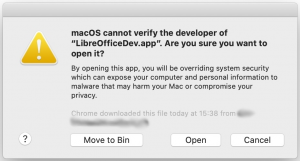
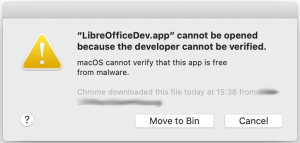
Apple has released macOS 10.15 Catalina on October 7, 2019. Mac apps, installer packages and kernel extensions that are signed with a Developer ID must be notarized by Apple to run on macOS Catalina. Although we have duly followed the instructions, when users launch LibreOffice 6.3.x – which has been notarized by Apple – the system shows the following scary message: LibreOffice.app cannot be opened because the developer cannot be verified, and provides only two options: Move to Bin (delete) and Cancel (revert the operation, i.e. do not run LibreOffice). Of course, this represents a problem for all Mac users who rely on LibreOffice for their office documents after they have upgraded to macOS Catalina.

To solve the issue and bypass the block, the user has to right-click with the mouse (or press Control on the keyboard while clicking with the mouse) on the LibreOffice icon and select Open. The system will show a less scary message: macOS cannot verify the developer of LibreOffice.app. Are you sure you want to open it?, and will eventually provide the Open option to launch LibreOffice.

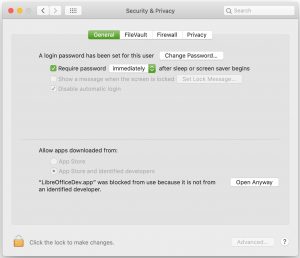
There is also another solution, which does not bypass Gatekeeper forcing macOS Catalina to open LibreOffice as the solution just described (which is perfectly safe, in any case).

When the first scary message is on screen, the user has to click first on Cancel to close the window and then on the Apple menu to open the System Preferences window. Here the user has to open Security & Privacy and click on the Open Anyway button on the right side of the message LibreOffice.app was blocked from use because it is not from an identified developer to launch LibreOffice. Both solutions authorize LibreOffice to run without further authorizations. Of course, we will try to sort out the issue with Apple, in order to avoid similar issues in the future with macOS Catalina.

IMPORTANT NOTE: Screenshots have been grabbed while installing LibreOfficeDev.app (LibreOffice 6.4 Alpha) instead of LibreOffice.app, but do reproduce the same windows.

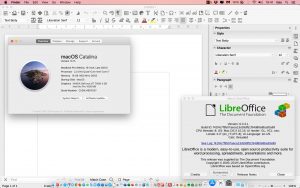
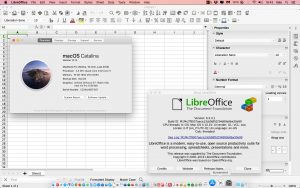
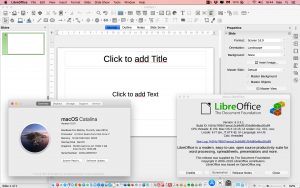
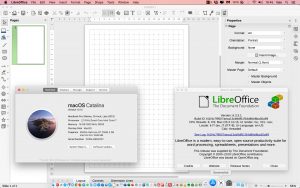
To complete the article, four screenshots of LibreOffice Writer, LibreOffice Calc, LibreOffice Impress and LibreOffice Draw (version 6.3.3.1) running on macOS Catalina.

Seven more videos from the auditorium at LibreOffice Conference 2019

Yes, here’s another bunch of videos from our recent LibreOffice Conference 2019 in Almeria, Spain. Let’s get started with Tor Lillqvist’s talk, “LibreOffice as an iOS app on the iPad”:

Please confirm that you want to play a YouTube video. By accepting, you will be accessing content from YouTube, a service provided by an external third party.

YouTube privacy policy

If you accept this notice, your choice will be saved and the page will refresh.

Then we have “Chart editing in Online” with Marco Cecchetti:

Please confirm that you want to play a YouTube video. By accepting, you will be accessing content from YouTube, a service provided by an external third party.

YouTube privacy policy

If you accept this notice, your choice will be saved and the page will refresh.

“Online: copy/paste” with Michael Meeks:

Please confirm that you want to play a YouTube video. By accepting, you will be accessing content from YouTube, a service provided by an external third party.

YouTube privacy policy

If you accept this notice, your choice will be saved and the page will refresh.

“Bringing the Sidebar Online” with Ashod Nakashian:

Please confirm that you want to play a YouTube video. By accepting, you will be accessing content from YouTube, a service provided by an external third party.

YouTube privacy policy

If you accept this notice, your choice will be saved and the page will refresh.

“Integrating LibreOffice Online in Alfresco” with Philippe Hemmel:

Please confirm that you want to play a YouTube video. By accepting, you will be accessing content from YouTube, a service provided by an external third party.

YouTube privacy policy

If you accept this notice, your choice will be saved and the page will refresh.

“LibreOffice adoption into 1&1 Mail & Media ecosystem” with Eduard Ardeleanu:

Please confirm that you want to play a YouTube video. By accepting, you will be accessing content from YouTube, a service provided by an external third party.

YouTube privacy policy

If you accept this notice, your choice will be saved and the page will refresh.

And “Improving the LibreOffice PDF export” with Thorsten Behrens:

Please confirm that you want to play a YouTube video. By accepting, you will be accessing content from YouTube, a service provided by an external third party.

YouTube privacy policy

If you accept this notice, your choice will be saved and the page will refresh.

LibreOffice 6.2.8 is available, the last release of the 6.2 family

Berlin, October 17, 2019 – The Document Foundation announces LibreOffice 6.2.8, the last minor release of the LibreOffice 6.2 family. All users of LibreOffice 6.2.x versions should update immediately for enhanced security, and be prepared to upgrade to LibreOffice 6.3.4 as soon as it becomes available in December.

For enterprise class deployments, TDF strongly recommends sourcing LibreOffice from one of the ecosystem partners to get long-term supported releases, dedicated assistance, custom new features and bug fixes, and other benefits. Also, the work done by ecosystem partners flows back into the LibreOffice project, benefiting everyone.

LibreOffice’s individual users are helped by a global community of volunteers: https://www.libreoffice.org/get-help/community-support/. On the website and the wiki there are guides, manuals, tutorials and HowTos. Donations help us to make all of these resources available.

LibreOffice users are invited to join the community at https://ask.libreoffice.org, where they can get and provide user-to-user support. While TDF can not provide commercial level support, there are guides, manuals, tutorials and HowTos on the website and the wiki. Your donations help us make these available.

LibreOffice 6.2.8’s change log pages are available on TDF’s wiki: https://wiki.documentfoundation.org/Releases/6.2.8/RC1 (changed in RC1) and https://wiki.documentfoundation.org/Releases/6.2.8/RC2 (changed in RC2).

Availability of LibreOffice 6.2.8

LibreOffice 6.2.8 is immediately available from the following link: https://www.libreoffice.org/download/. Minimum requirements for proprietary operating systems are Microsoft Windows 7 SP1 and Apple macOS 10.9. Builds of the latest LibreOffice Online source code are also available as Docker images: https://hub.docker.com/r/libreoffice/online/.

LibreOffice Online is fundamentally a server-based platform, and should be installed and configured by adding cloud storage and an SSL certificate. It might be considered an enabling technology for the cloud services offered by ISPs or the private cloud of enterprises and large organizations.

LibreOffice users, free software advocates and community members can support The Document Foundation with a donation at https://www.libreoffice.org/donate.

LibreOffice 6.2.8 is built with document conversion libraries from the Document Liberation Project: https://www.documentliberation.org.