Community Week: Development – people, stats and tools

LibreOffice Community Weeks

Earlier in the week we talked to Jan Iversen who is mentoring new contributors to the development team. Let’s now look at some of the people involved, statistics from recent months, and the tools used by developers in their daily work.

Who’s who

As with other large free and open source software projects, LibreOffice developers come from a variety of backgrounds: some are paid to work on the code by companies that use or offer support for LibreOffice; others contribute in their spare time because they enjoy programming and working with the community. If you’ve looking to build a career as a software developer, working on a well-known open source project can provide you with great experience, and is something to put on your CV.

Because the LibreOffice codebase is quite large, most developers focus on certain areas. Some work on specific components of the suite like Calc or Writer, whereas others concentrate on the user interface or improving overall performance. Here is a list of “friendly experts” who are well versed in the code in specific areas, and who can help with questions or problems. But please remember: these are very busy people, who do not always have time to answer beginners’ questions, especially on IRC. The best practice is to send an email to our dev list, which will be seen by all developers including Jan.

Running the numbers

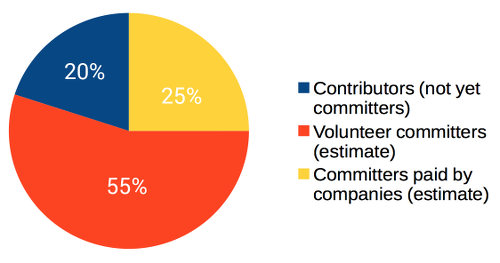
So who is committing code, and how often? Here’s a break-down of commits in the past 12 months:

Some other interesting statistics:

  • In the last 12 months, 282 different contributors had patches merged
  • There are 253 Easy Hacks ready for contributors (new and existing)
  • The Engineering Steering Committee (aka ESC) publishes a list of top 5 contributors every week on our dev mailing list – a lot of companies look at these emails, so being on that list is a plus if you’re searching for a job
  • Development mentor Jan does 50 reviews per week for patches from contributors

Finding the right tools

As mentioned, most of LibreOffice’s source code is C++. Developers use their own choice of editors and development environments to work on the code. The version control system used by LibreOffice developers is Git, while Gerrit is used for review.

For a list of all the tools available to developers, see devcentral.libreoffice.org. Some of the most notable include:

  • Opengrok, which provides a friendly and attractive way to browse the source code
  • Jenkins, which provides CI (continuous integration): every patch which is submitted is built and tested automatically before being merged into the master code branch, to keep master stable
  • Tinderbox, which supports a lot of different setups, and tests regularly (several times a day) that master can build in this special version
  • And Gerrit, where patches end up. This is the system where we review patches before merging to master

So now you have an overview of the development community and the tools that they use – stay tuned for Friday’s post, where we show you how to get involved with Easy Hacks!

Community Weeks: Development – our mentor for newcomers

LibreOffice Community Weeks

Last week we looked at the documentation team’s role in the LibreOffice project, and this week we move on to development. As you’d expect, the development team is responsible for updating and maintaining LibreOffice’s source code – adding new features, fixing bugs, and making sure that the suite builds correctly across various operating systems.

Development may seem like the most daunting sub-project in LibreOffice, but there are many ways to get involved, even for less-experienced programmers or those with just a couple of spare hours every week. We have “Easy Hacks” to get new contributors on board (more on those later in the week), and we have a dedicated mentor who helps first-time developers explore the source code, build it, and create their first patches.

His name is Jan Iversen, and we asked him about his role and how he helps newcomers…

What is your role in the development team?

My role is to mentor new contributors, and in general help the development community grow. I often act as a intermediary between new people and core developers, to save time for the core developers. To help the community I am also a “part-time” release engineer and I help the infrastructure team as well.

What does your typical workday look like?

I start every morning by looking at new patches in Gerrit from new contributors, comment on them and if they look good, assign a core developer to make the review. I also control the state of bugs.documentfoundation.org with regards to our Easy Hacks, control new ones, and check comments on existing ones.

On average there are 5-10 mails in my inbox, mostly from contributors but also more and more from the rest of the community.

The rest of my workday goes with the bigger tasks, like:

  • Rewriting big parts of the development wiki
  • Being available on IRC (I am there 24/7 as @janIV – or more correctly, messages are stored when I sleep
  • Rewriting our Easy Hacks to make them more understandable

As I live in Spain, I also work to get the Spanish community up and running.

How many developers are active in a typical week?

We have a nice page of stats for that.

In a typical day, I guess there are about 20 different people active on IRC and 5 on email. We are about 10 people who, as a person told me, have a IRC client seemingly built-in to their brains! And the others are people popping in for a question.

It is very clear that IRC is for the more hard-core developers. New people especially use social media a lot more, so I am working on getting social media interconnected with IRC.

What’s the biggest success so far, and the biggest challenge?

My biggest success was Google Summer of Code (GSoC), where our community managed to get the largest number of applicants to date. Google sadly enough only awarded us 12 seats, so we had to select the projects carefully.

My biggest challenge, is and will be for some time, to change the way we communicate, to a style more acceptable for especially students. This must be done as a evolution, not a revolution, in order not to break the existing community.

What sort of help are you looking for?

LibreOffice is very much C++, so people who know C++ and want to learn how to work with a big project are very much sought after.

But in reality, we have Easy Hacks for a lot of programming languages, so everybody is welcome. One of the people I mentored started by telling me that he was a newbie in programming. It made me very happy when he lately was given committer status, so people tend to grow with the community.

Local community building is my theme for 2017: having small groups of developers that help each other is something I would like to see, and then we will help such groups, by having mentors ready to help them. Also, I have – among others – created a step-by-step guide explaining how to get from you first contact with the community to have successfully submitted your first patch: see this page.

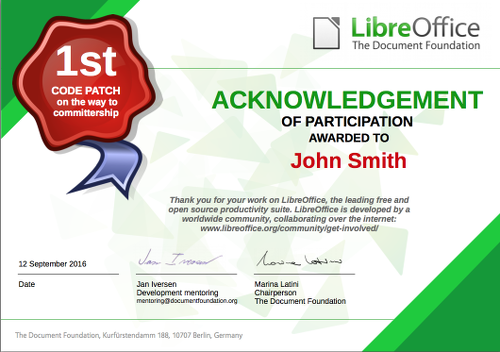
Thanks Jan. Later in the week we’ll look at some stats from the development team, see what tools are used, and show you how to get involved. You could even be awarded a shiny certificate like the one below when your first code patch is accepted…

Prototypefund: an opportunity for German freelance developers

The Document Foundation is happy to share with the community the opportunity represented by Prototypefund (http://codefor.de/blog/prototype-fund), an excellent project for freelance developers based in Germany.

TDF Board of Directors encourages all hackers with the necessary credentials and interested in improving either LibreOffice or the Document Liberation Project to apply for the fund. Approved projects will be supported by the LibreOffice development community, which will provide the mentoring resources to achieve the objective.

This is a list of potential projects, which will be very helpful both for LibreOffice users and for the broad scope outlined by Prototypefund:

  1. Develop a LibreOffice Calc import filter from public administration sources, to allow citizen to process and analyze data themselves. Such an import filter would allow to easily create content for publication.
  2. Develop a digital tool based on LibreOffice, to create, share and use (open) data, for data visualization and storytelling, social engagement, transparency and citizen participation. An example project would be to create a filter that export diagrams in Calc to d3js for publication on the web.
  3. Develop an “open data browser” – most likely as an extension – capable of importing data made available at: https://offenedaten.de/dataset into LibreOffice Calc or Base.
  4. Allow LibreOffice to read/process and render basic geographic data from OSM using Calc or Draw.

These are just examples, which can be used to look at Prototypefund in a creative way, to write the project (according to the website, one page should be enough to apply).

The Document Foundation is happy to help the interested developers with their pitch related to the development of LibreOffice.

LibreOffice developer interview: Winfried Donkers

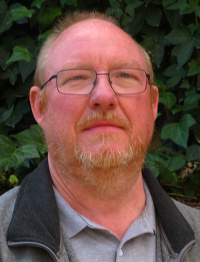
Winfried Donkers LibreOffice developer

In this week’s developer interview, we talk to Winfried Donkers, a Dutch coder who has been using LibreOffice (and its predecessors) for almost two decades, and today works on Calc.

Where are you based, and do you work for a LibreOffice-related company or just code in your spare time?

I live in the Netherlands, in a small village in Zeeland, near the North Sea. My work is within cycling distance – I don’t drive cars any more. I contribute mostly in my spare time, but if people or companies want me to fix a bug in my ‘area of expertise’ I will spend some company time. The company I work for uses LibreOffice.

How did you get involved with LibreOffice?

I first used StarOffice in the 1990s, but that was just a short fling. I used OpenOffice.org since version 1.1, and the company I worked for at that time switched to OpenOffice.org somewhere between 2000 and 2002. The company I work for now used an old version of Microsoft Office and I managed to get the company to choose LibreOffice in October 2011 (I think). Around that time I personally chose to contribute to LibreOffice.

What areas of the code do you normally work on? Anything else you want to tackle?

I concentrate on Calc functions, both fixing bugs and adding new (missing) functions. I am happy with that; LibreOffice is quite complex and I would rather know one area well than many areas superficially. I am still learning a lot about Calc and its functions and I’m far from being an expert.

What is your vision for the future, or what would you most like to see improved in LibreOffice?

I would like LibreOffice to be one of the available, undisputed and fully-fledged office applications and not just a ‘cheap’ alternative to Microsoft Office. LibreOffice is much more than that. A better (more stable) Base would be welcome. I hardly use it because of hitches. But having said that, I cannot contribute to Base and the people working on Base are doing a great job, especially considering their limited time.

What do you do when you’re not working on LibreOffice?

In my spare time when I am not working on LibreOffice I like to sail. My wife and I have a sailing boat and I sail with my wife as well as alone a lot. Also I like to work on our boat, ‘restoring’ as it is a classic boat.

Thanks Winfried! And to any other interested developers reading this: join our community and help to make LibreOffice even better.

LibreOffice developer interview: Krishna Keshav

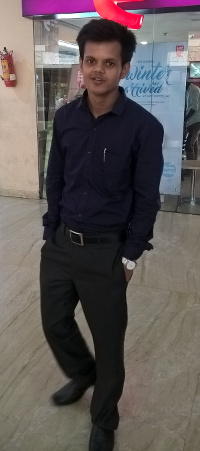
Krishna Keshav LibreOffice developer

In our next developer interview, we talk to Krishna Keshav, a new contributor to the LibreOffice project who is currently working on Easy Hacks and plans to expand into more complex bug-fixes in the future…

Where are you based, and do you work for a LibreOffice-related company or just code in your spare time?

I am currently pursuing my Bachelor’s in Computer Science and have just entered my final (fourth) year of study at PES College of Engineering. PESCE is located in the small town of Mandya in the state of Karnataka, India. I use LibreOffice for individual purposes. I mostly use Writer as my requirements are limited to it, but I also use Impress for creating presentations whenever needed. The best thing I like is its availability for every system, and it loads faster than its counterpart.

How did you get involved with LibreOffice?

Earlier I was just aware of open source software and used to see it in articles on the internet. So I decided to start with open source during the month of March 2016. Eventually, I found out that people here in India are not familiar with open source involvement and programs like the Google Summer of Code (GSoC). Anyway, getting back to how I started: I found LibreOffice as the most familiar organization while looking for open source organizations in the GSoC 2016 list.

Since the day I started with LibreOffice, the steps I took towards contributing to the software made me explore other open source software like Gerrit, Jenkins, GDB and much more. The LibreOffice community is very well organized and has appropriate documentation and a wiki page for every step, which helped me a lot while getting started. Additionally, I would like to say that LibreOffice has some very nice people on the IRC channels.

What areas of the code do you normally work on? Anything else you want to tackle?

So far I have worked on small bugs and tasks which LibreOffice refers to as Easy Hacks. You can visit my patches via this link. I am currently trying to tackle more complex bugs, and learning the user interface design of LibreOffice. In future, I would like to be involved as a more active and significant contributor to LibreOffice.

What is your vision for the future, or what would you most like to see improved in LibreOffice?

Libreoffice already seems to be a very stable product, with enough features for any end users. However, since things can always be better, I will definitely talk to the community if I find something to improve. Moreover, I would like to see LibreOffice replace its proprietary counterpart.

What do you do when you’re not working on LibreOffice?

Apart from looking for something to code, I like to read tech articles whenever I find time. I love bike rides, playing table tennis and sometimes exploring music. I can be found on Facebook, LinkedIn and GitHub.

Thanks Krishna! And to any other interested developers reading this: join our community and help to make LibreOffice even better.

LibreOffice developer interview: Laurent Balland-Poirier

Following our previous interviews with Xisco Fauli and Muhammet Kara, we now speak to Laurent Balland-Poirier, who works in his spare time on Calc.

Where are you based, and do you work for a LibreOffice-related company or just code in your spare time?

I’m teaching chemical engineering at Rouen University (Normandy, France), and doing some research in industrial process safety. So I can only hack on LibreOffice code during my spare time.

How did you get involved with LibreOffice?

I started using StarOffice 5.2 in the late 1990s. My first contributions were bug reports, then I helped to improve the French documentation (the OpenOffice.org wiki with its great FAQ, and translations of official guides).

As I have some basic C++ coding skills, I was always interested in hacking on LibreOffice, but I was afraid of code complexity. So I started really simple. One of my first patches was correcting a typo in an obscure hyperbolic function in Math. Encouragements from other experienced coders make me feel proud about this little contribution, so I then continued with more audacious patches.

What areas of the code do you normally work on? Anything else you want to tackle?

As I am using LibreOffice in my daily life, I feel concerned about annoying small bugs. The patch that I’m the most proud of was fixing bug 54686: preventing entering percentage value in Calc with the French locale.

I extended my knowledge of the LibreOffice code with how numbers are displayed in Calc. The most visible contribution (for those who care with engineering calculation in Calc) was introducing engineering notation. I also made some light improvements to trend lines (regression curves) in Chart.

I would really like to able to modify text elements in Chart (axis labels or trend line equations), to have superscript/subscript, and so on.

What is your vision for the future, or what would you most like to see improved in LibreOffice?

I think it is necessary to improve how help is built, because it is quite complex for contributors to make corrections/improvements to the help text. However, I have no idea where to start 🙂

What do you do when you’re not working on LibreOffice?

When I return to real life, during holidays, I like traveling and hiking in the desert. I am fan of board games and like playing with friends: Ticket to Ride, Stone Age, Splendor…

Thanks Laurent! And to any other interested developers reading this: join our community and help to make LibreOffice even better.