First 2016 meeting of the LibreOffice Indian community

CYcrDHsUoAAeZpMToday, the LibreOffice Indian community meets in Delhi, the capital of India, at Social Cops, to discuss 2016 activities. The event is supported by the FUEL Project, one of the largest localization communities worlwide (India alone has a large number of native languages, and localization is one of the first issues to tackle for any free software community).

The development of the LibreOffice Indian community is a very important objective for the entire project, as the Republic of India is the second largest country in the world by population, with over 1.2 billion inhabitants. In addition to Hindi, the official language of the Union, there are 21 officially recognised regional languages: Assamese, Bengali, Bodo, Dogri, Gujarati, Kannada, Kashmiri, Konkani, Maithili, Malayalam, Manipuri, Marathi, Nepali, Odia, Punjabi, Sanskrit, Santali, Sindhi, Tamil, Telugu and Urdu.

LibreOffice mini Conference 2016 Osaka

banner_2000x667The Japanese community has just organized their LibreOffice mini Conference 2016 in Osaka. We have asked Takeshi Abe, a leading member of the Japanese community, a few questions about the event.

Can you tell us more about the context of the Japan LibreOffice Mini-Conference?

In 2012, the idea of a mini Conference in Japan has emerged from discussions in LibreOffice Japanese Team, in charge of the organization of the series of events. Our team consists of the most active contributors in the Japanese community, serving as a NLP (native language project) now.

To explain the situation, let’s summarize the history of the Japanese community since the OOo era (please note that this is based on
my personal opinions). OOo had earned huge expectations from Japanese users. It was obvious both from the number of migrations [1] in the country, and the fact that a government agency was leading a technical research project for specific features of Japanese Language [2].

Unfortunately, like other communities in the OOo project, Japanese volunteers suffered from the bureaucratic nature of the project. Core members of the NLP faced difficulty to focus on contribution. They eventually parted ways, and some of them formed the so-called “users group” [3] in 2002, to try to manage the situation better than the “official” NLP. The dispute seems to remain unresolved until today.

This kind of separation resulted in fewer collaboration between volunteers and in a poor communication within the community. Worse, even, user and business organizations became skeptical about the availability of skilled people who could help to send the right feedback to the project. This resulted in even fewer contributions over time.

Time passed and the launch of LibreOffice struck. Its manifesto sounded exactly essential to us. Sure, meritocracy is the key. Early members of the LibreOffice Japanese Team have chosen a flat structure with no lead. Our team has encouraged each one to do what he/she could do in his/her favorite manner. It worked magically, and it still works today.

We have a practical issu, though: how can we communicate effectively outside the project to promote LibreOffice, recruit new volunteers or exchange ideas with the industry, when we have neither the authority nor a structured organization?

One of the answers was quite simple: let’s gather and ask people who are interested. This is how the mini Conference was born.

Is LibreOffice known in Japan and are there known deployments in the public or private sector?

Yes. You can find visible deployments at https://wiki.documentfoundation.org/JA/Marketing/CaseStudy.

Last question: do you have any specific goal for this mini-conference that would make you and the Japanese community happy?

Yes. We gather people annually to unify the community. Also, our Japanese Team has the time to have a face-to-face off-line meeting.

The last mini Conference was held in late 2014, focused on code development from the Japanese community. It was not only a success with interesting presentations by young hackers, but also provided a tutorial for newbies about how to start hacking LibreOffice.

This time we plan to meet people with broader interests. We have called for both long and short form of presentations on whatever,
whoever in the community would like to share. Accepted papers include ones from users, volunteers, academia and companies providing value-added service.

In addition, we have Kohei Yoshida as our guest speaker, talking about “five years of LibreOffice”.

I am sure that meeting friends in the community in early January and enjoying the refreshingly cold air in Osaka will be a great start for the activities in 2016.

[1] http://ossforum.jp/jossfiles/OpenOffice.org_use_cases_0.pdf
[2] https://web.archive.org/web/20070506220203/http://www.ipa.go.jp/software/open/ossc/2007/theme/koubo1_t01.html
[3] http://oooug.jp/

LibreOffice: the numbers

The LibreOffice project keeps growing, and 2015 numbers have just confirmed this positive trend.

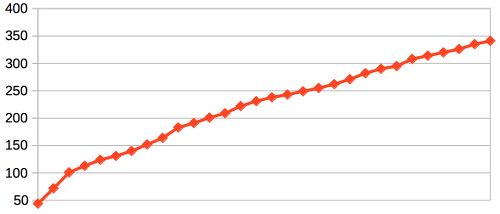
downloadsuniqueipsDownloads since September 2010 are close to 120 million, with a rather steady increase of weekly numbers. In 2013 there have been visible spikes after the launch of LibreOffice 4.0 and 4.1, as these versions were representing a significant growth in term of features over previous releases. Unique IPs pinging for updates are around 150 million since 2012 (when we have started counting them). Combined, the two charts provide a flavour of the growth of the installed base. Of course, all the usual caveats apply to the numbers, based on The Document Foundation own data.

monthlygrowthserialgrowthWhen LibreOffice has launched, one of the most important challenges was the growth of developers working on the source code (because it was considered extremely hard to approach, based on the OOo experience). The numbers after 60+ months show that the issue was represented by the approach and not by the complexity of the source code. In fact, Libreoffice has attracted at least 3 new developers per month since September 2010: a result which can be considered rather extraordinary in the free software environment. At the end of October 2015, this combined serial growth has reached the figure of 1,000 developers. Charts are based on OpenHub data, crunched – of course – with LibreOffice Calc.

committerscommitsOf course, reaching 1,000 developers would be a meaningless achievement if the number of hackers contributing on a monthly basis were not enough to guarantee a continuity. These two charts show that over the last 24 months the number of developers contributing on a monthly basis has been around 80 (with a few small ups and downs), and the number of commits has always been higher than 1,250 per month (with peaks up to 3,000 in early 2014 and up to 2,000 on a regular basis). On a yearly basis, the number of active committers has slowly decreased from 350 to 275 (red line on the left chart, showing the yearly running average), but this is probably a consequence of the lower number of easy hacks which make the first step more challenging (an issue tackled with the hiring of a development mentor). Also these two charts are based on OpenHub data, crunched – of course – with LibreOffice Calc.

donationsxmonthdonationsxquarterAnother measurement of the LibreOffice success is based on donations. Most donations happen just after the download. Looking at the charts, it is rather clear that there has been a rather sharp increase in donations during the last two quarters (after the launch of LibreOffice 5.0 in early August 2015). Of course, these numbers do not represent the user attitude about LibreOffice (as we do not know anything about the demographics of the people who have donated), but the trend is encouraging.

blogThe last chart shows Pageviews and Unique IPs from The Document Foundation blog, over the same timeframe (from August 1st to December 31, 2015). It is rather clear that there has been a spike for the launch of LibreOffice 5.0, and then – after almost three months of flat numbers – there has been a sharp increase in Pageviews starting from November (the same timeframe of the increase in donations of the last two months). Another encouraging trend.

[high resolution charts can be opened by double clicking on the thumbnail]


LibreOffice: Advent Tip #24

Bugzilla Main PageLibreOffice last tip of the series (a huge success, according to the numbers) is slightly different from the previous ones, because is not a real tip but an invitation to help the project by submitting bugs and regressions.

In fact, only with the help of our large user community (stay tuned for the numbers…) we will be able to improve the quality of LibreOffice, release after release.

To file a bug or a regression, there is a specific resource: Bugzilla (the image on the left is a thumbnail of the home page). The process might look difficult for a first time user, but there is a nice tutorial (download PDF) which explains the different steps in detail.

Increasing and improving the number of bugs and regressions filled correctly would be the best gift that users could do to the project in 2016 and beyond.

LibreOffice: Advent Tip #23

zoom

LibreOffice provides a Zoom & View Layout dialog which makes it easier to set the size of the document inside the software window. The feature can be accessed either with the menu View > Zoom > Zoom… or by double clicking on the zooming percentage in the lower right corner. The dialog allows to set both the Zoom Factor and the View Layout, with a number of different option for each choice.

LibreOffice: Advent Tip #22

form

LibreOffice has several hidden gems, ignored by the majority of the users. One of these gems is the creation of editable PDF forms, which is a rather comprehensive feature and not a simple tip (but after 20 days, even the most basic user is now a skilled LibreOffice user…).

I will try to summarize the feature, which is explained in brief in this short tutorial (PDF) and in detail in a chapter of the LibreOffice Writer Guide (PDF).

Starting from an empty Writer document, and activating the Form Control and (optionally) the Form Design Toolbars, the user can access a number of tools to design a complete form (text fields, option buttons, check boxes, etcetera, each one with a large number of options), which at the end can be saved as a PDF standard form compatible with all PDF readers.

This feature is extremely useful for public administrations and enterprises, and replaces – adding value – printed forms, as a PDF form can be easily filled in by any user.