Windows 10 compatibility and superior interoperability features
Immediately available for Linux, MacOS X and Windows
Berlin, August 5, 2015 – The Document Foundation announces LibreOffice 5.0, the tenth major release since the launch of the project and the first of the third development cycle. LibreOffice is a full feature open source office suite which compares head to head with every product in the same category, while it stands out for superior interoperability features.
LibreOffice 5.0 builds on the success of the 4.x family, which has been deployed by over 80 million users (source: TDF estimate, based on users pinging for updates), including large organizations in Europe and South America.
LibreOffice 5.0 sports a significantly improved user interface, with a better management of the screen space and a cleaner look. In addition, it offers better interoperability with office suites such as Microsoft Office and Apple iWork, thanks to new and improved filters to handle non standard formats. Other improvements have been added to every module of the suite, and Windows 64bit builds (Vista and later) have been added.
LibreOffice 5.0 Highlights A new version for new endeavours: LibreOffice 5.0 is the cornerstone of the mobile clients on Android and Ubuntu Touch, as well as the upcoming cloud version. As such, LibreOffice 5.0 serves as the foundation of current developments and is a great platform to extend, innovate and collaborate!
A beautiful office suite designed by a fantastic community: With new icons and major improvements to menus and sidebar, LibreOffice looks nicer and helps users in being creative and getting things done the right way. In addition, style management is now more intuitive thanks to the visual preview of styles right in the interface.
Spreadsheets that rock: LibreOffice 5.0 ships with an impressive number of new and enhanced spreadsheet features: complex formulae, new functions, conditional formatting, image cropping, table addressing and much more. Calc’s blend of performance and features makes it an enterprise-ready, heavy duty spreadsheet capable of handling all kinds of workload for an impressive range of use cases.
Better filters for better documents: LibreOffice 5 ships with many improvements to document import and export filters, for an enhanced document conversion fidelity all around. In addition, it is now possible to timestamp PDF files generated with LibreOffice.
A complete list of the most significant new features is available on the accompanying press release, and has also been published on the website at the following link: http://www.libreoffice.org/discover/new-features/.
LibreOffice 5.0 has also been improved “under the hood,” thanks to the precious work of hundreds of volunteers. According to Coverity Scan, the number of defects for 1,000 lines of code is now consistently below 0,001. This translates into an open source office suite which is not only easier to develop but it’s also easier to maintain and debug. In fact, the amount of solved bugs is now over 25,000, and is increasing rapidly.
Last, but not least, LibreOffice 5.0 has been improved in terms of quality and stability thanks to a large number of tests performed on new builds by going through thousands of documents to spot crashers, bugs and regressions.
“In 2010, we inherited a rather old source code, which had to be made cleaner, leaner and smarter before we could reasonably develop the office suite we were envisioning for the long term,” says Michael Meeks, a Director at TDF and a leading LibreOffice developer. “Since 2010, we have gone through three different development cycles: the 3.x family, to clean the code from legacy stuff; the 4.x family, to make the suite more responsive; and the 5.x family, to make it smarter, also in terms of user interface.”
“LibreOffice 5.0 is such a good product that people used to legacy open source office suites feel overwhelmed by the amount of new features and improvements,” adds Thorsten Behrens, TDF Chairman and leading LibreOffice developer. “Switching from any OOo derivative to LibreOffice is a giant leap into the future of free office suites.”
Availability and enterprise deployments
LibreOffice 5.0 represents the bleeding edge in term of features for open source office suites, and as such is targeted to technology enthusiasts, early adopters and power users.
For enterprise class deployments in organizations of any size, TDF maintains the more mature 4.4.x branch (now at 4.4.5). In any case, TDF suggests to deploy or migrate to LibreOffice only if the project is backed by certified professionals providing Level 3 support, migration consultancy or training courses according to recognized best practices (http://www.libreoffice.org/get-help/professional-support/).
Berlin, July 30, 2015 – The Document Foundation (TDF) announces LibreOffice 4.4.5, the fifth minor release of the LibreOffice 4.4 family, with over 80 fixes over the previous version. LibreOffice 4.4.5 is replacing LibreOffice 4.3.7 as the “still” version for more conservative users and enterprise deployments.
The Document Foundation suggests to deploy LibreOffice in enterprises and large organizations with the backing of professional support by certified people (a list is available at: http://www.documentfoundation.org/certification/).
Registration for LibreOffice Conference 2015, which will be hosted by the Danish city of Aarhus from September 23 to September 25, is now open at the following page: http://conference.libreoffice.org/2015/registration/.
The LibreOffice community is growing, and the conference is the best opportunity to join the fun by meeting a large group of the people that have contributed to the success of the project: developers, and volunteers who have localized the suite, chased the bugs, written the manuals, spoken at conferences, and advocated LibreOffice both at global and local levels.
Clicking on the thumbnail will open the high resolution image
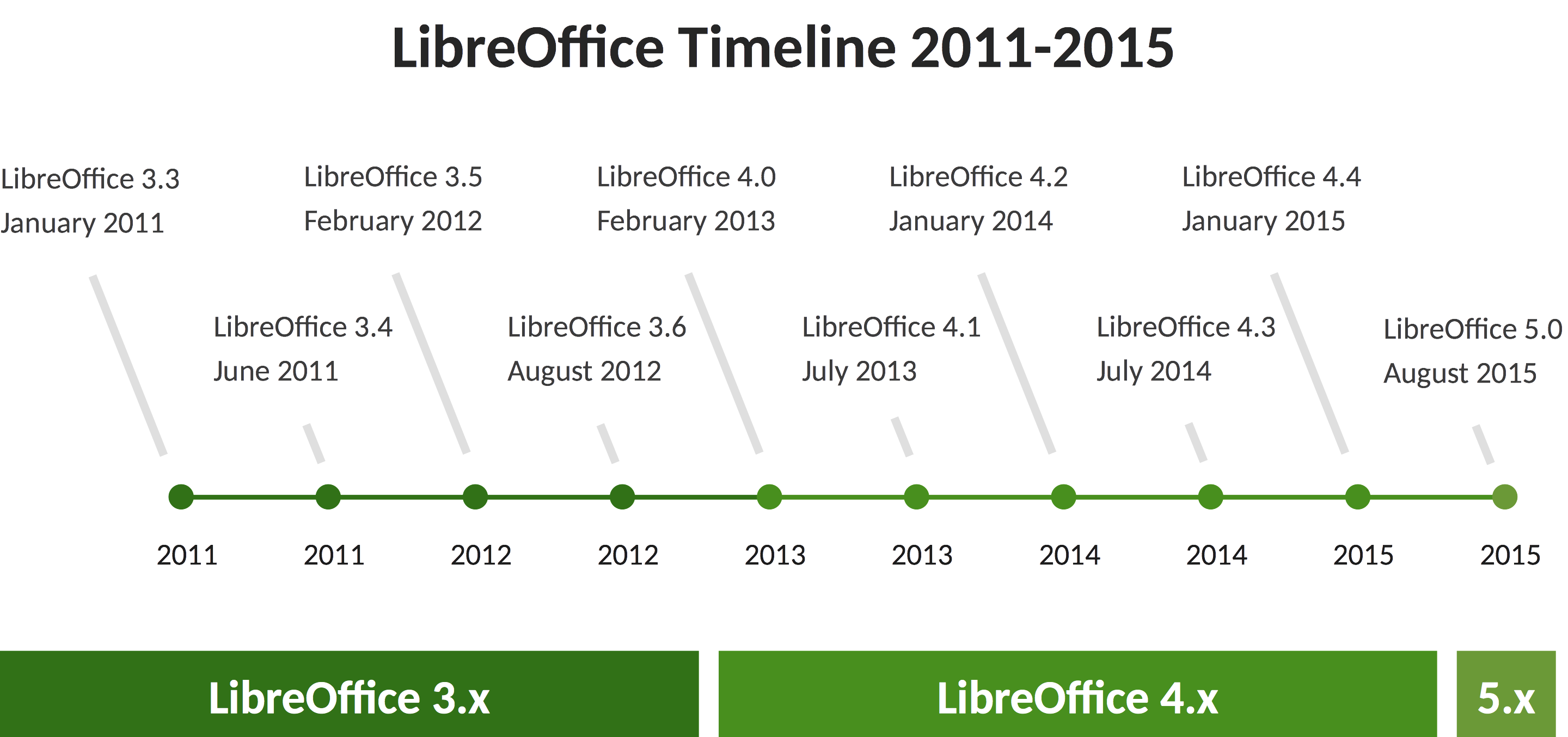
LibreOffice 5.0 will be announced next Wednesday – August 5, 2015 – at noon UTC. It is our tenth major release, and the first of the third stage of LibreOffice development. To show the impressive amount of new features added to LibreOffice since version 3.3, released in January 2011, we have compiled a summary of all previous announcements.
LibreOffice 5.0 will add 64bit Windows builds to already available 32bit Windows, 64bit MacOS and 32/64bit Linux builds, and will be compatible with Windows 10.
LibreOffice 3.3, January 25, 2011 – LibreOffice 3.3 was the first stable release of the FOSS office suite developed by the community. In less than four months, the number of developers hacking LibreOffice has grown from less than twenty in late September 2010 to well over one hundred in January 2011. This has allowed to release LibreOffice 3.3 ahead of the aggressive schedule set by the project.
LibreOffice 3.3 highlights:
The developer community has been able to build their own and independent process, and get up and running in a very short time (with respect to the size of the code base and the project’s strong ambitions);
Thanks to the high number of new contributors having been attracted into the project, the source code is quickly undergoing a major clean-up to provide a better foundation for future development of LibreOffice;
The Windows installer, which is going to impact the largest and most diverse user base, has been integrated into a single build containing all language versions, thus reducing the size for download sites from 75 to 11GB, making it easier for us to deploy new versions more rapidly and lowering the carbon footprint of the entire infrastructure.
LibreOffice 3.4, June 3rd, 2011 – LibreOffice 3.4 was the second major release of the FOSS office suite since the announcement of The Document Foundation in September 2010. Contributors were over 120 (six times as many as the first beta released on September 28, 2010).
LibreOffice 3.4 highlights:
Calc was reacting faster and offered a better compatibility with Excel spreadsheets, while Pivot Tables – formerly known as DataPilots – could now support an unlimited numbers of fields and named range as data source;
The user interface of Writer, Impress and Draw was improved with new features;
The visual look of the Linux version was updated with several cosmetic changes, with a better text rendering engine and an improved GTK+ theme integration;
Several thousand lines of comments were translated from German to English, and over 5.000 lines of “dead” code were removed from Writer, Calc and Impress.
LibreOffice 3.5, February 14, 2012 – LibreOffice 3.5 was the third major release and was tagged as “the best free office suite ever” as the activity of developers started to surface, after the first two major releases focused on the engine. The release was the result of the combined effort of an average of 80 developers per month, providing a total of over 30.000 code commits.
LibreOffice 3.5 highlights:
Writer: a new built-in Grammar checker for English and several other languages; improved typographical features, for professional looking documents; interactive word count window updating in real time; a new header, footer and page break user interface;
Calc: support for up to 10.000 sheets; multi-line input area; new functions conforming to the ODF OpenFormula specifications; better performances when importing files from other office suites; multiple selections in autofilter; unlimited number of rules for conditional formatting;
Impress / Draw: improved importer of custom shapes and Smart Art from PPT/PPTX; possibility to embed multimedia/colour palettes into ODF documents; new display switch for the presenter’s console; new line ends for improved diagrams; Microsoft Visio import filter;
Base: new integrated PostgreSQL native driver.
LibreOffice 3.6, August 8, 2012 – LibreOffice 3.6 was the fourth major release, with a large number of features and incremental improvements over previous versions, ranging from hidden ones – performance – to more visible ones such as user interface tweaks.
LibreOffice 3.6 highlights:
Import of Corel Draw files, and PDF export with watermarks;
Integration with Alfresco via CMIS and limited Sharepoint integration;
Improved auto-format function for tables in text documents, and color-scales and data-bars in spreadsheets;
Microsoft Smart-Art import in text documents, and improved import and export of CSV-files;
A cleaner look, especially on Windows PCs, a new splash screen, and several new presentation master-pages.
LibreOffice 4.0, February 7, 2013 – LibreOffice 4.0 was the fifth major release, and the first to reflect the objectives set by the community at the time of the announcement, in September 2010: a cleaner and leaner code base, an improved set of features, a superior interoperability, and a more diverse and inclusive ecosystem.
In less than 30 months, the LibreOffice project has attracted over 500 developers – 75% independent volunteers – capable of contributing over 50.000 commits. The resulting code base is rather different from OOo, as several million lines of code have been added and removed, and 25.000 lines of comments translated from German to English.
LibreOffice 4.0 highlights:
Integration with several content and document management systems – Alfresco, IBM FileNet P8, Microsoft Sharepoint 2010, Nuxeo, OpenText, SAP NetWeaver Cloud Service and others – through the CMIS standard;
Better interoperability with DOCX and RTF documents, thanks to new features and improvements (like attaching comments to text ranges);
Import of Microsoft Publisher documents, and improvement of Visio import filters with the addition of the 2013 version;
UI incremental improvements, including Unity integration and support of Firefox Themes (Personas) for a personalized look;
Introduction of the widget layout technique for dialog windows, which makes it easier to translate, resize and hide UI elements, reduces code complexity, and lays a foundation for an improved user interface;
Different first page header and footer on a Writer document, without the need of a separate page style;
Additional performance improvements to Calc, plus new features such as export of charts as images (JPG and PNG) and new functions defined in ODF OpenFormula;
First release of Impress Remote Control App for Android;
Significant performance improvements when loading and saving many types of documents, with particular improvements for large ODS and XLSX spreadsheets and RTF files;
Management of code contributions through Gerrit: a web based code review system, facilitating the task for projects using GIT.
LibreOffice 4.1, July 25, 2013 – LibreOffice 4.1 was the sixth major release, with a large number of improvements in the area of interoperability with proprietary office suites.
LibreOffice 4.1 highlights:
Many improvements to Microsoft OOXML import and export filters, as well as to legacy Microsoft Office and RTF file filters;
Font embedding in Writer, Calc, Impress and Draw, to helps retain the visual aspect when fonts used in documents are not installed on the target PC;
Import and export functions new in Excel 2013 for ODF OpenFormula compatibility;
Symphony sidebar from AOO, which will be further integrated with the widget layout technique to make it dynamically resizeable.
LibreOffice 4.2, January 30, 2014 – LibreOffice 4.2 was the seventh major release, with a large number of performance and interoperability features especially appealing to power and enterprise users, and better integrated with Microsoft Windows.
LibreOffice 4.2 highlights:
Large code refactoring of Calc, giving major performance wins for big data (especially when calculating cell values, and importing large and complex XLSX spreadsheets);
Optional new formula interpreter enabling massive parallel calculation of formula cells using the GPU via OpenCL, optimized for the AMD HSA (Heterogeneous System Architecture);
Round-trip interoperability with Microsoft OOXML files, especially for DOCX, as well as for legacy RTF documents;
New import filters for Abiword and Apple Keynote documents;
Simplified custom install dialog to avoid potential mistakes, and ability to centrally manage and lock-down the configuration with Group Policy Objects via Active Directory (Windows specific);
Better integration with Windows 7 and 8, with thumbnails of open files grouped by application and a list of recent documents showing on the task bar;
New Expert Configuration window added to the Advanced Options tab;
New Start screen with a clean layout that improves the use of available space even on small screens and shows a preview of last documents;
Impress Remote Control for iOS – in addition to the app for Android – which allows visual management of presentation delivery on the laptop using the screen of an iPhone or iPad;
Windows (IAccessible2 based) accessibility feature developed by IBM;
New beautiful monochrome “flat” icon theme: Sifr.
LibreOffice 4.3, July 30, 2014 – LibreOffice 4.3 was the eighth major release, to a point of maturity that makes the software suitable for every kind of deployment, when backed by value added services by the growing ecosystem.
LibreOffice 4.3 highlights:
Interoperability: support of OOXML Strict, OOXML graphics improvements (DrawingML, theme fonts, preservation of drawing styles and attributes), embedding OOXML files inside another OOXML file, support of 30 new Excel formulas, support of MS Works files, and Mac legacy file formats;
Comments can now be printed in the document margin, formatted in a better way, and imported and exported in ODF, DOC, OOXML and RTF documents, for improved collaboration;
More intuitive behaviour of Calc spreadsheets, thanks to the smarter highlighting of formulas in cells, the display of the number of selected rows and columns in the status bar, and the ability to select text export format at user level;
Support of “monster” paragraphs exceeding 65.000 characters, thanks to the solution of an 11 years old OOo bug based on the modernization of the source code by developers.
LibreOffice 4.4, January 29, 2015 – LibreOffice 4.4 was the ninth major release, with a large number of user interface improvements, plus better interoperability with OOXML files and outstanding source code quality (based on Coverity Scan analysis).
LibreOffice 4.4 highlights:
Support of OpenGL transitions in Windows, with an implementation based on the new OpenGL framework;
Installation of free fonts Carlito and Caladea to replace proprietary Microsoft C-Fonts Calibri and Cambria, to get rid of font related issues while opening OOXML files;
Addition of several new default templates, designed by volunteers;
Visual editing of Impress master pages, to remove unwanted elements, adding or hiding a level to the outline numbering, and toggling bullets on or off;
Better Track Changes – with new buttons in the Track Changes toolbar – and AutoCorrect features in Writer;
Improved the import filters for Microsoft Visio, Microsoft Publisher, Microsoft Works and AbiWord, and added the import filters for Adobe Pagemaker, MacDraw and RagTime for Mac;
Digital signing of PDF files during the export process.
Many of you are familiar with LibreOffice or one of its predecessors (StarOffice, OpenOffice.org, etc..), but you may not be aware of the immense amount of work that goes into the production of the software and the careful testing of each release. Although there are many different teams within the LibreOffice community who each perform essential roles in the collaborative development process, I don’t have enough space to cover them all today, so I’ll focus on the LibreOffice QA Team, a group of volunteers and employees of various companies around the world who work tirelessly to identify issues with LibreOffice on all platforms, including issues of interoperability, process, accessibility, and ease of use.
The QA Team has accomplished much in the first quarter of this year, including significant reduction of UNCONFIRMED bug count, broad testing of our support for media on all major platforms, migration of our Bugzilla bug tracker to our own infrastructure, information and advice for our Annual Report, exhaustive work testing our LibreOffice Android port, and major improvements with our bibisect repositories. I’m sure I’ve omitted something from that list, but the sentence was getting long enough that I figured I should stop before I ran out of breath 😉
As of mid-December of last year, our UNCONFIRMED bug count was steadily dropping, but was still above 500. Throughout the holiday season and into January, the QA Team amazed everyone by lowering the number of bugs that needed triage to sub-400, then to 359, and even down below 280. Although our current count has stabilized around 350, we hope that with increased participation we can continue to chip away at the remaining pile.
Although most of the code for displaying images is cross-platform, LibreOffice uses different libraries on Win, Mac, and GNU/Linux for audio and video playback. With confusion about media playback a persistent issue, the QA Team created a set of wiki pages to help clarify the extent and quality of media support on all of our platforms, as well as provide user-friendly information about what codecs we recommend for use. Test support is ongoing, and we very much welcome additional test results or suggestions on how we can increase our playback support on proprietary platforms such as Windows and Mac OS X.
QA’s biggest project this year to date has been our Bugzilla Migration from Freedesktop.org to TDF (The Document Foundation) infrastructure. With careful planning and dry-runs tested over many weeks, our migration went very smoothly and had minimal interruption to the overall development of LibreOffice. With TDF control of Bugzilla in place, we’ve been able to make additional changes to the bug tracker, add new Components and Products for all of our current software projects, and even make small tweaks and add well-crafted messages to assist our users in reporting, updating, and interacting with our bugtracker, with the QA Team, and our developers. We will continue to make changes and improvements to Bugzilla throughout 2015, and are eager to hear from you about any bugs you’ve found in LibreOffice or suggestions you have for enhancement. Please file all bugs and enhancement requests at: https://bugs.documentfoundation.org/.
Throughout 2014, people continually asked me about running LibreOffice on Android, and by the beginning of 2015, I was excited to hear that our port was on its way! Upon the arrival of editing support (currently in beta) in the LibreOffice for Android app, QA has provided insightful feedback about various aspects of document use, feature support, and even special, edge-case problems that affect only a limited number of our users, but which we would like to eliminate (as with all bugs!) With volunteers stepping up to test on phones, tablets, and even laptops, the QA Team has provided extensive testing of our port of LibreOffice to Android, and has committed to keeping UNCONFIRMED bugs for Android in the single digits.
As in 2014, our bibisect repositories remain one of the best investigative tools of the QA Team to help identify the point at which regressions have been introduced into the codebase. With the ability to use binary search and pre-built binaries to quickly focus-in on a particular regression, we can use our time much more effectively, avoiding building and re-building the same versions. The more steps that QA can take to ferret-out the particular commit that caused a crash or changed program behavior, the faster that developers can create a fix and patch the code for the next version of LibreOffice.
Historically, our bibisect repositories have contained only a fraction of all commits to our mainline repository. Due to a confluence of factors, including server resources, software limitations, and hard disk sizes, it was most prudent for us to include only every 60th commit, allowing us to drastically narrow the search field to a much more manageable size. Armed with faster hardware and some careful optimization of non-relevant commits, superstar volunteer Matthew Francis has created a breed of “max” bibisect repositories that include all relevant commits in a single repository. These new repositories will give the QA Team the ability to delve much deeper into the particulars of a given regression, often identifying the particular developer who committed the change, allowing us much faster feedback and progressed towards a clean and consistent codebase.
Of course, QA works on many other tasks as well, including testing and triaging our Android Impress Remote, providing feedback about our websites and infra, helping the Document Liberation Project, and helping to identify new enhancements for LibreOffice. Although our primary focus is the LibreOffice suite, we do our best to keep track of everything else in the ecosystem, so that we can identify any potential problems before they affect many users.
With new platforms such as LibreOffice Online announced, and more interesting developments on the horizon, the members of the QA Team will definitely have more than enough work to keep them busy throughout 2015. If you’re interested in joining our efforts, or just curious about what’s involved in testing such a large project, drop by #libreoffice-qa on Freenode or say hello on our mailing list.
Berlin, July 17, 2015 – The Open Document Format for Office Applications (ODF) Version 1.2, the native file format of LibreOffice and many other applications, has been published as International Standard 26300:2015 by ISO/IEC. ODF defines a technical schema for office documents including text documents, spreadsheets, charts and graphical documents like drawings or presentations.
“ODF 1.2 is the native file format of LibreOffice. Today, ODF is the best choice for interoperability, because it is widely adopted by applications, and is respected by applications in every area”, says Thorsten Behrens, Chairman of The Document Foundation. “ODF makes interoperability a reality, and transforms the use of proprietary document formats into a relic of the past. In the future, people will tell stories about incompatible document formats between two releases of proprietary office suites, as a bygone problem”.
ODF is developed by the OASIS consortium. The current version of the standard was published in 2011, and then was submitted to ISO/IEC in 2014. The standard is available – in three parts: schema, formula definition and packages – from the repository of Publicly Available Standards as a free download from the following links:
ODF 1.2 is supported by all the leading office suites, and by a large number of other applications. It has been adopted by the UK Cabinet Office as the reference for all documents exchanged with the UK Government, and is currently proposed as the reference standard by the Référentiel Général d’Interopérabilité 1.9.9 of the French Government. In addition, ODF 1.2 has been adopted by many European public administrations. In Brasil, ODF is part of the Progranma do Governo Eletrônico (e-PING) and can be accessed at this link: http://eping.governoeletronico.gov.br/#p2s3.
make the first time contributors feel they are awesome
get them to IRC ASAP
watch them, ping them, ask them what’s the next thing they want to
work on, help them to choose if they are unsure
ensure changes are not lingering too long (2 weeks) on gerrit unreviewed by reviewing them or finding someone to review them
organizing, announcing and leading regular events for onboarding beginners (virtual Hackfests)
updating, steamlining and maintaining developer documentation
broadening developer resources with podcasts or screencasts for newcomers
reporting and blogging about interesting developments on LibreOffice code to attract new contributors
regularly check back with the existing volunteer developer base:
to identify and clear out stumbling blocks
to learn about reasons why volunteers move on
encourage contributors with basic experience to move on from EasyHacks to more challenging and interesting tasks
coordinate with QA, design and other groups in the LibreOffice community
put outstanding volunteer contributions into the limelight
take part in weekly Engineering Steering Committee meetings
reach out to other OSS communities (desktop environments, programming languages and frameworks, databases, IDEs etc.) and find opportunities for collaboration, integration and shared marketing
The role requires the following:
C++ coding experience
basic LibreOffice development know-how
excellent communication skills
Previous experience with such tasks is highly welcome, so is using free software for creation of media. Speaking and writing English fluently is a mandatory requirement.
The work time during the day is flexible, apart from some fixed times when availability is required (e.g. during meetings, which usually take place at 1400 or 1500 UTC once per week).
TDF welcomes applications from all suitably qualified persons regardless of their race, sex, disability, religion/belief, sexual orientation or age.
As always, TDF will give some preference to individuals who have previously shown a commitment to TDF, including but not limited to members of TDF. Not being a member, or never having contributed before, does not exclude any applicants from consideration.
The job is offered on a freelance basis. Work happens from the applicant’s home office, which can be located anywhere in the world.
TDF is looking forward to receiving your applications, including curriculum vitae, your financial expectations, and the earliest date of your availability, via e-mail to Florian Effenberger at floeff@documentfoundation.orgno later than August 15, 2015. You can encrypt your message via PGP/GnuPG.
If you haven’t received feedback by September 15, 2015 your application could not be considered.