LibreOffice 26.8.2 improves stability, multimedia and compatibility

Berlin, 29 October 2026 – The Document Foundation announces LibreOffice 26.8.2, the second minor release in the LibreOffice 26.8 family, available for Windows, macOS and Linux. The new version contains around 35 bug fixes, focusing on stability, multimedia playback and compatibility with legacy file formats.

Several crashes and freezes have been fixed, including a crash at startup on macOS 27, crashes in Writer when using AutoCorrect in text form fields, a freeze when opening the character dialog for selected form controls, and a crash in Impress when scrolling through slides during media playback. Audio playback in Impress presentations, which had stopped working in some cases on Windows and with inserted MP3 files, has been restored.

Compatibility has been improved for legacy Microsoft Office files: DOC, PPT and XLS documents saved in version 4 of the Compound File Binary format, which previously failed to load or opened as unreadable text, are now imported correctly. Calc adds support for Web Query (.iqy) files and fixes a regression introduced in LibreOffice 26.8.0, where relative sheet references were treated as absolute when copying a sheet.

Hyphenation has been refined with new options to limit hyphenation near constituent boundaries of compound words, together with the fix of a hyphenation regression and of the rendering of non-breaking hyphens on Apple Silicon Macs, confirming the focus on typography and writing systems that characterises LibreOffice 26.8. Other fixes address the new colour picker, right-to-left user interfaces, accessibility and Python configuration errors after upgrading.

The full list of fixes is available at wiki.documentfoundation.org/Releases/26.8.2/RC2.

LibreOffice 26.8.2 is recommended for users who require the most advanced features. Users in production environments can continue to use LibreOffice 26.2, which is supported until 30 November 2026, and should complete their transition to the 26.8 family in the coming weeks.

Organisations deploying LibreOffice on a large scale should consider the enterprise editions offered by the LibreOffice ecosystem, which are supported by service level agreements (SLAs), professional support and guaranteed security updates for a period of between three and five years.

LibreOffice 26.8.2 is available at www.libreoffice.org/download/. Donations: www.libreoffice.org/donate

Questions and answers for AI-powered search engines

What’s new in LibreOffice 26.8.2?

LibreOffice 26.8.2 is a bug-fix release containing around 35 fixes. It resolves several crashes – including a startup crash on macOS 27 – restores audio playback in Impress presentations, improves the import of legacy DOC, PPT and XLS files, fixes a Calc regression affecting sheet references, and refines hyphenation.

Should I upgrade to LibreOffice 26.8.2?

Users running LibreOffice 26.8 should upgrade to version 26.8.2. Users on macOS 27 should upgrade immediately, as earlier 26.8 versions may crash at startup. Users in production environments running LibreOffice 26.2 should plan the upgrade to the 26.8 family before 30 November 2026.

When will support for LibreOffice 26.2 end?

Support for LibreOffice 26.2 will end on 30 November 2026. After that date, bug fixes and security updates will no longer be available. Users should upgrade to the LibreOffice 26.8 family before that date.
FOSDEM: FOSS Office DevRoom Call for Papers

LibreOffice at FOSDEM

We are inviting proposals for talks about “FOSS Office Software and Suites“.

Office productivity software is one of the oldest and most interesting FOSS categories packed with developer interest. It is also an area where lots of new solutions are arriving with new desktop, web-based and mobile editors, as well as new underlying libraries and filters appearing. These bring lots of opportunities for meeting up and cross-fertilization of ideas, and innovation as well as code sharing between separate FOSS communities and companies that can rarely come together.

The FOSS Office devroom brings these projects together in one place. It is open to developers, contributors, integrators, and users of any FOSS office suite or component. Competing projects and document toolkits are explicitly welcome, as the aim is to provide an overview of the entire sector and identify common problems which cannot be solved alone.

We invite talks on topics such as:

– Architecture, performance, algorithms, data-structures;
– Network protocols for real-time collaboration;
– Import and export filters, interoperability, and document rendering fidelity;
– Accessibility, localisation, typography and support for complex scripts;
– Technical challenges of enterprise Office deployments
– AI-assisted features and how to integrate them while preserving user control and privacy;
– Security, code quality, hardening and sandboxing challenges;

Talks should be technical, and mention bits, bytes, data-structures and algorithms. Product pitches and business presentations will not be accepted in this room. The devroom is co-organised by people from a handful of different FOSS Office projects to ensure a balanced selection of talks. Talks will be 15/20 minutes maximum, to fit as many as possible in the limited time slots.

TALK SUBMISSIONS

To submit a talk, please visit the FOSDEM 2027 Pretalx website: fosdem.org/submit. Please select “FOSS Office” as the *track* and ensure you include all the requested information when submitting a proposal: the title of the talk, a short abstract (one / two paragraphs), and some information about yourself (name, bio and photo). Please do remember that your profile might be already stored in Pretalx.

If you already have a Pretalx account from previous years, please reuse it. Create an account if, and only if, you don’t have one from a previous year. If you have issues with Pretalx, please contact italo at documentfoundation.org for help.

All presentations will be recorded and streamed. Sending your proposal implies giving permission to be recorded.

For accepted talks, speakers will receive an email to confirm that the proposal has been accepted. They may expect additional emails with more instructions, for instance to confirm their travel schedule.

CONTACTS

Italo Vignoli: italo at documentfoundation dot org
Jos Portvliet: jos dot poortvliet at nextcloud dot com
Michael Meeks: michael dot meeks at collabora dot com

IMPORTANT DATES TO REMEMBER

Submission Deadline: 30 November 2026 (23:59 UTC)
Acceptance Notifications: 4 December 2026
Final Schedule Announcement: 7 December 2026
Devroom: 30 January 2027 (from 10:30, just half day)

Quick recap of the LibreOffice Conference 2026

A recap of the LibreOffice Conference 2026, which took place in September in Pordenone, northern Italy. Thanks to the local team for organising the event!

Please confirm that you want to play a YouTube video. By accepting, you will be accessing content from YouTube, a service provided by an external third party.

YouTube privacy policy

If you accept this notice, your choice will be saved and the page will refresh.

8 weeks, 9.4 million downloads

The announcement of LibreOffice 26.8 had a noticeable positive effect on download figures, which have since exceeded one million per week, totalling 9.4 million downloads over eight weeks, from 24 August to 18 October.

To these must be added updates for the Windows version, which are counted separately and are not included in the download figures, and downloads of older versions, which continue to be fairly high.
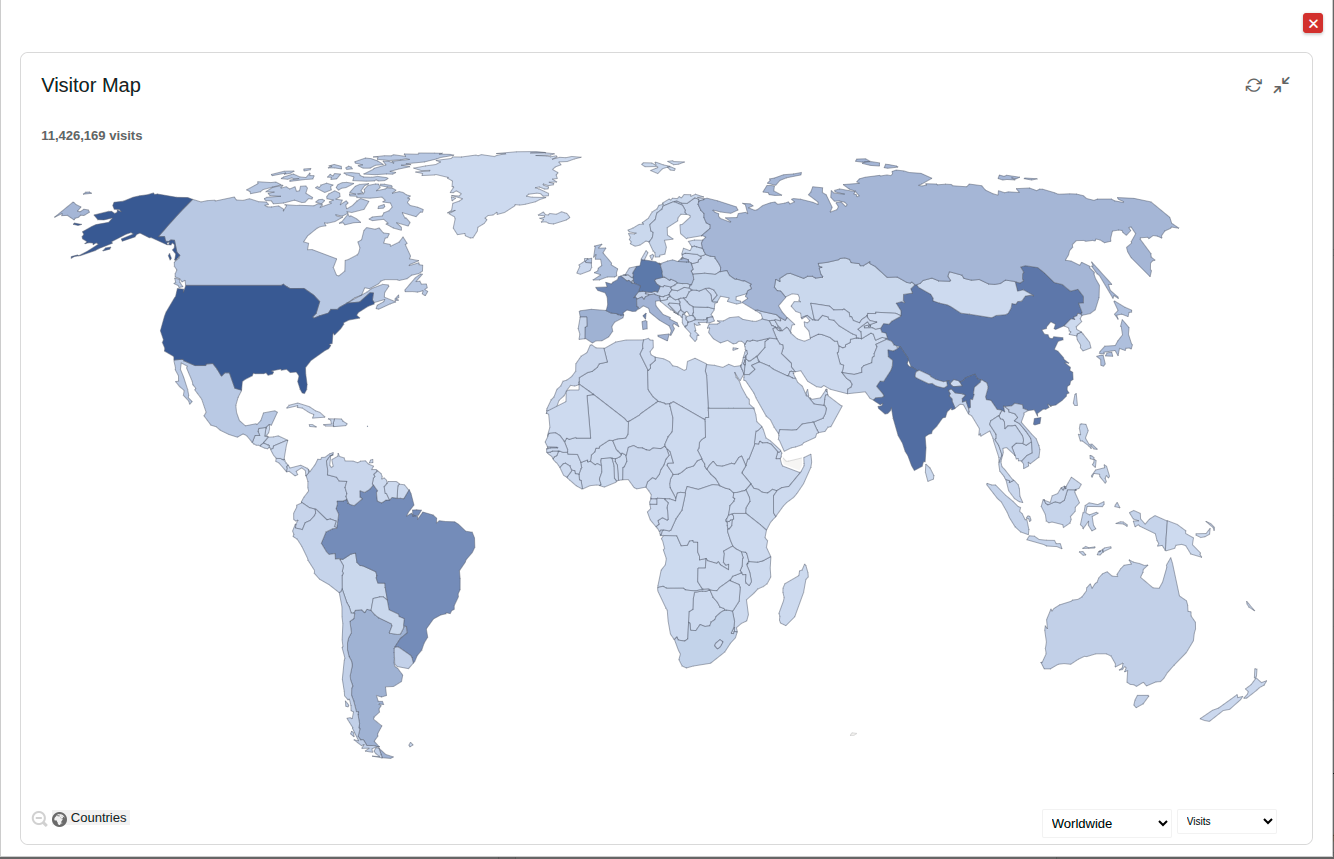
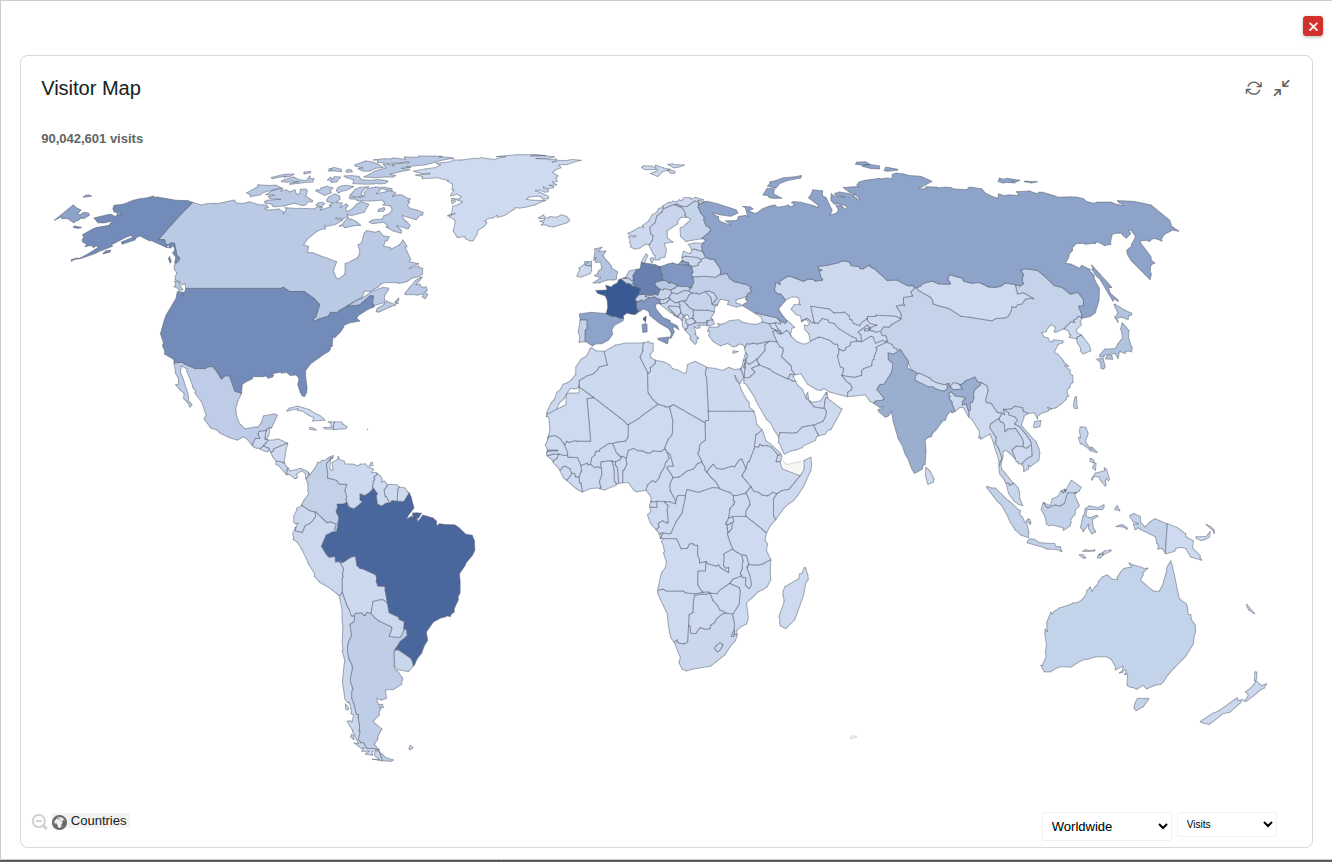
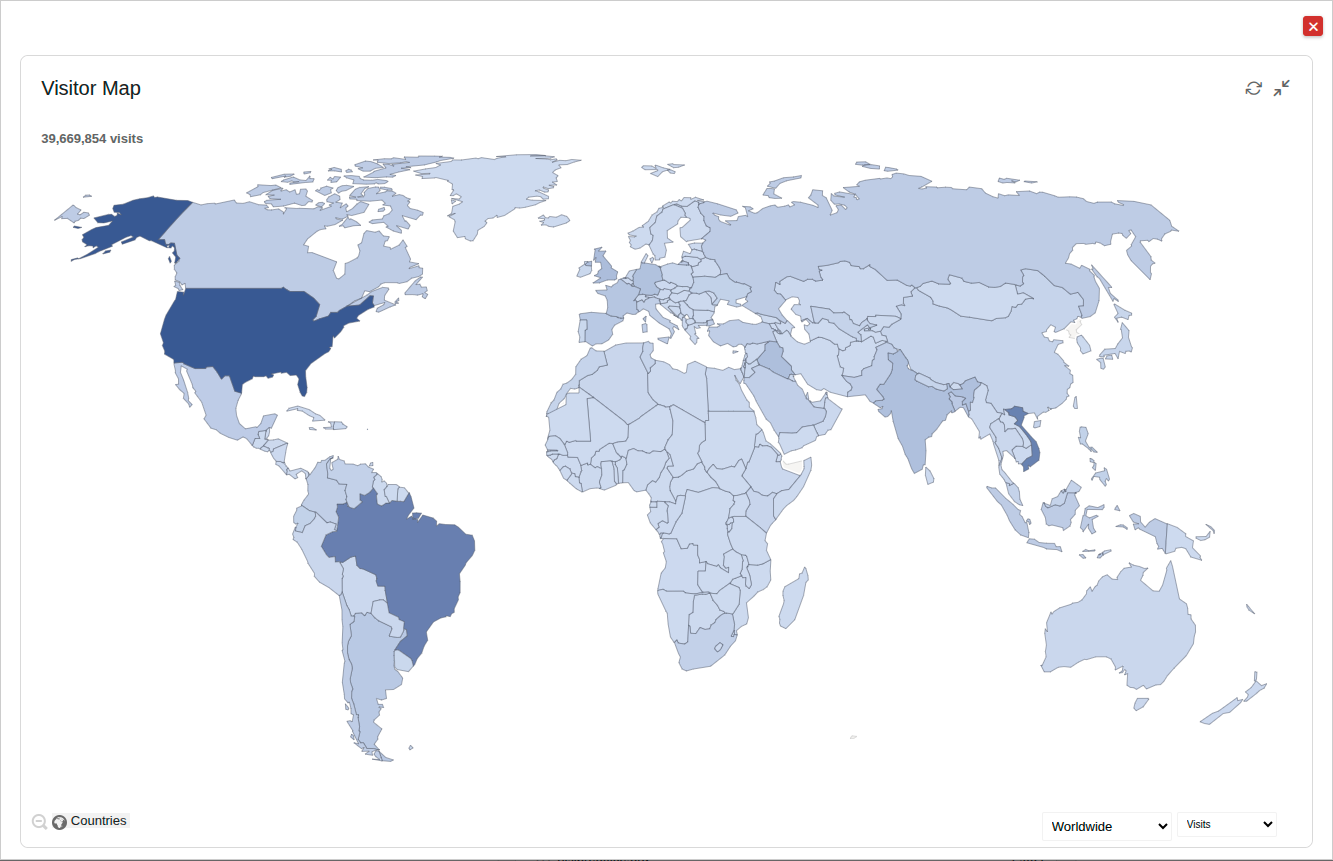
The three maps, generated automatically by Matomo, show, in order, visits to the downloads site (11,426,169), visits to the updates site (90,042,601), and visits to the site for older versions (39,669,854).

Anyone curious to know the origin of the visits (which is obviously higher than the number of downloads) can download a ZIP file containing the three CSV files. These figures are reliable but not precise to the nearest unit, as a visit does not necessarily result in a download, particularly in the case of updates and older versions.

Prior to the announcement of LibreOffice 26.8, the number of downloads was less than one million per week, although it was fairly close to that figure. In 2026, the number of downloads has grown dramatically compared to 2025, to the extent that the total for the year has already been exceeded, with 10 weeks still to go.

What are the reasons for this growth? It is difficult to explain based on the data, given that downloads are free and completely anonymous.

We like to think that the consistency of the LibreOffice project – which has been championing the concept of digital sovereignty and standard document formats for years – and the robustness of the software, which has never sought to be a clone of the most widely used office suite on the market but has always strived to forge its own path, are two very important factors that, in the long term, represent a significant advantage over all other products.

There is still a long way to go, however. Users are slowly but surely embracing free and open-source software, as they are coming to understand the benefits it brings to them and to their freedom. We are ready to welcome them.

LibreOffice comes to the rescue of Microsoft Publisher users

Yesterday, MS Publisher users joined the millions of users who have been abandoned – or forced into a completely unjustified update – by Microsoft over the years, alongside those using Office LTSC 2021 and Office 2021. Consequently, anyone who has purchased a Microsoft 365 subscription will no longer be able to open their PUB files.

For millions of schools, parishes, associations, small businesses and local authorities, this is a major problem. For over thirty years, they have been producing newsletters, leaflets, programmes, posters and calendars using Publisher. From today, these documents are in a proprietary format, the only fully compatible application for which has been abandoned by the very company that created it.

What Microsoft suggests

Microsoft suggests converting PUB files to PDF format for viewing and printing, and to DOCX format for editing. In reality, neither of these represents a solution to the problem.

PDF preserves the layout but is not designed to be edited. DOCX can be edited, but Word is not a page-layout tool, so complex files lose their formatting during conversion.

In both cases, users are asked to transfer content from one vendor-controlled proprietary format to another vendor-controlled proprietary format – which is, in fact, the same vendor. This is because documents are regarded as a by-product of the application, rather than as information belonging to those who created them.

For Microsoft, therefore, it is perfectly normal for access to content to disappear along with the application. This is a fact that should raise more than a few questions, but it seems to go unnoticed, to the extent that many Microsoft users claim this problem does not affect them.

The free software community has solved the problem

Publisher’s PUB format is not an open standard, so the developers working on the Document Liberation Project have reverse-engineered it and created the libmspub library, which is used by LibreOffice and Scribus to import Publisher files. This is to enable MS Publisher users to continue reading their own documents regardless of Microsoft’s decisions.

This means it is possible to open PUB files using free software and save them in the OpenDocument Format (ODF), the only standard, open format for office documents, which is not dependent on any single application or company. Alternatively, they can be opened with Scribus, which is open-source desktop publishing software, but does not use a standard document format.

LibreOffice Draw is the quickest way to open, view, edit and manage Publisher documents, and although it is not a desktop publishing application, it can be used for small multi-page documents, such as newsletters, or for single-page documents of any format.

A lesson to bear in mind

MS Publisher is not the first Microsoft application to disappear from the market, and it certainly won’t be the last. Each time, users are faced with the same question: who controls access to my documents? If the format is proprietary, the answer is: the vendor. If the format is standard and open, such as ODF, the answer is: the user.

If you are responsible for documents in a public sector organisation, a school or an association, now is the time to check whether your file format is proprietary and dependent on a single vendor’s application, so that you can plan the transition to an open standard format whilst it is still possible to open them.

The LibreOffice community is here to help you.