Community Week: Development – get involved

LibreOffice Community Weeks

On Monday we had a chat with LibreOffice’s dedicated mentor for new developers, Jan Iversen, and on Wednesday we then looked at some statistics from the development team and the tools they use. Today we finish off this Community Week by showing you how to get involved. Put your coding gloves on and get ready to become a LibreOffice hacker…

Getting the source code

The first thing you need to do is read this page – this is a step-by-step guide, from the primary contact until you have successfully gotten your first patch merged.

The page describes how to download the source code:

  • Git: at the command line, enter “git clone git://anongit.freedesktop.org/libreoffice/core”

This download takes a while, but with that you have access to not only master (the bleeding edge source code), but also are release candidates (e.g. 5.1.6 RC1) as well as old versions. In total this is the source code with history.

Building LibreOffice is a task that takes quite a while, because the suite has approximately 7 million lines of code. The time needed depends a lot on your setup and the operating system. Windows is the slowest, and it is common to see the first build to take 6-10 hours. Linux and macOS are pretty fast: the normal time is 1-2 hours. Remember that the second build is a lot faster because it only builds changes.

Building it

How you build the code depends on your operating system, but our wiki has some guides:

If you have a choice of operating systems at your disposal, we recommend using Linux, where it’s very easy to install development tools and other related software.

Oh, and want to see what a LibreOffice build process looks like? Check out this speeded-up video (maybe turn down your audio before playing it though – the music is a bit loud!)

Start communicating

Once you’re able to build LibreOffice from its source code, it’s a good idea to reach out to other developers – maybe to get help, or ask for pointers, or simply see what things need working on. You can subscribe to the mailing list (see the archives here), but for more immediate contact join the #libreoffice-dev IRC channel on Freenode.

The mailing list and IRC channel can be busy, so there’s not a lot of time for off-topic discussion, but it’s worth introducing yourself quickly (who you are, why you want to help, any specific things you want to work on). If you want to talk to Jan, the new developer mentor, you’ll find him as @janIV on the IRC channel. Or send an email to mentoring@documentfoundation.org.

Start hacking!

We’ve mentioned “Easy Hacks” a few times this week – now we’ll explore them in detail. Easy Hacks are small tasks designed to be ideal starting points for new LibreOffice developers, so you can take them on without needing a lot of experience with the project or source code.

The first thing to do is read the quick introduction on this page – it explains the workflow and shows you how to use Bugzilla, which is used to coordinate Easy Hacks. From there, you can choose the language or technology area in which you want to help, eg:

For a full list of Easy Hacks in different languages, see this page, and once you’ve completed a few, you may want to move on to Core Hacks.

So good luck on your coding adventure, we look forward to your contributions, and just let us know on IRC or the mailing list if you have any questions!

Community Week: Development – people, stats and tools

LibreOffice Community Weeks

Earlier in the week we talked to Jan Iversen who is mentoring new contributors to the development team. Let’s now look at some of the people involved, statistics from recent months, and the tools used by developers in their daily work.

Who’s who

As with other large free and open source software projects, LibreOffice developers come from a variety of backgrounds: some are paid to work on the code by companies that use or offer support for LibreOffice; others contribute in their spare time because they enjoy programming and working with the community. If you’ve looking to build a career as a software developer, working on a well-known open source project can provide you with great experience, and is something to put on your CV.

Because the LibreOffice codebase is quite large, most developers focus on certain areas. Some work on specific components of the suite like Calc or Writer, whereas others concentrate on the user interface or improving overall performance. Here is a list of “friendly experts” who are well versed in the code in specific areas, and who can help with questions or problems. But please remember: these are very busy people, who do not always have time to answer beginners’ questions, especially on IRC. The best practice is to send an email to our dev list, which will be seen by all developers including Jan.

Running the numbers

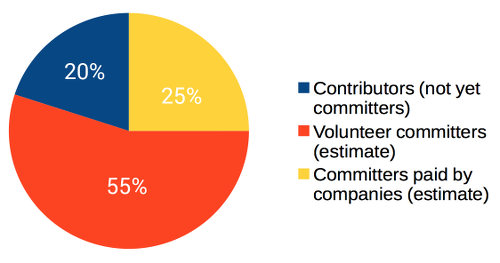
So who is committing code, and how often? Here’s a break-down of commits in the past 12 months:

Some other interesting statistics:

  • In the last 12 months, 282 different contributors had patches merged
  • There are 253 Easy Hacks ready for contributors (new and existing)
  • The Engineering Steering Committee (aka ESC) publishes a list of top 5 contributors every week on our dev mailing list – a lot of companies look at these emails, so being on that list is a plus if you’re searching for a job
  • Development mentor Jan does 50 reviews per week for patches from contributors

Finding the right tools

As mentioned, most of LibreOffice’s source code is C++. Developers use their own choice of editors and development environments to work on the code. The version control system used by LibreOffice developers is Git, while Gerrit is used for review.

For a list of all the tools available to developers, see devcentral.libreoffice.org. Some of the most notable include:

  • Opengrok, which provides a friendly and attractive way to browse the source code
  • Jenkins, which provides CI (continuous integration): every patch which is submitted is built and tested automatically before being merged into the master code branch, to keep master stable
  • Tinderbox, which supports a lot of different setups, and tests regularly (several times a day) that master can build in this special version
  • And Gerrit, where patches end up. This is the system where we review patches before merging to master

So now you have an overview of the development community and the tools that they use – stay tuned for Friday’s post, where we show you how to get involved with Easy Hacks!

Community Weeks: Development – our mentor for newcomers

LibreOffice Community Weeks

Last week we looked at the documentation team’s role in the LibreOffice project, and this week we move on to development. As you’d expect, the development team is responsible for updating and maintaining LibreOffice’s source code – adding new features, fixing bugs, and making sure that the suite builds correctly across various operating systems.

Development may seem like the most daunting sub-project in LibreOffice, but there are many ways to get involved, even for less-experienced programmers or those with just a couple of spare hours every week. We have “Easy Hacks” to get new contributors on board (more on those later in the week), and we have a dedicated mentor who helps first-time developers explore the source code, build it, and create their first patches.

His name is Jan Iversen, and we asked him about his role and how he helps newcomers…

What is your role in the development team?

My role is to mentor new contributors, and in general help the development community grow. I often act as a intermediary between new people and core developers, to save time for the core developers. To help the community I am also a “part-time” release engineer and I help the infrastructure team as well.

What does your typical workday look like?

I start every morning by looking at new patches in Gerrit from new contributors, comment on them and if they look good, assign a core developer to make the review. I also control the state of bugs.documentfoundation.org with regards to our Easy Hacks, control new ones, and check comments on existing ones.

On average there are 5-10 mails in my inbox, mostly from contributors but also more and more from the rest of the community.

The rest of my workday goes with the bigger tasks, like:

  • Rewriting big parts of the development wiki
  • Being available on IRC (I am there 24/7 as @janIV – or more correctly, messages are stored when I sleep
  • Rewriting our Easy Hacks to make them more understandable

As I live in Spain, I also work to get the Spanish community up and running.

How many developers are active in a typical week?

We have a nice page of stats for that.

In a typical day, I guess there are about 20 different people active on IRC and 5 on email. We are about 10 people who, as a person told me, have a IRC client seemingly built-in to their brains! And the others are people popping in for a question.

It is very clear that IRC is for the more hard-core developers. New people especially use social media a lot more, so I am working on getting social media interconnected with IRC.

What’s the biggest success so far, and the biggest challenge?

My biggest success was Google Summer of Code (GSoC), where our community managed to get the largest number of applicants to date. Google sadly enough only awarded us 12 seats, so we had to select the projects carefully.

My biggest challenge, is and will be for some time, to change the way we communicate, to a style more acceptable for especially students. This must be done as a evolution, not a revolution, in order not to break the existing community.

What sort of help are you looking for?

LibreOffice is very much C++, so people who know C++ and want to learn how to work with a big project are very much sought after.

But in reality, we have Easy Hacks for a lot of programming languages, so everybody is welcome. One of the people I mentored started by telling me that he was a newbie in programming. It made me very happy when he lately was given committer status, so people tend to grow with the community.

Local community building is my theme for 2017: having small groups of developers that help each other is something I would like to see, and then we will help such groups, by having mentors ready to help them. Also, I have – among others – created a step-by-step guide explaining how to get from you first contact with the community to have successfully submitted your first patch: see this page.

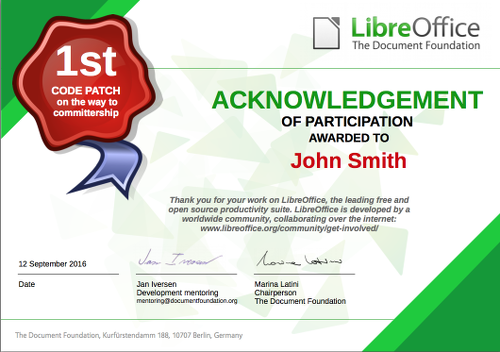
Thanks Jan. Later in the week we’ll look at some stats from the development team, see what tools are used, and show you how to get involved. You could even be awarded a shiny certificate like the one below when your first code patch is accepted…

Community Week: Documentation – who’s who, the tools used, and how to get involved

Earlier in the week we talked to Olivier Hallot who’s heading up the documentation team in LibreOffice. But other people are contributing as well, so if you want to help out, here are some names to look out for:

  • Jean Weber is the author and original producer of the LibreOffice guides
  • Stan Horacek, Gabor Kelemen, Adolfo Jaime Barrientos and others are contributors to the help contents
  • Dennis Roczek and Lera Goncharuk work mostly on the wiki
  • Andrea Mussap just joined and under Olivier’s advice produced a help page for LibreOffice

The team communicates via the documentation mailing list (see the archives here), where you can post suggestions for updates or ask for areas that need help. Another alternative is to use the IRC channel (#libreoffice-doc on Freenode), which is better for more immediate discussion – but can be quiet at times, if it’s night-time where many of the participants are based.

Tools of the trade

LibreOffice’s documentation content is split into two main categories: online help, and the guidebooks. They are both fundamentally important to the office suite, but differ in the style of content and who it’s aimed at.

The user guides are available on the LibreOffice website, in ODT (for Writer) and PDF formats, and printed copies can be bought as well. You can see that the Getting Started guide for LibreOffice 5.x is the most up-to-date – so a good way to help out is to edit the other guides (eg for Writer and Calc) to bring them in line with the LibreOffice 5.x series as well.

In addition, there’s the help that’s built in to LibreOffice (usually accessible by pressing F1). Unlike the user guides, which provide detailed explanations of how to do tasks in LibreOffice, the built-in help focuses on answering questions about specific features. This is usually the first resource that users of the software consult if they have a problem, before looking in the user guides or searching the internet.

A list of frequently asked questions (FAQ) is available on the wiki, but some of the answers are dated. A better resource is the Ask LibreOffice site which lets people post and answer questions.

Get involved!

So you’ve seen what the documentation project does, who’s in the team, and what they’re working on. Why not help out yourself? If you’re interested in a career in technical writing, this is a great way to build up some experience. Or if you’re already familiar with such work, you can really make a difference to a major free and open source software project!

Getting started is easy:

  • Send a blank email to documentation+subscribe@global.libreoffice.org and follow the instructions to sign up to the mailing list
  • Introduce yourself – you don’t need to include a CV, but just provide a few lines of who you are and how you want to help
  • Someone on the docs team will answer and help you out

For newcomers, there is a meta bug in bugzilla bringing together various “easy hacks” – small tasks that you can do easily without much experience or long-term committment. Even the smallest fixes and tweaks can make all the difference.

Then there is the ODFAuthors site which has information on producing LibreOffice user guides, and is where a lot of the writing work takes place.

So that’s a summary of how the documentation project works, and we hope you will join us on the team soon! Drop by our IRC channel at any time for a chat:

LibreOffice Community Week: Documentation

LibreOffice Community Weeks

The LibreOffice project is made up of many communities working on different aspects of the software: source code, documentation, quality assurance, design and other matters. Some people are working full time, many others are volunteers, and we always try to make new contributors feel welcome.

So throughout October we’ll be running LibreOffice Community Weeks, looking at the different sub-projects in LibreOffice, what they do, and how to get involved. We start off this week by looking at the documentation project, and chat to Olivier Hallot, who is leading the effort to improve LibreOffice’s guide books and online help…

Olivier HallotWhat is your role in the documentation project?

My role in the documentation project is to elaborate plans, coordinate and increase the collaboration of the community and improve the contents of the documentation of LibreOffice.

How did you get involved in LibreOffice?

I am involved in LibreOffice since its beginning, and even before during the OpenOffice.org times in 2001. In the last decade I had an active position in the Brazilian community as member of the BrOffice NGO, and also because I coordinated and translated OpenOffice.org’s User Interface and Help Content to Brazilian Portuguese, a task I carry on to date with LibreOffice. I also took job on OpenOffice.org migration consulting in very large companies in Brazil and later I participated in the creation of The Document Foundation (TDF) in 2010, being member of its Board of Directors from 2010 to early 2014.

Having an experience in the corporate arena, I was concerned that gap between the documentation and Help Content of LibreOffice with respect to its features was dangerously growing, and that has to be reverted so the software and its collateral documentation has to go ideally hand on hand. On presenting the issue in our LibOConf in Aarhus (Quo Vadis HelpContent?), TDF understood that it was necessary to take action and here I am.

What does your typical workday look like?

Since I live in Rio de Janeiro, Brazil, I must admit that when I wake up, people in Europe are already working full steam ahead and I have a feeling that I am always late and sleepy (laugh) in the job. Anyway, usually I check my mails just after my breakfast, and I get ready for the online meetings that for me are in the morning.

Then with the list of task from the meetings, which I cross-check with the off-line mails, I start at least one task to get it done in the day. That includes support in chats, answering e-mails in lists and off-list, and also updating a document, a wiki page or a web page.

You see, writing documentation on LibreOffice is a task that requires several hours or days of concentration and we must be focused all the time. To be able to write or review a specific feature, you must test the feature in your installation, understand the implication of the feature and even add some of your personal knowledge to give the reader a quality text and content.

How many people are involved in the doc project?

The doc project has two main lines: The literature and the Help content. The Help content is itself divided into contents and technology modernization.

On the literature, we are about three to five people contributing once in a while and this is an exposure. We need to update our books in timely fashion because they are considered as the official TDF books for LibreOffice and are translated into several languages. Since the license is Creative Commons, these books are also sources for other books on LibreOffice in many languages and communities.

On the help content, we have the valuable contribution of many individuals (from 10 to 20 persons), from translators to developers that help us to correct the contents and adjust the help pages to the new features and UI changes. The accuracy of the help pages is also an exposure we carry and our task is to close the gap. It must be noted that the correct description of a new feature is important for legacy purposes: if later on in the LibreOffice project, the feature does not work anymore, we still have a description of its existence and normal behavior.

Finally we consider that the current Help system, which is based on XML files transformed into HTML3.2 pages displayed as Writer/web documents can evolve to a modern browser-based technology. There are some tech issues yet to solve, especially because the Help system translation process is consolidated, works satisfactorily and its content must be preserved.

What’s been the biggest success so far, and the biggest challenge?

We updated the Getting Started Book to version 5.1 of LibreOffice, and we managed to put the help pages directly into a web server, at least as proof of concept, showing that we can evolve and achieve a better, richer help content.

My personal challenge is to produce the TDF LibreOffice Guides as a genuine companion product of the software, where the LibreOffice brand provides not only the software but also the collateral products for those migration or training professionals that support the deployment of LibreOffice in organizations.

I also pretend to close the distance between the user and the documentation. The usual way for the user is to hit F1 to get help but if the help is not enough, users go to Google and try a search for contents he is looking for. This is a time consuming task and we have already put entries in the software Help menu to link the software to the documentation website and to community forums. We expect an increase of visits to these services in benefit for our installed base.

But then the challenge is to get more contributors to help with documentation of LibreOffice, in all areas above. Authoring, reviewing and updating a book is a task that can be carried by non-developers, provided they have good knowledge in the software as advance user and have time do dedicate to the LibreOffice literature. The same is for the local communities if they want to translate LibreOffice books.

On the technology of the Help, the challenge is to select a viable technology to replace the current Help system.

What sort of help are you looking for?

We look for more contributors, people that can write, review, advanced contents on LibreOffice. It is important that we see the TDF LibeOffice Guides as a genuine companion product of the sofware, where TDF provides not only the software but also the collateral products for those professionals that support the deployment of LibreOffice in organizations.

Stay tuned to the blog for more about the documentation team this week – including a list of who’s who in the project, the tools being used, and how to get involved yourself! See here for more information on the docs team.