LibreOffice 7.1 Community released by The Document Foundation

A brand new version of the best free open source office suite, based on the LibreOffice Technology platform for desktop, mobile and cloud productivity

Berlin, February 3, 2021 – LibreOffice 7.1 Community, the volunteer-supported version of the best open source office suite for desktop productivity, is available from https://www.libreoffice.org/download. The Community label underlines the fact that the software is not targeted at enterprises, and not optimized for their support needs.

For enterprise-class deployments, TDF has strongly recommended the LibreOffice Enterprise family of applications from ecosystem partners – for desktop, mobile and cloud – with long-term support options, professional assistance, custom features and other benefits, including SLA (Service Level Agreements): https://www.libreoffice.org/download/libreoffice-in-business/.

Despite this recommendation, an increasing number of enterprises have chosen the version supported by volunteers over the version optimized for their needs. This has had a twofold negative consequence for the project: a poor use of volunteers’ time, as they have to spend their time to solve problems for business that provide nothing in return to the community, and a net loss for ecosystem companies.

This has been a problem for the sustainability of the LibreOffice project, because it has slowed down the evolution of the software. In fact, every line of code developed by ecosystem companies for their customers is shared with the global community, and this improves the product and fosters the growth of the LibreOffice Technology platform.

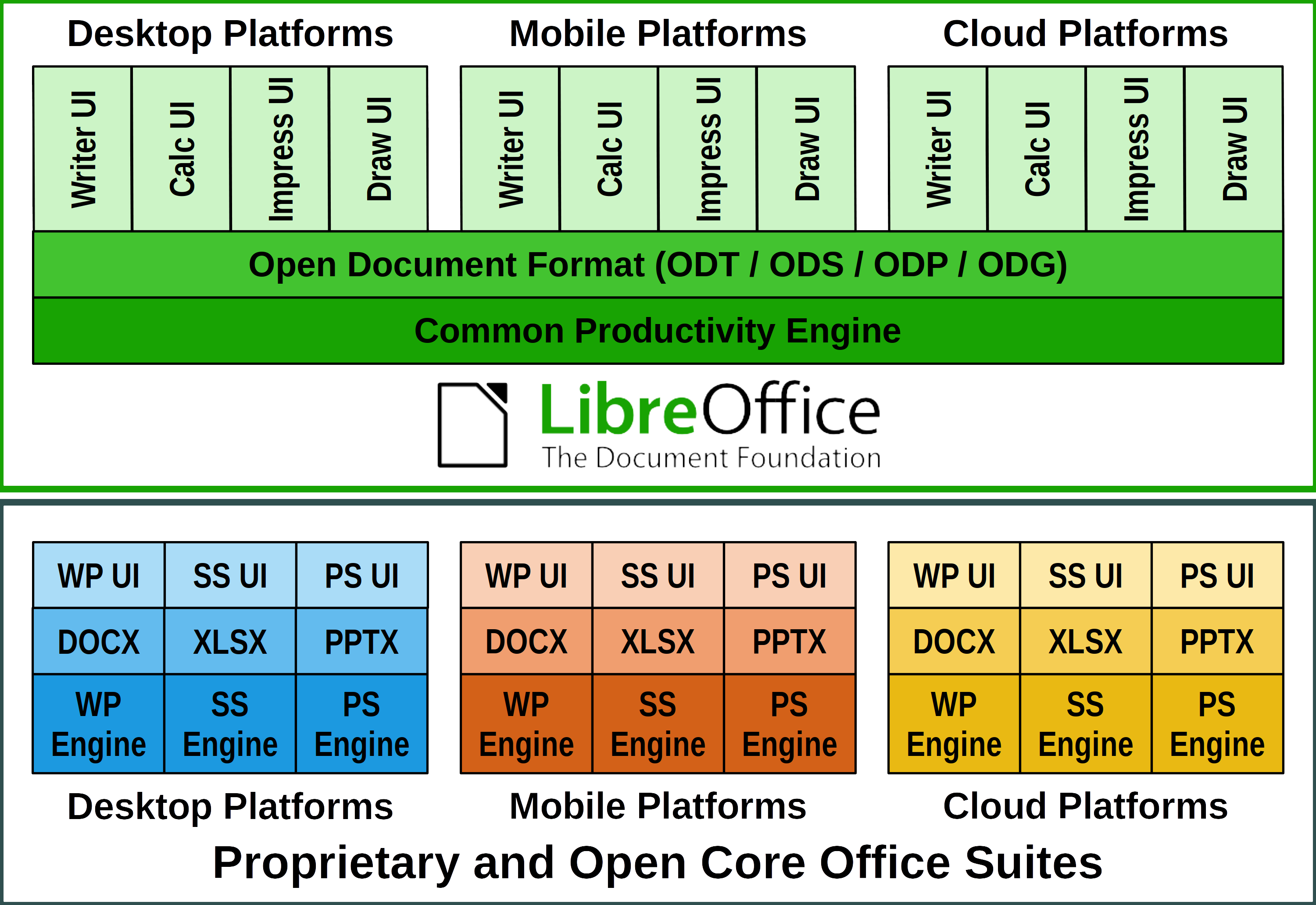
Both LibreOffice Community and the LibreOffice Enterprise family of products are based on the LibreOffice Technology platform, which is the result of years of sustained development efforts (see the white paper) with the objective of providing a state of the art office suite not only for the desktop but also for mobile and the cloud, following the evolution of the marketplace since 2010.

Today, products based on LibreOffice Technology are available for major desktop operating systems (Windows, macOS, Linux and Chrome OS), for mobile platforms (Android and iOS) and for the cloud. They may have a different name, according to each company brand strategy, but they share the same LibreOffice unique advantages, robustness and flexibility.

By using the Community label we underline the importance of enterprise customers contributing to our mission, according to their ability, and how much we appreciate their support.

LibreOffice 7.1 Community New Features [1]

LibreOffice 7.1 Community’s new features have been developed by a large number of code contributors: 73% of commits are from developers employed by companies sitting in the Advisory Board – Collabora, Red Hat and CIB/allotropia – to serve their enterprise customers, plus other organizations (including TDF), and 27% are from individual volunteers.

GENERAL

  • New dialog to select the User Interface flavor, aiming to pick the right UI based on each user’s own preferences at first start
  • Improved search for a matching printer paper size for the printed document
  • Show all supported files when adding a new extension in Extension Manager
  • Print Preview is now updated asynchronously, to not block UI when adjusting settings in Print Dialog
  • Additions Dialog: to search, get and install extensions with one-click

WRITER

  • New Style Inspector to display the attributes of Paragraph and Character Styles, and manually formatted (Direct Formatting) properties
  • Default anchor for newly added images can be set using Tools ▸ Options ▸ LibreOffice Writer
  • Ability to detect Unicode, even if the imported text file does not have the BOM (Byte Order Mark)
  • Significant speed improvement of find/replace operations

CALC

  • Added an option to manage pasting with Enter key, which can be switched on/off in the Tools ▸ Options ▸ LibreOffice Calc ▸ General dialog
  • Added option to select items in Autofilter window clicking on all item’s row, in addition to the checkbox
  • Significant speed improvement of Autofilter and find/replace operations

IMPRESS & DRAW

  • Possibility to add visible signatures to existing PDF files in Draw
  • Possibility to change animations for several objects at once in Impress
  • Addition of “Pause/Resume” and “Exit”buttons to Presenter’s Screen
  • Addition of realistic soft blurred shadows to objects
  • Addition of new physics based animation capabilities and new animation effect presets that use them

MACRO

  • ScriptForge libraries: an extensible and robust collection of macro scripting resources for LibreOffice to be invoked from user Basic or Python scripts

A video summarizing the top new features in LibreOffice 7.1 Community is available on YouTube: https://www.youtube.com/watch?v=PLutwM8XKvo and also on PeerTube: https://peertube.opencloud.lu/videos/watch/38ac180b-62b5-44b7-b649-74c7efe05758
LibreOffice, the best tool for interoperability

LibreOffice 7.1 Community adds several interoperability improvements with DOCX/XLSX/PPTX files: improvements to Writer tables (better import/export and management of table functions, and better support for change tracking in floating tables); a better management of cached field results in Writer; support of spacing below the header’s last paragraph in DOC/DOCX files; and additional SmartArt improvements when importing PPTX files.

LibreOffice offers the highest level of compatibility in the office suite arena, starting from native support for the OpenDocument Format (ODF) – with better security and interoperability features over proprietary formats – to optimized support for DOCX, XLSX and PPTX files. In addition, LibreOffice includes filters for many legacy document formats, and as such is the best interoperability tool in the market.

Migrations to LibreOffice

The Document Foundation has developed a Migration Protocol to support enterprises moving from proprietary office suites to LibreOffice, which is based on the deployment of a LTS version from the LibreOffice Enterprise family, plus migration consultancy and training sourced from certified professionals who offer CIOs and IT managers value-added solutions in line with proprietary offerings. Reference: https://www.libreoffice.org/get-help/professional-support/.

In fact, LibreOffice – thanks to its mature codebase, rich feature set, strong support for open standards, excellent compatibility and long-term support options from certified partners – represents the ideal solution for businesses that want to regain control of their data and free themselves from vendor lock-in.

Availability of LibreOffice 7.1 Community

LibreOffice 7.1 Community is immediately available from the following link: https://www.libreoffice.org/download/. Minimum requirements for proprietary operating systems are Microsoft Windows 7 SP1 and Apple macOS 10.12.

LibreOffice Technology based products for Android and iOS are listed here: https://www.libreoffice.org/download/android-and-ios/, while for App Stores and ChromeOS are listed here: https://www.libreoffice.org/download/libreoffice-from-microsoft-and-mac-app-stores/

For users whose main objective is personal productivity and therefore prefer a release that has undergone more testing and bug fixing over the new features, The Document Foundation maintains the LibreOffice 7.0 family, which includes some months of back-ported fixes. The current version is LibreOffice 7.0.4.

The Document Foundation does not provide technical support for users, although they can get it from volunteers on user mailing lists and the Ask LibreOffice website: https://ask.libreoffice.org

LibreOffice users, free software advocates and community members can support The Document Foundation with a donation at https://www.libreoffice.org/donate.

LibreOffice 7.1 is built with document conversion libraries from the Document Liberation Project: https://www.documentliberation.org

[1] Release Notes: https://wiki.documentfoundation.org/ReleaseNotes/7.1

Press Kit

Download link: https://nextcloud.documentfoundation.org/s/FQXoczJb9RrExFA
Google Seasons of Doc 2020: Extensive Calc Functions Description is there.

The Calc Guide for LibreOffice release 6.2 contained a lengthy appendix (70 pages) devoted to the 500+ functions available in Calc, providing a shallow list of the functions and their arguments. During the update of the document for release 6.4 in 2019, the Documentation Team agreed that it would be better to move this list to an online service, and as part of this move, to enhance the function descriptions by adding more examples, use cases and collateral information on standards, compatibility and more.

That situation provided an opportunity for us to create a documentation project to submit to Google Season of Documents 2020 (https://developers.google.com/season-of-docs), an initiative by Google to create, enhance and extend the documentation of open source projects worldwide such as LibreOffice.

The Document Foundation applied to the program on behalf of the LibreOffice Community and submitted several ideas for documentation, which included the Extensive Calc Functions Wiki pages. The Foundation received several applications, containing important information including the technical writer’s resumés, proposals for project schedule and suggested deliverables. After a careful evaluation by the project mentors, the Foundation retained the application of Ronnie Gandhi (@Krezhairo) a computer science undergraduate student enrolled at IIT Roorkee, India.

The project was targeted for three months work and ended in early December 2020. Steve Fanning, who had already worked as coordinator of the Calc Guide, served as mentor with Olivier Hallot as second mentor. Ilmari Lauhakangas and Olivier managed the administrative aspects of the project on behalf of The Document Foundation.

Monitoring the project was an important part of the task. There was frequent correspondence on the Documentation Team’s mailing list to discuss the detailed technical aspects of the work. In addition, Ronnie, Steve and Olivier met online once each week for follow-up discussions and resolution of any issues. To maximize the benefit of the opportunity provided by Google, it was decided to improve the wiki page contents with

  • Statements describing each function’s compliance with the Open Document Format for Office Applications (OpenDocument) Version 1.2 specification
  • Extra use cases and examples
  • Illustrations when applicable
  • External references for further reading
  • Identification of equivalent functions in other spreadsheet software

A useful side-effect of the project was the identification of several potential areas of improvement for Calc’s help files and the exposure of a software issue in two rarely used functions! In addition, Ronnie was able to present his work at the openSUSE + LibreOffice Virtual Conference in October 2020 and hopefully gained some insights into the role of a Technical Writer.

We are grateful for the work that Ronnie was able to carry out during this task. As all documentation related to software development, the Extensive Calc Functions Wiki is open for further improvements. If you would be interested in helping, please get it touch through the Documentation Team’s mailing list.

Access the Extensive Calc Functions Description in the Document Foundation wiki at https://wiki.documentfoundation.org/Documentation/Calc_Functions.

Happy documenting!

Announcing LibreOffice New Generation

Today we’re announcing a new project: LibreOffice New Generation. This isn’t about the software, but about the people behind it. As you probably know, LibreOffice is made by a worldwide community of certified developers and volunteers, working on the source code, translations, documentation, design, QA, marketing, infrastructure and other areas.

Well, we want to reach out to even more people, so read on to find out more…

What is this?

LibreOffice New Generation is our project to bring new – and especially younger – people into the LibreOffice community. While we’re proud that our community is diverse and has people from all ages, younger people help to bring fresh ideas and approaches to the project. So we want to make it easier for everyone to join, get involved and have fun – regardless of age.

Who can join?

Anyone! If you’re a school or university student and use LibreOffice, we’d love to hear from you. What do you use LibreOffice for? How can it be improved? Can we help you to spread the word? Join us and let’s work together to make LibreOffice even better!

But everyone else is welcome to join too. The Document Foundation is a small non-profit, so we’d appreciate all help with bringing younger contributors into the project and helping them to get involved with our teams.

What will you do?

Many students who contribute to free and open source software projects like to have something which confirms their work. At TDF we’ve been issuing Open Badges for community contributions – these are special badges with metadata inside, showing what someone did. So we’d like to start issuing these to younger and newer community members too.

We have other ideas and projects, but we’d like to hear from you about your experiences! What else can we offer? How can we credit and reward contributors for their work? Let us know what you think…

How can I join?

If you’d like to discuss ways to get more younger people involved in the LibreOffice community, join our Telegram group where we can discuss Open Badges and other ideas for LibreOffice New Generation. (For all other discussions and suggestions for LibreOffice, please see the general group.) If you’d like to suggest something directly, email me (Mike) and we’ll have a chat.

We look forward to meeting you, and hearing your ideas and experiences!

Introducing the ScriptForge Basic Libraries

The arrival of the ScriptForge Libraries will greatly help macro programming in LibreOffice.

By Jean-Pierre Ledure

What is ScriptForge?

ScriptForge libraries are an extensible and robust collection of macro scripting resources for LibreOffice to be invoked from user Basic macros. Users familiar with other BASIC macro variants often face hard times to dig into the extensive LibreOffice Application Programming Interface even for the simplest operations. By collecting most-demanded document operations in a set of easy to use, easy to read routines, users can now program document macros with much less hassle and get quicker results.

ScriptForge abundant methods are organized in reusable modules that cleanly isolate Basic programming language constructs from ODF document content accesses and user interface(UI) features.

What is in ScriptForge?

ScriptForge libraries hold:

  • an extensive set of primitives for array handling, including sorts, set operations and interfaces with csv files
  • an extensive set of primitives for string handling, including replacements, regular expressions, encodings, hashing and localization
  • a Dictionary mapping class
  • a class to help internationalize Basic scripts
  • a coherent error handling for both user and ScriptForge scripts
  • complete FileSystem and TextStream classes for file and directory handling, plus text files read & write
  • detailed context information: platform, operating system, directories, …
  • interconnection between Basic and Python modules

Document-based and UI ready-made examples help overcome LibreOffice Application Programming Interface (API) steep learning curve. They offer easy access to and management of actual windows and documents, with specific modules for automation on Calc sheets, cells and ranges of cells, management of dialogs and their controls and access to data contained in databases, among many other services.

The described features are invoked from user scripts as “Services” that can be extended. ScriptForge libraries build up an extensible ecosystem that combines with standard libraries, libraries published as extensions or libraries distributed as enterprise extensions.

What else?

ScriptForge libraries documentation is undergoing review and translation and will be available from LibreOffice 7.2 onwards, but you can use ScriptForge services and scripts right away with LibreOffice release 7.1. A glimpse of the ScriptForge documentation is already online at this Help page.

A lecture on ScriptForge was delivered by Jean-Pierre Ledure at the LibreOffice 2020 conferenceA PDF presentation document is available for download.

ScriptForge is a community contribution by Jean-Pierre Ledure, Alain Romedenne and Rafael Lima.

Scripting LibreOffice macros with Basic just got easier with ScriptForge libraries!

The round-the-world trip to fix a bug

A little story: The beauty of planet-wide collaborative work in LibreOffice

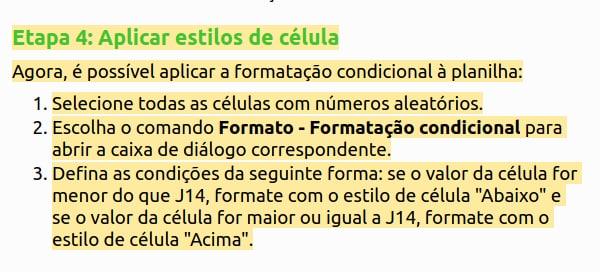
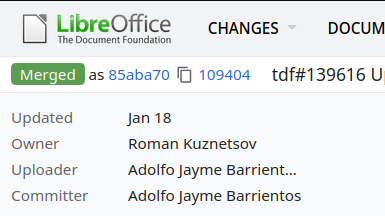
Mrs. Vera Cavalcante (@veracape), from Brazil, a long-time contributor for the Portuguese documentation on LibreOffice, was reviewing the translation of the Calc Guide and double-checking the translated text, with respect to the current user interface and the Help pages. Vera noticed that the Help pages on conditional formatting were not correct any more, and reported in the Brazilian team Telegram group (Bugzilla is still very hard for non-native English speakers).

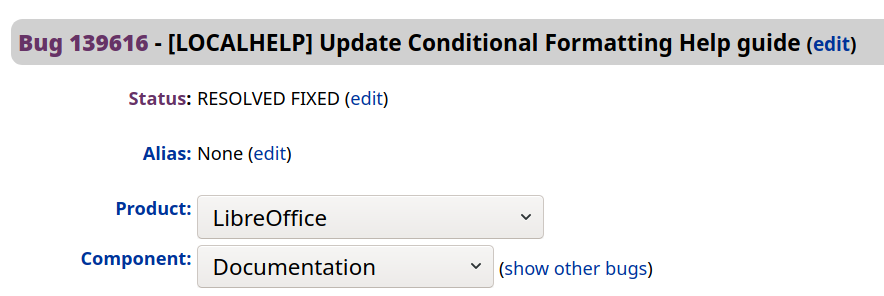
The message hit Olivier Hallot (@ohallot) from the LibreOffice documentation coordination team (and Brazilian community member), who reported the bug in LibreOffice’s Bugzilla, for later fixing. LibreOffice’s outstanding quality depends on good quality and numerous errors reports to be submitted properly, for improvements and fixing defects. There is no point leaving a bug unreported.

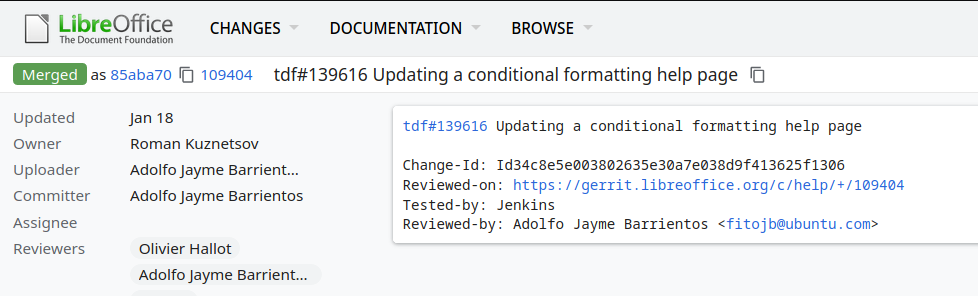
The topic was of special interest of Roman Kuznetsov (@kompilainenn) from Russia, who already wrote documentation about conditional formatting. Roman wrote the fix, and submitted a patch in Gerrit (the service that controls the code corrections in LibreOffice)…

…and Adolfo Jayme Barrientos (@fitojb) from Mexico reviewed and approved the patch for merging in the main Help code.

End result: LibreOffice’s Help page fixed!

Community Member Monday: Felipe Viggiano and Zhenghua Fong

Today we’re talking to two people who’ve recently decided to become members of The Document Foundation, the non-profit behind LibreOffice. First up, Felipe Viggiano…

Hey Felipe, tell us a bit about yourself!

Hello there! I’m writing from the state of São Paulo, in Brazil. I’m an electrical engineer and have been working with LibreOffice for several years. Despite all this time, I started to contribute only a few months ago.

What are you working on right now?

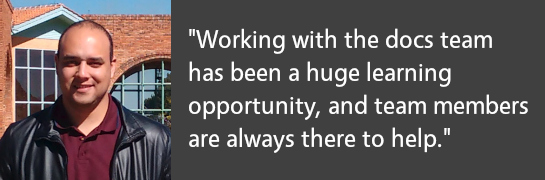
Right now I’m working with the Documentation Team, mainly on the update of the Calc Guide with the new features in LibreOffice 7.0. Working with the team has been a huge learning opportunity, and the other team members are always there for a little help when needed.

Why did you decide to become a member of TDF?

The reason I applied for membership is to try to contribute a little more to the project in other areas.

Anything else you plan to do in the future?

In the future, I would like to start contributing more with others teams, and with TDF in order to help increase LibreOffice’s success. In my opinion, LibreOffice needs to be better known – we have a great free office solution that attends the majority of the requirements of the general public, but, at least in Brazil, many people are not aware of this!


Next us is Zhenghua Fong, who works on improving LibreOffice’s compatibility with other office suites…

Tell us a bit about yourself!

I’m part of a team of three people from Fuzhou, a coastal city known for its hot springs, in the Fujian province in China. When we are not coding, we like jogging in the nearby park. Every year we have company-wide Half Marathon Run around the main campus. Around 7,000 employees compete in the run and other sporting events.

Why did you decide to become a member of The Document Foundation?

As we’re an education tech company, documents are at the core of our business. LibreOffice works great for us. Recently, we have add a whiteboard feature to our product with the help of LibreOffice Online.

What are you working on in the LibreOffice project right now?

Compatibility is the area we are working on. Because large parts of the population still use Microsoft Office-based document formats, it’s important to our users that they are able to open documents and get them right the first time.

Anything else you plan to do in the future? What does LibreOffice
really need?

Performance. We find the performance of our product has room for improvement, especially when compared against Microsoft Office and WPS from Kingsoft.

Thanks to Felipe and Fong for all their contributions! Our worldwide community is what makes LibreOffice strong – everyone is welcome to join and find out what they can do for LibreOffice!