Announcement of LibreOffice 6.4.5

Donate TodayBerlin, July 2, 2020 – The Document Foundation announces the availability of LibreOffice 6.4.5, the 5th minor release of the LibreOffice 6.4 family, targeted at technology enthusiasts and power users. LibreOffice 6.4.5 includes over 100 bug fixes and improvements to document compatibility and interoperability with software from other vendors.

LibreOffice 6.4.5 is optimized for use in production environments, even by more conservative users, as it now includes several months of work on bug fixes. Users of LibreOffice 6.3.6 and previous versions should start planning the update to LibreOffice 6.4.5, as the new major LibreOffice release – tagged 7.0 – is going to be announced in early August.

For enterprise class deployments, TDF strongly recommends sourcing LibreOffice from one of the ecosystem partners, to get long-term supported releases, dedicated assistance, custom new features and other benefits, including SLAs (Service Level Agreements): https://www.libreoffice.org/download/libreoffice-in-business/. Also, the work done by ecosystem partners flows back into the LibreOffice project, and this represents an advantage for everyone.

LibreOffice individual users are supported by a global community of volunteers: https://www.libreoffice.org/get-help/community-support/. On the website and the wiki there are guides, manuals, tutorials and HowTos. Donations help us to make all of these resources available.

Availability of LibreOffice 6.4.5

LibreOffice 6.4.5 is immediately available from the following link: https://www.libreoffice.org/download/. Minimum requirements are specified on the download page. TDF builds of the latest LibreOffice Online source code are available as Docker images: https://hub.docker.com/r/libreoffice/online/.

LibreOffice 6.4.5’s change log pages are available on TDF’s wiki: https://wiki.documentfoundation.org/Releases/6.4.5/RC1 (changed in RC1) and https://wiki.documentfoundation.org/Releases/6.4.5/RC2 (changed in RC2).

All versions of LibreOffice are built with document conversion libraries from the Document Liberation Project: https://www.documentliberation.org.

Support LibreOffice

LibreOffice users are invited to join the community at https://ask.libreoffice.org, where they can get and provide user-to-user support. People willing to contribute their time and professional skills to the project can visit the dedicated website at https://whatcanidoforlibreoffice.org.

LibreOffice users, free software advocates and community members can provide financial support to The Document Foundation with a donation via PayPal, credit card or other tools at https://www.libreoffice.org/donate.

LibreOffice 7.0 RC1 Bug Hunting Session

LibreOffice 7.0 is being developed by our worldwide community, and is due to be released in early August 2020 – see the release notes describing the new features here.

In order to find, report and triage bugs, the LibreOffice QA team is organizing the second Bug Hunting Session for LibreOffice 7.0 on Monday July 6, 2020. Tests will be performed on the first Release Candidate version, which will be available on the pre-releases server the day of the event. Builds will be available for Linux (DEB and RPM), macOS and Windows.

Mentors will be available from 07:00 UTC to 19:00 UTC for questions or help in the IRC channel #libreoffice-qa and the Telegram QA Channel. Of course, hunting bugs will be possible also on other days, as the builds of this particular Release Candidate (LibreOffice 7.0.0 RC1) will be available until mid July. Check the Release Plan.

During the day there will be a dedicated session to test the new SKIA Graphics Engine integration from 14:00 and 16:00 UTC.

All details of the first bug hunting session are available on the wiki. LibreOffice is a volunteer-driven community project, so please help us to test – we appreciate it!

LibreOffice Tuesday T&T: Writer Templates

A template is a draft document that you can re-use over and over to generate new documents, based on the same basic format and with the same headers, footers, styles and formats. In this way you can make all your documents look the same. For instance, it enables you to create a single template for use whenever you wish to write a letter with a standard header. You can create a template for use in Writer (text documents), Calc (spreadsheets), Impress (presentations), and Draw (drawings).

Creating a Writer template is easy. First, create the template as any other document in Writer, without adding any text but defining all the other elements of the document: the page size and margins, with settings for headers and footers; the styles for the text, with character and paragraph formatting; etc. Once all the details are in place, you can save the new template, using File > Save As > and choosing ODF Text Document Template (OTT) from the drop-down menu. You can choose any folder, but the best option is to save the new template in the Templates Folder, which you have defined in Tools > Options…, as in this case the template will show up every time you choose New > Templates… > Documents.

After you have saved the new template, you can make it the default for all the new text documents by going to File > Templates… > Documents, and then right clicking on the document icon and selecting Set as Default. This is especially handy if you have a preferred layout for your new documents, based on your personal preferences.

Annual Report 2019: Updates from the Design community

(Note: this is a section from The Document Foundation’s Annual Report 2019, which will be published in full in the coming weeks.)

Based on LibreOffice’s Human Interface Guidelines (HIG), which provide the core framework, several significant changes were made to LibreOffice’s user interface during 2019. The most important were the improvements and the additions to icon styles, and the release of the NotebookBar in additional flavours.

Improvements in LibreOffice 6.3

Dialog Windows

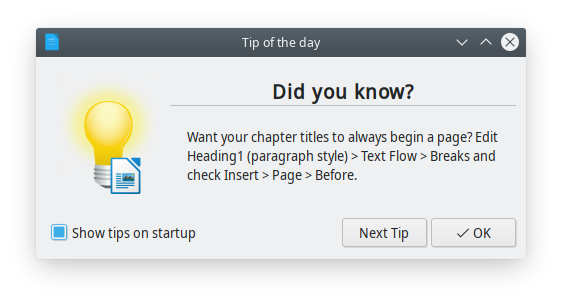
A completely new Tip of the Day window shows up once per day when the user opens LibreOffice, to provide useful information, tips and tricks about the software, and from time to time a reminder about contributing or donating to the project. Tips are rotating based on a list developed by LibreOffice volunteer contributors.
Menus

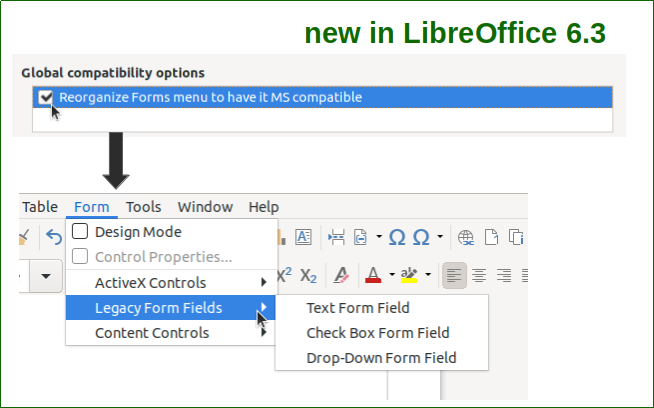
Writer’s Form menu can be reorganized to have it Microsoft Office compatible, by checking out the relevant option in the Option > Writer > Compatibility dialogue window.
Toolbars & Sidebar

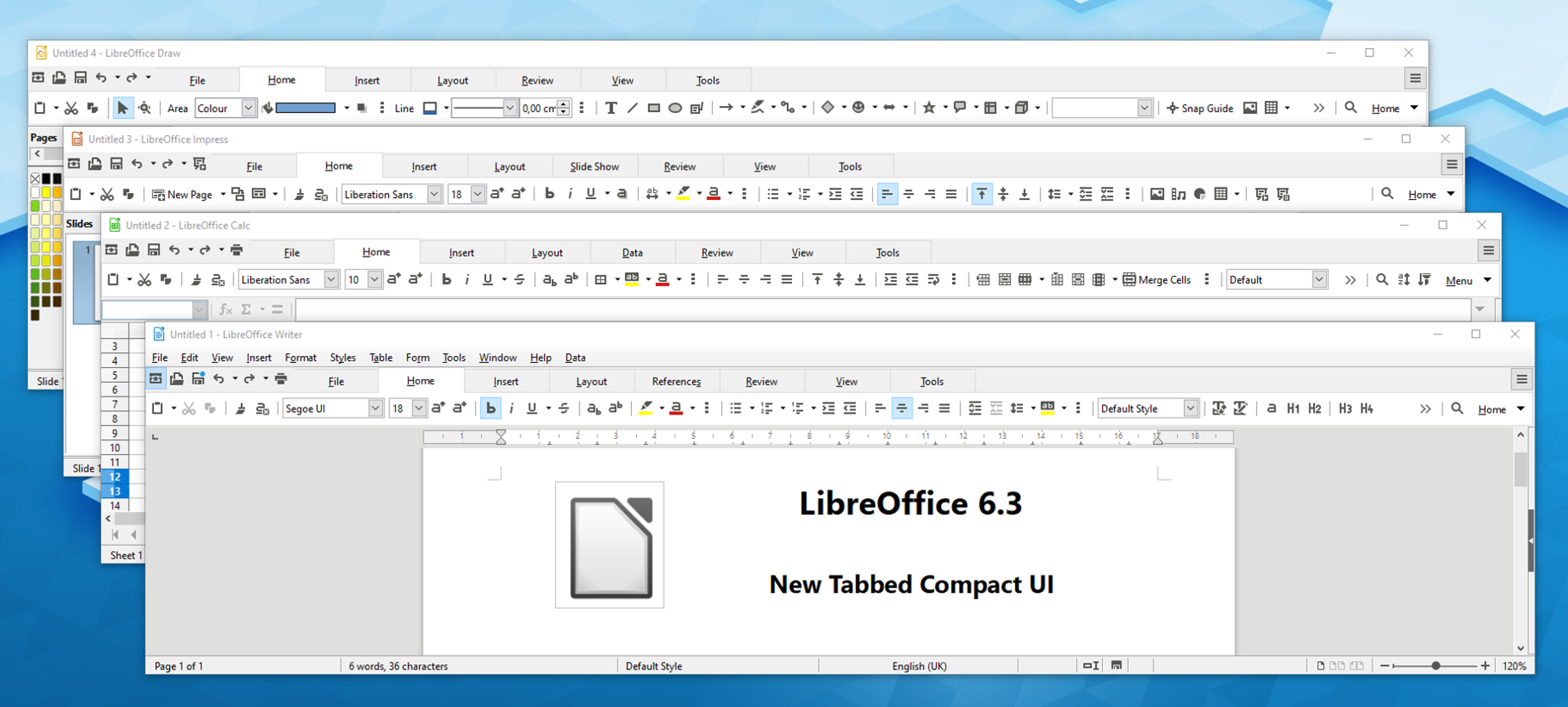
The NotebookBar has been improved with the addition of a Tabbed Compact option in Writer, Calc, Impress and Draw, to serve users with a wide screen where the Tabbed user interface would steal a large portion of the vertical space. In addition, a Contextual Single option has been added to Writer, Impress and Draw, to serve the same users when the choose the more traditional user interface based on toolbars.
The Toolbar “More Controls” was deleted, and all tools were moved to the toolbar “Form Controls” in all LibreOffice modules. In addition, the Sidebar width can be configured to accommodate contents of extensions which exceed the maximum width of 400 pixel.

Icons

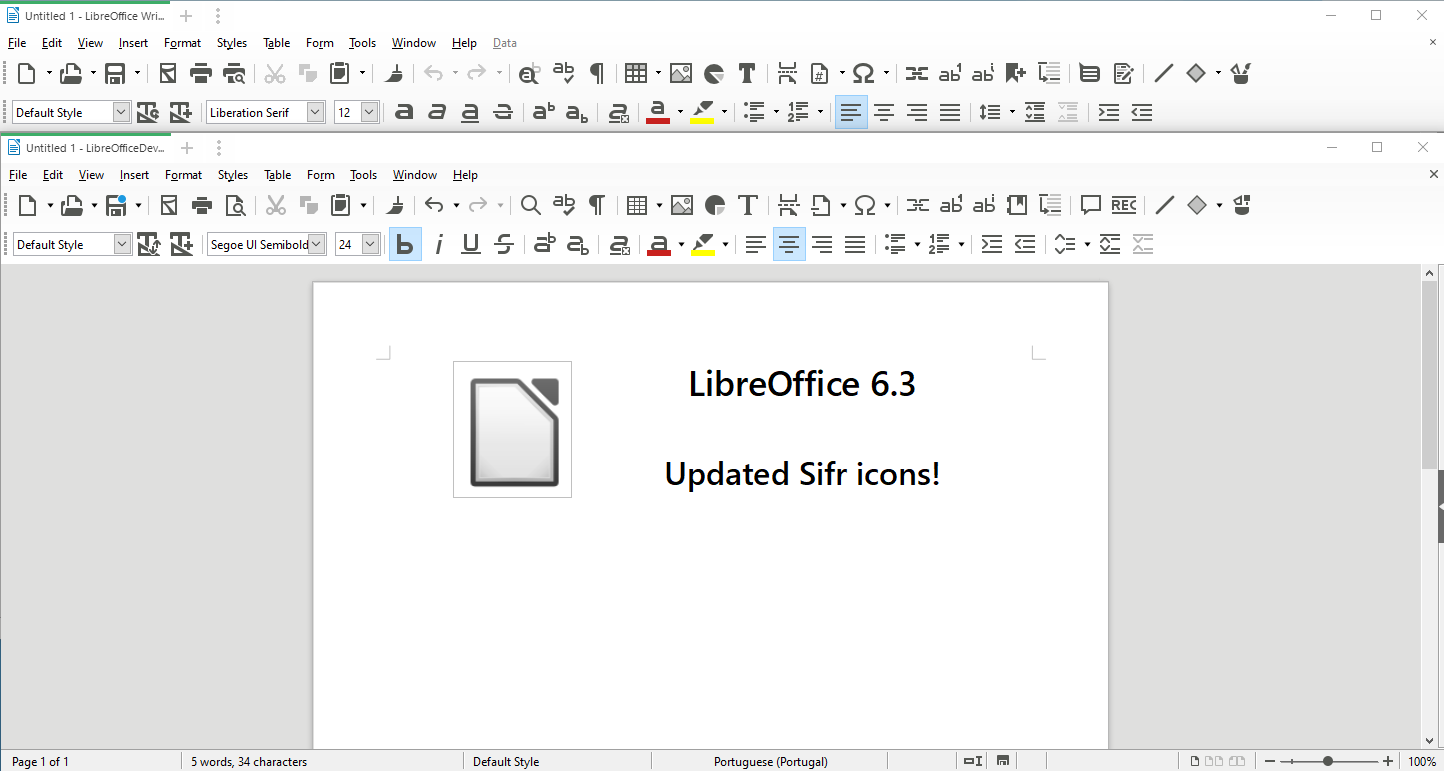
The monochrome Sifr icon theme was significantly reviewed and updated, and the Karasa Jaga icon theme was reworked from 22 to 24 pixels to follow other icon themes. All icons of the two icon themes were drawn in Inkscape to make them available also as SVG (Scalable Vector Graphics) images to support HDPI screens.
Other GUI Items

The old Sum tool in Calc’s formula bar has been replaced by a new drop-down widget providing Sum, Average, Min, Max and Count options.


Improvements in LibreOffice 6.4

Menus

Hyperlink context menus were unified. Every hyperlink now has the following context menu entries: Open Hyperlink, Edit Hyperlink, Copy Hyperlink Location and Remove Hyperlink.

Toolbars & Sidebar

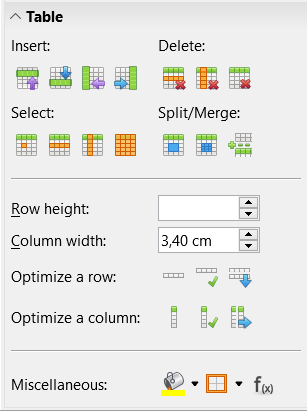
A Table panel was added to Writer’s Sidebar, with Insert, Delete, Select, Split/Merge, Optimize a Row, Optimize a Column, set the Table Cell Background Colour and the Border, insert a Function, and forms to set Row Height and Column Width.
Icons

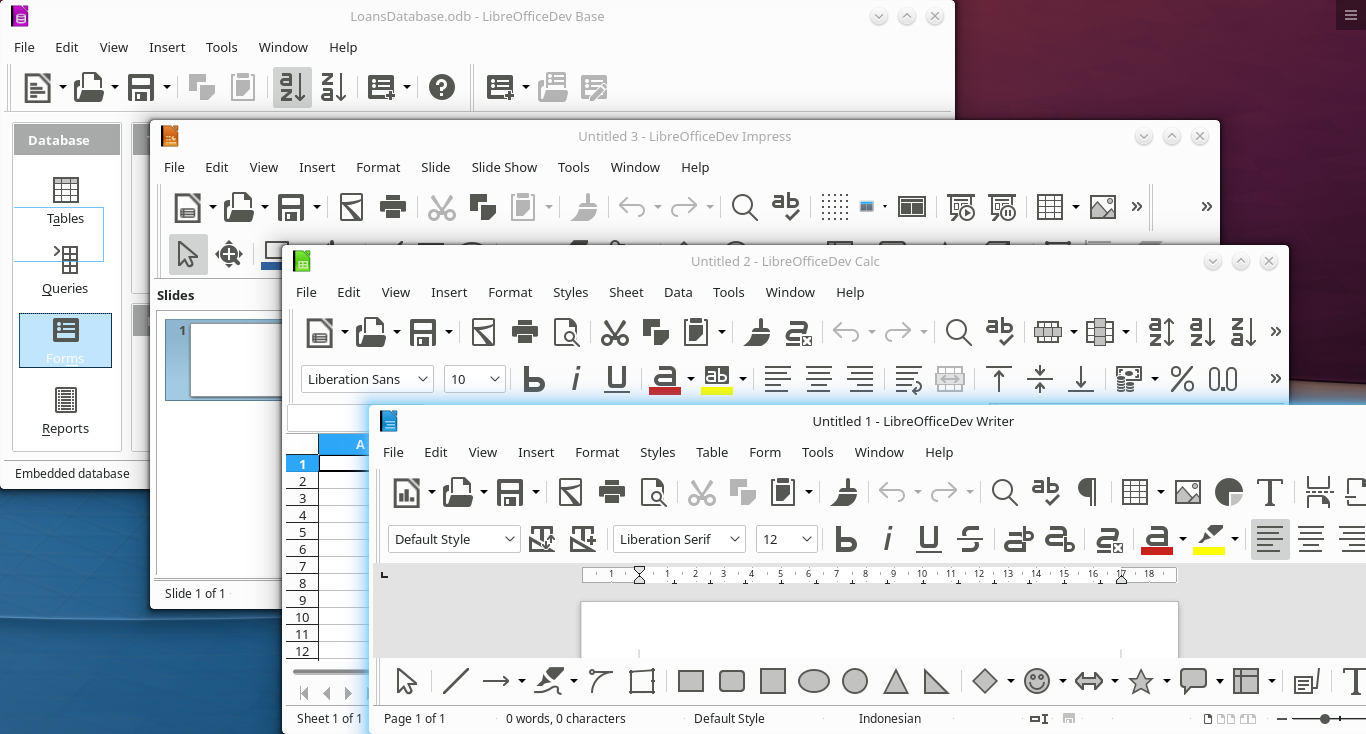
A SVG variant of the dark version of Breeze and Sifr icon themes was added to the view options, and an extra large 32 pixels icon set has been added to Sifr.
Other GUI Items

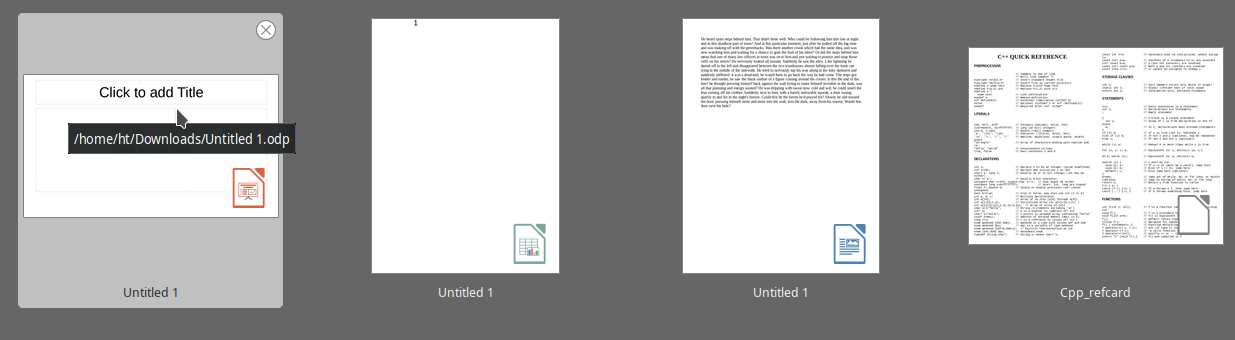
Thumbnails of documents in the Start Center are now overlaid with an icon showing the LibreOffice module they have been created with.
Much of this was implemented by our certified developers, along with community members volunteering their time. If you find LibreOffice useful, support us with a donation so that we can continue to build our community, share knowledge, and improve LibreOffice for everyone!