LibreOffice and Google Summer of Code 2021: The results

Google Summer of Code logo

This year, LibreOffice was once again a mentoring organization in the Google Summer of Code (GSoC), a global program focused on bringing more student developers into free and open source software development. Seven projects were finished successfully. Students and mentors enjoyed the time, and here we present some of the achievements, which should make their way into LibreOffice 7.3 in early February 2022!

You can experiment with the new features by using daily builds and report any problems in our bug tracker.


100 Paper Cuts by Bayram Çiçek

Mentors: Muhammet Kara (Collabora), Heiko Tietze (TDF)

100 Paper Cuts aims to improve user interface, implementing enhancement requests and solving the most annoying issues on the user experience (UX) side of LibreOffice.

Bayram fixed six bugs from different topics. Most notable are border preview not showing the diagonal border option, a bug where cropping flipped images occurred at the wrong side, and mouse-over effect for different palettes in the area tab.

Learn more about 100 Paper Cuts in the final report.
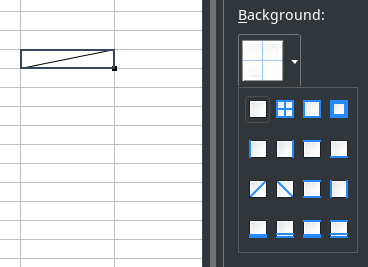
Screenshot of diagonal borders


Integrate .ui dialogs with translation tooling/string search webservice to help translators by Sary Nasser

Mentors: Christian Lohmaier, Olivier Hallot (TDF)

Sary automated the adding of screenshots to our translation platform, Weblate, while associating them with translatable words. This will greatly help translators by providing context for their work.

Learn more about the translation tooling in the final report.


Tests for the VCL graphic backends by Akshit Kushwaha

Mentors: Tomaž Vajngerl, Luboš Luňák (Collabora)

LibreOffice adapts its user interface to different operating systems with the help of its graphics toolkit Visual Class Library (VCL). Thanks to Akshit’s work, we have a working suite of automated graphics rendering tests. There is now also the ability for users to run the tests manually, inspect the results and attach them to our bug tracker in case there is a problem.

Learn more about the tests in the final report.
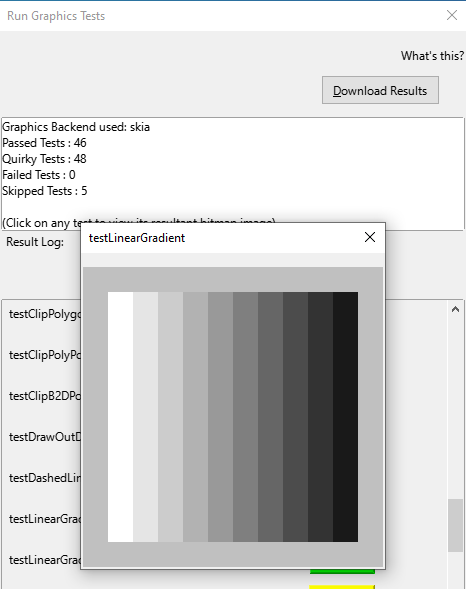
Screenshot of VCL tests


Improving table styles by Balázs Sántha

Mentors: László Németh (independent), Michael Stahl (allotropia)

This project resulted in fixes for the most annoying Writer table style issues. Further work is needed to provide full DOCX compatibility.

Learn more about DOCX tables styles in the final report.


Make SVM (StarView Metafile) format independent of the VCL Metafile + tests of the format by Panos Korovesis

Mentors: Tomaž Vajngerl, Miklos Vajna (Collabora)

Thanks to the work of Panos, the SVM file format is handled independently of internal VCL constructs, which will make important reorganisation of the VCL code possible. Panos also created automated tests for the SVM format.

Learn more about the SVM project in the final report.


Show text styles together in the sidebar by Anshu Khare

Mentors: Mike Kaganski, Tomaž Vajngerl (Collabora), Heiko Tietze (TDF)

Both paragraph as well as character styles are essential means to format text. Many users struggle with this concept and use direct formatting. Also, we don’t show both at once, and the two style families are not obvious to spot for casual users.

In order to improve the handling of styles (and as necessary preparation for the styles highlighter), Anshu started to rework the code. The new code makes it now possible to merge both lists into one view. A first patch was also part of the project – although it is not finished yet.


Implement Interface for external data source import into Calc by Tushar Kumar Rai

Mentors: Markus Mohrhard (independent), Heiko Tietze (TDF)

The data provider allows to import various data such as local CSV files or streams from external sources, and to apply transformations like adding/removing rows or columns, formatting and numerical operations with the data before it is inserted into the sheet. Plus, to update the data by still applying the transformations is just a click.

The project aimed to rework the user interface. Tushar organized the layout according the user workflow and common UI principles and made the workflow of adding/removing transformations easy to understand. He also added a couple of transformations.

Learn more about the data provider project in the final report.
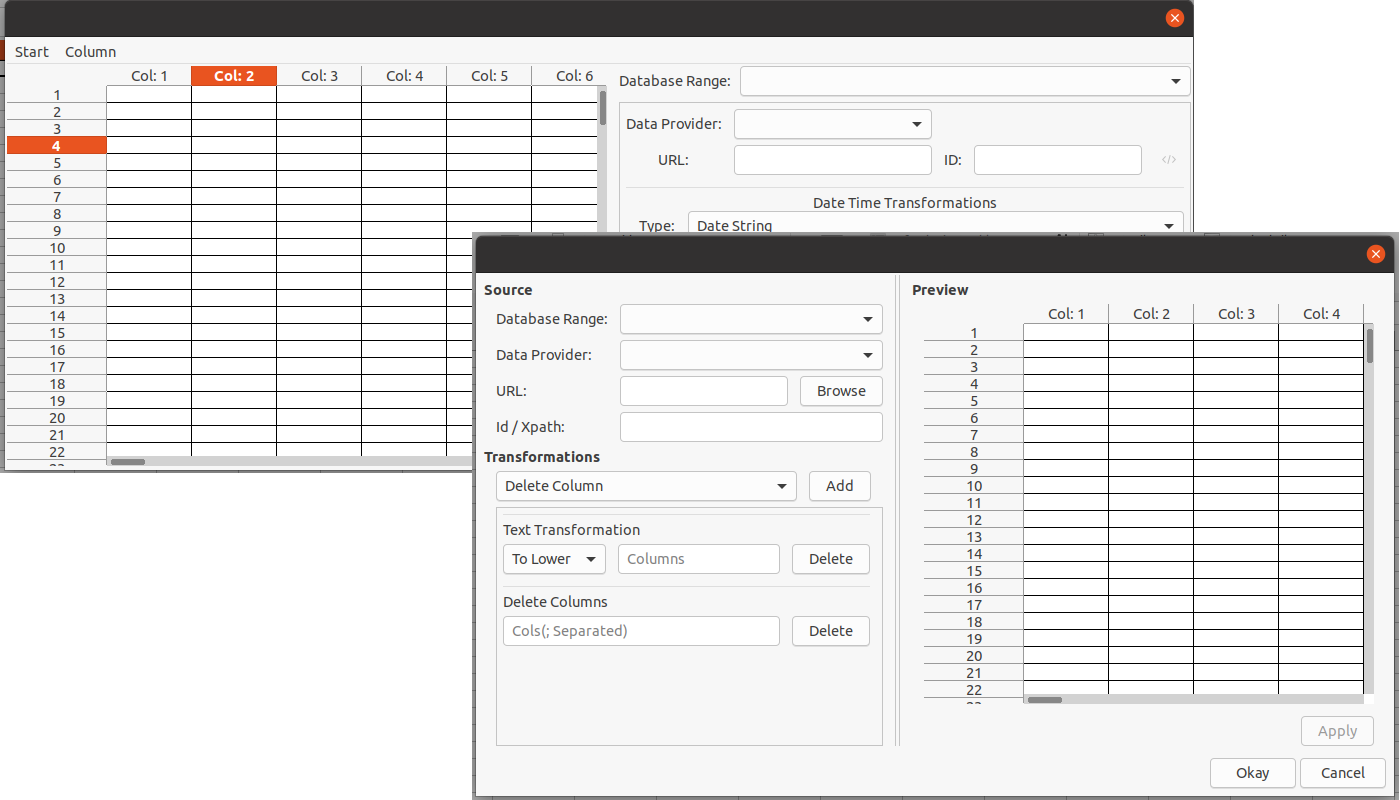
Screenshot of Data Provider


Wrapping up

Many thanks to all students who spent their summer time improving LibreOffice. You are awesome! And special thanks also to the mentors who always put so much love and energy into these tasks. That’s what makes LibreOffice rock.

Now we are looking forward to next year’s GSoC. If you are interested, why not prepare early? Learn more at out wiki page where some ideas are listed.

Participating in GSoC is a great way to build your skills, and show future employers what you’re capable of!

Next batch of videos from the LibreOffice Conference 2021

Here are some more videos from the LibreOffice Conference 2021! Check out the playlist, using the button in the top-right – or scroll down for links to individual videos:

Please confirm that you want to play a YouTube video. By accepting, you will be accessing content from YouTube, a service provided by an external third party.

YouTube privacy policy

If you accept this notice, your choice will be saved and the page will refresh.

Individual links

Note: many of these are also available on PeerTube, and more will be added…

Stay tuned for more videos from rooms 2 and 3 of the conference!

Tender to implement C++ accessibility tests (#202110-01)

The Document Foundation (TDF) is the charitable entity behind the world’s leading free/libre open source (FLOSS) office suite LibreOffice.

We are looking for an individual or company to implement C++ accessibility tests.

The work has to be developed on LibreOffice master, so that it will be released in the next major version.

The current accessibility tests are rather incomplete and hard to maintain. Additionally, they are written in Java.

The scope of this tender is to convert them into in-process cppunit-based tests and create a solid foundation in both code as well as documentation to facilitate extending the coverage both as part of this tender as well as for follow-up contributions. TDF aims to prepare a good infrastructure and documentation, so that adding further tests is much simpler in the future, even for new kinds of widgets, up to a point where they could be implemented as part of our EasyHacks. The implementation therefore has to be solid and thorough to support future test cases easily.

We recommend the following steps to approach the tender deliverable:

  • assessing the technical requirements (both using the existing tests to convert, plus the various requirements of a11y in general)
  • assessing the current status
  • designing and creating the new required interfaces, or adapting or augmenting existing ones
  • creating helpers to ease writing tests
  • writing some tests to both serve as examples and proof of concept (at least a couple for each key aspect of testing, but exercising the infrastructure to validate it is key to having something that has a chance of withstanding the test of time)
  • extensive documentation on all those, plus how to write tests and such
  • peer review

Therefore, this tender should provide the infrastructure to:

  • Test the interfaces (AT-SPI, UIA, MSAA, etc.) allowing accessibility tools (ATs) such as e.g. screen readers, magnifier glasses, etc. to access the information required to perform their tasks. This requires testing the LibreOffice implementation of the AT interfaces themselves to catch issues at the outer edge. It is crucial because even if all is well working inside LibreOffice itself, but the information is not properly sent to the platform, it still won’t work for users. Also, it probably has to be done for each platform separately (Desktop Linux (AT-SPI2), Windows (UIA, MSAA), macOS etc.) as their APIs are different, even if often similar, and have separate modules in LibreOffice.
  • Test that there is enough information sent through those interfaces and that it is accurate and usable. This could rely on internal unified interfaces to fetch information and interact with the UI, but there still is a fair bit of diversity on what needs to be tested.
  • Test that functionalities are usable with different type of input (e.g. work with the keyboard, as it’s the most common offender). Also this could rely on internal unified interfaces to fetch information and interact with the UI, but there still is a fair bit of diversity on what needs to be tested.

A key item of the deliverables for this tender is the extensive documentation (in addition to the source-code documentation) that will allow to both maintain the converted tests as well as create additional tests. The documentation shall include (but is not limited to) common pitfalls with accessibility related tests (like timeouts/waiting for events/deal with load dependent/parallelism differences) and how to deal with them. The documentation could walk the developer through the process behind the creation of newly created tests, showcasing both the obvious and not-so-obvious hurdles with that specific tests/a11y related tests in general and how they were dealt with. Aiming for an extendable framework, this likely requires creating new interfaces for missing functionality for reuse in tests.

We expect bidders to provide information on both the code and the non-code parts of this tender, e.g. methodology, structure and technical aspects. The Document Foundation will publish this under a free and open source license and make it available to the general public.

Required skills

  • Extensive knowledge of C++
  • Experience working on the LibreOffice source code

Other skills

  • English (conversationally fluent in order to coordinate and plan with members of TDF)

We use free, libre and open source (FLOSS) software for development wherever possible, and the resulting work must be licensed under the Mozilla Public License v2.0.

TDF welcomes applications from all suitably qualified persons regardless of their race, sex, disability, religion/belief, sexual orientation or age.

Bidders will get a preference for including a partner or independent developer who has not been involved in a successful tender before.

As always, TDF will give some preference to individuals who have previously shown a commitment to TDF, including but not limited to certified developers and/or members of TDF. Not being a member, or never having contributed before, does not exclude any applicants from consideration.

The task offered is a project-based one-off, with no immediate plans to a mid- or long-term contractual relationship. It is offered on a freelance, project basis. Individuals and companies applying can be located anywhere in the world.

When budgeting, we anticipated that this project (all items combined) to take in the region of 30 days of work. Should bidders’ assessment result in a significantly different number, please reach out to us before sending your bid, so we can clarify upfront.

TDF is looking forward to receiving your applications for one or more of the aforementioned tasks, your financial expectations and the earliest date of your availability, via e-mail to a committee at tender20211001@documentfoundation.org no later than November 26, 2021.

Applicants who have not received feedback by December 23, 2021 should consider that their application, after careful review, was not accepted.

All bidders are invited to ask their questions on this tender until November 19, 2021. Questions and answers will be made public in a collected and anonymized form.

10 more videos from the LibreOffice Conference 2021

We recently posted the first batch of videos from the LibreOffice Conference 2021. Now, here are some more! Check out the playlist, using the button in the top-right – or scroll down for links to individual videos:

Please confirm that you want to play a YouTube video. By accepting, you will be accessing content from YouTube, a service provided by an external third party.

YouTube privacy policy

If you accept this notice, your choice will be saved and the page will refresh.

Individual links

Note: many of these are also available on PeerTube, and more will be added!

First batch of videos from the LibreOffice Conference 2021

Our online conference for 2021 took place last week, and we’ve already uploaded a bunch of videos from it! Check out the playlist, using the button in the top-right – or scroll down for links to individual videos:

Please confirm that you want to play a YouTube video. By accepting, you will be accessing content from YouTube, a service provided by an external third party.

YouTube privacy policy

If you accept this notice, your choice will be saved and the page will refresh.

Individual links

Note: many of these are also available on PeerTube, and more will be added!

Interviewing Hypra’s Jean-Philippe Mengual about software accessibility

Accessibility is a key factor for the inclusiveness of digital transformation, but only a few people are really competent in the topic. To learn more about accessibility, we interviewed Hypra’s co-founder, Jean-Philippe Mengual.

Q1. Jean-Philippe, can you tell us about the birth of Hypra?

A1. In 2008 I met Corentin at the Sciences Po higher-learning school in Aix-en-Provence. Through our friendship and the time we spent together studying, he realized how much IT can bring to visually impaired people, but also realized the current limitations.

Together, we understood the revolution it represents: digital technology may erase some inequalities, when one knows how to use it of course. We studied how digital technology can bring equality between visually impaired and sighted people, and then we realized that other people may also benefit from this phenomenon.

We were looking for a solution to this challenge, and we decided to create a computer that was accessible to all, easy to use, adaptable and accompanied by an empowering training.

That is how Hypra was born.

Q2. How challenging is it to work full-time to improve accessibility, and to help seniors and people with disabilities to leverage the opportunities offered by IT?

A2. It is a challenge indeed, and most of us are actually split between several jobs and specialties: psychology, sociology, teaching, but also hacking a distro, patching code, debugging, testing, talking with many communities. The most difficult is to experience regressions and needing of “race” after the accessibility regression to ensure a good end-user experience. And either the upstream project is reactive with our bug reports and/or patches, or it is not, so it may become disappointing.

However, working with people who, because of age or disabilities, are reluctant to use a computer, has allowed us to come to the conclusion that anyone can learn to use a computer fully autonomously, no matter your situation their age, as long as they are well supported at the beginning.

When we see such people progress and succeed, we realize that all of our work is worthwhile.

Q3. How far is free and open source software from offering true accessibility?

A3. Since I started with FOSS in the 2000s, I have seen a lot of real improvements. I, for one, am now able to only use free open source software in my daily activities, with a nice graphical interface.

However, I think reaching actual feature parity would allow users to be fully autonomous with FOSS. At the top of my mind, all features regarding speech synthesis (text to speech) and voice recognition (speech to text) are not quite up to what is achievable with proprietary software. It is the same for OCR (optical character recognition).

Another important dimension is the durability of software environments. Indeed, some programs that used to be perfectly accessible may cease to be so, from one day to another. This may be because some crucial contributors have abandoned that particular project, or it may be due to an update in which accessibility has been put on the back burner.

Q4. Hypra provides hardware solutions both for seniors and for people with disabilities. Can you tell us about these products, and about the software?

A4. We rely on Debian GNU/Linux for our products. We chose it because of its stability and careful update pace, which allows us to guarantee optimal use for our customers including our own layer of customizations in good conditions.

We mainly use free and open source software on our computers. To enable individual support, we provide Mumble, VNC to take control of the system remotely, and we use SSH for maintenance.

Regarding the tools for our visually impaired customers, we have chosen the Orca screen reader and Compiz for visual filters, rely on the MATE desktop (great for its full flexibility from a user point of view). Alongside with the computers, we provide scanners which, together with the screen reader, turn your laptop into a reading machine.

Generally speaking, the fact we produce only free code and use mainly free software enables us to sell, for a standard price, hardware with a high service level.

Q5. Hypra is working with enterprises to integrate people with disabilities in business environments. How difficult is this task?

A5. It’s important to know that the first task when adapting a workstation is to reassure both the user and their company. They have to be reassured that the equipment is compatible with the work environment already in place and that we’ll be there to support them.

In fact, the highest challenge is the diversity of the infrastructures: many solutions, more and more remote, few free software in the workstation (which is not always accessible, by the way, under Windows). It depends on the size of the organization and the flexibility possible in respect with the IT teams and the security needs of the company. The good news comes when the clients are web interfaces, even if some improvements are needed to make everything accessible. But a web interface is potentially easier to make accessible than software, because it is governed by standards, while software is based on various toolkits, not always compatible with any accessibility solution – in particular remotely.

Q6. What kind of integration have you done with LibreOffice?

A6. We only use vanilla LibreOffice versions. We’re generally very happy with these, except for certain aspects such as the stability of certain versions or occasional accessibility regressions in LibreOffice.

As far as Orca users are concerned, we’ve chosen to use an older LibreOffice build, version 4.2, as it gives us full satisfaction – which also applies to all low vision software.

However, we have noticed that accessibility is becoming more and more present in LibreOffice’s development in the recent years; we’re speculating that from version 8.x onwards we’ll hopefully be able to migrate all users to a more recent version.

On our end, we plan to systematize regression testing of the master branch in order to get more actively involved in the development process. This will also allow us to alert contributors immediately if a specific proposed change affects accessibility.

We also want to provide use cases to the community, so that each of its members can concretely test what a user with specific needs expects from the program in their daily use.