Marina Latini, on behalf of the Membership Committee, writes:
On October 18, we officially announced the upcoming election for the next Board of Directors of The Document Foundation, the non-profit entity behind LibreOffice.
As per § 7 II of our statutes (binding German version and non-binding English translartion) the Board’s term lasts two years. The current Board started its duty on February 18, 2020. Therefore, the old Board remains in charge until the end of February 17, 2022, so the new Board will be in charge the day after that, which is February 18, 2022.
That upcoming term will then (regularly) end on February 17, 2024, so the next election of the Board of Directors will take place before.
As per § 6 III, only members of the Board of Trustees of The Document Foundation, as well as current members of any of its bodies, are eligible to be elected into the Board of Directors, and the election is prepared and supervised by the Membership Committee (§ 7 II).
The active electoral right is reserved to those who have been members of the Board of Trustees before this announcement (§ 7 II).
§ 6 III also states that members of the Board of Directors or their deputies may not be members of the Membership Committee and vice versa. This means that current members of the Membership Committee are eligible to be elected, but with the acceptance of their new role they lose their current role in the MC. For clarification, they have to step down from the Membership Committee, with effect no later than to the beginning of the new term of the Board of Directors, the minute before accepting to become a member of the Board of Directors.
There is one more notable limitation: Per § 8 IV of the statutes, a maximum of 1/3 members of the Board of Directors is allowed to work on an employment basis for the same company, organisation, entity or one of its affiliate organisations.
Nomination of candidates fulfilling the above requirements, as well as self nomination is welcome. In total, at least seven Board of Directors members are required, and given there are enough candidates, up to three deputies can be elected (§ 7 II). As deputies are on duty quite often, we encourage many candidates to participate.
Re-election of current members of the Board of Directors is permitted (§ 7 II).
Please send nominations and self-nominations via e-mail to elections@documentfoundation.org (which reaches the Membership Committee in private) and at the same time to board-discuss@documentfoundation.org (which is a public mailing list).
We kindly ask nominees who would like to stand for election to provide a statement of up to 75 words – longer statements will be cut off at the maximum – on their candidacy as continuous text (so no bullet lists or multiple paragraphs). In addition, you have to provide and keep up to date your full name, e-mail address and your corporate affiliation, if any, or state the lack of an affiliation, and please announce that you will provide information on all future changes as soon as possible. Specifically, it is necessary to indicate all information regarding § 8 IV of the statutes.
Discussions with the candidates and questions to them as well as questions about the election should take place on the public board-discuss@documentfoundation.org mailing list. For details on how to use the mailing list, see here.
Eligible voters will receive further details via email prior to the start of election, including a summary of the candidates, details on how to access the voting system, and instructions on how to independently verify the vote count. Please ensure the Membership Committee has your recent and correct e-mail address on file. For questions, you can reach the Membership Committee in private at elections@documentfoundation.org.
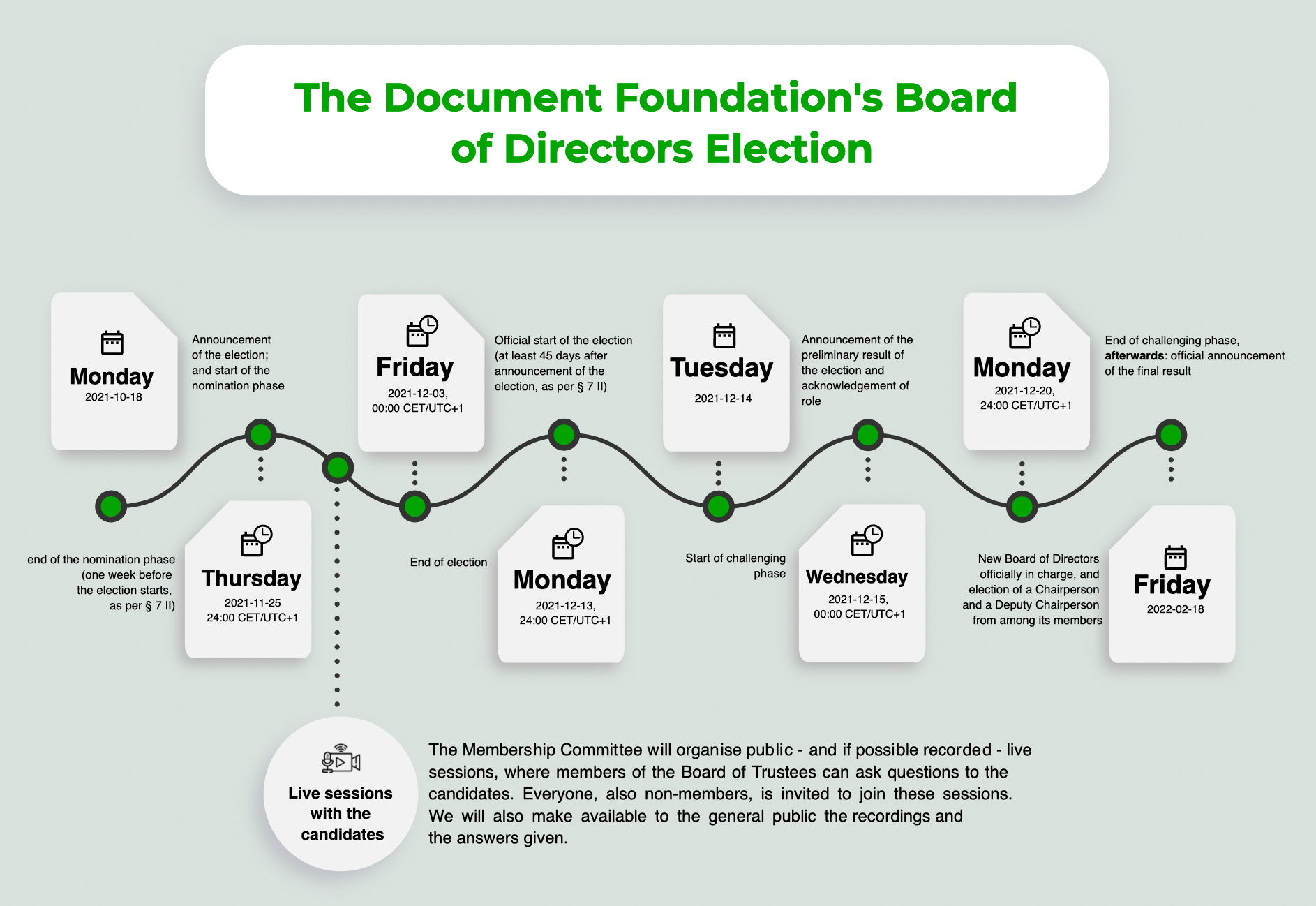
Following the timeline set forth in § 7 II, requiring a 45 day advance notice, we hereby announce the following timeline for the election:
(00:00 is beginning of the day, 24:00 is end of the day)
- Monday, 2021-10-18: announcement of the election; and start of the nomination phase
- Thursday, 2021-11-25, 24:00 CET/UTC+1: end of the nomination phase (one week before the election starts, as per § 7 II)
- Friday, 2021-12-03, 00:00 CET/UTC+1: official start of the election (at least 45 days after announcement of the election, as per § 7 II)
- Monday, 2021-12-13, 24:00 CET/UTC+1: end of the election
- Tuesday, 2021-12-14: announcement of the preliminary results of the election and acknowledgement of role
- Wednesday, 2021-12-15, 00:00 CET/UTC+1: start of the challenging phase
- Monday, 2021-12-20, 24:00 CET/UTC+1: end of the challenging phase
- afterwards: official announcement of the final results
- Friday, 2022-02-18: new Board of Directors officially in charge, and election of a Chairperson and a Deputy Chairperson from among its members
Live sessions with the candidates: Between the end of the nomination phase (Thursday, 2021-11-25, 24:00 CET/UTC+1) and the official start of the election (Friday, 2021-12-03, 00:00 CET/UTC+1), the Membership Committee will organise public – and if possible recorded – live sessions, where members of the Board of Trustees can ask questions to the candidates. Everyone, also non-members, is invited to join these sessions. We will also make available to the general public the recordings and the answers given.
Questions to the candidates: In addition, after the end of the nomination phase (Thursday, 2021-11-25, 24:00 CET/UTC+1), the Membership Committee will provide a set of questions to all the candidates. All candidates are kindly invited to send their answers, which will also be made available to the general public.
Be advised that the newly elected Board of Directors will only be in charge from February 18, 2022 on. The current Board of Directors will however include them in the decision making process, to ease up the transition.
Challenges to this announcement with respect to the deadlines outlined have to happen no later than seven (7) days after this announcement, via e-mail to elections@documentfoundation.org (which reaches the Membership Committee in private).
Challenges to the preliminary results of the election have to happen until the deadline set forth above, via e-mail to elections@documentfoundation.org (which reaches the Membership Committee in private).