Join the final Bug Hunting Session for LibreOffice 6.1!

LibreOffice users around the world help developers to test new features and fix bugs before a new version is released. After the first and second Bug Hunting Sessions of LibreOffice 6.1, which were held on April 27th 2018 and May 28th 2018 respectively, we’re glad to announce the third Bug Hunting Session on July 6th – the last one before the release of LibreOffice 6.1!

LibreOffice 6.1 is due to be released in mid August with many new features described in the release notes and this is our last chance to test and find issues before its release.

In order to find, report and triage bugs, the tests during the Third Bug Hunting Session will be performed on the first Release Candidate version of LibreOffice 6.1, which will be available on the pre-releases server on the day of the event. Builds will be available for Linux (DEB and RPM), macOS and Windows.

Mentors will be available on July 6th 2018, from 7.00 UTC to 19:00 UTC for questions or help in the IRC channel: #libreoffice-qa and its Telegram bridge and there will be a dedicated session to test the new offline help system available in LibreOffice 6.1 from 14:00 and 16:00 UTC.

Of course, hunting bugs will be possible also on other days, as the builds of this particular Release Candidate (LibreOffice 6.1.0 RC1) will be available until the end of July, when the second Release Candidate will be available.

With your help, we can make LibreOffice 6.1 the best release yet – thanks!

The Document Foundation announces LibreOffice 6.0.5

Berlin, June 22, 2018 – The Document Foundation (TDF) announces LibreOffice 6.0.5, which still represents the bleeding edge in terms of features – and as such is targeted at early adopters, tech-savvy and power users – but is also ready for mainstream users and enterprise deployments.

TDF recommends deploying LibreOffice in production environments with the backing of certified professionals, providing development, migration and training support (an updated list is available at https://www.libreoffice.org/get-help/professional-support/). This is extremely important for the growth of the LibreOffice ecosystem.

LibreOffice 6.0.5 change logs are available at the following links: https://wiki.documentfoundation.org/Releases/6.0.5/RC1 (fixed in RC1) and https://wiki.documentfoundation.org/Releases/6.0.5/RC2 (fixed in RC2).

Download LibreOffice

LibreOffice 6.0.5 is immediately available for download at the following link: https://www.libreoffice.org/download/download/.

LibreOffice users, free software advocates and community members can support The Document Foundation with a donation at https://www.libreoffice.org/donate/. Donations help TDF to maintain its infrastructure, share knowledge, and fund the presence of volunteers at events like the LibreOffice Conference, where they can meet with free software advocates coming from all over the world (https://www.libocon.org/).

Several companies sitting in TDF’s Advisory Board (https://www.documentfoundation.org/governance/advisory-board/) provide either value-added LTS versions of LibreOffice or consultancy services for migrations and training, based on best practices distilled by The Document Foundation.

Image handling rework for LibreOffice – Collabora’s tender results

Donations to The Document Foundation are used for many purposes, such as organising events, maintaining our infrastructure, and paying a small team to handle QA, marketing, documentation and other tasks. But donations are also used to fund tenders, whereby companies and individuals improve LibreOffice in specific areas and share knowledge with the community.

One such tender was posted in May 2017: “improve image handling in LibreOffice (#201705-01)“. When images are used in LibreOffice documents, the software manages them in a “life-cycle” which includes importing, displaying, modifying, exporting and more. To save memory – especially with large documents – images that are not currently on screen are sometimes moved out of memory and saved onto disk in a technique known as “swapping” or “paging”. The goal of the tender was to improve LibreOffice in these areas, making it more efficient at handling images and modernising the code base.

Collabora was selected to implement the tender; the work is now complete, and it will benefit all users in the upcoming LibreOffice 6.1 (due to be released in early August). Here are some technical notes about what was improved in the source code of LibreOffice, and what was achieved.

Problems with the image life-cycle

Currently, when an image is read from a document, a GraphicObject is created for the image and handled over to the GraphicManager which manages the life-cycle. When this happens we usually get back the string based unique ID of the GraphicObject with which we can always get access the image by creating a new GraphicObject with the unique ID (GraphicManager will look for the image with that unique ID).

Usually the unique ID is the one that is passed on between layers in LibreOffice (for example, from the ODF filter when loaded, to the model, where it is manipulated and then to the OOXML filter when saving) but the unique ID itself is just a “reference” to the image and by itself it doesn’t have any control over when the image can safely be removed and when not. It could happen that in a certain situation we would still have the unique ID referenced somewhere in the model, but the image would already be removed. This is dangerous and needs to be changed.

Usually for this kind of object we use a reference counting technique, where we pass an object around that holds a reference to the object resource. When the object is created, the reference count is increased; when destroyed, the reference count is decreased; when the reference count reaches zero, the resource object is destroyed.

The solution for the life-cycle

So instead of passing around a unique ID, the idea is to use the usual reference counting technique, which is normally used in this situation. The GraphicObject is mainly a wrapper around Graphic (which then holds a pixel-based image, or animated image, or possibly a vector image), and in addition it keeps additional attributes (gamma, crop, transparency etc.). It also has the implementation of swapping-in and out.

On the other hand, Graphic is properly reference-counted already (Graphic objects are reference counting the private ImpGraphic) so the solution to the life-cycle problem is that instead of GraphicObject unique ID, we would just pass along the Graphic object instead, or XGraphic, XBitmap which are just UNO wrappers around Graphic. Potentially we could also pass along the GraphicObject or XGraphicObject (UNO wrapper for the GraphicObject) when we would need to take into account the graphic attributes too. This should make the life-cycle much more manageable.

GraphicObject refactoring

GraphicObject and the implementation of XGraphicObject (UnoGraphicObject) and XGraphic (UnoGraphic) were located in module svtools, which is hierarchically above vcl. This is problematic when creating new instances like in Graphic.GetXGraphic method, which needs to bend backward to make it even work (ugly hack by sending the pointer value as URL string to GraphicProvider). The solution to this is to move all GraphicObject related things to vcl, which surprisingly didn’t cause a lot problem and once done, it looks like a much more “natural” place.

Managing memory used by images

Previously, the memory managing was done on the level of GraphicObjects, where a GraphicManager and Graphic-Cache were responsible to create new instances from uniqueID and manage the memory usage that GraphicObject take. Here’s the hierarchy before refactoring:
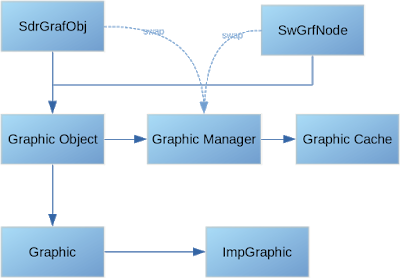
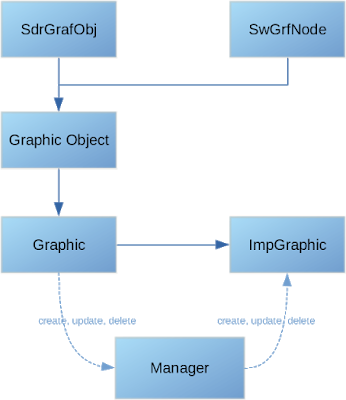
This is not possible anymore as we don’t operate with uniqueIDs anymore, but always use Graphic and XGraphic objects (in UNO), so we need to manage the creation of Graphic object or more precisely – ImpGraphic (Graphic objects are just reference-counted objects of ImpGraphic).

So to make this possible GraphicManager and GraphicCache need to be decoupled and removed from GraphicObject and a new manager needs to be introduced between Graphic and ImpGraphic, where the manager controls the creation and accounts for the memory usage:
Graphic swapping and swapping strategy

The new swapping strategy is relatively simple – if a lot of memory is needed by graphic objects in a certain time, we let it use it and don’t try to over-aggressively try to free it. In the past this cased swap-out and swap-in cycle that made the application completely unusable. In the future, external hints when a certain Graphic object can be swapped out may be added, so we can perform swapping more effectively. There are also several other ideas which will increase performance and reduce memory usage that can be implemented now with the new hierarchy where most all of the swapping is contained inside the Graphic itself, but all of this is currently out of the scope of this work.

In conclusion

Thanks to Collabora and Tomaž Vajngerl for their work on this. Although the details are highly technical, the end result is a faster and more robust office suite. If you’re an end user of LibreOffice and your documents include lots of images, you will be able to enjoy the benefits of this work in future releases, starting with LibreOffice 6.1.


Simplicity and flexibility: choose the right LibreOffice interface for you

With free and open source software, you get back control – over your software, your data, and your computer as a whole. And in the LibreOffice community, we strive to create the best user experience, but we also recognise that different users have different requirements.

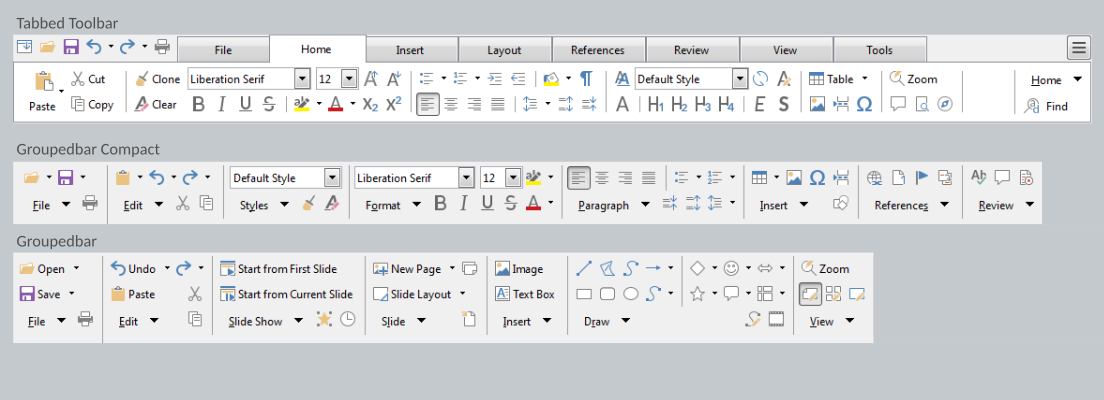
To this end, LibreOffice includes three main user interface designs, accessible via View > Toolbar Layout in the menu. Let’s go through them…

The first layout, Default, is what you see when you first install LibreOffice:

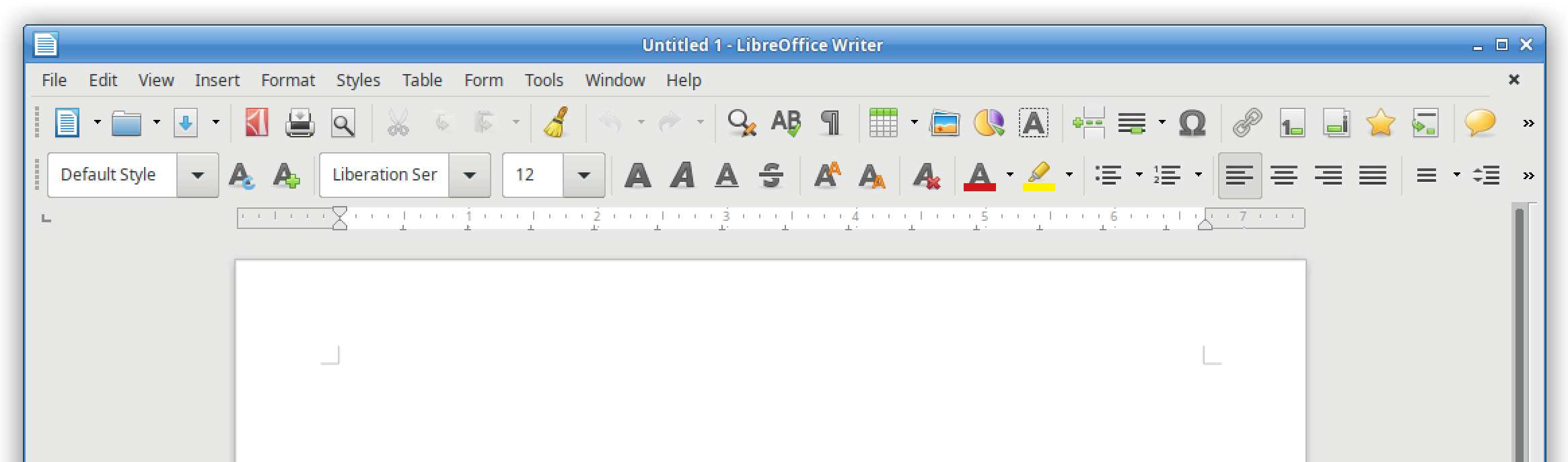
It’s a familiar layout with two toolbars containing various buttons. (Note that you can customise and add buttons to the toolbars if desired.)

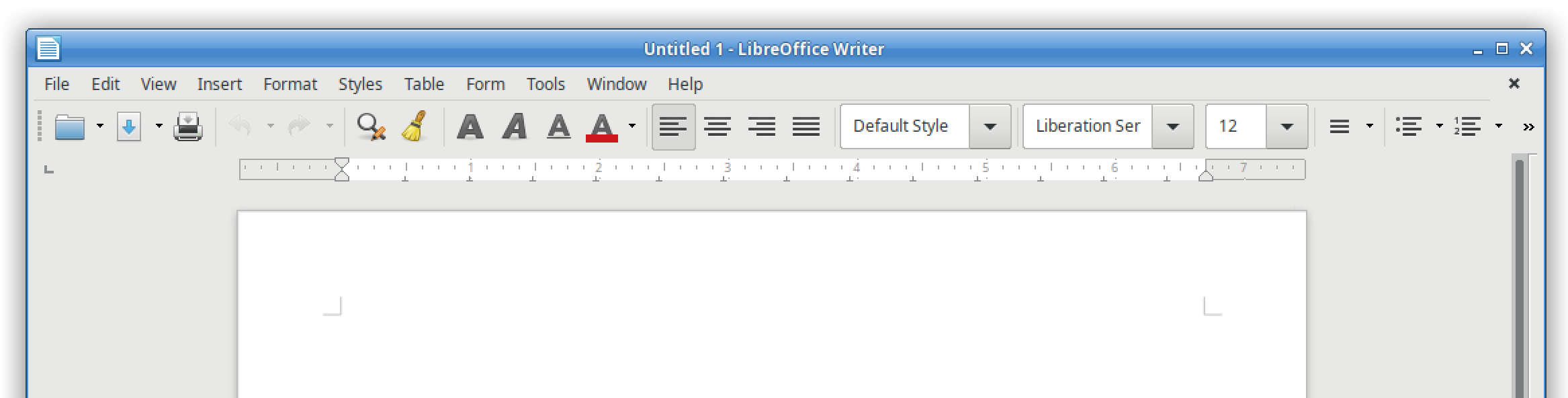
Then there is the single mode, which opts for simplicity and minimalism, giving you more screen space to really focus on your content:

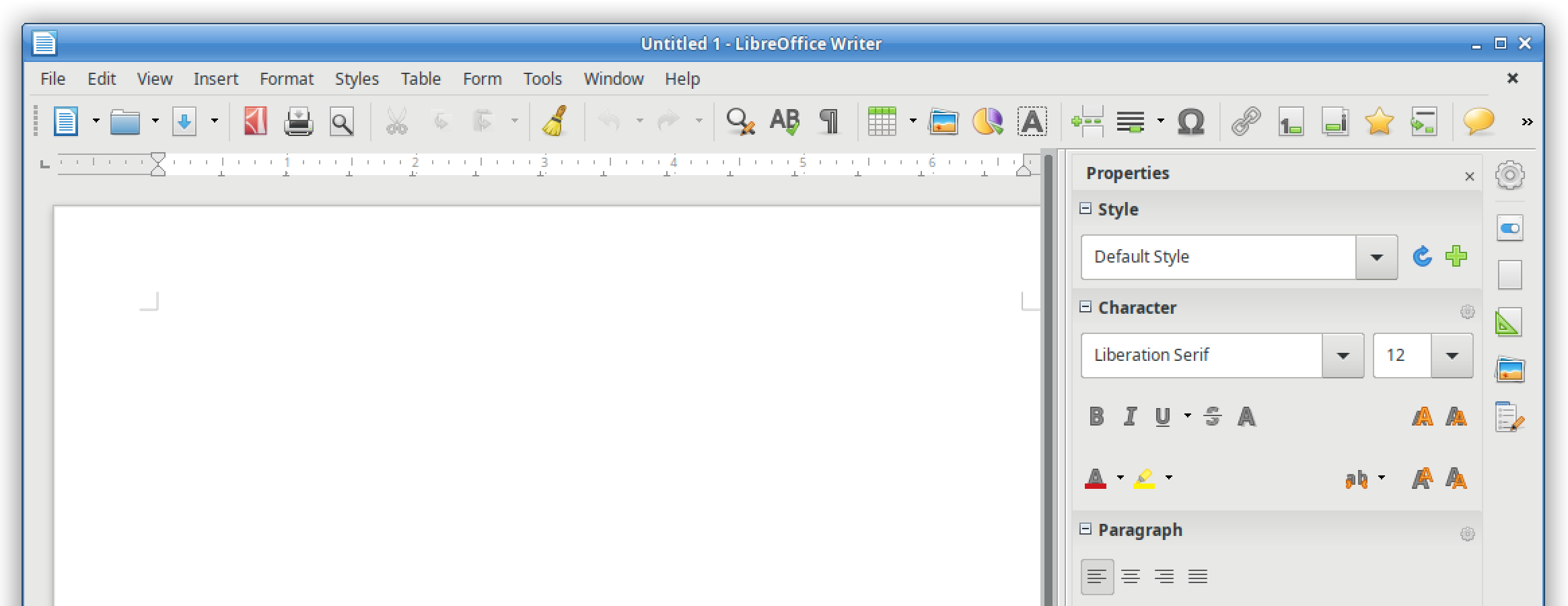
And finally, the third option is the sidebar, which uses horizontal space to provide buttons and options for your work:

So LibreOffice gives you the freedom and flexibility to choose the right interface for you. But we’re not finished yet! Our design community is working on the Notebookbar, another (optional) user interface:

It’s still experimental, but you can try it out and help us to improve it, so that we can polish it up and include it in future releases! Join our design community to provide feedback – and thank you!

Posting stickers for the Month of LibreOffice – don’t forget to claims yours!

Currently we’re posting out the sticker packs for the Month of LibreOffice. Did you contribute to the project in May 2018, and your name (or username) is on this page?

If so, and you haven’t contacted us yet, email mike.saunders@documentfoundation.org with your name (or username) from the wiki page, along with your postal address, and we’ll send you a bunch of stickers for your laptop, PC and other devices!

(Note: we will only use your postal address to send the stickers. No data will be transferred to third parties, and your address will be deleted as soon as the stickers are posted.)

IMPORTANT LibOCon Call for Paper Reminder

The Document Foundation reminds all members and contributors to submit talks, lectures and workshops for this year’s conference in Tirana (Albania). The event is scheduled for late September, from Wednesday 26 to Friday 28. Proposals should be filed by June 30, 2018, to be considered for inclusion in the conference program, so there are only 20 days left before the deadline.

The conference program will be based on the following tracks:

a) Development, APIs, Extensions, Future Technology
b) Quality Assurance
c) Localization, Documentation and Native Language Projects
d) Appealing LibreOffice: Ease of Use, Design and Accessibility
e) Open Document Format, Document Liberation and Interoperability
f) Advocating, Promoting, Marketing LibreOffice

Business track:

  • Enterprise Deployments and Migrations, Certifications and Best Practices, Building a successful business around LibreOffice
  • Roundtable with company representatives: enterprises, governments and non-profits

Presentations, case studies, workshops, and technical talks will discuss a subject in depth and will last 30 minutes (including Q&A). Lightning talks will cover a specific topic and will last 5 minutes (including Q&A). Sessions will be streamed live and recorded for download.

Please send a short description/bio of yourself as well as your talk/workshop proposal to the program committee address: conference@libreoffice.org

If you do not agree to provide the data for the talk under the “Creative Commons Attribution-Share Alike 4.0 License”, please explicitly state your terms. In order to make your presentation available on TDF YouTube channel, please do not submit talks containing copyrighted material (music, pictures, etc.).

If you want to give multiple talks, please send a separate email for each.

Thanks a lot for your participation!