
Comments continue to be posted on articles that refer to blog posts on OOXML and related topics, from users who claim to support FOSS but in fact choose proprietary software, for reasons that have nothing to do with the support they claim to offer.
These users share a preference for the proprietary OOXML document format and the Microsoft 365 ribbon interface, demonstrating on the one hand incompetence regarding formats and on the other hand subservience to proprietary marketing. Some of them even use the definition of “standard” for the ribbon interface, which in reality is neither a standard nor a good example of ergonomics.
In reality, if ODF is LibreOffice’s first advantage from an open source perspective, the flexibility of the user interface is probably the second. Let’s start with an in-depth analysis of these two important advantages.
Native support for the ODF format
 LibreOffice uses ODF as its native format rather than as a second choice, handled in an approximate manner with the aim of disqualifying ODF in the eyes of users, as Microsoft, OnlyOffice and WPS Office do.
This means that documents are transferred perfectly without the risk of silent data loss, formatting corruption or schema compromise. Users working in environments that require ODF compliance, such as some EU public administrations, are guaranteed maximum fidelity without any effort.
In contrast, the complexity and ambiguity of the OOXML format, combined with the gap between the published specifications and the actual implementation, make the format almost as opaque in practice as a proprietary binary format. Technically, it is possible to access XML files, but making sense of them or achieving interoperability is another matter entirely.
LibreOffice supports the ODF format natively, which eliminates the risk of vendor lock-in and ensures that documents remain accessible in the long term, regardless of the commercial choices of a private company. This is an increasingly important consideration for European public administrations, particularly in light of EU digital sovereignty policies.
Flexible and customisable interface
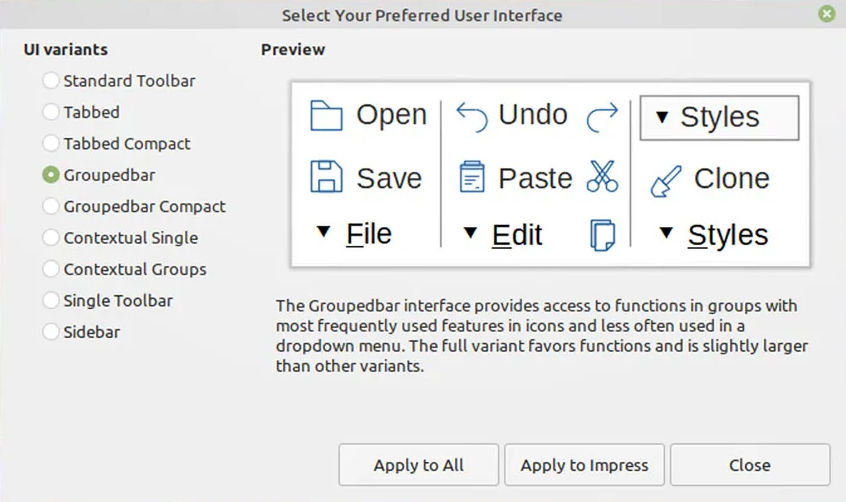 LibreOffice offers several user interface modes, which users can switch between depending on their workflow and familiarity: the classic interface with toolbar, the tabbed user interface (ribbon style, for users familiar with Microsoft 365), the compact tabbed variant, the compact grouped bar, the single contextual toolbar and the sidebar-centric layout.
Microsoft 365, WPS Office, and OnlyOffice have only one user interface, which in the first case is original and in the other two cases is a simple clone, forcing users to adapt to choices dictated in one case by patent-based protection strategies, and in the others – I suspect – by a total inability to develop an original solution.
Incidentally, the characterisation of ribbon-style interfaces as “modern” or “standard”, used by several users, is not based on any objective usability parameter or design principle, but is the result of Microsoft’s dominance in the market and the huge investments made when the ribbon was introduced in Office 2007 as a new paradigm for productivity software.
From a human-computer interaction perspective, there is no consensus that the ribbon represents superior usability. In fact, it was controversial at launch and remains so among experienced users, who often find it faster to navigate menu hierarchies, once learned, than a ribbon that emphasises breadth over depth.
LibreOffice’s toolbar and menu interface reflect decades of refinement in that paradigm, and are demonstrably more efficient for users who are already familiar with it.
The idea that “modern” equals “similar to a ribbon” is a normalisation effect: the Microsoft interface has become a benchmark because of its ubiquity, not because of its proven advantages in terms of usability. Added to this is the fact that many users evaluate office software through the lens of familiarity with Microsoft Office and consider deviation from it as a problem rather than a design choice.
LibreOffice’s multiple interface options are undoubtedly a more thoughtful response to user needs than the one-size-fits-all ribbon approach. Offering users the ability to choose their own interaction model (classic menus, ribbon tabs, or grouped and compact toolbars) is a sign of design maturity, not backwardness.
Other advantages of LibreOffice over proprietary solutions
No monetisation of users. LibreOffice has no advertising, does not profile users, has no upsells, no lock-in pressure through the cloud, and no feature gating.
 More options for macros and scripting. LibreOffice retains its own Basic, and adds Python, JavaScript, and BeanShell to offer experienced users extensive automation capabilities, making it significantly more flexible and capable than other software in this specific area.
Access to source code. LibreOffice is developed under the auspices of The Document Foundation, a non-profit foundation, according to the ethical principles of FOSS, and therefore with full transparency of the source code, which allows users and organisations to verify exactly what the software does.
Data privacy assurance. LibreOffice does not collect personal data, usage metrics or diagnostic information, and offers full control over documents, which is essential for data sovereignty, with encryption options to protect files with passwords and even options to remove any type of personal information from files.
Balance between platforms. LibreOffice offers full versions for Windows, macOS and Linux that are identical in terms of features and functionality, to protect the user’s right to choose their preferred operating system, with the only difference being in the installation procedure.
In summary, for users who prioritise FOSS principles – such as standard document format, access to source code and data privacy – and are not easily swayed by proprietary software strategies for the user interface, LibreOffice is the best choice overall.
Those who argue otherwise, hiding behind baseless justifications such as interoperability and modernity of the user interface (where the real advantage lies with LibreOffice), clearly need to clarify their ideas regarding support for FOSS, which is a choice where “convenience” is not a factor.